
Top Related Projects

An implementation of model parallel autoregressive transformers on GPUs, based on the Megatron and DeepSpeed libraries

Inference code for Llama models

🤗 Transformers: the model-definition framework for state-of-the-art machine learning models in text, vision, audio, and multimodal models, for both inference and training.
Quick Overview
Yi is an open-source large language model (LLM) developed by 01.AI. It aims to provide a powerful, versatile, and efficient AI model for various natural language processing tasks. The repository contains model weights, training scripts, and evaluation tools for the Yi series of models.
Pros
- Open-source and freely available for research and commercial use
- Supports multiple languages and various NLP tasks
- Offers different model sizes to accommodate different computational resources
- Provides comprehensive documentation and evaluation results
Cons
- Relatively new project, may have less community support compared to more established LLMs
- Limited pre-trained task-specific models available
- May require significant computational resources for fine-tuning and deployment
- Documentation primarily in Chinese, which may be a barrier for non-Chinese speakers
Code Examples
# Loading and using the Yi model with transformers library
from transformers import AutoTokenizer, AutoModelForCausalLM

tokenizer = AutoTokenizer.from_pretrained("01-ai/Yi-6B")
model = AutoModelForCausalLM.from_pretrained("01-ai/Yi-6B")

input_text = "Translate the following English text to French: 'Hello, how are you?'"
input_ids = tokenizer.encode(input_text, return_tensors="pt")

output = model.generate(input_ids, max_length=100)
generated_text = tokenizer.decode(output[0], skip_special_tokens=True)
print(generated_text)
# Fine-tuning Yi model on a custom dataset
from transformers import Trainer, TrainingArguments

training_args = TrainingArguments(
    output_dir="./results",
    num_train_epochs=3,
    per_device_train_batch_size=8,
    save_steps=10_000,
    save_total_limit=2,
)

trainer = Trainer(
    model=model,
    args=training_args,
    train_dataset=train_dataset,
    data_collator=data_collator,
)

trainer.train()
# Using Yi model for text classification
from transformers import pipeline

classifier = pipeline("text-classification", model="01-ai/Yi-6B-200K")

text = "This movie was absolutely fantastic!"
result = classifier(text)
print(result)
Getting Started
To get started with Yi, follow these steps:
-
Install the required dependencies:
pip install transformers torch -
Load the model and tokenizer:
from transformers import AutoTokenizer, AutoModelForCausalLM tokenizer = AutoTokenizer.from_pretrained("01-ai/Yi-6B") model = AutoModelForCausalLM.from_pretrained("01-ai/Yi-6B") -
Use the model for inference:
input_text = "What is the capital of France?"
input_ids = tokenizer.encode(input_text, return_tensors="pt")
output = model.generate(input_ids, max_length=50)
response = tokenizer.decode(output[0], skip_special_tokens=True)
print(response)
For more detailed instructions and advanced usage, refer to the repository's documentation.
Competitor Comparisons
An implementation of model parallel autoregressive transformers on GPUs, based on the Megatron and DeepSpeed libraries
Pros of gpt-neox
- More established project with a longer history and larger community
- Extensive documentation and tutorials for training and fine-tuning
- Supports distributed training across multiple GPUs and nodes
Cons of gpt-neox
- Requires more computational resources for training
- Less focus on multilingual capabilities
- More complex setup and configuration process
Code Comparison
gpt-neox:
from megatron.neox_arguments import NeoXArgs
from megatron.global_vars import set_global_variables, get_tokenizer
from megatron.neox_model import GPTNeoX

args = NeoXArgs.from_pretrained('gpt-neox-20b')
model = GPTNeoX.from_pretrained(args)
Yi:
from transformers import AutoTokenizer, AutoModelForCausalLM

tokenizer = AutoTokenizer.from_pretrained("01-ai/Yi-6B")
model = AutoModelForCausalLM.from_pretrained("01-ai/Yi-6B")
The code comparison shows that gpt-neox uses a custom architecture and requires more setup, while Yi leverages the Hugging Face Transformers library for easier integration and use.
Inference code for Llama models
Pros of Llama
- More extensive documentation and resources available
- Larger community and ecosystem support
- Better performance on certain benchmarks and tasks
Cons of Llama
- More restrictive licensing terms
- Higher computational requirements for training and inference
- Less focus on multilingual capabilities
Code Comparison
Yi:
from transformers import AutoTokenizer, AutoModelForCausalLM

tokenizer = AutoTokenizer.from_pretrained("01-ai/Yi-6B")
model = AutoModelForCausalLM.from_pretrained("01-ai/Yi-6B")
Llama:
from transformers import LlamaTokenizer, LlamaForCausalLM

tokenizer = LlamaTokenizer.from_pretrained("meta-llama/Llama-2-7b")
model = LlamaForCausalLM.from_pretrained("meta-llama/Llama-2-7b")
Both repositories provide pre-trained language models, but they differ in their approach and focus. Yi aims to be more accessible and multilingual, while Llama offers stronger performance and a larger ecosystem. The code snippets demonstrate that both models can be easily loaded using the Hugging Face Transformers library, with slight differences in the specific classes used.
🤗 Transformers: the model-definition framework for state-of-the-art machine learning models in text, vision, audio, and multimodal models, for both inference and training.
Pros of transformers
- Extensive library supporting a wide range of models and tasks
- Well-documented with comprehensive examples and tutorials
- Large community support and frequent updates
Cons of transformers
- Can be complex for beginners due to its extensive features
- May have higher resource requirements for some models
Code Comparison
transformers:
from transformers import AutoModelForCausalLM, AutoTokenizer

model = AutoModelForCausalLM.from_pretrained("gpt2")
tokenizer = AutoTokenizer.from_pretrained("gpt2")

inputs = tokenizer("Hello, how are you?", return_tensors="pt")
outputs = model.generate(**inputs)
Yi:
from transformers import AutoModelForCausalLM, AutoTokenizer

model = AutoModelForCausalLM.from_pretrained("01-ai/Yi-6B", device_map="auto")
tokenizer = AutoTokenizer.from_pretrained("01-ai/Yi-6B", use_fast=False)

response, history = model.chat(tokenizer, "Hello, how are you?", history=None)
The code comparison shows that both repositories use the transformers library for model loading and tokenization. However, Yi provides a more streamlined approach for chat-based interactions with its models, while transformers offers a more general-purpose interface for various tasks.
Convert  designs to code with AI

Introducing Visual Copilot: A new AI model to turn Figma designs to high quality code using your components.
Try Visual CopilotREADME
English | ä¸æ



Building the Next Generation of Open-Source and Bilingual LLMs
ð¤ Hugging Face ⢠ð¤ ModelScope ⢠ð£ wisemodel
ð©âð Ask questions or discuss ideas on GitHub
ð Join us on ð¾ Discord or ð¬ WeChat
ð Check out Yi Tech Report
ð Grow at Yi Learning Hub
ðª Learn at Yi Tech Blog
ð Table of Contents
What is Yi?
Introduction
-
ð¤ The Yi series models are the next generation of open-source large language models trained from scratch by 01.AI.
-
ð Targeted as a bilingual language model and trained on 3T multilingual corpus, the Yi series models become one of the strongest LLM worldwide, showing promise in language understanding, commonsense reasoning, reading comprehension, and more. For example,
-
Yi-34B-Chat model landed in second place (following GPT-4 Turbo), outperforming other LLMs (such as GPT-4, Mixtral, Claude) on the AlpacaEval Leaderboard (based on data available up to January 2024).
-
Yi-34B model ranked first among all existing open-source models (such as Falcon-180B, Llama-70B, Claude) in both English and Chinese on various benchmarks, including Hugging Face Open LLM Leaderboard (pre-trained) and C-Eval (based on data available up to November 2023).
-
ð (Credits to Llama) Thanks to the Transformer and Llama open-source communities, as they reduce the efforts required to build from scratch and enable the utilization of the same tools within the AI ecosystem.
If you're interested in Yi's adoption of Llama architecture and license usage policy, see Yi's relation with Llama. â¬ï¸
ð¡ TL;DR
The Yi series models adopt the same model architecture as Llama but are NOT derivatives of Llama.
-
Both Yi and Llama are based on the Transformer structure, which has been the standard architecture for large language models since 2018.
-
Grounded in the Transformer architecture, Llama has become a new cornerstone for the majority of state-of-the-art open-source models due to its excellent stability, reliable convergence, and robust compatibility. This positions Llama as the recognized foundational framework for models including Yi.
-
Thanks to the Transformer and Llama architectures, other models can leverage their power, reducing the effort required to build from scratch and enabling the utilization of the same tools within their ecosystems.
-
However, the Yi series models are NOT derivatives of Llama, as they do not use Llama's weights.
-
As Llama's structure is employed by the majority of open-source models, the key factors of determining model performance are training datasets, training pipelines, and training infrastructure.
-
Developing in a unique and proprietary way, Yi has independently created its own high-quality training datasets, efficient training pipelines, and robust training infrastructure entirely from the ground up. This effort has led to excellent performance with Yi series models ranking just behind GPT4 and surpassing Llama on the Alpaca Leaderboard in Dec 2023.
-
-
News
ð¥ 2024-07-29: The Yi Cookbook 1.0 is released, featuring tutorials and examples in both Chinese and English.
ð¯ 2024-05-13: The Yi-1.5 series models are open-sourced, further improving coding, math, reasoning, and instruction-following abilities.
ð¯ 2024-03-16: The Yi-9B-200K is open-sourced and available to the public.
ð¯ 2024-03-08: Yi Tech Report is published!
ð 2024-03-07: The long text capability of the Yi-34B-200K has been enhanced.
In the "Needle-in-a-Haystack" test, the Yi-34B-200K's performance is improved by 10.5%, rising from 89.3% to an impressive 99.8%. We continue to pre-train the model on 5B tokens long-context data mixture and demonstrate a near-all-green performance.
ð¯ 2024-03-06: The Yi-9B is open-sourced and available to the public.
Yi-9B stands out as the top performer among a range of similar-sized open-source models (including Mistral-7B, SOLAR-10.7B, Gemma-7B, DeepSeek-Coder-7B-Base-v1.5 and more), particularly excelling in code, math, common-sense reasoning, and reading comprehension.
ð¯ 2024-01-23: The Yi-VL models, Yi-VL-34B and Yi-VL-6B, are open-sourced and available to the public.
Yi-VL-34B has ranked first among all existing open-source models in the latest benchmarks, including MMMU and CMMMU (based on data available up to January 2024).
ð¯ 2023-11-23: Chat models are open-sourced and available to the public.
This release contains two chat models based on previously released base models, two 8-bit models quantized by GPTQ, and two 4-bit models quantized by AWQ.
Yi-34B-ChatYi-34B-Chat-4bitsYi-34B-Chat-8bitsYi-6B-ChatYi-6B-Chat-4bitsYi-6B-Chat-8bits
You can try some of them interactively at:
ð 2023-11-23: The Yi Series Models Community License Agreement is updated to v2.1.
ð¯ 2023-11-05: The base models, Yi-6B-200K and Yi-34B-200K, are open-sourced and available to the public.
This release contains two base models with the same parameter sizes as the previous release, except that the context window is extended to 200K.
ð¯ 2023-11-02: The base models, Yi-6B and Yi-34B, are open-sourced and available to the public.
The first public release contains two bilingual (English/Chinese) base models with the parameter sizes of 6B and 34B. Both of them are trained with 4K sequence length and can be extended to 32K during inference time.
Models
Yi models come in multiple sizes and cater to different use cases. You can also fine-tune Yi models to meet your specific requirements.
If you want to deploy Yi models, make sure you meet the software and hardware requirements.
Chat models
| Model | Download |
|---|---|
| Yi-34B-Chat | ⢠ð¤ Hugging Face ⢠ð¤ ModelScope ⢠ð£ wisemodel |
| Yi-34B-Chat-4bits | ⢠ð¤ Hugging Face ⢠ð¤ ModelScope ⢠ð£ wisemodel |
| Yi-34B-Chat-8bits | ⢠ð¤ Hugging Face ⢠ð¤ ModelScope ⢠ð£ wisemodel |
| Yi-6B-Chat | ⢠ð¤ Hugging Face ⢠ð¤ ModelScope ⢠ð£ wisemodel |
| Yi-6B-Chat-4bits | ⢠ð¤ Hugging Face ⢠ð¤ ModelScope ⢠ð£ wisemodel |
| Yi-6B-Chat-8bits | ⢠ð¤ Hugging Face ⢠ð¤ ModelScope ⢠ð£ wisemodel |
- 4-bit series models are quantized by AWQ.
- 8-bit series models are quantized by GPTQ
- All quantized models have a low barrier to use since they can be deployed on consumer-grade GPUs (e.g., 3090, 4090).
Base models
| Model | Download |
|---|---|
| Yi-34B | ⢠ð¤ Hugging Face ⢠ð¤ ModelScope ⢠ð£ wisemodel |
| Yi-34B-200K | ⢠ð¤ Hugging Face ⢠ð¤ ModelScope ⢠ð£ wisemodel |
| Yi-9B | ⢠ð¤ Hugging Face ⢠ð¤ ModelScope ⢠ð£ wisemodel |
| Yi-9B-200K | ⢠ð¤ Hugging Face ⢠ð¤ ModelScope ⢠ð£ wisemodel |
| Yi-6B | ⢠ð¤ Hugging Face ⢠ð¤ ModelScope ⢠ð£ wisemodel |
| Yi-6B-200K | ⢠ð¤ Hugging Face ⢠ð¤ ModelScope ⢠ð£ wisemodel |
- 200k is roughly equivalent to 400,000 Chinese characters.
- If you want to use the previous version of the Yi-34B-200K (released on Nov 5, 2023), run git checkout 069cd341d60f4ce4b07ec394e82b79e94f656cf to download the weight.
Model info
- For chat and base models
| Model | Intro | Default context window | Pretrained tokens | Training Data Date |
|---|---|---|---|---|
| 6B series models | They are suitable for personal and academic use. | 4K | 3T | Up to June 2023 |
| 9B series models | It is the best at coding and math in the Yi series models. | Yi-9B is continuously trained based on Yi-6B, using 0.8T tokens. | ||
| 34B series models | They are suitable for personal, academic, and commercial (particularly for small and medium-sized enterprises) purposes. It's a cost-effective solution that's affordable and equipped with emergent ability. | 3T |
-
For chat models
For chat model limitations, see the explanations below. â¬ï¸
- Hallucination: This refers to the model generating factually incorrect or nonsensical information. With the model's responses being more varied, there's a higher chance of hallucination that are not based on accurate data or logical reasoning.
- Non-determinism in re-generation: When attempting to regenerate or sample responses, inconsistencies in the outcomes may occur. The increased diversity can lead to varying results even under similar input conditions.
- Cumulative Error: This occurs when errors in the model's responses compound over time. As the model generates more diverse responses, the likelihood of small inaccuracies building up into larger errors increases, especially in complex tasks like extended reasoning, mathematical problem-solving, etc.
- To achieve more coherent and consistent responses, it is advisable to adjust generation configuration parameters such as temperature, top_p, or top_k. These adjustments can help in the balance between creativity and coherence in the model's outputs.
The released chat model has undergone exclusive training using Supervised Fine-Tuning (SFT). Compared to other standard chat models, our model produces more diverse responses, making it suitable for various downstream tasks, such as creative scenarios. Furthermore, this diversity is expected to enhance the likelihood of generating higher quality responses, which will be advantageous for subsequent Reinforcement Learning (RL) training.
However, this higher diversity might amplify certain existing issues, including:
How to use Yi?
Quick start
ð¡ Tip: If you want to get started with the Yi model and explore different methods for inference, check out the Yi Cookbook.
Choose your path
Select one of the following paths to begin your journey with Yi!
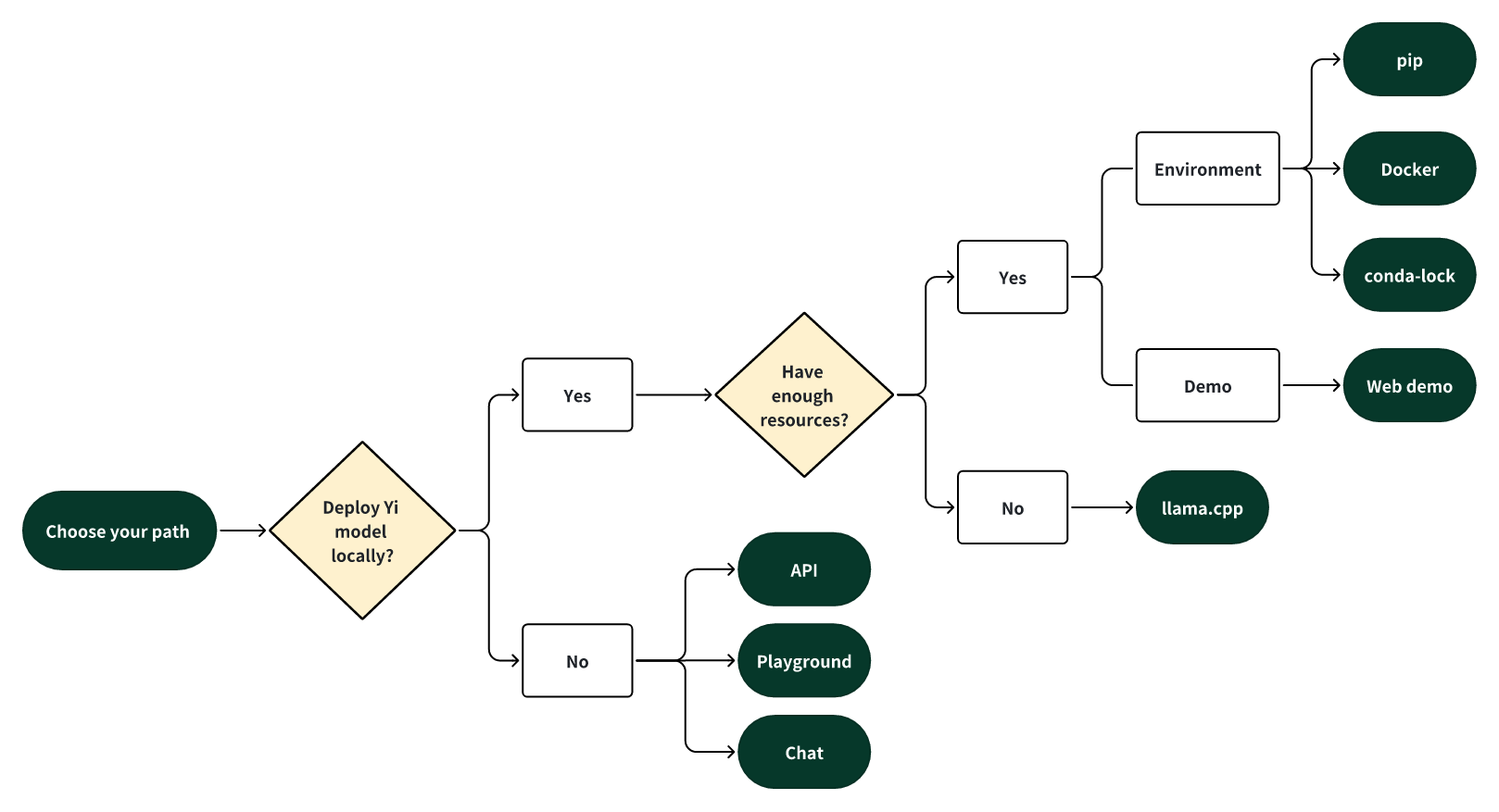
ð¯ Deploy Yi locally
If you prefer to deploy Yi models locally,
-
ðââï¸ and you have sufficient resources (for example, NVIDIA A800 80GB), you can choose one of the following methods:
-
ðââï¸ and you have limited resources (for example, a MacBook Pro), you can use llama.cpp.
ð¯ Not to deploy Yi locally
If you prefer not to deploy Yi models locally, you can explore Yi's capabilities using any of the following options.
ðââï¸ Run Yi with APIs
If you want to explore more features of Yi, you can adopt one of these methods:
-
Yi APIs (Yi official)
- Early access has been granted to some applicants. Stay tuned for the next round of access!
-
Yi APIs (Replicate)
ðââï¸ Run Yi in playground
If you want to chat with Yi with more customizable options (e.g., system prompt, temperature, repetition penalty, etc.), you can try one of the following options:
- Yi-34B-Chat-Playground (Yi official)
- Yi-34B-Chat-Playground (Replicate)
ðââï¸ Chat with Yi
If you want to chat with Yi, you can use one of these online services, which offer a similar user experience:
-
Yi-34B-Chat (Yi official on Hugging Face)
- No registration is required.
-
Yi-34B-Chat (Yi official beta)
Quick start - pip
This tutorial guides you through every step of running Yi-34B-Chat locally on an A800 (80G) and then performing inference.
Step 0: Prerequisites
-
Make sure Python 3.10 or a later version is installed.
-
If you want to run other Yi models, see software and hardware requirements.
Step 1: Prepare your environment
To set up the environment and install the required packages, execute the following command.
git clone https://github.com/01-ai/Yi.git
cd yi
pip install -r requirements.txt
Step 2: Download the Yi model
You can download the weights and tokenizer of Yi models from the following sources:
Step 3: Perform inference
You can perform inference with Yi chat or base models as below.
Perform inference with Yi chat model
-
Create a file named
quick_start.pyand copy the following content to it.from transformers import AutoModelForCausalLM, AutoTokenizer model_path = '<your-model-path>' tokenizer = AutoTokenizer.from_pretrained(model_path, use_fast=False) # Since transformers 4.35.0, the GPT-Q/AWQ model can be loaded using AutoModelForCausalLM. model = AutoModelForCausalLM.from_pretrained( model_path, device_map="auto", torch_dtype='auto' ).eval() # Prompt content: "hi" messages = [ {"role": "user", "content": "hi"} ] input_ids = tokenizer.apply_chat_template(conversation=messages, tokenize=True, add_generation_prompt=True, return_tensors='pt') output_ids = model.generate(input_ids.to('cuda')) response = tokenizer.decode(output_ids[0][input_ids.shape[1]:], skip_special_tokens=True) # Model response: "Hello! How can I assist you today?" print(response) -
Run
quick_start.py.python quick_start.pyThen you can see an output similar to the one below. ð¥³
Hello! How can I assist you today?
Perform inference with Yi base model
-
Yi-34B
The steps are similar to pip - Perform inference with Yi chat model.
You can use the existing file
text_generation.py.python demo/text_generation.py --model <your-model-path>Then you can see an output similar to the one below. ð¥³
Output. â¬ï¸
Prompt: Let me tell you an interesting story about cat Tom and mouse Jerry,
Generation: Let me tell you an interesting story about cat Tom and mouse Jerry, which happened in my childhood. My father had a big house with two cats living inside it to kill mice. One day when I was playing at home alone, I found one of the tomcats lying on his back near our kitchen door, looking very much like he wanted something from us but couldnât get up because there were too many people around him! He kept trying for several minutes before finally giving up...
-
Yi-9B
Input
from transformers import AutoModelForCausalLM, AutoTokenizer

MODEL_DIR = "01-ai/Yi-9B"
model = AutoModelForCausalLM.from_pretrained(MODEL_DIR, torch_dtype="auto")
tokenizer = AutoTokenizer.from_pretrained(MODEL_DIR, use_fast=False)

input_text = "# write the quick sort algorithm"
inputs = tokenizer(input_text, return_tensors="pt").to(model.device)
outputs = model.generate(**inputs, max_length=256)
print(tokenizer.decode(outputs[0], skip_special_tokens=True))
Output
# write the quick sort algorithm
def quick_sort(arr):
    if len(arr) <= 1:
        return arr
    pivot = arr[len(arr) // 2]
    left = [x for x in arr if x < pivot]
    middle = [x for x in arr if x == pivot]
    right = [x for x in arr if x > pivot]
    return quick_sort(left) + middle + quick_sort(right)

# test the quick sort algorithm
print(quick_sort([3, 6, 8, 10, 1, 2, 1]))
Quick start - Docker
Run Yi-34B-chat locally with Docker: a step-by-step guide. â¬ï¸
This tutorial guides you through every step of running Yi-34B-Chat on an A800 GPU or 4*4090 locally and then performing inference.
Step 0: Prerequisites
Make sure you've installed Docker and nvidia-container-toolkit.
Step 1: Start Docker
docker run -it --gpus all \
-v <your-model-path>: /models
ghcr.io/01-ai/yi:latest
Alternatively, you can pull the Yi Docker image from registry.lingyiwanwu.com/ci/01-ai/yi:latest.
Step 2: Perform inference
You can perform inference with Yi chat or base models as below.
Perform inference with Yi chat model
The steps are similar to pip - Perform inference with Yi chat model.
Note that the only difference is to set model_path = '<your-model-mount-path>' instead of model_path = '<your-model-path>'.
Perform inference with Yi base model
The steps are similar to pip - Perform inference with Yi base model.
Note that the only difference is to set --model <your-model-mount-path>' instead of model <your-model-path>.
Quick start - conda-lock
You can use conda-lock to generate fully reproducible lock files for conda environments. â¬ï¸
You can refer to conda-lock.yml for the exact versions of the dependencies. Additionally, you can utilize
micromamba for installing these dependencies.
To install the dependencies, follow these steps:
-
Install micromamba by following the instructions available here.
-
Execute
micromamba install -y -n yi -f conda-lock.ymlto create a conda environment namedyiand install the necessary dependencies.
Quick start - llama.cpp
The following tutorial will guide you through every step of running a quantized model (Yi-chat-6B-2bits) locally and then performing inference.
Run Yi-chat-6B-2bits locally with llama.cpp: a step-by-step guide. â¬ï¸
This tutorial guides you through every step of running a quantized model (Yi-chat-6B-2bits) locally and then performing inference.
- Step 0: Prerequisites
- Step 1: Download llama.cpp
- Step 2: Download Yi model
- Step 3: Perform inference
Step 0: Prerequisites
-
This tutorial assumes you use a MacBook Pro with 16GB of memory and an Apple M2 Pro chip.
-
Make sure
git-lfsis installed on your machine.
Step 1: Download llama.cpp
To clone the llama.cpp repository, run the following command.
git clone git@github.com:ggerganov/llama.cpp.git
Step 2: Download Yi model
2.1 To clone XeIaso/yi-chat-6B-GGUF with just pointers, run the following command.
GIT_LFS_SKIP_SMUDGE=1 git clone https://huggingface.co/XeIaso/yi-chat-6B-GGUF
2.2 To download a quantized Yi model (yi-chat-6b.Q2_K.gguf), run the following command.
git-lfs pull --include yi-chat-6b.Q2_K.gguf
Step 3: Perform inference
To perform inference with the Yi model, you can use one of the following methods.
Method 1: Perform inference in terminal
To compile llama.cpp using 4 threads and then conduct inference, navigate to the llama.cpp directory, and run the following command.
Tips
Replace
/Users/yu/yi-chat-6B-GGUF/yi-chat-6b.Q2_K.ggufwith the actual path of your model.By default, the model operates in completion mode.
For additional output customization options (for example, system prompt, temperature, repetition penalty, etc.), run
./main -hto check detailed descriptions and usage.
make -j4 && ./main -m /Users/yu/yi-chat-6B-GGUF/yi-chat-6b.Q2_K.gguf -p "How do you feed your pet fox? Please answer this question in 6 simple steps:\nStep 1:" -n 384 -e

...

How do you feed your pet fox? Please answer this question in 6 simple steps:

Step 1: Select the appropriate food for your pet fox. You should choose high-quality, balanced prey items that are suitable for their unique dietary needs. These could include live or frozen mice, rats, pigeons, or other small mammals, as well as fresh fruits and vegetables.

Step 2: Feed your pet fox once or twice a day, depending on the species and its individual preferences. Always ensure that they have access to fresh water throughout the day.

Step 3: Provide an appropriate environment for your pet fox. Ensure it has a comfortable place to rest, plenty of space to move around, and opportunities to play and exercise.

Step 4: Socialize your pet with other animals if possible. Interactions with other creatures can help them develop social skills and prevent boredom or stress.

Step 5: Regularly check for signs of illness or discomfort in your fox. Be prepared to provide veterinary care as needed, especially for common issues such as parasites, dental health problems, or infections.

Step 6: Educate yourself about the needs of your pet fox and be aware of any potential risks or concerns that could affect their well-being. Regularly consult with a veterinarian to ensure you are providing the best care.

...
Now you have successfully asked a question to the Yi model and got an answer! ð¥³
Method 2: Perform inference in web
-
To initialize a lightweight and swift chatbot, run the following command.
cd llama.cpp
./server --ctx-size 2048 --host 0.0.0.0 --n-gpu-layers 64 --model /Users/yu/yi-chat-6B-GGUF/yi-chat-6b.Q2_K.gguf
Then you can get an output like this:
... llama_new_context_with_model: n_ctx = 2048 llama_new_context_with_model: freq_base = 5000000.0 llama_new_context_with_model: freq_scale = 1 ggml_metal_init: allocating ggml_metal_init: found device: Apple M2 Pro ggml_metal_init: picking default device: Apple M2 Pro ggml_metal_init: ggml.metallib not found, loading from source ggml_metal_init: GGML_METAL_PATH_RESOURCES = nil ggml_metal_init: loading '/Users/yu/llama.cpp/ggml-metal.metal' ggml_metal_init: GPU name: Apple M2 Pro ggml_metal_init: GPU family: MTLGPUFamilyApple8 (1008) ggml_metal_init: hasUnifiedMemory = true ggml_metal_init: recommendedMaxWorkingSetSize = 11453.25 MB ggml_metal_init: maxTransferRate = built-in GPU ggml_backend_metal_buffer_type_alloc_buffer: allocated buffer, size = 128.00 MiB, ( 2629.44 / 10922.67) llama_new_context_with_model: KV self size = 128.00 MiB, K (f16): 64.00 MiB, V (f16): 64.00 MiB ggml_backend_metal_buffer_type_alloc_buffer: allocated buffer, size = 0.02 MiB, ( 2629.45 / 10922.67) llama_build_graph: non-view tensors processed: 676/676 llama_new_context_with_model: compute buffer total size = 159.19 MiB ggml_backend_metal_buffer_type_alloc_buffer: allocated buffer, size = 156.02 MiB, ( 2785.45 / 10922.67) Available slots: -> Slot 0 - max context: 2048 llama server listening at http://0.0.0.0:8080 -
To access the chatbot interface, open your web browser and enter
http://0.0.0.0:8080into the address bar.
-
Enter a question, such as "How do you feed your pet fox? Please answer this question in 6 simple steps" into the prompt window, and you will receive a corresponding answer.

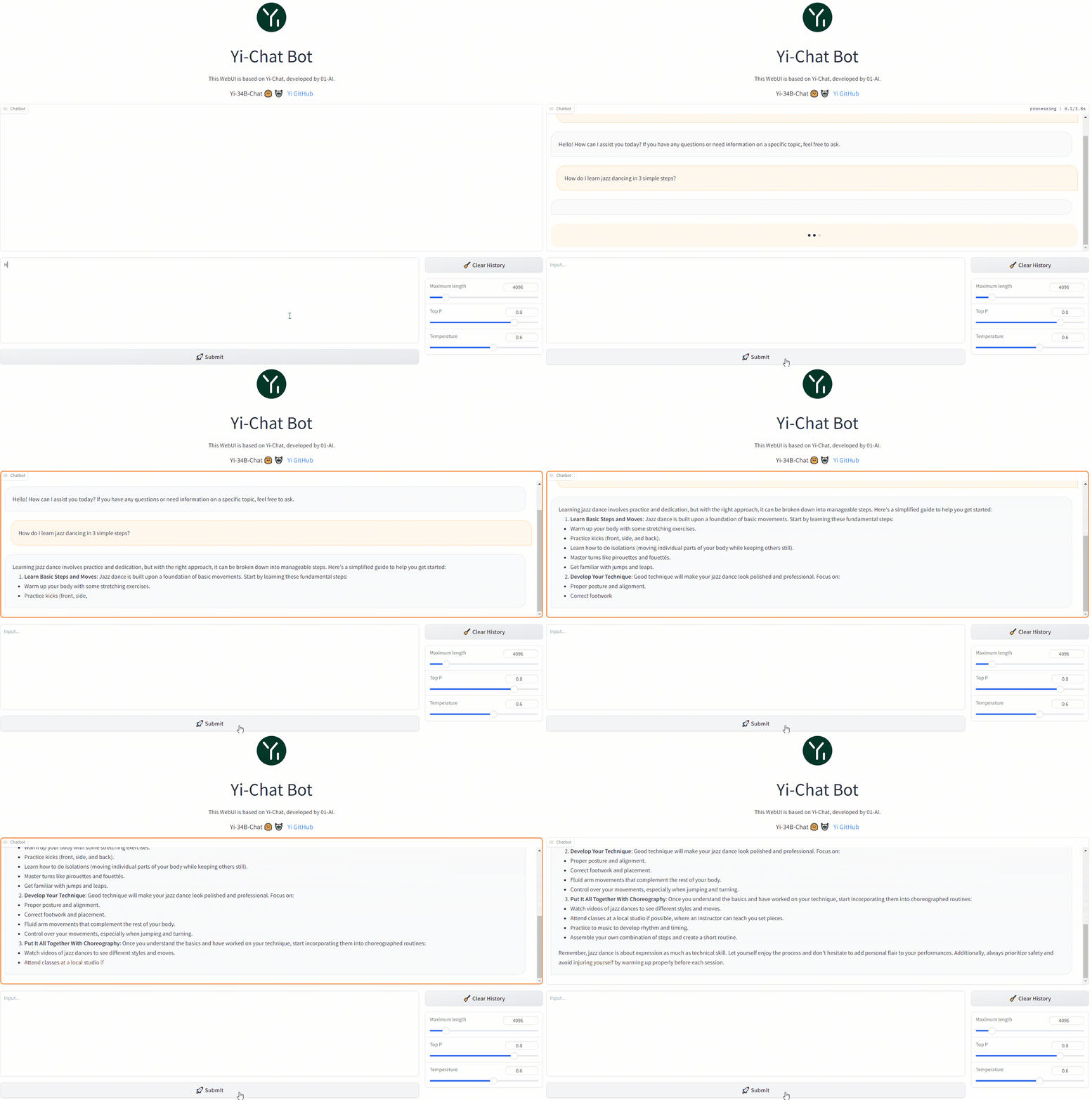
Web demo
You can build a web UI demo for Yi chat models (note that Yi base models are not supported in this senario).
Step 1: Prepare your environment.
Step 2: Download the Yi model.
Step 3. To start a web service locally, run the following command.
python demo/web_demo.py -c <your-model-path>
You can access the web UI by entering the address provided in the console into your browser.
Fine-tuning
bash finetune/scripts/run_sft_Yi_6b.sh
Once finished, you can compare the finetuned model and the base model with the following command:
bash finetune/scripts/run_eval.sh
For advanced usage (like fine-tuning based on your custom data), see the explanations below. â¬ï¸
Finetune code for Yi 6B and 34B
Preparation
From Image
By default, we use a small dataset from BAAI/COIG to finetune the base model.
You can also prepare your customized dataset in the following jsonl format:
{ "prompt": "Human: Who are you? Assistant:", "chosen": "I'm Yi." }
And then mount them in the container to replace the default ones:
docker run -it \
    -v /path/to/save/finetuned/model/:/finetuned-model \
    -v /path/to/train.jsonl:/yi/finetune/data/train.json \
    -v /path/to/eval.jsonl:/yi/finetune/data/eval.json \
    ghcr.io/01-ai/yi:latest \
    bash finetune/scripts/run_sft_Yi_6b.sh
From Local Server
Make sure you have conda. If not, use
mkdir -p ~/miniconda3
wget https://repo.anaconda.com/miniconda/Miniconda3-latest-Linux-x86_64.sh -O ~/miniconda3/miniconda.sh
bash ~/miniconda3/miniconda.sh -b -u -p ~/miniconda3
rm -rf ~/miniconda3/miniconda.sh
~/miniconda3/bin/conda init bash
source ~/.bashrc
Then, create a conda env:
conda create -n dev_env python=3.10 -y
conda activate dev_env
pip install torch==2.0.1 deepspeed==0.10 tensorboard transformers datasets sentencepiece accelerate ray==2.7
Hardware Setup
For the Yi-6B model, a node with 4 GPUs, each with GPU memory larger than 60GB, is recommended.
For the Yi-34B model, because the usage of the zero-offload technique consumes a lot of CPU memory, please be careful to limit the number of GPUs in the 34B finetune training. Please use CUDA_VISIBLE_DEVICES to limit the number of GPUs (as shown in scripts/run_sft_Yi_34b.sh).
A typical hardware setup for finetuning the 34B model is a node with 8 GPUs (limited to 4 in running by CUDA_VISIBLE_DEVICES=0,1,2,3), each with GPU memory larger than 80GB, and total CPU memory larger than 900GB.
Quick Start
Download a LLM-base model to MODEL_PATH (6B and 34B). A typical folder of models is like:
|-- $MODEL_PATH
|   |-- config.json
|   |-- pytorch_model-00001-of-00002.bin
|   |-- pytorch_model-00002-of-00002.bin
|   |-- pytorch_model.bin.index.json
|   |-- tokenizer_config.json
|   |-- tokenizer.model
|   |-- ...
Download a dataset from huggingface to local storage DATA_PATH, e.g. Dahoas/rm-static.
|-- $DATA_PATH
|   |-- data
|   |   |-- train-00000-of-00001-2a1df75c6bce91ab.parquet
|   |   |-- test-00000-of-00001-8c7c51afc6d45980.parquet
|   |-- dataset_infos.json
|   |-- README.md
finetune/yi_example_dataset has example datasets, which are modified from BAAI/COIG
|-- $DATA_PATH
    |--data
        |-- train.jsonl
        |-- eval.jsonl
cd into the scripts folder, copy and paste the script, and run. For example:
cd finetune/scripts

bash run_sft_Yi_6b.sh
For the Yi-6B base model, setting training_debug_steps=20 and num_train_epochs=4 can output a chat model, which takes about 20 minutes.
For the Yi-34B base model, it takes a relatively long time for initialization. Please be patient.
Evaluation
cd finetune/scripts

bash run_eval.sh
Then you'll see the answer from both the base model and the finetuned model.
Quantization
GPT-Q
python quantization/gptq/quant_autogptq.py \
  --model /base_model                      \
  --output_dir /quantized_model            \
  --trust_remote_code
Once finished, you can then evaluate the resulting model as follows:
python quantization/gptq/eval_quantized_model.py \
  --model /quantized_model                       \
  --trust_remote_code
For details, see the explanations below. â¬ï¸
GPT-Q quantization
GPT-Q is a PTQ (Post-Training Quantization) method. It saves memory and provides potential speedups while retaining the accuracy of the model.
Yi models can be GPT-Q quantized without a lot of efforts. We provide a step-by-step tutorial below.
To run GPT-Q, we will use AutoGPTQ and exllama. And the huggingface transformers has integrated optimum and auto-gptq to perform GPTQ quantization on language models.
Do Quantization
The quant_autogptq.py script is provided for you to perform GPT-Q quantization:
python quant_autogptq.py --model /base_model \
    --output_dir /quantized_model --bits 4 --group_size 128 --trust_remote_code
Run Quantized Model
You can run a quantized model using the eval_quantized_model.py:
python eval_quantized_model.py --model /quantized_model --trust_remote_code
AWQ
python quantization/awq/quant_autoawq.py \
  --model /base_model                      \
  --output_dir /quantized_model            \
  --trust_remote_code
Once finished, you can then evaluate the resulting model as follows:
python quantization/awq/eval_quantized_model.py \
  --model /quantized_model                       \
  --trust_remote_code
For details, see the explanations below. â¬ï¸
AWQ quantization
AWQ is a PTQ (Post-Training Quantization) method. It's an efficient and accurate low-bit weight quantization (INT3/4) for LLMs.
Yi models can be AWQ quantized without a lot of efforts. We provide a step-by-step tutorial below.
To run AWQ, we will use AutoAWQ.
Do Quantization
The quant_autoawq.py script is provided for you to perform AWQ quantization:
python quant_autoawq.py --model /base_model \
    --output_dir /quantized_model --bits 4 --group_size 128 --trust_remote_code
Run Quantized Model
You can run a quantized model using the eval_quantized_model.py:
python eval_quantized_model.py --model /quantized_model --trust_remote_code
Deployment
If you want to deploy Yi models, make sure you meet the software and hardware requirements.
Software requirements
Before using Yi quantized models, make sure you've installed the correct software listed below.
| Model | Software |
|---|---|
| Yi 4-bit quantized models | AWQ and CUDA |
| Yi 8-bit quantized models | GPTQ and CUDA |
Hardware requirements
Before deploying Yi in your environment, make sure your hardware meets the following requirements.
Chat models
| Model | Minimum VRAM | Recommended GPU Example |
|---|---|---|
| Yi-6B-Chat | 15 GB | 1 x RTX 3090 (24 GB) 1 x RTX 4090 (24 GB) 1 x A10 (24 GB) 1 x A30 (24 GB) |
| Yi-6B-Chat-4bits | 4 GB | 1 x RTX 3060 (12 GB) 1 x RTX 4060 (8 GB) |
| Yi-6B-Chat-8bits | 8 GB | 1 x RTX 3070 (8 GB) 1 x RTX 4060 (8 GB) |
| Yi-34B-Chat | 72 GB | 4 x RTX 4090 (24 GB) 1 x A800 (80GB) |
| Yi-34B-Chat-4bits | 20 GB | 1 x RTX 3090 (24 GB) 1 x RTX 4090 (24 GB) 1 x A10 (24 GB) 1 x A30 (24 GB) 1 x A100 (40 GB) |
| Yi-34B-Chat-8bits | 38 GB | 2 x RTX 3090 (24 GB) 2 x RTX 4090 (24 GB) 1 x A800 (40 GB) |
Below are detailed minimum VRAM requirements under different batch use cases.
| Model | batch=1 | batch=4 | batch=16 | batch=32 |
|---|---|---|---|---|
| Yi-6B-Chat | 12 GB | 13 GB | 15 GB | 18 GB |
| Yi-6B-Chat-4bits | 4 GB | 5 GB | 7 GB | 10 GB |
| Yi-6B-Chat-8bits | 7 GB | 8 GB | 10 GB | 14 GB |
| Yi-34B-Chat | 65 GB | 68 GB | 76 GB | > 80 GB |
| Yi-34B-Chat-4bits | 19 GB | 20 GB | 30 GB | 40 GB |
| Yi-34B-Chat-8bits | 35 GB | 37 GB | 46 GB | 58 GB |
Base models
| Model | Minimum VRAM | Recommended GPU Example |
|---|---|---|
| Yi-6B | 15 GB | 1 x RTX 3090 (24 GB) 1 x RTX 4090 (24 GB) 1 x A10 (24 GB) 1 x A30 (24 GB) |
| Yi-6B-200K | 50 GB | 1 x A800 (80 GB) |
| Yi-9B | 20 GB | 1 x RTX 4090 (24 GB) |
| Yi-34B | 72 GB | 4 x RTX 4090 (24 GB) 1 x A800 (80 GB) |
| Yi-34B-200K | 200 GB | 4 x A800 (80 GB) |
FAQ
If you have any questions while using the Yi series models, the answers provided below could serve as a helpful reference for you. â¬ï¸
ð¡Fine-tuning
- Base model or Chat model - which to fine-tune?
The choice of pre-trained language model for fine-tuning hinges on the computational resources you have at your disposal and the particular demands of your task.- If you are working with a substantial volume of fine-tuning data (say, over 10,000 samples), the Base model could be your go-to choice.
- On the other hand, if your fine-tuning data is not quite as extensive, opting for the Chat model might be a more fitting choice.
- It is generally advisable to fine-tune both the Base and Chat models, compare their performance, and then pick the model that best aligns with your specific requirements.
- Yi-34B versus Yi-34B-Chat for full-scale fine-tuning - what is the difference?
The key distinction between full-scale fine-tuning onYi-34BandYi-34B-Chatcomes down to the fine-tuning approach and outcomes.- Yi-34B-Chat employs a Special Fine-Tuning (SFT) method, resulting in responses that mirror human conversation style more closely.
- The Base model's fine-tuning is more versatile, with a relatively high performance potential.
- If you are confident in the quality of your data, fine-tuning with
Yi-34Bcould be your go-to. - If you are aiming for model-generated responses that better mimic human conversational style, or if you have doubts about your data quality,
Yi-34B-Chatmight be your best bet.
ð¡Quantization
- Quantized model versus original model - what is the performance gap?
- The performance variance is largely contingent on the quantization method employed and the specific use cases of these models. For instance, when it comes to models provided by the AWQ official, from a Benchmark standpoint, quantization might result in a minor performance drop of a few percentage points.
- Subjectively speaking, in situations like logical reasoning, even a 1% performance shift could impact the accuracy of the output results.
ð¡General
-
Where can I source fine-tuning question answering datasets?
- You can find fine-tuning question answering datasets on platforms like Hugging Face, with datasets like m-a-p/COIG-CQIA readily available.
- Additionally, Github offers fine-tuning frameworks, such as hiyouga/LLaMA-Factory, which integrates pre-made datasets.
-
What is the GPU memory requirement for fine-tuning Yi-34B FP16?
The GPU memory needed for fine-tuning 34B FP16 hinges on the specific fine-tuning method employed. For full parameter fine-tuning, you'll need 8 GPUs each with 80 GB; however, more economical solutions like Lora require less. For more details, check out hiyouga/LLaMA-Factory. Also, consider using BF16 instead of FP16 for fine-tuning to optimize performance. -
Are there any third-party platforms that support chat functionality for the Yi-34b-200k model?
If you're looking for third-party Chats, options include fireworks.ai.
Learning hub
If you want to learn Yi, you can find a wealth of helpful educational resources here. â¬ï¸
Welcome to the Yi learning hub!
Whether you're a seasoned developer or a newcomer, you can find a wealth of helpful educational resources to enhance your understanding and skills with Yi models, including insightful blog posts, comprehensive video tutorials, hands-on guides, and more.
The content you find here has been generously contributed by knowledgeable Yi experts and passionate enthusiasts. We extend our heartfelt gratitude for your invaluable contributions!
At the same time, we also warmly invite you to join our collaborative effort by contributing to Yi. If you have already made contributions to Yi, please don't hesitate to showcase your remarkable work in the table below.
With all these resources at your fingertips, you're ready to start your exciting journey with Yi. Happy learning! ð¥³
Tutorials
Blog tutorials
GitHub Project
Video tutorials
Why Yi?
Ecosystem
Yi has a comprehensive ecosystem, offering a range of tools, services, and models to enrich your experiences and maximize productivity.
Upstream
The Yi series models follow the same model architecture as Llama. By choosing Yi, you can leverage existing tools, libraries, and resources within the Llama ecosystem, eliminating the need to create new tools and enhancing development efficiency.
For example, the Yi series models are saved in the format of the Llama model. You can directly use LlamaForCausalLM and LlamaTokenizer to load the model. For more information, see Use the chat model.
from transformers import AutoModelForCausalLM, AutoTokenizer

tokenizer = AutoTokenizer.from_pretrained("01-ai/Yi-34b", use_fast=False)

model = AutoModelForCausalLM.from_pretrained("01-ai/Yi-34b", device_map="auto")
Downstream
ð¡ Tip
Feel free to create a PR and share the fantastic work you've built using the Yi series models.
To help others quickly understand your work, it is recommended to use the format of
<model-name>: <model-intro> + <model-highlights>.
Serving
If you want to get up with Yi in a few minutes, you can use the following services built upon Yi.
-
Yi-34B-Chat: you can chat with Yi using one of the following platforms:
- Yi-34B-Chat | Hugging Face
- Yi-34B-Chat | Yi Platform: Note that currently it's available through a whitelist. Welcome to apply (fill out a form in English or Chinese) and experience it firsthand!
-
Yi-6B-Chat (Replicate): you can use this model with more options by setting additional parameters and calling APIs.
-
ScaleLLM: you can use this service to run Yi models locally with added flexibility and customization.
Quantization
If you have limited computational capabilities, you can use Yi's quantized models as follows.
These quantized models have reduced precision but offer increased efficiency, such as faster inference speed and smaller RAM usage.
Fine-tuning
If you're seeking to explore the diverse capabilities within Yi's thriving family, you can delve into Yi's fine-tuned models as below.
-
TheBloke Models: this site hosts numerous fine-tuned models derived from various LLMs including Yi.
This is not an exhaustive list for Yi, but to name a few sorted on downloads:
-
SUSTech/SUS-Chat-34B: this model ranked first among all models below 70B and outperformed the twice larger deepseek-llm-67b-chat. You can check the result on the Open LLM Leaderboard.
-
OrionStarAI/OrionStar-Yi-34B-Chat-Llama: this model excelled beyond other models (such as GPT-4, Qwen-14B-Chat, Baichuan2-13B-Chat) in C-Eval and CMMLU evaluations on the OpenCompass LLM Leaderboard.
-
NousResearch/Nous-Capybara-34B: this model is trained with 200K context length and 3 epochs on the Capybara dataset.
API
- amazing-openai-api: this tool converts Yi model APIs into the OpenAI API format out of the box.
- LlamaEdge: this tool builds an OpenAI-compatible API server for Yi-34B-Chat using a portable Wasm (WebAssembly) file, powered by Rust.
Tech report
For detailed capabilities of the Yi series model, see Yi: Open Foundation Models by 01.AI.
Citation
@misc{ai2024yi,
    title={Yi: Open Foundation Models by 01.AI},
    author={01. AI and : and Alex Young and Bei Chen and Chao Li and Chengen Huang and Ge Zhang and Guanwei Zhang and Heng Li and Jiangcheng Zhu and Jianqun Chen and Jing Chang and Kaidong Yu and Peng Liu and Qiang Liu and Shawn Yue and Senbin Yang and Shiming Yang and Tao Yu and Wen Xie and Wenhao Huang and Xiaohui Hu and Xiaoyi Ren and Xinyao Niu and Pengcheng Nie and Yuchi Xu and Yudong Liu and Yue Wang and Yuxuan Cai and Zhenyu Gu and Zhiyuan Liu and Zonghong Dai},
    year={2024},
    eprint={2403.04652},
    archivePrefix={arXiv},
    primaryClass={cs.CL}
}
Benchmarks
Chat model performance
Yi-34B-Chat model demonstrates exceptional performance, ranking first among all existing open-source models in the benchmarks including MMLU, CMMLU, BBH, GSM8k, and more.

Evaluation methods and challenges. â¬ï¸
- Evaluation methods: we evaluated various benchmarks using both zero-shot and few-shot methods, except for TruthfulQA.
- Zero-shot vs. few-shot: in chat models, the zero-shot approach is more commonly employed.
- Evaluation strategy: our evaluation strategy involves generating responses while following instructions explicitly or implicitly (such as using few-shot examples). We then isolate relevant answers from the generated text.
- Challenges faced: some models are not well-suited to produce output in the specific format required by instructions in few datasets, which leads to suboptimal results.
*: C-Eval results are evaluated on the validation datasets
Base model performance
Yi-34B and Yi-34B-200K
The Yi-34B and Yi-34B-200K models stand out as the top performers among open-source models, especially excelling in MMLU, CMMLU, common-sense reasoning, reading comprehension, and more.

Evaluation methods. â¬ï¸
- Disparity in results: while benchmarking open-source models, a disparity has been noted between results from our pipeline and those reported by public sources like OpenCompass.
- Investigation findings: a deeper investigation reveals that variations in prompts, post-processing strategies, and sampling techniques across models may lead to significant outcome differences.
- Uniform benchmarking process: our methodology aligns with the original benchmarksâconsistent prompts and post-processing strategies are used, and greedy decoding is applied during evaluations without any post-processing for the generated content.
- Efforts to retrieve unreported scores: for scores that were not reported by the original authors (including scores reported with different settings), we try to get results with our pipeline.
- Extensive model evaluation: to evaluate the modelâs capability extensively, we adopted the methodology outlined in Llama2. Specifically, we included PIQA, SIQA, HellaSwag, WinoGrande, ARC, OBQA, and CSQA to assess common sense reasoning. SquAD, QuAC, and BoolQ were incorporated to evaluate reading comprehension.
- Special configurations: CSQA was exclusively tested using a 7-shot setup, while all other tests were conducted with a 0-shot configuration. Additionally, we introduced GSM8K (8-shot@1), MATH (4-shot@1), HumanEval (0-shot@1), and MBPP (3-shot@1) under the category "Math & Code".
- Falcon-180B caveat: Falcon-180B was not tested on QuAC and OBQA due to technical constraints. Its performance score is an average from other tasks, and considering the generally lower scores of these two tasks, Falcon-180B's capabilities are likely not underestimated.
Yi-9B
Yi-9B is almost the best among a range of similar-sized open-source models (including Mistral-7B, SOLAR-10.7B, Gemma-7B, DeepSeek-Coder-7B-Base-v1.5 and more), particularly excelling in code, math, common-sense reasoning, and reading comprehension.

-
In terms of overall ability (Mean-All), Yi-9B performs the best among similarly sized open-source models, surpassing DeepSeek-Coder, DeepSeek-Math, Mistral-7B, SOLAR-10.7B, and Gemma-7B.

-
In terms of coding ability (Mean-Code), Yi-9B's performance is second only to DeepSeek-Coder-7B, surpassing Yi-34B, SOLAR-10.7B, Mistral-7B, and Gemma-7B.

-
In terms of math ability (Mean-Math), Yi-9B's performance is second only to DeepSeek-Math-7B, surpassing SOLAR-10.7B, Mistral-7B, and Gemma-7B.

-
In terms of common sense and reasoning ability (Mean-Text), Yi-9B's performance is on par with Mistral-7B, SOLAR-10.7B, and Gemma-7B.

Who can use Yi?
Everyone! ð â
The code and weights of the Yi series models are distributed under the Apache 2.0 license, which means the Yi series models are free for personal usage, academic purposes, and commercial use.
Misc.
Acknowledgments
A heartfelt thank you to each of you who have made contributions to the Yi community! You have helped Yi not just a project, but a vibrant, growing home for innovation.
Disclaimer
We use data compliance checking algorithms during the training process, to ensure the compliance of the trained model to the best of our ability. Due to complex data and the diversity of language model usage scenarios, we cannot guarantee that the model will generate correct, and reasonable output in all scenarios. Please be aware that there is still a risk of the model producing problematic outputs. We will not be responsible for any risks and issues resulting from misuse, misguidance, illegal usage, and related misinformation, as well as any associated data security concerns.
License
The code and weights of the Yi-1.5 series models are distributed under the Apache 2.0 license.
If you create derivative works based on this model, please include the following attribution in your derivative works:
This work is a derivative of [The Yi Series Model You Base On] by 01.AI, used under the Apache 2.0 License.
Top Related Projects
An implementation of model parallel autoregressive transformers on GPUs, based on the Megatron and DeepSpeed libraries
Inference code for Llama models
🤗 Transformers: the model-definition framework for state-of-the-art machine learning models in text, vision, audio, and multimodal models, for both inference and training.
Convert designs to code with AI
Introducing Visual Copilot: A new AI model to turn Figma designs to high quality code using your components.
Try Visual Copilot