 budibase
AI agents, automations and apps that run your operations. Model agnostic.
Top Related Projects

🔥 🔥 🔥 A Free & Self-hostable Airtable Alternative

The Postgres development platform. Supabase gives you a dedicated Postgres database to build your web, mobile, and AI applications.

The flexible backend for all your projects 🐰 Turn your DB into a headless CMS, admin panels, or apps with a custom UI, instant APIs, auth & more.

Open Source realtime backend in 1 file

Build databases, automations, apps & agents with AI — no code. Open source platform available on cloud and self-hosted. GDPR, HIPAA, SOC 2 compliant. Best Airtable alternative.
Quick Overview
Budibase is an open-source low-code platform for building and automating internal tools, admin panels, and workflows. It allows users to create web applications quickly using a visual interface, connect to various data sources, and deploy applications with ease.
Pros
- Rapid application development with a user-friendly interface
- Supports multiple data sources, including SQL databases, REST APIs, and more
- Customizable with JavaScript for advanced functionality
- Self-hosted option available for better control and security
Cons
- Limited advanced features compared to some enterprise-level low-code platforms
- Learning curve for users new to low-code development
- Community support may be less extensive than more established platforms
Getting Started
To get started with Budibase:
-
Install Budibase:
npm install -g @budibase/cli -
Create a new Budibase project:
budi new my-project -
Start the Budibase server:
cd my-project budi run -
Open your browser and navigate to
http://localhost:10000to access the Budibase builder. -
Begin creating your application using the visual interface, connecting data sources, and designing your UI.
For more detailed instructions and documentation, visit the Budibase Documentation.
Competitor Comparisons
🔥 🔥 🔥 A Free & Self-hostable Airtable Alternative
Pros of NocoDB
- More flexible database support, including MySQL, PostgreSQL, SQL Server, SQLite, and MariaDB
- Advanced filtering and sorting capabilities for data manipulation
- Built-in REST and GraphQL API generation for easy integration
Cons of NocoDB
- Steeper learning curve for non-technical users
- Less focus on visual app building and UI customization
- Limited built-in authentication and access control options
Code Comparison
NocoDB (SQL query example):
SELECT * FROM users
WHERE age > 18
ORDER BY last_name ASC
LIMIT 10;
Budibase (JavaScript component example):
export default function UserList() {
  const users = useUsers()
  return (
    <ul>
      {users.map(user => <li key={user.id}>{user.name}</li>)}
    </ul>
  )
}
Both Budibase and NocoDB are open-source platforms for building internal tools and applications. Budibase focuses more on low-code development with a visual interface, while NocoDB emphasizes database management and API generation. Budibase may be more suitable for rapid prototyping and non-technical users, whereas NocoDB offers greater flexibility for developers working with complex data structures and multiple database types.
The Postgres development platform. Supabase gives you a dedicated Postgres database to build your web, mobile, and AI applications.
Pros of Supabase
- More comprehensive backend solution, including authentication, storage, and real-time subscriptions
- Stronger focus on developer experience with extensive documentation and SDKs
- Larger community and ecosystem, leading to more third-party integrations and resources
Cons of Supabase
- Steeper learning curve due to its broader feature set
- Less emphasis on visual app building, requiring more coding knowledge
- Potentially higher costs for scaling, especially with heavy database usage
Code Comparison
Supabase (JavaScript):
const { data, error } = await supabase
  .from('users')
  .select('name, email')
  .eq('id', 123)
Budibase (JavaScript):
const users = await db.search('users', {
  id: 123
})
Both Supabase and Budibase offer powerful tools for building web applications, but they cater to different needs. Supabase provides a more comprehensive backend solution with a focus on developer experience, while Budibase emphasizes low-code development and rapid prototyping. The choice between the two depends on the specific requirements of your project and your team's technical expertise.
The flexible backend for all your projects 🐰 Turn your DB into a headless CMS, admin panels, or apps with a custom UI, instant APIs, auth & more.
Pros of Directus
- More flexible data modeling with support for complex relationships and custom fields
- Extensive API options, including REST, GraphQL, and real-time subscriptions
- Advanced user management with granular permissions and role-based access control
Cons of Directus
- Steeper learning curve due to its more complex architecture
- Requires more setup and configuration compared to Budibase's no-code approach
- Less focus on rapid application development for non-technical users
Code Comparison
Directus API request:
const response = await axios.get('https://api.example.com/items/articles', {
  headers: { Authorization: 'Bearer TOKEN' }
});
Budibase API request:
const response = await fetch('/api/public/v1/tables/articles/rows', {
  headers: { 'x-budibase-api-key': 'API_KEY' }
});
Both Directus and Budibase offer powerful platforms for building applications and managing data. Directus provides more flexibility and advanced features for developers, while Budibase focuses on simplicity and rapid development for users with varying technical expertise. The choice between the two depends on the specific project requirements and the team's skill set.
Open Source realtime backend in 1 file
Pros of Pocketbase
- Lightweight and portable: Single executable with embedded database
- Simpler setup and configuration process
- Built-in real-time subscriptions and file storage
Cons of Pocketbase
- Less extensive UI building capabilities
- Fewer integrations and plugins available
- Limited customization options for complex workflows
Code Comparison
Pocketbase (Go):
package main

import "github.com/pocketbase/pocketbase"

func main() {
    app := pocketbase.New()
    app.Start()
}
Budibase (JavaScript):
import { Builder } from "@budibase/builder"

const builder = new Builder()
builder.load()
builder.build()
Both Pocketbase and Budibase are open-source platforms for building web applications, but they have different focuses. Pocketbase is a backend-focused solution with a built-in database and API, while Budibase is a more comprehensive low-code platform for building full-stack applications.
Pocketbase offers a simpler setup and is more suitable for developers who want a lightweight backend solution. Budibase, on the other hand, provides more extensive UI building capabilities and is better suited for creating complex applications with custom workflows.
The code comparison shows the simplicity of Pocketbase's setup compared to Budibase's more feature-rich approach. Pocketbase's single executable nature makes it easier to deploy, while Budibase offers more flexibility in terms of customization and integration with other tools.
Build databases, automations, apps & agents with AI — no code. Open source platform available on cloud and self-hosted. GDPR, HIPAA, SOC 2 compliant. Best Airtable alternative.
Error generating comparison
Convert  designs to code with AI

Introducing Visual Copilot: A new AI model to turn Figma designs to high quality code using your components.
Try Visual CopilotREADME

Budibase
AI Agents that run your operations
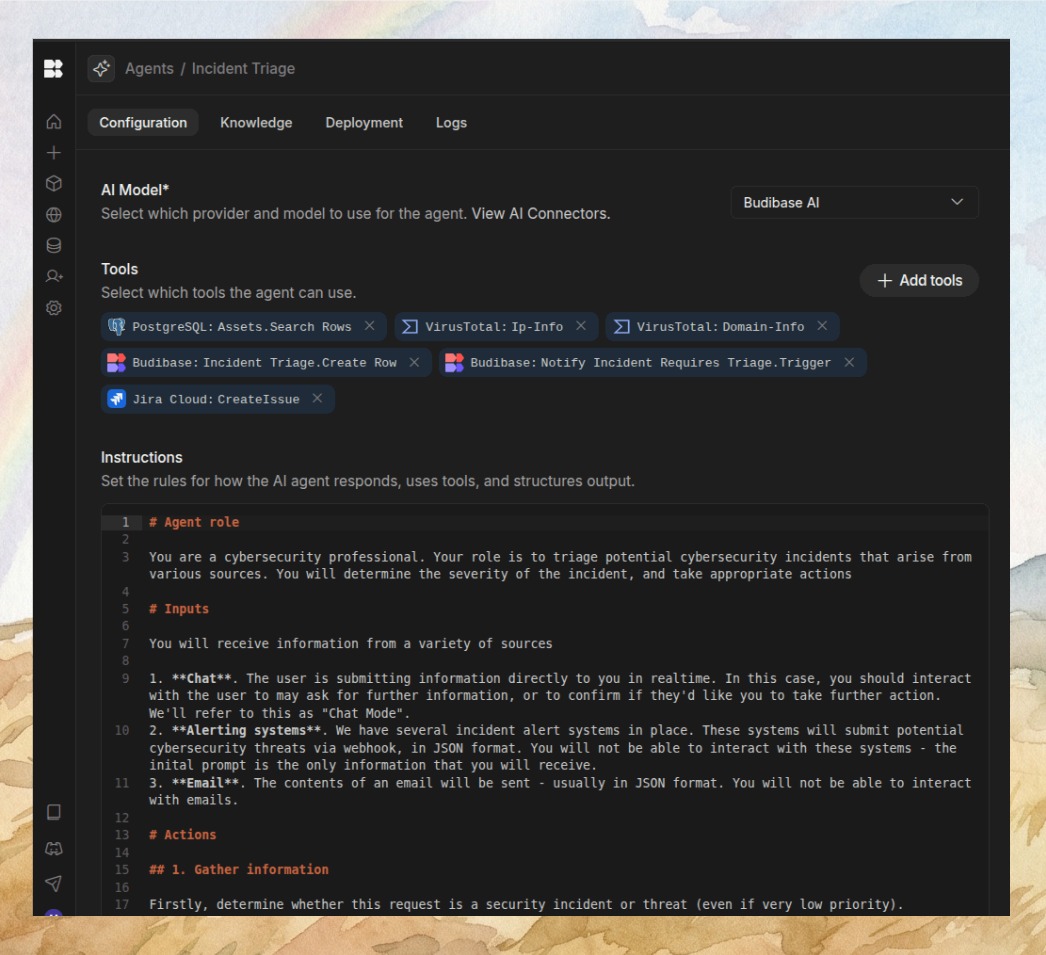
Budibase is an open-source operations platform that saves engineers 100s of hours building Agents, Apps and Automations, securely.
ð¤ ð¨ ð





Get started - we host (Budibase Cloud) · Get started - you host (Docker, K8s, DO) · Docs · Feature request · Report a bug · Support: Discussions
⨠Features
Run your operations on one platform
Handle requests, automate workflows, manage processes, and connect your business systems - without stitching together multiple tools.
Employees ask questions, request approvals, and report issues every day. Budibase agents understand these requests and handle the work automatically.
Operations your team can run with AI agents
Employees ask questions, request approvals, and report issues every day. Budibase agents understand these requests and handle the work automatically.
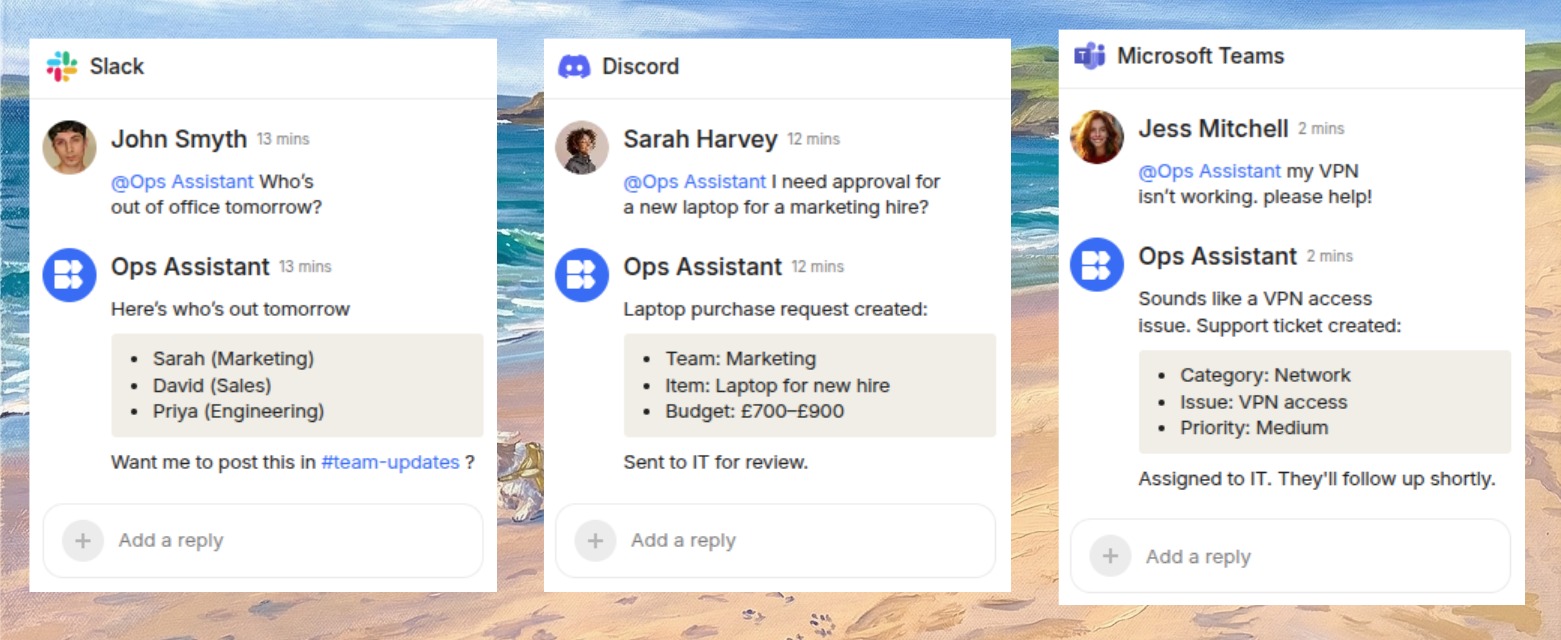
Agents that take action
Budibase agents donât just answer questions. They run workflows across your business - creating records, routing approvals, updating apps, and notifying teams automatically.
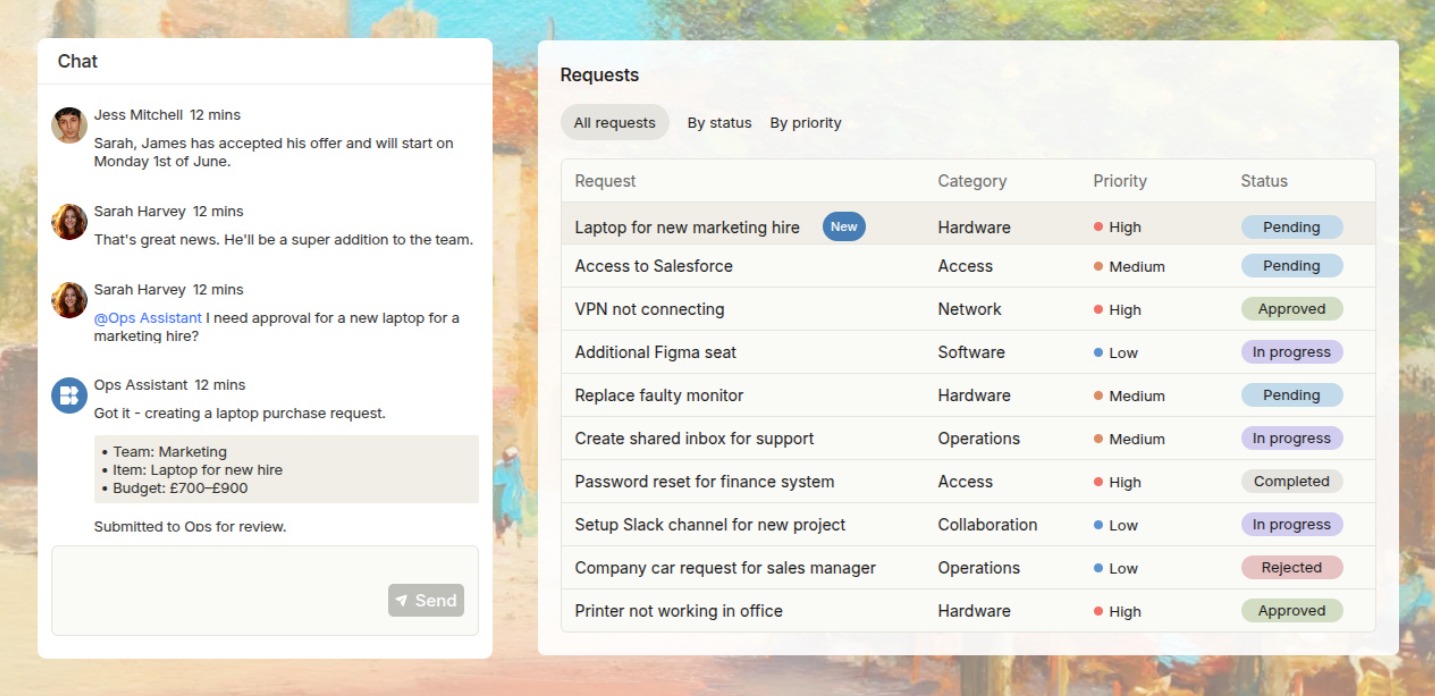
Connect the tools your business runs on
Integrate with databases, AI models, and business apps so agents and automations can take action across your operations.
Deploy with confidence and security
Budibase is open-source and is made to scale. With Budibase, you can self-host on your own infrastructure and globally manage users, onboarding, SMTP, apps, groups, theming and more. You can also provide users/groups with a portal and disseminate user management to the group manager.
Budibase Public API
As with anything that we build in Budibase, our public API is simple to use, flexible, and introduces new extensibility. To summarize, the Budibase API enables:
- Budibase as a backend
- Interoperability
Docs
You can learn more about the Budibase API at the following places:
- General documentation: Learn how to get your API key, how to use spec, and how to use Postman
- Interactive API documentation : Learn how to interact with the API
ð Get started
Deploy Budibase using Docker, Kubernetes, and Digital Ocean on your existing infrastructure. Or use Budibase Cloud if you don't need to self-host and would like to get started quickly.
Get started with self-hosting Budibase
Get started with Budibase Cloud
ð Learning Budibase
The Budibase documentation lives here.
ð¬ Community
If you have a question or would like to talk with other Budibase users and join our community, please hop over to Github discussions
â Code of conduct
Budibase is dedicated to providing everyone a welcoming, diverse, and harassment-free experience. We expect everyone in the Budibase community to abide by our Code of Conduct. Please read it.
ð Contributing to Budibase
From opening a bug report to creating a pull request: every contribution is appreciated and welcomed. If you're planning to implement a new feature or change the API, please create an issue first. This way, we can ensure your work is not in vain. Environment setup instructions are available here.
Not Sure Where to Start?
A good place to start contributing is by looking for the good first issue tag.
How the repository is organized
Budibase is a monorepo managed by lerna. Lerna manages the building and publishing of the budibase packages. At a high level, here are the packages that make up Budibase.
-
packages/builder - contains code for the budibase builder client-side svelte application.
-
packages/client - A module that runs in the browser responsible for reading JSON definition and creating living, breathing web apps from it.
-
packages/server - The budibase server. This Koa app is responsible for serving the JS for the builder and budibase apps, as well as providing the API for interaction with the database and file system.
For more information, see CONTRIBUTING.md
ð License
Budibase is open-source, licensed as GPL v3. The client and component libraries are licensed as MPL - so the apps you build can be licensed however you like. Budibase paid features are licensed under the Business Source License,
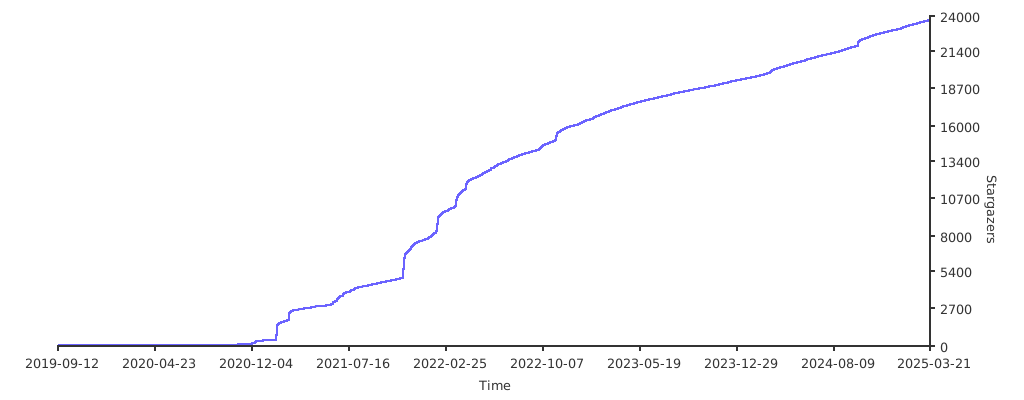
â Stargazers over time
If you are having issues between updates of the builder, please use the guide here to clear down your environment.
Contributors â¨
Thanks goes to these wonderful people (emoji key):
Made with contrib.rocks.
Top Related Projects
🔥 🔥 🔥 A Free & Self-hostable Airtable Alternative
The Postgres development platform. Supabase gives you a dedicated Postgres database to build your web, mobile, and AI applications.
The flexible backend for all your projects 🐰 Turn your DB into a headless CMS, admin panels, or apps with a custom UI, instant APIs, auth & more.
Open Source realtime backend in 1 file
Build databases, automations, apps & agents with AI — no code. Open source platform available on cloud and self-hosted. GDPR, HIPAA, SOC 2 compliant. Best Airtable alternative.
Convert designs to code with AI
Introducing Visual Copilot: A new AI model to turn Figma designs to high quality code using your components.
Try Visual Copilot