 AIL-framework
AIL framework - Analysis Information Leak framework. Project moved to https://github.com/ail-project
Top Related Projects


Quick Overview
AIL-framework (Analysis Information Leak framework) is an open-source modular framework designed to analyze potential information leaks from unstructured data sources. It focuses on detecting and processing sensitive information from various online sources, including darknet markets, paste sites, and social media platforms.
Pros
- Modular architecture allowing easy extension and customization
- Supports multiple data sources and input formats
- Includes various analysis modules for different types of sensitive information
- Active development and community support
Cons
- Complex setup and configuration process
- Requires significant computational resources for large-scale analysis
- Steep learning curve for new users
- Limited documentation for advanced features
Code Examples
# Example 1: Initializing AIL framework
from ail_framework import AILFramework

ail = AILFramework()
ail.initialize()
# Example 2: Adding a custom data source
from ail_framework import DataSource

class CustomSource(DataSource):
    def fetch_data(self):
        # Implement custom data fetching logic
        pass

ail.add_data_source(CustomSource())
# Example 3: Running analysis on collected data
results = ail.analyze_data()
for result in results:
    print(f"Detected leak: {result.type} - Confidence: {result.confidence}")
Getting Started
-
Clone the repository:
git clone https://github.com/CIRCL/AIL-framework.git cd AIL-framework -
Install dependencies:
pip install -r requirements.txt -
Configure the framework:
cp config/core.cfg.sample config/core.cfg # Edit config/core.cfg with your settings -
Run the framework:
./LAUNCH.sh -
Access the web interface at
http://localhost:7000
Competitor Comparisons
MISP (core software) - Open Source Threat Intelligence and Sharing Platform
Pros of MISP
- Widely adopted and supported threat intelligence platform
- Extensive documentation and active community
- Flexible data model for various threat intelligence types
Cons of MISP
- Steeper learning curve for new users
- Can be resource-intensive for large deployments
- Requires more setup and configuration compared to AIL-framework
Code Comparison
MISP (Python):
from pymisp import PyMISP
misp = PyMISP(misp_url, misp_key, ssl=False)
event = misp.new_event(info='Test Event', distribution=0, threat_level_id=3, analysis=0)
AIL-framework (Python):
from packages import Item
from packages.modules import module_name

item = Item.get_item(item_id)
module = module_name.Module()
module.run(item)
Both projects are written primarily in Python, but MISP has a more extensive codebase and API. AIL-framework focuses on information leaks and has a modular structure for processing data. MISP is designed for broader threat intelligence sharing and collaboration, with a more complex data model and user interface.
TheHive is a Collaborative Case Management Platform, now distributed as a commercial version
Pros of TheHive
- Comprehensive incident response platform with case management features
- Integrates well with other security tools and supports automation
- Active community and regular updates
Cons of TheHive
- Steeper learning curve for new users
- Requires more resources to set up and maintain
Code Comparison
TheHive (Scala):
def create(caze: Case): Future[Case] = {
  val id = caze.id.getOrElse(UUID.randomUUID.toString)
  val newCase = caze.copy(
    id = Some(id),
    createdAt = Some(new Date),
    createdBy = Some(authContext.userId)
  )
  caseRepo.create(newCase)
}
AIL-framework (Python):
def create_item(self, obj_id, ltags=[], ltagsgalaxies=[]):
    self.r_serv_metadata.hset('tag:{}'.format(obj_id), 'first_seen', int(time.time()))
    self.r_serv_metadata.hset('tag:{}'.format(obj_id), 'last_seen', int(time.time()))
    for tag in ltags:
        self.r_serv_metadata.sadd('{}:{}'.format(self.set_prefix, tag), obj_id)
TheHive focuses on case management and incident response workflows, while AIL-framework is geared towards information leaks detection and analysis. TheHive's code demonstrates its case creation process, whereas AIL-framework's code shows how it handles tagging and metadata for detected items.
Cortex: a Powerful Observable Analysis and Active Response Engine
Pros of Cortex
- Designed for security operations and incident response, integrating well with other security tools
- Offers a wide range of analyzers for various security tasks, enhancing threat intelligence capabilities
- Provides a user-friendly web interface for managing and running analyses
Cons of Cortex
- More focused on analyzing specific observables rather than large-scale data processing
- May require additional setup and configuration for full functionality compared to AIL-framework
- Less emphasis on information leaks and data exfiltration detection
Code Comparison
AIL-framework (Python):
def crawl_onion(url, domain, port):
    paste = Paste.Paste(url)
    paste.save_paste()
    crawled_pastes.append(paste)
    return paste
Cortex (Scala):
def analyze(artifact: Artifact)(implicit ec: ExecutionContext): Future[Report] = {
  for {
    report <- analyzeArtifact(artifact)
    _ <- reportActor ? SaveReport(report)
  } yield report
}
Both projects use different languages and approaches, with AIL-framework focusing on crawling and processing data, while Cortex emphasizes analyzing specific artifacts and generating reports.
Convert  designs to code with AI

Introducing Visual Copilot: A new AI model to turn Figma designs to high quality code using your components.
Try Visual CopilotREADME

AIL Framework
Open-source framework for the collection, crawling, processing, and analysis of unstructured information.




AIL framework is an open-source platform to collect, crawl, process and analyse unstructured data from the clear web, Tor, I2P, chats, files and external feeds.
Originally developed at CIRCL, AIL helps analysts transform raw, messy content into structured intelligence through extraction, tagging, detection, correlation and investigation workflows.
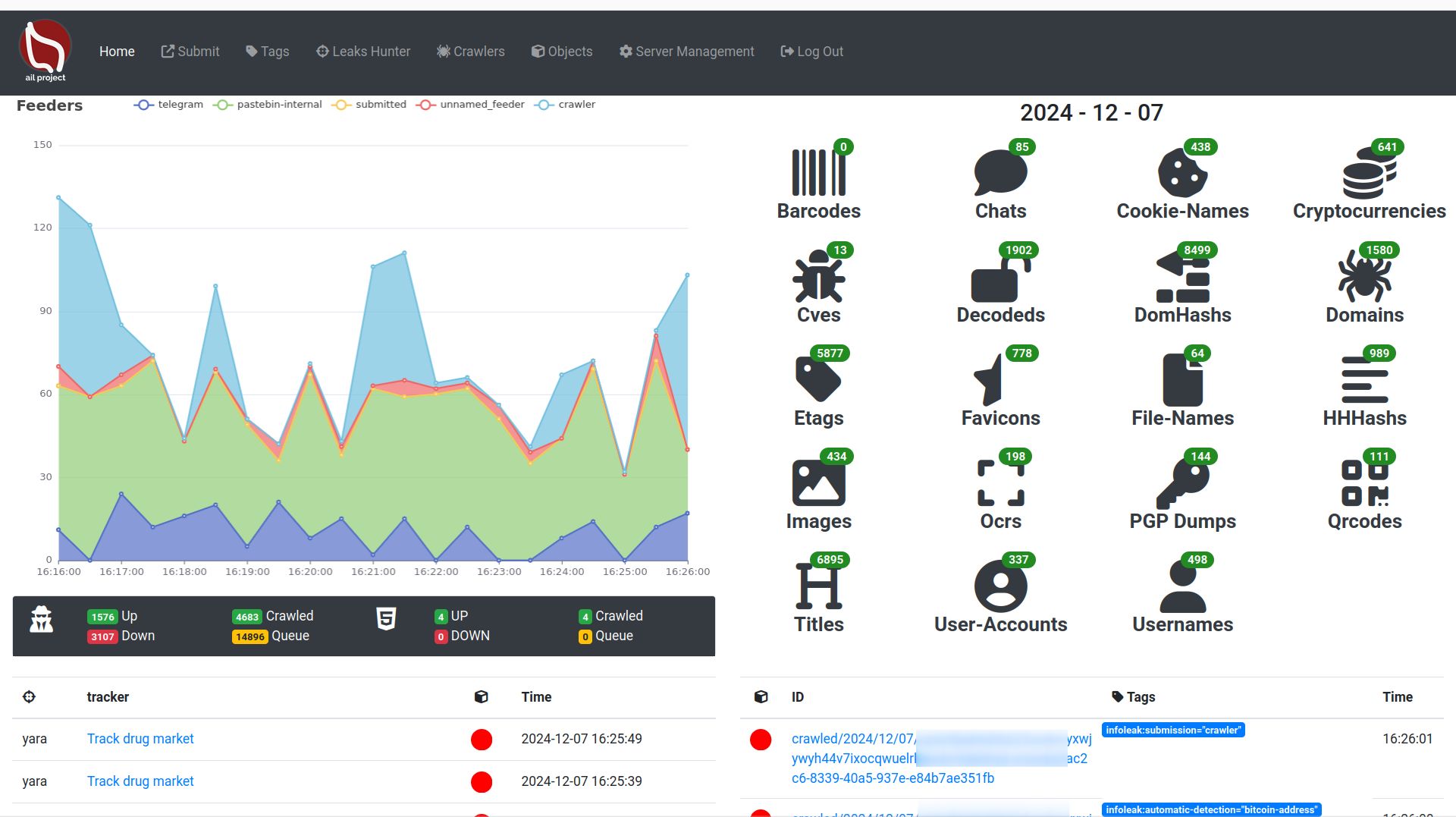
What is AIL? https://ail-project.org
AIL (Analysis of Information Leaks) is an open-source framework for the collection, crawling, processing, and analysis of unstructured information. It supports threat intelligence, leak analysis, and investigative workflows by helping analysts extract, detect, correlate, and share relevant information from a wide range of sources.
AIL includes:
- an extensible Python-based framework for processing and analysing unstructured information,
- a crawler manager for continuous and authenticated collection,
- feeders for communication platforms and external streams,
- a detection and retro-hunt engine based on keywords, regex and YARA,
- search, correlation and investigation capabilities to pivot across extracted data,
- and export/integration features for platforms such as MISP.
AIL intelligence lifecycle
AIL follows a practical intelligence workflow:
- Collection Continuous ingestion from chats, websites, hidden services, files and feeds.
- Processing Extraction, decoding, OCR, QR/barcode parsing, enrichment and tagging.
- Detection Real-time tracking with words, sets, regex, typo-squatting and YARA rules.
- Analysis Search, pivoting, correlation graphs and investigations.
- Dissemination Export of findings and objects to MISP intelligence-sharing platforms.
Whatâs new in AIL v6.7
AIL is now at v6.7 and recent releases significantly expanded search, image analysis, crawling and document-processing capabilities.
Highlights include:
- Unified search interface with best-match and most-recent ordering
- Date range filtering and improved advanced search workflows
- Image and screenshot descriptions for faster visual analysis and searchability
- Expanded OCR and QR extraction, including support for more difficult image cases
- Full PDF processing pipeline, including metadata extraction and translation support
- I2P crawling support in addition to clear web and Tor collection
- Passive SSH correlation for infrastructure analysis and deanonymization workflows
- Improved chat exploration for platforms such as Discord, Telegram and Matrix
Features

Collection
- Modular architecture to handle streams of unstructured information
- Multiple feeder and importer support
- Feeders for chat and stream sources such as Discord, Telegram and other providers
- Crawling support for the clear web, darknet, Tor hidden services (.onion), and I2P
- Authenticated crawling with browser sessions, cookies and local storage reuse
- Continuous or on-demand monitoring of websites and hidden services over time
- UI submission/import capabilities
Processing and enrichment
- Full-text indexing of unstructured information (chats, crawled contents)
- Extraction of URLs, hostnames, email addresses and credentials
- Detection of phone numbers, API keys, IBANs, certificates and private keys
- Detection of Bitcoin addresses, private keys and related cryptocurrency artifacts
- File extraction and decoding from encoded content (Base64, hex)
- OCR processing for screenshots and images
- QR code and barcode extraction with reprocessing of embedded content
- AI-assisted descriptions for images, screenshots and domains
- PDF metadata extraction, ingestion and translation
- Tagging system using MISP Galaxy and MISP Taxonomies
Detection and tracking
Trackers are user-defined rules or patterns that automatically detect, tag and notify analysts about relevant information collected by AIL.
Supported tracker types:
- word tracking
- set-of-words tracking
- regex tracking
- YARA rules
- typo-squatting detection
Detection capabilities include:
- real-time tagging and classification
- object occurrence tracking
- webhook or email notification workflows
- built-in YARA editor
AIL also supports Retro Hunts, enabling analysts to run newly created YARA rules against historical data to uncover previously missed content.


Search, correlation and investigation
- Unified search interface with recency and relevancy ordering
- Search by date range and specialized advanced search for selected data types
- Search across chats, crawled domains, titles, filenames and AI-generated descriptions
- Correlation engine and graph visualisation for relationships between:
- decoded files and hashes
- PGP metadata
- domains, titles, dom-hash, favicons, cookie-names
- usernames and user-accounts
- CVEs
- SSH keys
- cryptocurrencies
- PDF metadata
- ...
- Investigation workflow to group, enrich and follow analyst findings

Export and integrations
- Alerting and sharing to MISP
- Export of AIL objects and investigations to MISP formats
- Automatic exports on selected detections and tags
- Integrations supporting collaborative intelligence and incident-response workflows
Why AIL?
AIL is built for analysts who need to work with messy, real-world data:
- free text,
- screenshots,
- PDFs and files,
- chat messages,
- encoded payloads,
- content collected from web, Tor and I2P sources.
Instead of treating those sources separately, AIL helps turn them into searchable, correlated and actionable intelligence.
Screenshots
Websites, forums and hidden services

Login-protected crawling with pre-recorded session cookies

Extracted and decoded files

Correlation engine


Investigation

Tagging system


MISP export

Automatic events and alerts

UI submission

Installation
To install the AIL framework:
# Clone the repository
git clone https://github.com/ail-project/ail-framework.git
cd ail-framework
git submodule update --init --recursive

# Install dependencies on Debian/Ubuntu-based distributions
./installing_deps.sh

# Start AIL
cd bin
./LAUNCH.sh -l
The default installing_deps.sh script targets Debian and Ubuntu based distributions.
Requirements
- Python 3.8+
How to size the hardware requirements for AIL?
Installation notes
Some optional components require additional configuration, including the Lacus crawler, the Meilisearch search indexer, and the translation. See the HOWTO for detailed setup instructions.
Starting AIL
cd bin
./LAUNCH.sh -l
The web interface is available at:
https://localhost:7000/
The default credentials are stored in the DEFAULT_PASSWORD file and the file is removed once the password is changed.
Documentation
- Main documentation: doc/README.md
- API documentation: doc/api.md
- HOWTO guides: HOWTO.md
Training
Training materials on how to use and extend the AIL framework are available at ail-project/ail-training.
Privacy and GDPR
For information on privacy and GDPR-related considerations, see the document AIL information leaks analysis and the GDPR in the context of collection, analysis and sharing information leaks.
This document provides guidance on using AIL in a lawful context, especially within the scope of the General Data Protection Regulation.
Research using AIL
If you use or reference AIL in academic work, you can cite it as follows:
@inproceedings{mokaddem2018ail,
  title={AIL-The design and implementation of an Analysis Information Leak framework},
  author={Mokaddem, Sami and Wagener, G{\'e}rard and Dulaunoy, Alexandre},
  booktitle={2018 IEEE International Conference on Big Data (Big Data)},
  pages={5049--5057},
  year={2018},
  organization={IEEE}
}
License
Copyright (C) 2014 Jules Debra
Copyright (c) 2021 Olivier Sagit
Copyright (C) 2014-2026 CIRCL - Computer Incident Response Center Luxembourg
Copyright (c) 2014-2024 Raphaël Vinot
Copyright (c) 2014-2026 Alexandre Dulaunoy
Copyright (c) 2016-2024 Sami Mokaddem
Copyright (c) 2018-2026 Thirion Aurélien

This program is free software: you can redistribute it and/or modify
it under the terms of the GNU Affero General Public License as published by
the Free Software Foundation, either version 3 of the License, or
(at your option) any later version.

This program is distributed in the hope that it will be useful,
but WITHOUT ANY WARRANTY; without even the implied warranty of
MERCHANTABILITY or FITNESS FOR A PARTICULAR PURPOSE.  See the
GNU Affero General Public License for more details.

You should have received a copy of the GNU Affero General Public License
along with this program.  If not, see <http://www.gnu.org/licenses/>.
Top Related Projects
Convert designs to code with AI
Introducing Visual Copilot: A new AI model to turn Figma designs to high quality code using your components.
Try Visual Copilot