 PaddleOCR
Turn any PDF or image document into structured data for your AI. A powerful, lightweight OCR toolkit that bridges the gap between images/PDFs and LLMs. Supports 100+ languages.
Top Related Projects

Large-scale Self-supervised Pre-training Across Tasks, Languages, and Modalities

Tesseract Open Source OCR Engine (main repository)

Ready-to-use OCR with 80+ supported languages and all popular writing scripts including Latin, Chinese, Arabic, Devanagari, Cyrillic and etc.

Text recognition (optical character recognition) with deep learning methods, ICCV 2019

Mask R-CNN for object detection and instance segmentation on Keras and TensorFlow
Quick Overview
PaddleOCR is an open-source Optical Character Recognition (OCR) toolkit developed by Baidu's PaddlePaddle team. It provides a comprehensive set of tools for text detection, recognition, and layout analysis, supporting multiple languages and offering both lightweight and accurate models for various OCR tasks.
Pros
- Comprehensive OCR solution with support for multiple languages and tasks
- Offers both lightweight models for mobile devices and high-accuracy models for server-side applications
- Active development and frequent updates from the PaddlePaddle team
- Extensive documentation and examples for easy integration
Cons
- Primarily based on the PaddlePaddle deep learning framework, which may have a steeper learning curve for those familiar with other frameworks
- Some advanced features may require more computational resources
- Documentation is sometimes not fully up-to-date with the latest features
- Limited community support compared to some other popular OCR libraries
Code Examples
- Basic text detection and recognition:
from paddleocr import PaddleOCR

ocr = PaddleOCR(use_angle_cls=True, lang='en')
result = ocr.ocr('image.jpg')
for line in result:
    print(line)
- Extracting text from a specific region of an image:
import cv2
from paddleocr import PaddleOCR

image = cv2.imread('image.jpg')
roi = image[100:300, 200:400]  # Define region of interest
ocr = PaddleOCR(use_angle_cls=True, lang='en')
result = ocr.ocr(roi)
for line in result:
    print(line[1][0])  # Print recognized text
- Using a custom dictionary for text recognition:
from paddleocr import PaddleOCR

custom_dict = 'path/to/custom_dict.txt'
ocr = PaddleOCR(use_angle_cls=True, lang='en', rec_char_dict_path=custom_dict)
result = ocr.ocr('image.jpg')
for line in result:
    print(line)
Getting Started
To get started with PaddleOCR:
- Install PaddleOCR:
pip install paddleocr
- Use PaddleOCR in your Python script:
from paddleocr import PaddleOCR

# Initialize PaddleOCR
ocr = PaddleOCR(use_angle_cls=True, lang='en')

# Perform OCR on an image
result = ocr.ocr('path/to/your/image.jpg')

# Print the results
for line in result:
    print(line)
For more advanced usage and customization options, refer to the official documentation on the PaddleOCR GitHub repository.
Competitor Comparisons
Large-scale Self-supervised Pre-training Across Tasks, Languages, and Modalities
Pros of UniLM
- Broader scope: Supports a wide range of natural language processing tasks beyond OCR
- More advanced language understanding: Utilizes large-scale pre-trained models for improved performance
- Active research focus: Regularly updated with cutting-edge NLP techniques and models
Cons of UniLM
- Less specialized for OCR: May not offer as many OCR-specific features and optimizations
- Potentially more complex to use: Broader scope may require more setup and configuration for OCR tasks
- Larger resource requirements: Pre-trained models can be computationally intensive
Code Comparison
PaddleOCR:
from paddleocr import PaddleOCR

ocr = PaddleOCR(use_angle_cls=True, lang='en')
result = ocr.ocr('image.jpg')
UniLM (using LayoutLM for OCR):
from transformers import LayoutLMForTokenClassification, LayoutLMTokenizer

model = LayoutLMForTokenClassification.from_pretrained("microsoft/layoutlm-base-uncased")
tokenizer = LayoutLMTokenizer.from_pretrained("microsoft/layoutlm-base-uncased")
Note: The code snippets demonstrate basic setup and may not reflect the full complexity of using each library for OCR tasks.
Tesseract Open Source OCR Engine (main repository)
Pros of Tesseract
- Mature and widely adopted OCR engine with a long history
- Supports a wide range of languages and scripts
- Highly customizable with extensive documentation
Cons of Tesseract
- Generally slower performance compared to modern deep learning-based approaches
- May struggle with complex layouts or low-quality images
- Requires more manual configuration for optimal results
Code Comparison
Tesseract
import pytesseract
from PIL import Image

image = Image.open('image.png')
text = pytesseract.image_to_string(image)
print(text)
PaddleOCR
from paddleocr import PaddleOCR

ocr = PaddleOCR(use_angle_cls=True, lang='en')
result = ocr.ocr('image.png', cls=True)
for line in result:
    print(line[1][0])
PaddleOCR offers a more streamlined API for OCR tasks, with built-in support for text detection, recognition, and angle classification. Tesseract, while powerful, often requires additional preprocessing steps for optimal results. PaddleOCR's deep learning approach generally provides better performance on complex layouts and low-quality images, but Tesseract's extensive language support and customization options make it a versatile choice for specific use cases.
Ready-to-use OCR with 80+ supported languages and all popular writing scripts including Latin, Chinese, Arabic, Devanagari, Cyrillic and etc.
Pros of EasyOCR
- Simpler installation process and easier to use for beginners
- Supports a wider range of languages (80+) out of the box
- Better documentation and examples for quick start
Cons of EasyOCR
- Generally slower inference speed compared to PaddleOCR
- Less flexibility and customization options for advanced users
- Smaller community and fewer pre-trained models available
Code Comparison
EasyOCR:
import easyocr
reader = easyocr.Reader(['en'])
result = reader.readtext('image.jpg')
PaddleOCR:
from paddleocr import PaddleOCR
ocr = PaddleOCR(use_angle_cls=True, lang='en')
result = ocr.ocr('image.jpg')
Both libraries offer simple APIs for OCR tasks, but PaddleOCR provides more options for fine-tuning and optimization. EasyOCR's code is more straightforward, making it easier for beginners to get started quickly. PaddleOCR's approach allows for more advanced configurations, which can be beneficial for complex OCR tasks or when performance optimization is crucial.
Text recognition (optical character recognition) with deep learning methods, ICCV 2019
Pros of deep-text-recognition-benchmark
- Focuses specifically on text recognition, providing a comprehensive benchmark for various models
- Implements multiple state-of-the-art architectures, allowing for easy comparison and experimentation
- Offers a modular design, making it easier to swap components and test different combinations
Cons of deep-text-recognition-benchmark
- Limited to text recognition, while PaddleOCR offers a more comprehensive OCR pipeline
- Less extensive documentation and fewer pre-trained models compared to PaddleOCR
- Smaller community and fewer updates, potentially leading to slower development and support
Code Comparison
deep-text-recognition-benchmark:
model = Model(opt)
converter = AttnLabelConverter(opt.character)
criterion = torch.nn.CrossEntropyLoss(ignore_index=0).to(device)
PaddleOCR:
model = build_model(config['Architecture'])
loss_class = build_loss(config['Loss'])
optimizer = build_optimizer(config['Optimizer'], model)
Both repositories use similar approaches for model initialization and loss function definition. However, PaddleOCR's code structure is more modular and configurable, allowing for easier customization of the OCR pipeline.
Mask R-CNN for object detection and instance segmentation on Keras and TensorFlow
Pros of Mask_RCNN
- Specialized in instance segmentation, offering precise object detection and segmentation
- Well-documented with extensive tutorials and examples
- Supports both TensorFlow 1.x and 2.x
Cons of Mask_RCNN
- Limited to object detection and segmentation tasks
- Less frequent updates and maintenance compared to PaddleOCR
- Steeper learning curve for beginners
Code Comparison
Mask_RCNN:
import mrcnn.model as modellib
from mrcnn import utils

class InferenceConfig(coco.CocoConfig):
    GPU_COUNT = 1
    IMAGES_PER_GPU = 1

model = modellib.MaskRCNN(mode="inference", config=InferenceConfig(), model_dir=MODEL_DIR)
PaddleOCR:
from paddleocr import PaddleOCR

ocr = PaddleOCR(use_angle_cls=True, lang='en')
result = ocr.ocr('image.jpg', cls=True)
The code snippets highlight the difference in focus between the two repositories. Mask_RCNN requires more setup for object detection and segmentation, while PaddleOCR offers a simpler interface for OCR tasks.
Convert  designs to code with AI

Introducing Visual Copilot: A new AI model to turn Figma designs to high quality code using your components.
Try Visual CopilotREADME
Global Leading OCR Toolkit & Document AI Engine
English | ç®ä½ä¸æ | ç¹é«ä¸æ | æ¥æ¬èª | íêµì´ | Français | Ð ÑÑÑкий | Español | اÙعربÙØ©








PaddleOCR converts PDF documents and images into structured, LLM-ready data (JSON/Markdown) with industry-leading accuracy. With 70k+ Stars and trusted by top-tier projects like Dify, RAGFlow, and Cherry Studio, PaddleOCR is the bedrock for building intelligent RAG and Agentic applications.
ð Key Features
ð Intelligent Document Parsing (LLM-Ready)
Transforming messy visuals into structured data for the LLM era.
- SOTA Document VLM: Featuring PaddleOCR-VL-1.6 (0.9B), the industry's leading lightweight vision-language model for document parsing. It achieves 96.3% accuracy on OmniDocBench v1.6, leads in text, formula, and table recognition, and shows significantly enhanced capabilities in ancient documents, rare characters, seals, and charts, with structured outputs in Markdown and JSON formats.
- Structure-Aware Conversion: Powered by PP-StructureV3, seamlessly convert complex PDFs and images into Markdown or JSON. Unlike the PaddleOCR-VL series models, it provides more fine-grained coordinate information, including table cell coordinates, text coordinates, and more.
- Production-Ready Efficiency: Achieve commercial-grade accuracy with an ultra-small footprint. Outperforms numerous closed-source solutions in public benchmarks while remaining resource-efficient for edge/cloud deployment.
ð Universal Text Recognition (Scene OCR)
The global gold standard for high-speed, multilingual text spotting.
- 100+ Languages Supported: Native recognition for a vast global library. PP-OCRv6 supports 50 languages with a single unified model (Chinese, English, Japanese, and 46 Latin-script languages) â no model switching needed for multilingual documents.
- Complex Element Mastery: Beyond standard text recognition, we support natural scene text spotting across a wide range of environments, including IDs, street views, books, and industrial components
- Performance Leap: PP-OCRv6 achieves +4.6% detection and +5.1% recognition accuracy over PP-OCRv5, surpassing mainstream Vision-Language Models. 5.2Ã CPU inference speedup end-to-end.
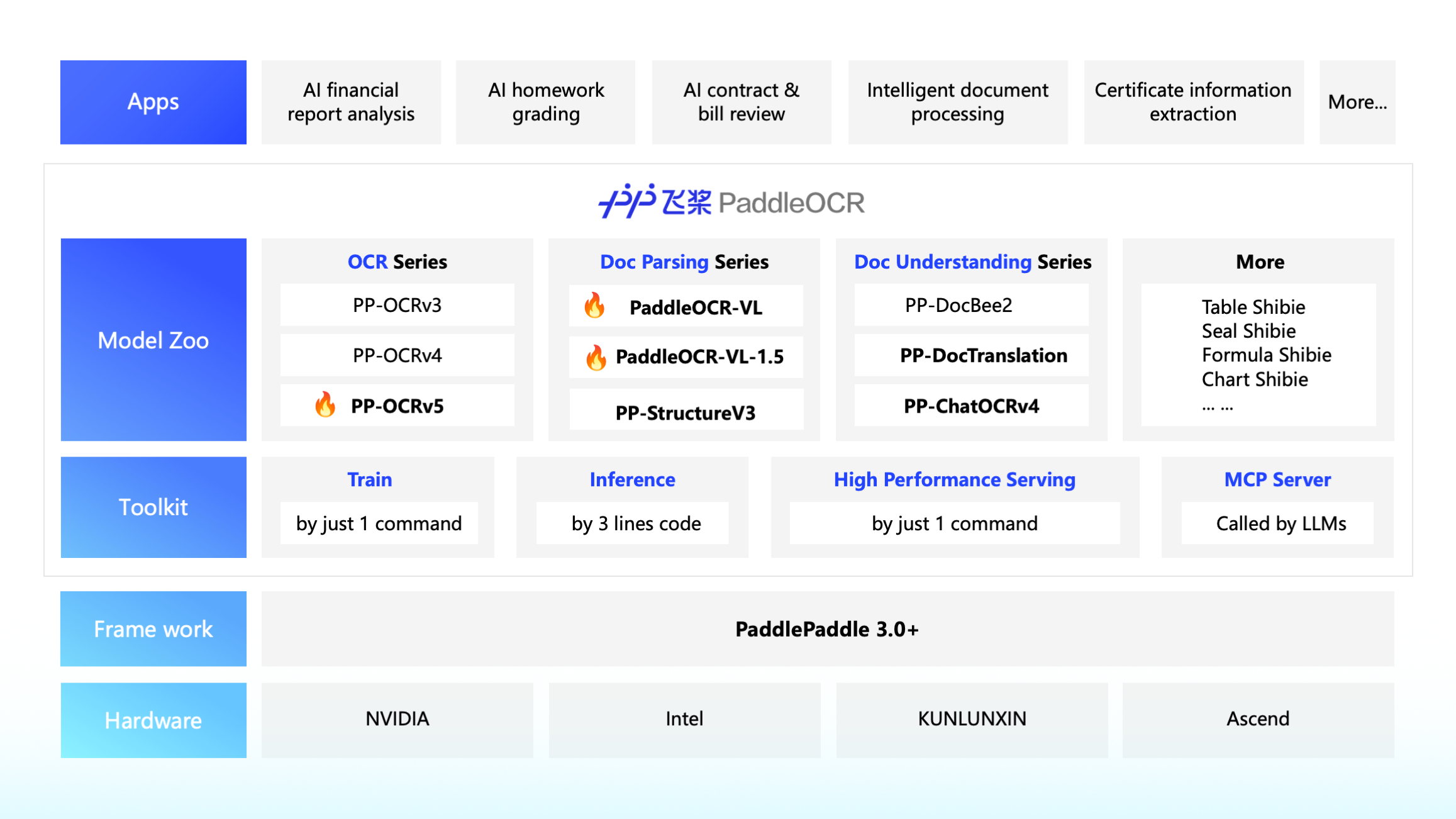
ð ï¸ Developer-Centric Ecosystem
- Seamless Integration: The premier choice for the AI Agent ecosystemâdeeply integrated with Dify, RAGFlow, Pathway, and Cherry Studio.
- LLM Data Flywheel: A complete pipeline to build high-quality datasets, providing a sustainable "Data Engine" for fine-tuning Large Language Models.
- One-Click Deployment: Supports various hardware backends (NVIDIA GPU, Intel CPU, Kunlunxin XPU, and diverse AI Accelerators).
ð£ Recent updates
ð¥ 2026.07.22: HPD-Parsing is now available
- HPD-Parsing is a lightweight vision-language model designed for high-throughput document parsing. It adopts a hierarchical parallel decoding paradigm and Progressive Multi-Token Prediction (P-MTP), achieving a peak throughput of 4,752 tokens/s on public benchmarks while maintaining competitive parsing accuracy.
- HPD-Parsing supports both OpenAI-compatible serving and local inference through a customized vLLM runtime, making it suitable for document parsing scenarios with high demands on inference efficiency and deployment throughput.
- See the HPD-Parsing usage tutorial for environment setup, serving, and local inference instructions.
2026.06.11: Release of PaddleOCR 3.7.0
-
PP-OCRv6 highlights:
- Accuracy boost: Medium tier achieves +4.6% detection and +5.1% recognition over PP-OCRv5_server, surpassing mainstream VLMs (Qwen3-VL-235B, GPT-5.5) with only 34.5M parameters.
- 50 languages unified: Single model covers Chinese, English, Japanese, and 46 Latin-script languages â no model switching needed.
- Specialized scenarios: Major improvements in digital displays, dot-matrix characters, tire prints, and industrial text recognition.
- Faster inference: 5.2Ã CPU speedup (OpenVINO), 6.1Ã on Apple M4 (tiny), 0.13s on A100 GPU.
- Three tiers for all scenarios: tiny (1.5M) / small (7.7M) / medium (34.5M) for edge, mobile, and server deployment.
- Model availability: All models are available on HuggingFace and ModelScope.
2026.05.28: Release of PaddleOCR 3.6.0
-
PaddleOCR-VL-1.6 highlights:
- New SOTA Accuracy: Achieves over 96.3% on OmniDocBench v1.6, also sets new SOTA on OmniDocBench v1.5 and Real5-OmniDocBench, leading both open-source and proprietary solutions in text, formula, and table recognition.
- Comprehensive Capability Upgrade: Significant improvements in table, ancient document, and rare character recognition, with notably enhanced seal recognition, spotting, and chart understanding across multiple scenarios.
- Seamless Migration: Model architecture is fully consistent with PaddleOCR-VL-1.5, enabling zero-cost adaptationâswap and go.
- Try it now: Available on HuggingFace or our Official Website.
2026.04.21: Release of PaddleOCR 3.5.0
- Flexible inference backends: Seamlessly switch between Paddle static graph, Paddle dynamic graph, or Transformers. PaddleOCR is now deeply integrated with the Hugging Face ecosystem, and 20 major models support Transformers as the inference backend.
- Office documents to Markdown: Convert common document formats such as Word, Excel, and PowerPoint into Markdown.
- DOCX export for parsed results: The
PaddleOCR-VLseries,PP-StructureV3, andPP-DocTranslationnow support exporting parsed results to DOCX for convenient viewing and editing in Microsoft Word. - Official browser inference SDK: Released
PaddleOCR.js, the official browser inference SDK that supports runningPP-OCRv5directly in the browser.
2026.01.29: Release of PaddleOCR 3.4.0
- PaddleOCR-VL-1.5 (SOTA 0.9B VLM): Our latest flagship model for document parsing is now live!
- 94.5% Accuracy on OmniDocBench: Surpassing top-tier general large models and specialized document parsers.
- Real-World Robustness: First to introduce the PP-DocLayoutV3 algorithm for irregular shape positioning, mastering 5 tough scenarios: Skew, Warping, Scanning, Illumination, and Screen Photography.
- Capability Expansion: Now supports Seal Recognition, Text Spotting, and expands to 111 languages (including Chinaâs Tibetan script and Bengali).
- Long Document Mastery: Supports automatic cross-page table merging and hierarchical heading identification.
- Try it now: Available on HuggingFace or our Official Website.
2025.10.16: Release of PaddleOCR 3.3.0
-
Released PaddleOCR-VL:
-
Model Introduction:
- PaddleOCR-VL is a SOTA and resource-efficient model tailored for document parsing. Its core component is PaddleOCR-VL-0.9B, a compact yet powerful vision-language model (VLM) that integrates a NaViT-style dynamic resolution visual encoder with the ERNIE-4.5-0.3B language model to enable accurate element recognition. This innovative model efficiently supports 109 languages and excels in recognizing complex elements (e.g., text, tables, formulas, and charts), while maintaining minimal resource consumption. Through comprehensive evaluations on widely used public benchmarks and in-house benchmarks, PaddleOCR-VL achieves SOTA performance in both page-level document parsing and element-level recognition. It significantly outperforms existing solutions, exhibits strong competitiveness against top-tier VLMs, and delivers fast inference speeds. These strengths make it highly suitable for practical deployment in real-world scenarios. The model has been released on HuggingFace. Everyone is welcome to download and use it! More introduction information can be found in PaddleOCR-VL.
-
Core Features:
- Compact yet Powerful VLM Architecture: We present a novel vision-language model that is specifically designed for resource-efficient inference, achieving outstanding performance in element recognition. By integrating a NaViT-style dynamic high-resolution visual encoder with the lightweight ERNIE-4.5-0.3B language model, we significantly enhance the modelâs recognition capabilities and decoding efficiency. This integration maintains high accuracy while reducing computational demands, making it well-suited for efficient and practical document processing applications.
- SOTA Performance on Document Parsing: PaddleOCR-VL achieves state-of-the-art performance in both page-level document parsing and element-level recognition. It significantly outperforms existing pipeline-based solutions and exhibiting strong competitiveness against leading vision-language models (VLMs) in document parsing. Moreover, it excels in recognizing complex document elements, such as text, tables, formulas, and charts, making it suitable for a wide range of challenging content types, including handwritten text and historical documents. This makes it highly versatile and suitable for a wide range of document types and scenarios.
- Multilingual Support: PaddleOCR-VL Supports 109 languages, covering major global languages, including but not limited to Chinese, English, Japanese, Latin, and Korean, as well as languages with different scripts and structures, such as Russian (Cyrillic script), Arabic, Hindi (Devanagari script), and Thai. This broad language coverage substantially enhances the applicability of our system to multilingual and globalized document processing scenarios.
-
-
Released PP-OCRv5 Multilingual Recognition Model:
- Improved the accuracy and coverage of Latin script recognition; added support for Cyrillic, Arabic, Devanagari, Telugu, Tamil, and other language systems, covering recognition of 109 languages. The model has only 2M parameters, and the accuracy of some models has increased by over 40% compared to the previous generation.
2025.08.21: Release of PaddleOCR 3.2.0
-
Significant Model Additions:
- Introduced training, inference, and deployment for PP-OCRv5 recognition models in English, Thai, and Greek. The PP-OCRv5 English model delivers an 11% improvement in English scenarios compared to the main PP-OCRv5 model, with the Thai and Greek recognition models achieving accuracies of 82.68% and 89.28%, respectively.
-
Deployment Capability Upgrades:
- Full support for PaddlePaddle framework versions 3.1.0 and 3.1.1.
- Comprehensive upgrade of the PP-OCRv5 C++ local deployment solution, now supporting both Linux and Windows, with feature parity and identical accuracy to the Python implementation.
- High-performance inference now supports CUDA 12, and inference can be performed using either the Paddle Inference or ONNX Runtime backends.
- The high-stability service-oriented deployment solution is now fully open-sourced, allowing users to customize Docker images and SDKs as required.
- The high-stability service-oriented deployment solution also supports invocation via manually constructed HTTP requests, enabling client-side code development in any programming language.
-
Benchmark Support:
- All production lines now support fine-grained benchmarking, enabling measurement of end-to-end inference time as well as per-layer and per-module latency data to assist with performance analysis. Here's how to set up and use the benchmark feature.
- Documentation has been updated to include key metrics for commonly used configurations on mainstream hardware, such as inference latency and memory usage, providing deployment references for users.
-
Bug Fixes:
- Resolved the issue of failed log saving during model training.
- Upgraded the data augmentation component for formula models for compatibility with newer versions of the albumentations dependency, and fixed deadlock warnings when using the tokenizers package in multi-process scenarios.
- Fixed inconsistencies in switch behaviors (e.g.,
use_chart_parsing) in the PP-StructureV3 configuration files compared to other pipelines.
-
Other Enhancements:
- Separated core and optional dependencies. Only minimal core dependencies are required for basic text recognition; additional dependencies for document parsing and information extraction can be installed as needed.
- Enabled support for NVIDIA RTX 50 series graphics cards on Windows; users can refer to the installation guide for the corresponding PaddlePaddle framework versions.
- PP-OCR series models now support returning single-character coordinates.
- Added AIStudio, ModelScope, and other model download sources, allowing users to specify the source for model downloads.
- Added support for chart-to-table conversion via the PP-Chart2Table module.
- Optimized documentation descriptions to improve usability.
ð Quick Start
Step 1: Try Online
PaddleOCR official website provides interactive Experience Center and APIsâno setup required, just one click to experience.
Step 2: Local Deployment
For local usage, please refer to the following documentation based on your needs:
- PP-OCR Series: See PP-OCR Documentation
- PaddleOCR-VL Series: See PaddleOCR-VL Documentation
- PP-StructureV3: See PP-StructureV3 Documentation
- More Capabilities: See More Capabilities Documentation
𧩠More Features
- Convert models to ONNX format: Obtaining ONNX Models.
- Accelerate inference using engines like OpenVINO, ONNX Runtime, TensorRT, or perform inference using ONNX format models: High-Performance Inference.
- Accelerate inference using multi-GPU and multi-process: Parallel Inference for Pipelines.
- Integrate PaddleOCR into applications written in C++, C#, Java, etc.: Serving.
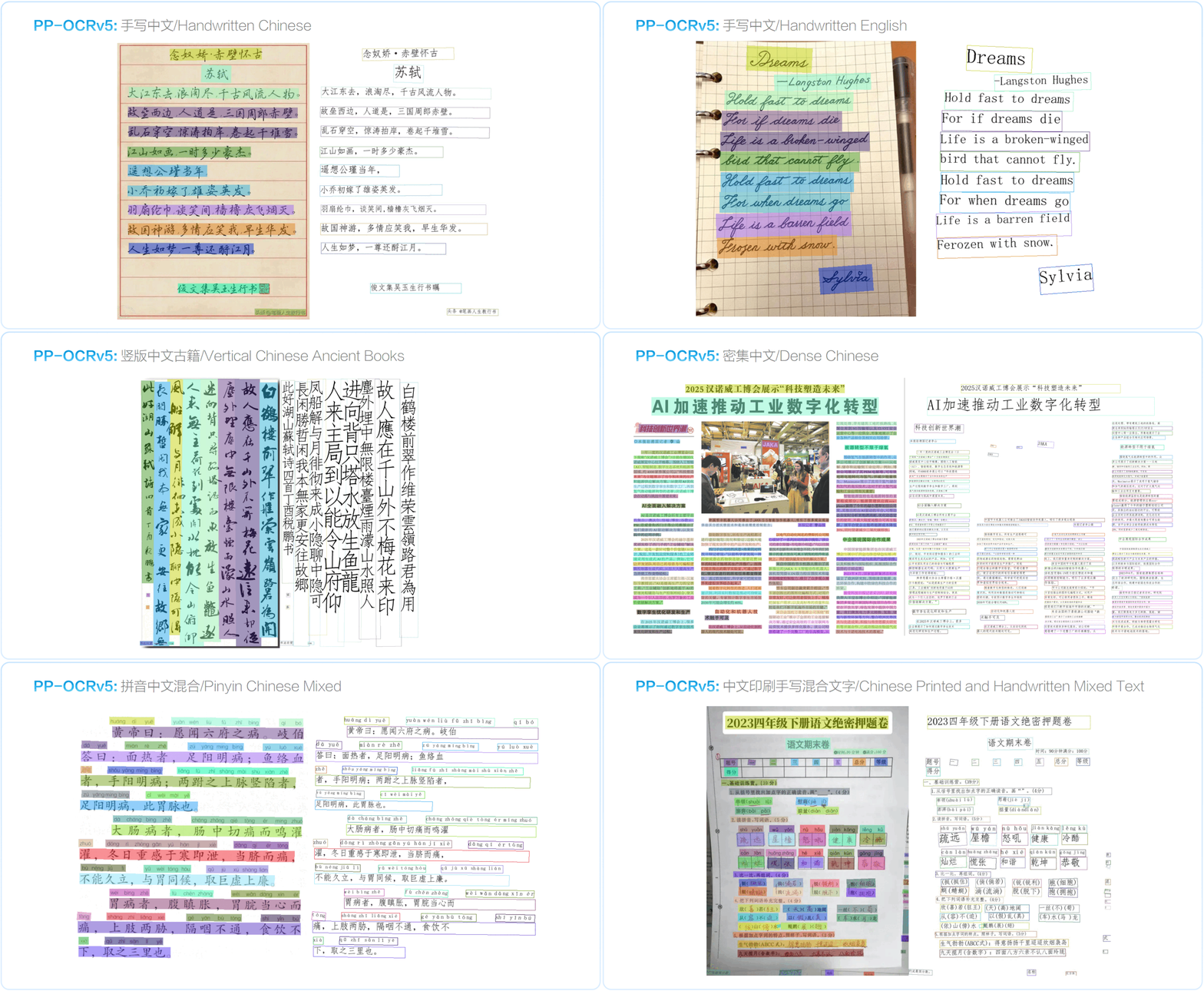
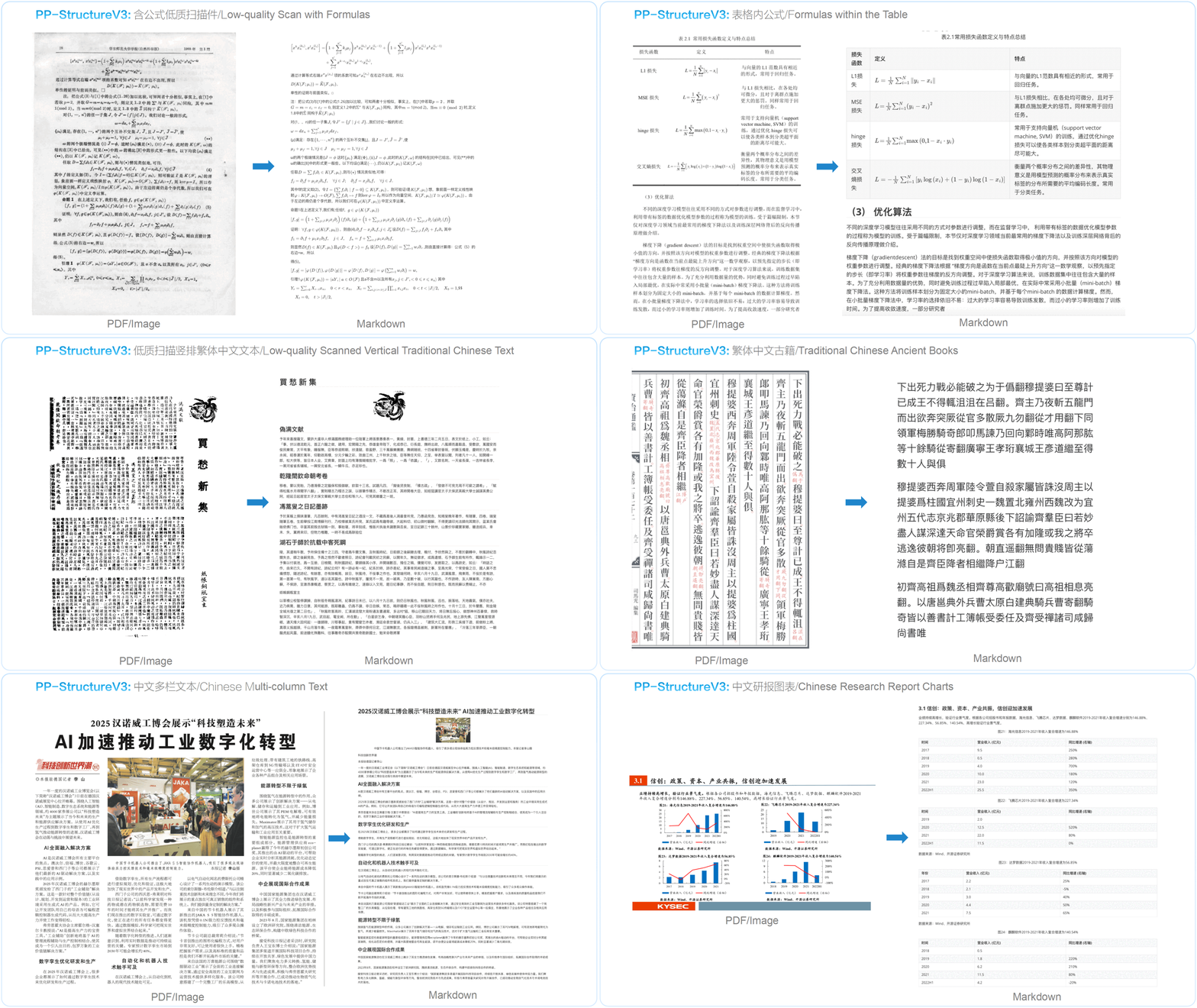
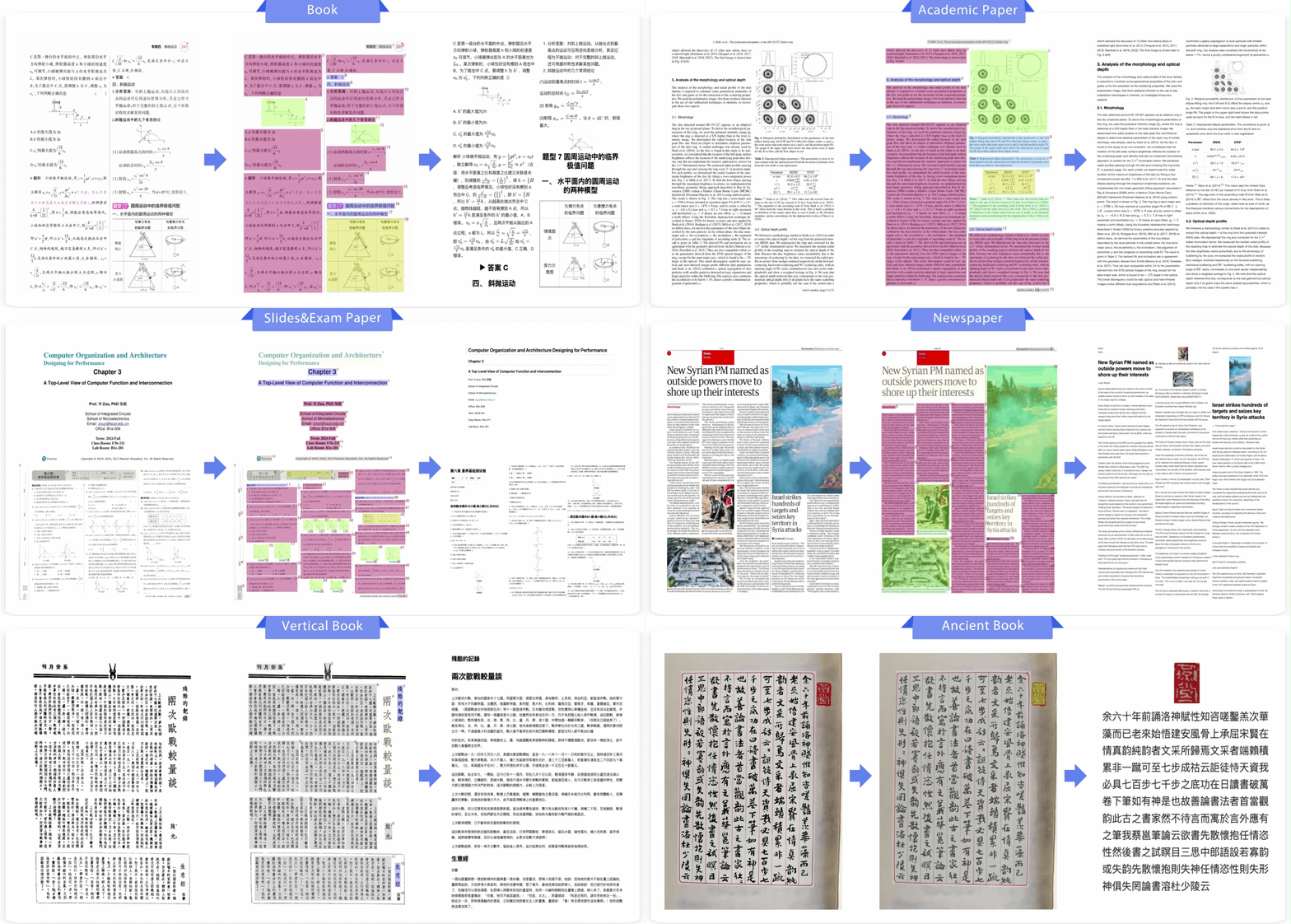
ð Quick Overview of Execution Results
PP-OCRv5
PP-StructureV3
PaddleOCR-VL
⨠Stay Tuned
â Star this repository to keep up with exciting updates and new releases, including powerful OCR and document parsing capabilities! â
ð©âð©âð§âð¦ Community
| PaddlePaddle WeChat official account | Join the tech discussion group |
|---|---|
 |  |
ð Awesome Projects Leveraging PaddleOCR
PaddleOCR wouldn't be where it is today without its incredible community! ð A massive thank you to all our longtime partners, new collaborators, and everyone who's poured their passion into PaddleOCR â whether we've named you or not. Your support fuels our fire!
| Project Name | Description |
|---|---|
Dify  | Production-ready platform for agentic workflow development. |
RAGFlow  | RAG engine based on deep document understanding. |
pathway  | Python ETL framework for stream processing, real-time analytics, LLM pipelines, and RAG. |
MinerU  | Multi-type Document to Markdown Conversion Tool |
Umi-OCR  | Free, Open-source, Batch Offline OCR Software. |
cherry-studio  | A desktop client that supports for multiple LLM providers. |
haystack | AI orchestration framework to build customizable, production-ready LLM applications. |
OmniParser | OmniParser: Screen Parsing tool for Pure Vision Based GUI Agent. |
QAnything | Question and Answer based on Anything. |
| Learn more projects | More projects based on PaddleOCR |
ð©âð©âð§âð¦ Contributors
ð Star
ð License
This project is released under the Apache 2.0 license.
ð Citation
If PaddleOCR helps your research, please cite PaddleOCR 3.0 and PaddleOCR-VL. For more papers, research summaries, and BibTeX entries, see PaddleOCR Research Papers.
@misc{cui2025paddleocr30technicalreport,
      title={PaddleOCR 3.0 Technical Report},
      author={Cheng Cui and Ting Sun and Manhui Lin and Tingquan Gao and Yubo Zhang and Jiaxuan Liu and Xueqing Wang and Zelun Zhang and Changda Zhou and Hongen Liu and Yue Zhang and Wenyu Lv and Kui Huang and Yichao Zhang and Jing Zhang and Jun Zhang and Yi Liu and Dianhai Yu and Yanjun Ma},
      year={2025},
      eprint={2507.05595},
      archivePrefix={arXiv},
      primaryClass={cs.CV},
      url={https://arxiv.org/abs/2507.05595},
}

@misc{cui2025paddleocrvlboostingmultilingualdocument,
      title={PaddleOCR-VL: Boosting Multilingual Document Parsing via a 0.9B Ultra-Compact Vision-Language Model},
      author={Cheng Cui and Ting Sun and Suyin Liang and Tingquan Gao and Zelun Zhang and Jiaxuan Liu and Xueqing Wang and Changda Zhou and Hongen Liu and Manhui Lin and Yue Zhang and Yubo Zhang and Handong Zheng and Jing Zhang and Jun Zhang and Yi Liu and Dianhai Yu and Yanjun Ma},
      year={2025},
      eprint={2510.14528},
      archivePrefix={arXiv},
      primaryClass={cs.CV},
      url={https://arxiv.org/abs/2510.14528},
}
Top Related Projects
Large-scale Self-supervised Pre-training Across Tasks, Languages, and Modalities
Tesseract Open Source OCR Engine (main repository)
Ready-to-use OCR with 80+ supported languages and all popular writing scripts including Latin, Chinese, Arabic, Devanagari, Cyrillic and etc.
Text recognition (optical character recognition) with deep learning methods, ICCV 2019
Mask R-CNN for object detection and instance segmentation on Keras and TensorFlow
Convert designs to code with AI
Introducing Visual Copilot: A new AI model to turn Figma designs to high quality code using your components.
Try Visual Copilot