
Top Related Projects

A modern file manager that helps users organize their files and folders.
Quick Overview
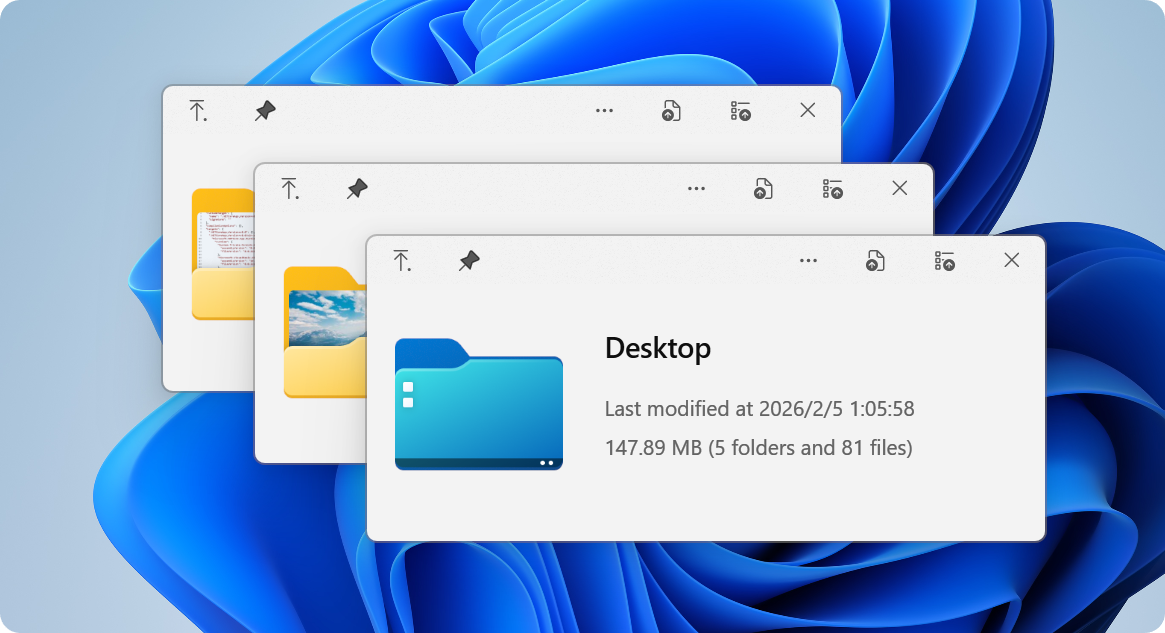
QuickLook is an open-source file previewer for Windows, similar to the Quick Look feature on macOS. It allows users to quickly preview various file types by pressing the spacebar while selecting a file in File Explorer, providing a fast and convenient way to view file contents without opening them fully.
Pros
- Supports a wide range of file formats, including images, videos, text files, PDFs, and more
- Lightweight and fast, with minimal impact on system resources
- Customizable through plugins, allowing users to add support for additional file types
- Integrates seamlessly with Windows File Explorer
Cons
- May occasionally encounter compatibility issues with certain file types or Windows versions
- Some advanced features may require additional plugins or configuration
- Not as deeply integrated into the operating system as the macOS counterpart
- Limited customization options for the default user interface
Getting Started
To get started with QuickLook:
- Download the latest release from the GitHub releases page.
- Run the installer and follow the on-screen instructions.
- Once installed, select a file in File Explorer and press the spacebar to preview it.
- To close the preview, press the spacebar again or hit the Esc key.
For additional plugins and customization options, visit the project's wiki.
Competitor Comparisons
A modern file manager that helps users organize their files and folders.
Pros of Files
- More comprehensive file management features, including multiple tabs, tags, and advanced sorting options
- Modern, customizable UI with themes and layout options
- Active development with frequent updates and new features
Cons of Files
- Larger application size and potentially higher resource usage
- Steeper learning curve due to more complex features
- May be overkill for users seeking simple quick file previews
Code Comparison
Files (C#):
public static async Task<StorageFolder> GetFolderFromPathAsync(string path)
{
    if (string.IsNullOrEmpty(path))
        return null;
    try
    {
        return await StorageFolder.GetFolderFromPathAsync(path);
    }
    catch (Exception)
    {
        return null;
    }
}
QuickLook (C#):
public static string GetFileDescription(string path)
{
    var info = new FileInfo(path);
    return $"{info.Name} ({info.Length} bytes)";
}
The code snippets demonstrate different approaches:
- Files focuses on asynchronous operations and exception handling for folder access
- QuickLook emphasizes simplicity in file information retrieval
Convert  designs to code with AI

Introducing Visual Copilot: A new AI model to turn Figma designs to high quality code using your components.
Try Visual CopilotREADME

QuickLook
 Instant File Previews, Just Press Space
The most powerful Quick Look implementation for Windows



 The Problem |
 Superpowers |
 Get Started |
 Extend |
 Community |
ð¡ The Problem
Ever wished Windows had macOS's Quick Look?You know the drill: you want to peek at a file, so you double-click, wait for an app to launch, view the file, close the app... exhausting, right? macOS users? They just press Space. Instant preview. Any file. Now Windows has it too. ð QuickLook brings that buttery-smooth, instant-preview experience to Windows. No more waiting. No more opening heavy applications just to peek at a document. |
|
ð Superpowers
What Makes QuickLook Extraordinary
â¡ï¸ Lightning Speed
Instant previews with zero lag Native performance that feels like magic Hardware-accelerated rendering |
ð¨ Gorgeous Design
Fluent Design System integration Beautiful on 4K displays Touch-optimized interface |
ð 100+ Formats
Images, videos, documents, code 3D models, archives, fonts Extensible with plugins |
ð¸ Visual Files
ð Documents
|
ð» Developer Files
ðµ Media
|
ð¯ Works Everywhere
|
File Explorer 
Native integration |
Open/Save Dialogs 
System-wide support |
3rd Party Managers 
Total Commander, xplorer² |
Cloud Storage 
OneDrive, Dropbox ready |
ð¦ Get Started
Choose Your Adventure

Microsoft StoreRecommended for most users â Automatic updates â Sandboxed security â One-click install 
â ï¸ Limited Open/Save dialog support |
InstallerFull-featured experience â Complete functionality â Open/Save dialog support â Portable option available 
ð Get the full power |

ScoopFor command-line lovers â Easy updates â Reproducible installs â Version management ð¤ Power user choice |

NightlyLive on the edge â Latest features â Bug fixes first â ï¸ May be unstable 
ð Experimental builds |
ð¤ Not sure which version to choose?
| Feature | Store | Installer | Scoop | Nightly |
|---|---|---|---|---|
| Auto-updates | â | â ï¸ | â | â ï¸ |
| Open/Save dialogs | â | â | â | â |
| Portable mode | â | â | â | â |
| Stability | â â â | â â â | â â â | â â |
â¡ Quick Start in 10 Seconds
|
ð¡ Pro Tips:
|
â¨ï¸ Master the Shortcuts
Your New Superpowers
ð® Basic Controls
|
ð Navigation
|
ð¨ Advanced
|
ð¡ Pro Tip: You can navigate files using arrow keys even when the preview window isn't focused!
𧩠Extend
Supercharge QuickLook with Plugins
Transform QuickLook into a universal file viewer

OfficeViewerPreview Word, Excel & PowerPoint files No Microsoft Office required! 
|
PdfViewer-NativeEnhanced PDF viewing with WebView2 Modern, fast, feature-rich 
|

PostScriptViewerPreview Perfect for designers 
|

CADImportView CAD files natively

|
ð¦ How to Install or Upgrade Plugins
|
1ï¸â£ Download Get the |
2ï¸â£ Install Ensure QuickLook is currently running, select the file and press |
3ï¸â£ Restart Click on the |
ð¦ How to Remove Plugins
|
1ï¸â£ Quit Quit QuickLook. |
2ï¸â£ Navigate Navigate to the Data location. |
3ï¸â£ Remove You should find several folders. Remove the one you do not want to use. |


ð Community
Join Thousands of Happy Users

QQ GroupJoin our Chinese community 371388501 
|

TranslateHelp QuickLook speak your language Make it accessible 
|

Star UsShow your support It means a lot! 
|
ð¨âð» For Developers
Interested in contributing? Check out our development resources:


ð Credits
Built with Love by Amazing People

Design Team @OiCkilL @QubitsDev @Donno @Shomnipotence Fluent UI & Icons |

Contributors Code, translations & ideas |

Open Source Standing on giants |

You! Every User Matters Thank you for using QuickLook |
ð License

QuickLook is free and open source under GPL-3.0
Free software, free forever. No ads, no tracking, no premium tiers.
Need commercial licensing? Contact us for sublicensing options.
â Like QuickLook? Star the repo!
Your support keeps this project alive and improving


Note: The official website content may be inaccurate or out of date. To help maintain the site, please submit a PR to QuickLook Website Repository
Made with â¤ï¸ by the QuickLook community

Top Related Projects
A modern file manager that helps users organize their files and folders.
Convert designs to code with AI
Introducing Visual Copilot: A new AI model to turn Figma designs to high quality code using your components.
Try Visual Copilot