 dasel
dasel
Unified querying, transformation, and modification of JSON, TOML, YAML, XML, INI, HCL, KDL and CSV.
Top Related Projects



Quick Overview
Dasel (Data Selector) is a command-line tool and Go library for querying and modifying data structures. It supports various data formats including JSON, YAML, TOML, and XML, allowing users to easily extract, modify, and transform data across these formats.
Pros
- Multi-format support: Works with JSON, YAML, TOML, and XML
- Powerful query language: Supports complex data selections and modifications
- Format conversion: Can convert data between supported formats
- Lightweight and fast: Efficient for both small and large datasets
Cons
- Learning curve: Requires understanding of the query syntax
- Limited to supported formats: May not work with less common data formats
- Command-line focus: Might be less intuitive for users preferring GUI tools
- Documentation could be more extensive: Some advanced features may require experimentation
Code Examples
- Selecting a value from JSON:
value, err := dasel.New(jsonData).Select(".users.[0].name")
if err != nil {
    log.Fatal(err)
}
fmt.Println(value)
- Modifying a YAML file:
err := dasel.New(yamlData).Put(".config.timeout", "30s")
if err != nil {
    log.Fatal(err)
}
- Converting TOML to JSON:
jsonData, err := dasel.New(tomlData).ToJSON()
if err != nil {
    log.Fatal(err)
}
fmt.Println(string(jsonData))
Getting Started
To use Dasel as a Go library, first install it:
go get github.com/tomwright/dasel
Then, import it in your Go code:
import "github.com/tomwright/dasel"

func main() {
    data := []byte(`{"name": "John", "age": 30}`)
    value, err := dasel.New(data).Select(".name")
    if err != nil {
        log.Fatal(err)
    }
    fmt.Println(value)
}
This example demonstrates how to select a value from a JSON string using Dasel.
Competitor Comparisons
Make JSON greppable!
Pros of gron
- Simpler, more focused tool specifically for flattening JSON
- Easier to learn and use for basic JSON manipulation tasks
- Outputs in a grep-friendly format, making it ideal for command-line piping
Cons of gron
- Limited to JSON input and output formats
- Lacks advanced querying and modification capabilities
- Not designed for handling other data formats like YAML or TOML
Code Comparison
gron:
gron "https://api.github.com/repos/tomnomnom/gron/commits?per_page=1" | grep "commit.author"
dasel:
dasel -r json -w plain ".[0].commit.author" < <(curl -s "https://api.github.com/repos/TomWright/dasel/commits?per_page=1")
Summary
gron is a specialized tool for flattening JSON, making it easy to grep and manipulate JSON data in the command line. It's simpler to use for basic tasks but limited to JSON.
dasel is a more versatile tool that supports multiple data formats and offers advanced querying and modification capabilities. It's more powerful but may have a steeper learning curve for simple tasks.
Choose gron for quick JSON flattening and grepping, or dasel for a more comprehensive data manipulation tool across various formats.
Command-line YAML, XML, TOML processor - jq wrapper for YAML/XML/TOML documents
Pros of yq
- Built on top of jq, leveraging its powerful JSON processing capabilities
- Supports YAML, XML, and TOML in addition to JSON
- Extensive documentation and examples available
Cons of yq
- Requires Python runtime, which may add overhead
- Less focused on being a standalone CLI tool compared to Dasel
- May have a steeper learning curve due to jq syntax
Code Comparison
yq:
yq '.users[] | select(.age > 30) | .name' input.yaml
Dasel:
dasel select -f input.yaml '.users.(age>30).name'
Both tools allow for querying and manipulating structured data, but they use different syntaxes. yq leverages jq-style expressions, while Dasel uses a more straightforward dot notation with built-in functions.
yq excels in environments where Python is already available and when working with multiple data formats. It's particularly powerful for complex data transformations due to its jq foundation.
Dasel, on the other hand, is designed as a standalone CLI tool with a focus on simplicity and ease of use. It's a good choice for users who prefer a more intuitive syntax and don't require the full power of jq-style expressions.
The choice between yq and Dasel depends on the specific use case, existing environment, and personal preference for syntax and features.
Command-line JSON processor
Pros of jq
- More mature and widely adopted project with extensive documentation
- Powerful and expressive query language specifically designed for JSON manipulation
- Faster performance for large JSON datasets
Cons of jq
- Limited to JSON format only
- Steeper learning curve due to its unique query syntax
- Less versatile for handling multiple data formats in a single command
Code Comparison
jq example:
echo '{"name": "John", "age": 30}' | jq '.name'
dasel example:
echo '{"name": "John", "age": 30}' | dasel -r json '.name'
Key Differences
- dasel supports multiple data formats (JSON, YAML, TOML, XML), while jq is JSON-specific
- jq has a more powerful query language for complex JSON transformations
- dasel offers a more intuitive syntax for basic operations across various formats
- jq is generally faster for large JSON datasets, but dasel provides broader format support
Use Cases
jq is ideal for:
- Complex JSON data manipulation and analysis
- High-performance JSON processing in data pipelines
dasel is better suited for:
- Working with multiple data formats in a single tool
- Simpler queries across various structured data formats
- Quick data extraction tasks with minimal syntax learning
Pure Go implementation of jq
Pros of gojq
- Faster performance for JSON processing
- More extensive JSON query language support
- Closer compatibility with jq, making it easier for users familiar with jq
Cons of gojq
- Limited to JSON format, while Dasel supports multiple data formats
- Less versatile for general data manipulation tasks
- Steeper learning curve for those not familiar with jq syntax
Code Comparison
gojq:
input := `{"name": "John", "age": 30}`
query := ".name"
output, _ := gojq.Run(input, query)
fmt.Println(output) // Output: "John"
Dasel:
input := `{"name": "John", "age": 30}`
sel, _ := dasel.New(input)
output, _ := sel.Query(".name")
fmt.Println(output) // Output: "John"
Both gojq and Dasel are powerful tools for data manipulation, but they serve different purposes. gojq excels in JSON processing with its extensive query language and performance optimizations. It's an excellent choice for users familiar with jq or those working primarily with JSON data.
Dasel, on the other hand, offers broader format support and a more intuitive syntax for general data manipulation tasks. It's more versatile and easier to pick up for users without prior jq experience.
The choice between gojq and Dasel depends on the specific use case, data formats involved, and the user's familiarity with jq-like query languages.
Terminal JSON viewer & processor
Pros of fx
- Specialized for JSON manipulation with a more interactive, terminal-based interface
- Supports JavaScript expressions for advanced data transformations
- Offers a live preview feature for real-time data exploration
Cons of fx
- Limited to JSON format, while Dasel supports multiple data formats
- Lacks the ability to modify files in-place, which Dasel provides
- May have a steeper learning curve for users unfamiliar with JavaScript
Code Comparison
fx example:
echo '{"key": "value"}' | fx 'x => x.key'
Dasel example:
echo '{"key": "value"}' | dasel -r json '.key'
Summary
fx excels in JSON manipulation with its interactive interface and JavaScript-based transformations. However, Dasel offers broader format support and in-place file modifications. fx is ideal for JSON-centric workflows, while Dasel provides more versatility across different data formats.
Convert  designs to code with AI

Introducing Visual Copilot: A new AI model to turn Figma designs to high quality code using your components.
Try Visual CopilotREADME











Dasel
Dasel (short for Data-Select) is a command-line tool and library for querying, modifying, and transforming data structures such as JSON, YAML, TOML, XML, and CSV.
It provides a consistent, powerful syntax to traverse and update data â making it useful for developers, DevOps, and data wrangling tasks.
Features
- Multi-format support: JSON, YAML, TOML, XML, CSV, HCL, INI.
- Unified query syntax: Access data in any format with the same selectors.
- Query & search: Extract values, lists, or structures with intuitive syntax.
- Modify in place: Update, insert, or delete values directly in structured files.
- Convert between formats: Seamlessly transform data from JSON â YAML, TOML â JSON, etc.
- Script-friendly: Simple CLI integration for shell scripts and pipelines.
- Library support: Import and use in Go projects.
Installation
Homebrew (macOS/Linux)
brew install dasel
Go Install
go install github.com/tomwright/dasel/v3/cmd/dasel@master
Prebuilt Binaries
Prebuilt binaries are available on the Releases page for Linux, macOS, and Windows.
None of the above?
See the installation docs for more options.
Basic Usage
Selecting Values
By default, Dasel evaluates the final selector and prints the result.
echo '{"foo": {"bar": "baz"}}' | dasel -i json 'foo.bar'
# Output: "baz"
Modifying Values
Update values inline:
echo '{"foo": {"bar": "baz"}}' | dasel -i json 'foo.bar = "bong"'
# Output: "bong"
Use --root to output the full document after modification:
echo '{"foo": {"bar": "baz"}}' | dasel -i json --root 'foo.bar = "bong"'
# Output:
{
  "foo": {
    "bar": "bong"
  }
}
Update values based on previous value:
echo '[1,2,3,4,5]' | dasel -i json --root 'each($this = $this*2)'
# Output:
[
    2,
    4,
    6,
    8,
    10
]
Format Conversion
cat data.json | dasel -i json -o yaml
Recursive Descent (..)
Searches all nested objects and arrays for a matching key or index.
echo '{"foo": {"bar": "baz"}}' | dasel -i json '..bar'
# Output:
[
    "baz"
]
Search (search)
Finds all values matching a condition anywhere in the structure.
echo '{"foo": {"bar": "baz"}}' | dasel -i json 'search(bar == "baz")'
# Output:
[
    {
        "bar": "baz"
    }
]
Documentation
Full documentation is available at daseldocs.tomwright.me.
Contributing
Contributions are welcome! Please see the CONTRIBUTING.md for details.
License
MIT License. See LICENSE for details.
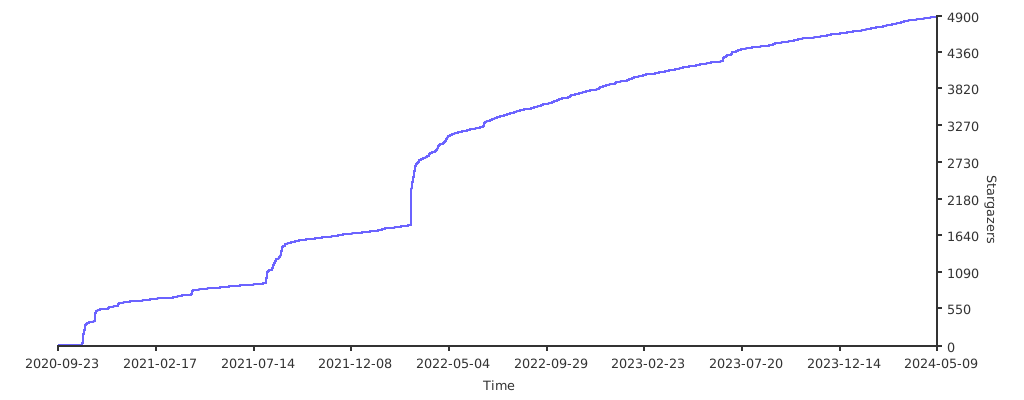
Stargazers over time
Top Related Projects
Convert designs to code with AI
Introducing Visual Copilot: A new AI model to turn Figma designs to high quality code using your components.
Try Visual Copilot