
Top Related Projects

The most customisable and low-latency cross platform/shell prompt renderer

ConEmu: Customizable Windows terminal with tabs, splits, quake-style, hotkeys and more

:mag: Quick file search & app launcher for Windows with community-made plugins

An 'alt+space' launcher for Windows, built with Electron
Quick Overview
Wox is an open-source launcher for Windows, designed to boost productivity by providing quick access to programs, files, and web searches. It offers a customizable interface and supports plugins, allowing users to extend its functionality and tailor it to their specific needs.
Pros
- Fast and efficient search capabilities across various sources (programs, files, web)
- Extensible through a plugin system, allowing for customization and added functionality
- Keyboard-centric design for quick access and improved productivity
- Active community and ongoing development
Cons
- Limited to Windows operating system
- Some users report occasional stability issues or crashes
- Learning curve for advanced features and plugin development
- May conflict with other system-wide hotkey applications
Getting Started
- Download the latest release from the Wox GitHub releases page.
- Run the installer and follow the on-screen instructions.
- Launch Wox using the default hotkey (Alt + Space).
- Start typing to search for programs, files, or web content.
- Explore available plugins in the Wox settings to extend functionality.
To create a custom plugin:
- Create a new directory in the Wox plugins folder (usually
%APPDATA%\Wox\Plugins). - Implement the plugin using Python or C#.
- Create a
plugin.jsonfile with metadata about your plugin. - Restart Wox to load the new plugin.
For more detailed instructions and API documentation, refer to the Wox wiki.
Competitor Comparisons
The most customisable and low-latency cross platform/shell prompt renderer
Pros of oh-my-posh
- Cross-platform support (Windows, macOS, Linux)
- Highly customizable with a wide range of themes and segments
- Active development and frequent updates
Cons of oh-my-posh
- Primarily focused on command-line prompts, not a full launcher
- Steeper learning curve for customization
- May require additional setup for full functionality in some shells
Code Comparison
oh-my-posh configuration example:
{
  "$schema": "https://raw.githubusercontent.com/JanDeDobbeleer/oh-my-posh/main/themes/schema.json",
  "blocks": [
    {
      "type": "prompt",
      "alignment": "left",
      "segments": [
        {
          "type": "path",
          "style": "powerline",
          "powerline_symbol": "\uE0B0",
          "foreground": "#100e23",
          "background": "#91ddff",
          "properties": {
            "style": "folder"
          }
        }
      ]
    }
  ]
}
Wox plugin example:
from wox import Wox

class HelloWorld(Wox):
    def query(self, query):
        return [
            {"Title": "Hello World", "SubTitle": "Query: {}".format(query), "IcoPath": "Images/app.png", "JsonRPCAction": {"method": "take_action", "parameters": ["{}".format(query)], "dontHideAfterAction": False}}
        ]

    def take_action(self, query):
        self.shell_run("echo Hello World {}".format(query))

if __name__ == "__main__":
    HelloWorld()
ConEmu: Customizable Windows terminal with tabs, splits, quake-style, hotkeys and more
Pros of ConEmu
- More comprehensive terminal emulator with advanced features like split screens and tabs
- Supports a wide range of shells and consoles (cmd, PowerShell, WSL, etc.)
- Highly customizable with extensive configuration options
Cons of ConEmu
- Steeper learning curve due to its complexity
- Primarily focused on terminal emulation, lacking application launcher functionality
- Larger resource footprint compared to lightweight launchers
Code Comparison
ConEmu (ConEmu.xml configuration):
<key name="Tasks" modified="2023-04-15 12:00:00" build="230415">
<key name="{Shells::cmd}">
<value name="Name" type="string" data="Command Prompt"/>
<value name="Hotkey" type="dword" data="00000000"/>
<value name="GuiArgs" type="string" data=""/>
<value name="Cmd1" type="string" data="cmd.exe /k "%ConEmuBaseDir%\CmdInit.cmd""/>
</key>
</key>
Wox (plugin.json):
{
  "ID": "D2D2C23B084D411DB66FE0C79D6C2A6E",
  "ActionKeyword": "*",
  "Name": "Shell",
  "Description": "Provide shell integration for Wox",
  "Author": "qianlifeng",
  "Version": "1.0.0",
  "Language": "csharp",
  "Website": "https://github.com/Wox-launcher/Wox",
  "ExecuteFileName": "Wox.Plugin.Shell.dll",
  "IcoPath": "Images\\shell.png"
}
While ConEmu focuses on terminal emulation with extensive configuration options, Wox is primarily an application launcher with plugin support for additional functionality.
:mag: Quick file search & app launcher for Windows with community-made plugins
Pros of Flow.Launcher
- Actively maintained and regularly updated
- Better performance and stability
- Improved plugin system with more features
Cons of Flow.Launcher
- Smaller community and fewer available plugins
- Some users report occasional compatibility issues with certain plugins
Code Comparison
Wox:
public class Program
{
    static void Main(string[] args)
    {
        Wox.App.App app = new Wox.App.App();
        app.Run();
    }
}
Flow.Launcher:
public class Program
{
    [STAThread]
    public static void Main()
    {
        using (var mutex = new Mutex(true, "Flow.Launcher"))
        {
            if (mutex.WaitOne(TimeSpan.Zero, true))
            {
                App.Main();
            }
        }
    }
}
The main difference in the code snippets is that Flow.Launcher implements a mutex to ensure only one instance of the application is running at a time, while Wox does not have this feature in its main program entry point.
Both projects are launcher applications for Windows, but Flow.Launcher is a fork of Wox that aims to improve upon the original. Flow.Launcher offers better performance and more frequent updates, but Wox has a larger community and more available plugins due to its longer existence.
An 'alt+space' launcher for Windows, built with Electron
Pros of Hain
- Built with modern web technologies (Electron), making it more accessible for web developers to contribute
- Offers a plugin system with hot-reload capability, allowing for easier development and testing of plugins
- Provides a sleek, minimalist user interface with smooth animations
Cons of Hain
- Less mature project with fewer plugins available compared to Wox
- May have higher resource usage due to being built on Electron
- Development appears to be less active, with fewer recent updates
Code Comparison
Hain plugin example:
module.exports = (context) => {
  const app = context.app;
  const shell = context.shell;

  function search(query, res) {
    res.add({
      id: 'hello',
      title: `Hello, ${query}!`,
      desc: 'Select to open Google'
    });
  }

  function execute(id, payload) {
    if (id === 'hello') {
      shell.openExternal('https://google.com');
    }
  }

  return { search, execute };
};
Wox plugin example:
from wox import Wox

class HelloWorld(Wox):
    def query(self, query):
        return [{
            "Title": "Hello World",
            "SubTitle": "Query: {}".format(query),
            "IcoPath": "Images/app.png",
            "JsonRPCAction": {
                "method": "open_url",
                "parameters": ["https://www.google.com"]
            }
        }]

    def open_url(self, url):
        import webbrowser
        webbrowser.open(url)

if __name__ == "__main__":
    HelloWorld()
Convert  designs to code with AI

Introducing Visual Copilot: A new AI model to turn Figma designs to high quality code using your components.
Try Visual CopilotREADME
Wox



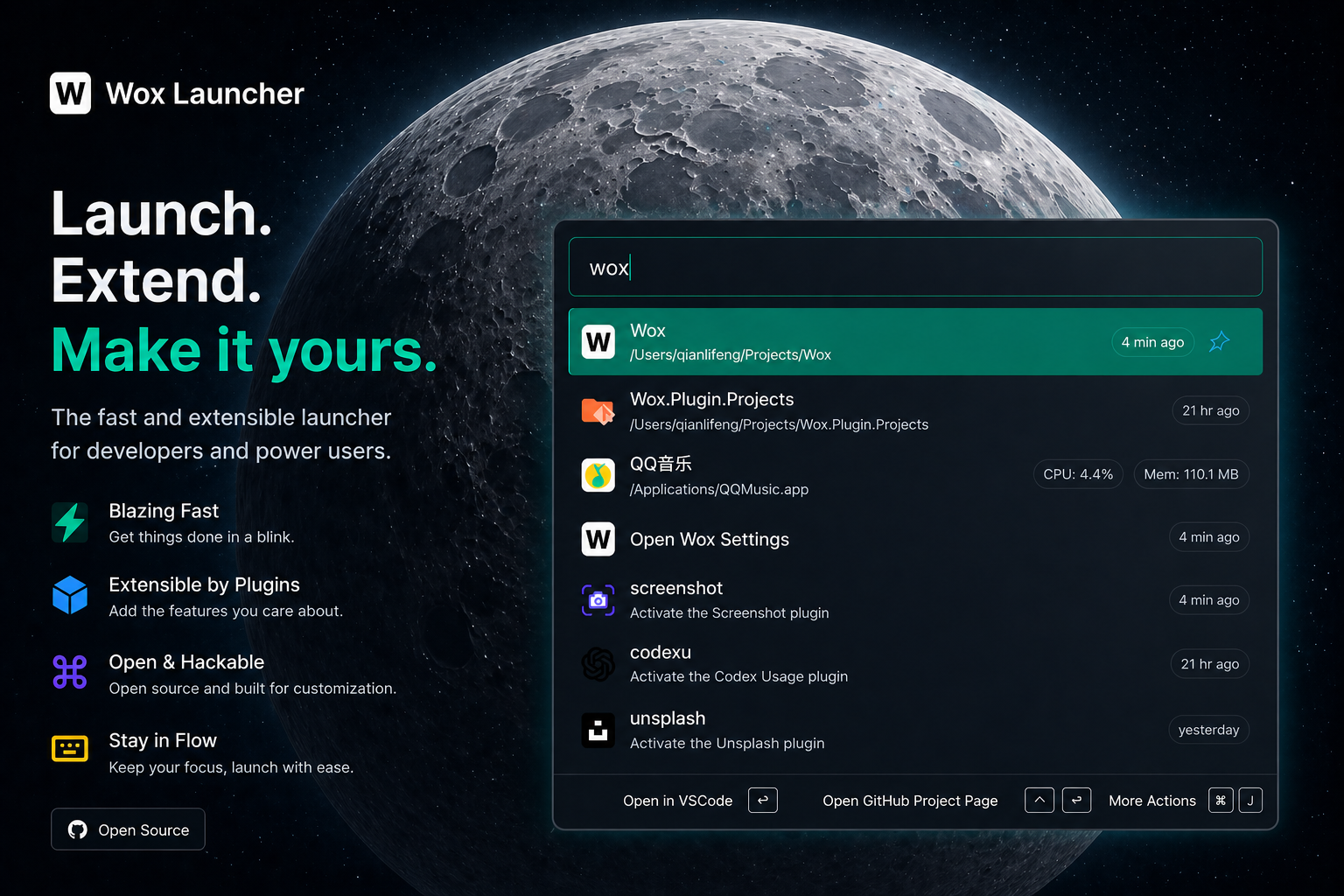
Wox is an open-source cross-platform launcher for macOS, Linux, and Windows. It is designed for fast local search, extensibility through plugins, and a lightweight distribution model that can run from a single executable.
It is a practical alternative to Alfred and Raycast.
Highlights
- Search and launch applications, files, folders, and commands
- AI chat with MCP integration and multiple provider backends
- Extensible plugin system with Python and JavaScript SDKs
- Theme support with online plugin and theme stores
- Cross-platform packaging with no mandatory installation flow
Install
| Platform | Method | Command or instructions |
|---|---|---|
| macOS | Homebrew | brew install --cask wox |
| Windows | Winget | winget install -e --id Wox.Wox |
| Windows | Scoop | scoop install extras/wox |
| Arch Linux | AUR | yay -S wox-bin |
| macOS / Linux / Windows | Manual | Download the latest package from Releases and run it directly |
Default Shortcuts
| Action | Shortcut |
|---|---|
| Open or hide Wox | Alt/Command + Space |
| Show item actions | Alt/Command + J |
| Close or go back | Esc |
Documentation
Contributing
Contributions are welcome through issues, discussions, and pull requests.
Sponsors

|
Free code signing on Windows provided by SignPath.io, with certificates from SignPath Foundation. |
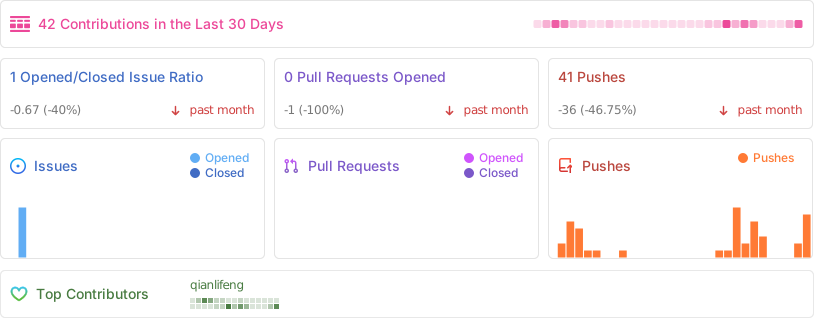
Project Activity
Top Related Projects
The most customisable and low-latency cross platform/shell prompt renderer
ConEmu: Customizable Windows terminal with tabs, splits, quake-style, hotkeys and more
:mag: Quick file search & app launcher for Windows with community-made plugins
An 'alt+space' launcher for Windows, built with Electron
Convert designs to code with AI
Introducing Visual Copilot: A new AI model to turn Figma designs to high quality code using your components.
Try Visual Copilot