 Xray-core
Xray, Penetrates Everything. Also the best v2ray-core. Where the magic happens. An open platform for various uses.
Top Related Projects

A platform for building proxies to bypass network restrictions.

An unidentifiable mechanism that helps you bypass GFW.

A Rust port of shadowsocks

Go实现的Trojan代理,支持多路复用/路由功能/CDN中转/Shadowsocks混淆插件,多平台,无依赖。A Trojan proxy written in Go. An unidentifiable mechanism that helps you bypass GFW. https://p4gefau1t.github.io/trojan-go/

Make a fortune quietly
Quick Overview
Xray-core is a platform for building proxies to bypass network restrictions. It's a powerful and extensible framework that supports various protocols and transport methods, designed to provide secure and efficient network tunneling solutions.
Pros
- Supports multiple protocols (VMess, VLESS, Trojan, Shadowsocks, etc.)
- Highly customizable and extensible
- Strong focus on performance and security
- Active development and community support
Cons
- Steep learning curve for beginners
- Complex configuration options may be overwhelming
- Limited official documentation in English
- Potential legal and ethical concerns in some jurisdictions
Code Examples
- Basic client configuration:
{
  "inbounds": [
    {
      "port": 1080,
      "protocol": "socks",
      "sniffing": {
        "enabled": true,
        "destOverride": ["http", "tls"]
      },
      "settings": {
        "auth": "noauth"
      }
    }
  ],
  "outbounds": [
    {
      "protocol": "vmess",
      "settings": {
        "vnext": [
          {
            "address": "example.com",
            "port": 443,
            "users": [
              {
                "id": "your-uuid-here"
              }
            ]
          }
        ]
      },
      "streamSettings": {
        "network": "ws",
        "security": "tls"
      }
    }
  ]
}
- Server configuration with VLESS protocol:
{
  "inbounds": [
    {
      "port": 443,
      "protocol": "vless",
      "settings": {
        "clients": [
          {
            "id": "your-uuid-here",
            "level": 0
          }
        ],
        "decryption": "none"
      },
      "streamSettings": {
        "network": "tcp",
        "security": "tls",
        "tlsSettings": {
          "certificates": [
            {
              "certificateFile": "/path/to/fullchain.pem",
              "keyFile": "/path/to/privkey.pem"
            }
          ]
        }
      }
    }
  ],
  "outbounds": [
    {
      "protocol": "freedom"
    }
  ]
}
- Using Xray-core in a Go program:
package main

import (
    "log"

    "github.com/xtls/xray-core/core"
    "github.com/xtls/xray-core/infra/conf"
)

func main() {
    config, err := conf.LoadConfig("config.json")
    if err != nil {
        log.Fatalf("Failed to load config: %v", err)
    }

    server, err := core.New(config)
    if err != nil {
        log.Fatalf("Failed to create server: %v", err)
    }

    if err := server.Start(); err != nil {
        log.Fatalf("Failed to start server: %v", err)
    }
}
Getting Started
-
Install Xray-core:
go install github.com/xtls/xray-core/main@latest -
Create a configuration file (e.g.,
config.json) with your desired settings. -
Run Xray-core:
xray run -c config.json -
Configure your applications to use the proxy (usually localhost:1080 for SOCKS5).
Competitor Comparisons
A platform for building proxies to bypass network restrictions.
Pros of v2ray-core
- More established project with a longer history and larger community
- Wider range of supported protocols and features
- Better documentation and user guides
Cons of v2ray-core
- Slower development pace and less frequent updates
- Higher resource consumption compared to Xray-core
- Lacks some advanced features like XTLS
Code Comparison
v2ray-core:
type ServerConfig struct {
    Address *Address  `json:"address"`
    Port    uint16    `json:"port"`
    Network *Network  `json:"network"`
}
Xray-core:
type ServerConfig struct {
    Address *Address  `json:"address"`
    Port    uint16    `json:"port"`
    Network *Network  `json:"network"`
    Flow    string    `json:"flow"`
}
The main difference in the code structure is the addition of the Flow field in Xray-core, which is used for XTLS flow control. This demonstrates Xray-core's focus on performance optimization and advanced features.
Both projects share similar core functionality, but Xray-core has introduced enhancements and optimizations over time. While v2ray-core offers a more stable and well-documented experience, Xray-core provides improved performance and cutting-edge features for users who prioritize speed and efficiency.
An unidentifiable mechanism that helps you bypass GFW.
Pros of Trojan
- Simpler and more lightweight design
- Easier to set up and configure for basic use cases
- Better compatibility with older systems and devices
Cons of Trojan
- Limited protocol support compared to Xray-core
- Fewer advanced features and customization options
- Less active development and community support
Code Comparison
Trojan (main.cpp):
int main(int argc, char *argv[]) {
    Log::log("Welcome to trojan " + Version::get_version(), Log::FATAL);
    service_loop();
    return 0;
}
Xray-core (main.go):
func main() {
    flag.Parse()
    core.PrintVersion()
    configFiles := getConfigFilePath()
    server, err := startXRay(configFiles)
    if err != nil {
        fmt.Println("Failed to start:", err)
        os.Exit(-1)
    }
    // ...
}
The code comparison shows that Trojan has a simpler main function, reflecting its more straightforward approach. Xray-core's main function includes more complex initialization and configuration handling, indicating its broader feature set and flexibility.
A Rust port of shadowsocks
Pros of shadowsocks-rust
- Written in Rust, offering memory safety and performance benefits
- Lightweight and efficient implementation of the Shadowsocks protocol
- Active development and community support
Cons of shadowsocks-rust
- Limited protocol support compared to Xray-core
- Fewer advanced features and customization options
- Smaller ecosystem and plugin availability
Code Comparison
shadowsocks-rust:
let server = ServerConfig::load_from_str(&config_str)?;
let mut service = ServiceBuilder::new(server);
service.run().await?;
Xray-core:
config, err := core.LoadConfig("json", configContent)
if err != nil {
    return nil, newError("failed to read config file").Base(err)
}
server, err := core.New(config)
Both projects aim to provide secure and efficient proxy solutions, but Xray-core offers a more comprehensive feature set and protocol support, while shadowsocks-rust focuses on a lightweight and performant implementation of the Shadowsocks protocol. Xray-core is better suited for users requiring advanced features and multiple protocols, while shadowsocks-rust is ideal for those prioritizing simplicity and Rust's safety guarantees.
Go实现的Trojan代理,支持多路复用/路由功能/CDN中转/Shadowsocks混淆插件,多平台,无依赖。A Trojan proxy written in Go. An unidentifiable mechanism that helps you bypass GFW. https://p4gefau1t.github.io/trojan-go/
Pros of trojan-go
- Lightweight and focused on the Trojan protocol implementation
- Easier to set up and configure for users familiar with Trojan
- Better performance in some scenarios due to its specialized nature
Cons of trojan-go
- Limited protocol support compared to Xray-core's multi-protocol capabilities
- Smaller community and potentially slower development pace
- Fewer advanced features and customization options
Code Comparison
trojan-go:
type Config struct {
    RunType      string   `json:"run_type"`
    LocalAddr    string   `json:"local_addr"`
    LocalPort    int      `json:"local_port"`
    RemoteAddr   string   `json:"remote_addr"`
    RemotePort   int      `json:"remote_port"`
    Password     []string `json:"password"`
}
Xray-core:
type Config struct {
    Inbound  []*InboundHandlerConfig  `json:"inbounds"`
    Outbound []*OutboundHandlerConfig `json:"outbounds"`
    API      *APIConfig               `json:"api"`
    Stats    *StatsConfig             `json:"stats"`
    Policy   *PolicyConfig            `json:"policy"`
}
The code comparison shows that trojan-go has a simpler configuration structure focused on Trojan protocol settings, while Xray-core's configuration is more complex and flexible, supporting multiple inbound and outbound protocols.
Make a fortune quietly
Pros of naiveproxy
- Simpler setup and configuration process
- Better compatibility with standard HTTPS infrastructure
- Lower detection risk in restrictive network environments
Cons of naiveproxy
- Limited protocol support compared to Xray-core
- Less flexibility in terms of routing and advanced features
- Smaller community and fewer third-party tools
Code Comparison
naiveproxy configuration example:
{
  "listen": "http://127.0.0.1:1080",
  "proxy": "https://example.com",
  "username": "user",
  "password": "pass"
}
Xray-core configuration example:
{
  "inbounds": [{"port": 1080, "protocol": "socks"}],
  "outbounds": [{
    "protocol": "vless",
    "settings": {"vnext": [{"address": "example.com"}]}
  }]
}
naiveproxy focuses on a straightforward configuration with fewer options, while Xray-core offers more detailed control over protocols and routing. Xray-core's configuration is more complex but provides greater flexibility for advanced users. naiveproxy's simplicity makes it easier to set up and maintain for basic proxy needs, while Xray-core is better suited for users requiring extensive customization and support for multiple protocols.
Convert  designs to code with AI

Introducing Visual Copilot: A new AI model to turn Figma designs to high quality code using your components.
Try Visual CopilotREADME
Project X
Project X originates from XTLS protocol, providing a set of network tools such as Xray-core and REALITY.
README is open, so feel free to submit your project here.
Sponsors
Donation & NFTs
Collect a Project X NFT to support the development of Project X!

- TRX(Tron)/USDT/USDC:
TNrDh5VSfwd4RPrwsohr6poyNTfFefNYan - TON:
UQApeV-u2gm43aC1uP76xAC1m6vCylstaN1gpfBmre_5IyTH - BTC:
1JpqcziZZuqv3QQJhZGNGBVdCBrGgkL6cT - XMR:
4ABHQZ3yJZkBnLoqiKvb3f8eqUnX4iMPb6wdant5ZLGQELctcerceSGEfJnoCk6nnyRZm73wrwSgvZ2WmjYLng6R7sR67nq - SOL/USDT/USDC:
3x5NuXHzB5APG6vRinPZcsUv5ukWUY1tBGRSJiEJWtZa - ETH/USDT/USDC:
0xDc3Fe44F0f25D13CACb1C4896CD0D321df3146Ee - Project X NFT: https://opensea.io/item/ethereum/0x5ee362866001613093361eb8569d59c4141b76d1/1
- VLESS NFT: https://opensea.io/collection/vless
- REALITY NFT: https://opensea.io/item/ethereum/0x5ee362866001613093361eb8569d59c4141b76d1/2
- Related links: VLESS Post-Quantum Encryption, XHTTP: Beyond REALITY, Announcement of NFTs by Project X
License
Mozilla Public License Version 2.0
Documentation
Telegram
Project VLESS (Ð ÑÑÑкий)
Project XHTTP (Persian)
Installation
- Linux Script
- XTLS/Xray-install (Official)
- tempest (supports
systemdand OpenRC; Linux-only)
- Docker
- Web Panel
- One Click
- Magisk
- Homebrew
brew install xray
Usage
- Example
- Xray-examples
- Tutorial
GUI Clients
- OpenWrt
- Asuswrt-Merlin
- Windows
- Android
- iOS & macOS arm64 & tvOS
- macOS arm64 & x64
- Linux
- HarmonyOS
Others that support VLESS, XTLS, REALITY, XUDP, PLUX...
- iOS & macOS arm64 & tvOS
- Xray Tools
- Xray Wrapper
- XrayR
- Cores
Contributing

Credits
- Xray-core v1.0.0 was forked from v2fly-core 9a03cc5, and we have made & accumulated a huge number of enhancements over time, check the release notes for each version.
- For third-party projects used in Xray-core, check your local or the latest go.mod.
Bundled Third-Party Components Redistribution
Certain optional features dynamically load third-party components. These optional components are separate works distributed under their own licenses, and are bundled into the ZIP package for ease of use. Users may replace these components under the licenses from these components.
These components include:
Wintun
This distribution contains unmodified official precompiled and pre-signed Wintun binaries.
- Project: Wintun
- Copyright: Copyright (C) 2018-2021 WireGuard LLC. All Rights Reserved.
- Redistribution License: Prebuilt Binaries License (PBL) bundled with official precompiled and pre-signed binaries from wintun.net
- Component(s): wintun.dll
- Source: https://www.wintun.net/
- Included in:
- Windows x86 (windows-32, win7-32)
- Windows x86-64 (windows-64, win7-64)
- Windows AArch64 (windows-arm64)
- Notes: Wintun is an optional runtime-loaded component only used for TUN inbound functionality on supported Windows platforms.
One-line Compilation
Windows (PowerShell)
$env:CGO_ENABLED=0
go build -o xray.exe -trimpath -buildvcs=false -ldflags="-s -w -buildid=" -v ./main
Linux / macOS
CGO_ENABLED=0 go build -o xray -trimpath -buildvcs=false -ldflags="-s -w -buildid=" -v ./main
Reproducible Releases
Make sure that you are using the same Go version, and remember to set the git commit id (7 bytes):
CGO_ENABLED=0 go build -o xray -trimpath -buildvcs=false -gcflags="all=-l=4" -ldflags="-X github.com/xtls/xray-core/core.build=REPLACE -s -w -buildid=" -v ./main
For Android:
GOOS=android GOARCH=arm64 CGO_ENABLED=1 CC=/path/to/aarch64-linux-android24-clang go build -o xray -trimpath -buildvcs=false -gcflags="all=-l=4" -ldflags="-X github.com/xtls/xray-core/core.build=REPLACE -s -w -buildid= -checklinkname=0" -v ./main
GOOS=android GOARCH=amd64 CGO_ENABLED=1 CC=/path/to/x86_64-linux-android24-clang go build -o xray -trimpath -buildvcs=false -gcflags="all=-l=4" -ldflags="-X github.com/xtls/xray-core/core.build=REPLACE -s -w -buildid= -checklinkname=0" -v ./main
If you are compiling a 32-bit MIPS/MIPSLE target, use this command instead:
CGO_ENABLED=0 go build -o xray -trimpath -buildvcs=false -gcflags="-l=4" -ldflags="-X github.com/xtls/xray-core/core.build=REPLACE -s -w -buildid=" -v ./main
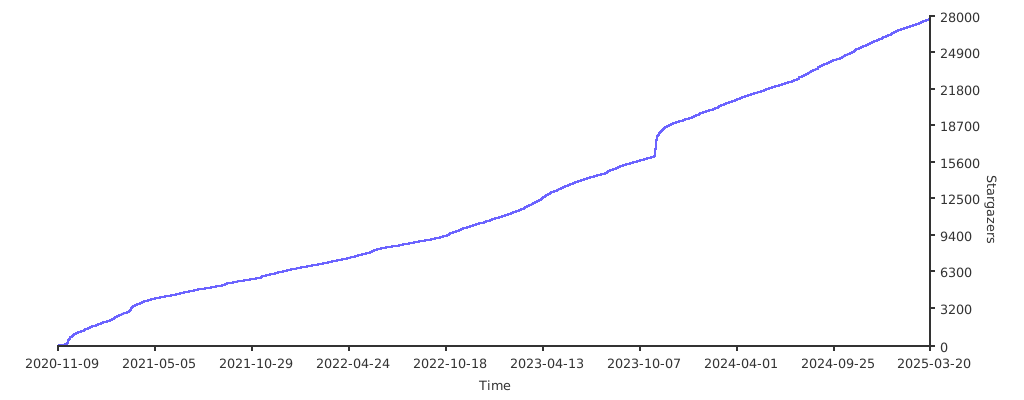
Stargazers over time
Top Related Projects
A platform for building proxies to bypass network restrictions.
An unidentifiable mechanism that helps you bypass GFW.
A Rust port of shadowsocks
Go实现的Trojan代理,支持多路复用/路由功能/CDN中转/Shadowsocks混淆插件,多平台,无依赖。A Trojan proxy written in Go. An unidentifiable mechanism that helps you bypass GFW. https://p4gefau1t.github.io/trojan-go/
Make a fortune quietly
Convert designs to code with AI
Introducing Visual Copilot: A new AI model to turn Figma designs to high quality code using your components.
Try Visual Copilot