
Top Related Projects

Find vulnerabilities, misconfigurations, secrets, SBOM in containers, Kubernetes, code repositories, clouds and more

Vulnerability Static Analysis for Containers

Container Image Linter for Security, Helping build the Best-Practice Docker Image, Easy to start

OpenSSF Scorecard - Security health metrics for Open Source
Quick Overview
Grype is an open-source vulnerability scanner for container images and filesystems. It's designed to quickly and efficiently identify known vulnerabilities in software packages and dependencies, helping developers and security teams improve the security of their applications and infrastructure.
Pros
- Fast and efficient scanning of container images and filesystems
- Supports multiple package types and ecosystems (e.g., npm, pip, apt, rpm)
- Regularly updated vulnerability database
- Easy integration with CI/CD pipelines and other tools
Cons
- May produce false positives in some cases
- Limited to known vulnerabilities in public databases
- Requires regular updates to maintain effectiveness
- Can be resource-intensive for large images or complex filesystems
Getting Started
To install Grype on Linux or macOS using curl:
curl -sSfL https://raw.githubusercontent.com/anchore/grype/main/install.sh | sh -s -- -b /usr/local/bin
To scan a container image:
grype alpine:latest
To scan a directory:
grype dir:/path/to/your/project-dir
To output results in JSON format:
grype alpine:latest -o json > results.json
For more advanced usage and configuration options, refer to the official documentation at https://github.com/anchore/grype#usage.
Competitor Comparisons
Find vulnerabilities, misconfigurations, secrets, SBOM in containers, Kubernetes, code repositories, clouds and more
Pros of Trivy
- Broader scanning capabilities, including Infrastructure as Code (IaC) and Kubernetes manifests
- Faster scanning speed, especially for large images
- More comprehensive vulnerability database, including multiple sources
Cons of Trivy
- Higher resource consumption during scans
- Slightly more complex configuration for advanced use cases
- Less granular control over vulnerability reporting
Code Comparison
Grype usage:
grype <image_name>
Trivy usage:
trivy image <image_name>
Both tools offer similar basic usage, but Trivy provides additional scanning options:
trivy config <directory>
trivy filesystem <directory>
trivy kubernetes --namespace <namespace>
Grype focuses primarily on container and filesystem scanning, while Trivy offers a wider range of scanning capabilities. Both tools are actively maintained and provide valuable security insights, with Trivy offering a more comprehensive feature set at the cost of slightly higher complexity and resource usage. The choice between the two depends on specific use cases and integration requirements within your development and security workflows.
Vulnerability Static Analysis for Containers
Pros of Clair
- More mature project with longer development history
- Supports multiple scanners and data sources
- Designed for integration with container registries
Cons of Clair
- More complex setup and configuration
- Slower scan times for large images
- Less frequent updates compared to Grype
Code Comparison
Grype example:
grype:
  db:
    auto-update: true
  output: table
  scope: squashed
Clair example:
clair:
  database:
    type: pgsql
    options:
      source: host=postgres port=5432 user=clair dbname=clair sslmode=disable
  updaters:
    interval: 6h
Both tools use YAML configuration, but Clair's setup is more complex due to its modular architecture and database requirements. Grype's configuration is simpler and more focused on vulnerability scanning options.
Grype is designed for ease of use and quick scans, while Clair offers more flexibility and integration options at the cost of increased complexity. Grype is better suited for individual developers or small teams, whereas Clair is more appropriate for large-scale deployments and organizations with complex container ecosystems.
Container Image Linter for Security, Helping build the Best-Practice Docker Image, Easy to start
Pros of Dockle
- Focuses on Docker best practices and CIS benchmarks, providing a more comprehensive container security assessment
- Offers a simple, user-friendly CLI interface with clear output and remediation suggestions
- Includes linting capabilities for Dockerfile and image configurations
Cons of Dockle
- Limited to container image analysis, while Grype can scan various artifact types
- Smaller community and less frequent updates compared to Grype
- Lacks advanced features like software bill of materials (SBOM) generation
Code Comparison
Dockle:
dockle --exit-code 1 --exit-level fatal myimage:latest
Grype:
grype myimage:latest
Both tools offer straightforward CLI usage, but Grype provides more extensive scanning capabilities and output formats. Dockle's command includes options for exit codes and severity levels, which can be useful for CI/CD integration.
While Grype excels in vulnerability scanning across multiple artifact types, Dockle shines in Docker-specific security and best practice checks. The choice between the two depends on the specific use case and the depth of container security analysis required.
OpenSSF Scorecard - Security health metrics for Open Source
Pros of Scorecard
- Focuses on overall project security health, not just vulnerabilities
- Provides a comprehensive security score based on multiple criteria
- Integrates with GitHub Actions for automated checks
Cons of Scorecard
- Less focused on specific vulnerability detection
- May require more setup and configuration for full benefits
- Not primarily designed for container image scanning
Code Comparison
Grype (vulnerability scanning):
name: Scan for vulnerabilities
uses: anchore/scan-action@v3
with:
  image: "localbuild/testimage:latest"
  fail-build: true
Scorecard (security health check):
name: Scorecard analysis
uses: ossf/scorecard-action@v2.0.6
with:
  results_file: results.sarif
  results_format: sarif
  repo_token: ${{ secrets.SCORECARD_TOKEN }}
Summary
Grype is primarily focused on vulnerability scanning for container images and filesystems, while Scorecard provides a broader assessment of a project's security practices and health. Grype excels at identifying specific vulnerabilities, whereas Scorecard offers a more holistic view of security measures in place. Both tools can be valuable in a comprehensive security strategy, with Grype being more suited for targeted vulnerability detection and Scorecard for overall project security evaluation.
Convert  designs to code with AI

Introducing Visual Copilot: A new AI model to turn Figma designs to high quality code using your components.
Try Visual CopilotREADME

Grype
A vulnerability scanner for container images and filesystems.







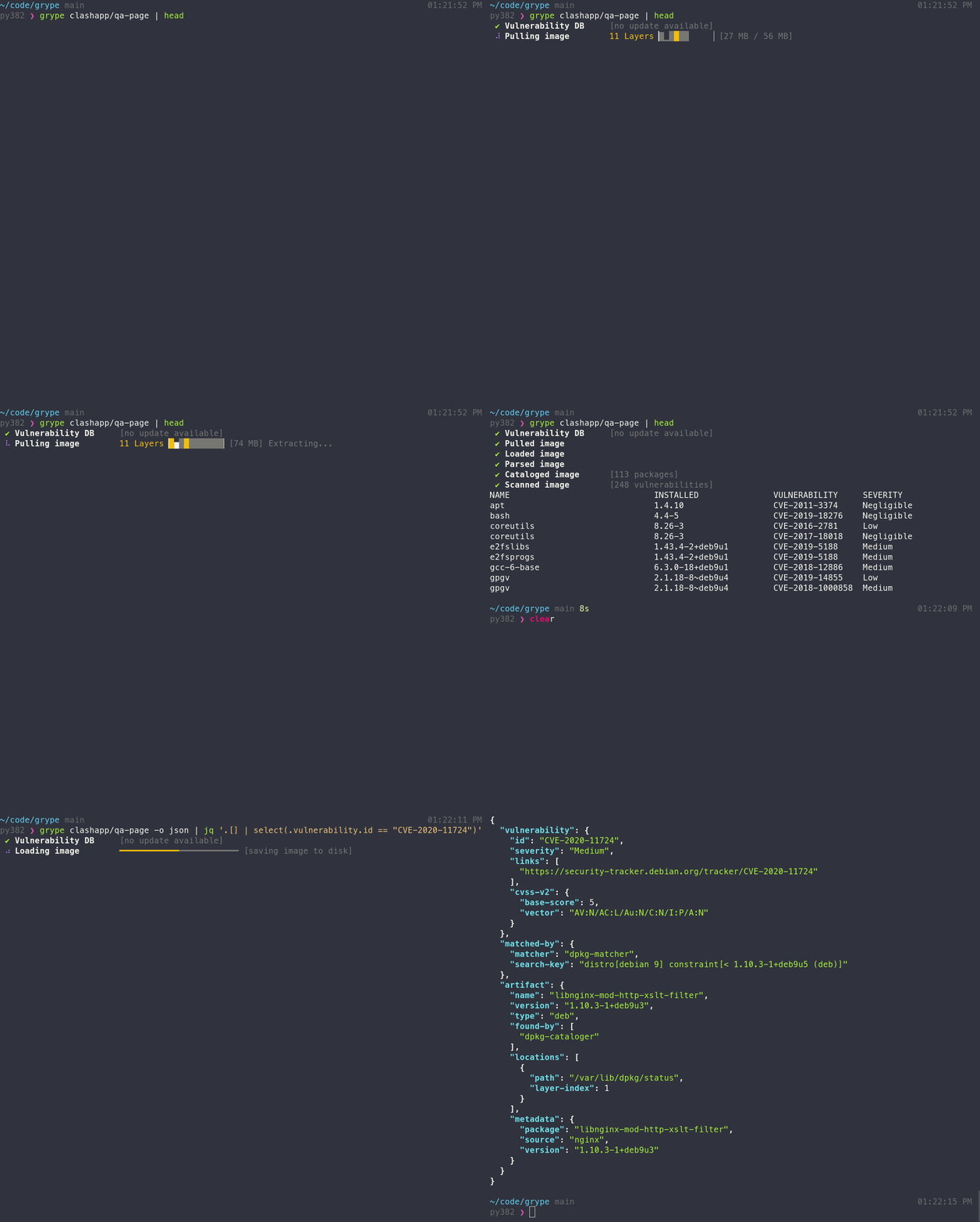
Features
- Scan container images, filesystems, and SBOMs for known vulnerabilities (see the docs for a full list of supported scan targets)
- Supports major OS package ecosystems (Alpine, Debian, Ubuntu, RHEL, Oracle Linux, Amazon Linux, and more)
- Supports language-specific packages (Ruby, Java, JavaScript, Python, .NET, Go, PHP, Rust, and more)
- Supports Docker, OCI, and Singularity image formats
- Threat & risk prioritization with EPSS, KEV, and risk scoring (see interpreting the results docs)
- OpenVEX support for filtering and augmenting scan results
[!TIP] New to Grype? Check out the Getting Started guide for a walkthrough!
Installation
The quickest way to get up and going:
curl -sSfL https://get.anchore.io/grype | sudo sh -s -- -b /usr/local/bin
[!TIP] See Installation docs for more ways to get Grype, including Homebrew, Docker, Chocolatey, MacPorts, and more!
The basics
Scan a container image or directory for vulnerabilities:
# container image
grype alpine:latest

# directory
grype ./my-project
Scan an SBOM for even faster vulnerability detection:
# scan a Syft SBOM
grype sbom:./sbom.json

# pipe an SBOM into Grype
cat ./sbom.json | grype
[!TIP] Check out the Getting Started guide to explore all of the capabilities and features.
Want to know all of the ins-and-outs of Grype? Check out the CLI docs and configuration docs.
Contributing
We encourage users to help make these tools better by submitting issues when you find a bug or want a new feature. Check out our contributing overview and developer-specific documentation if you are interested in providing code contributions.
Grype development is sponsored by Anchore, and is released under the Apache-2.0 License.
The Grype logo by Anchore is licensed under CC BY 4.0


For commercial support options with Syft or Grype, please contact Anchore.
Come talk to us!
The Grype Team holds regular community meetings online. All are welcome to join to bring topics for discussion.
- Check the calendar for the next meeting date.
- Add items to the agenda (join this group for write access to the agenda)
- See you there!
Top Related Projects
Find vulnerabilities, misconfigurations, secrets, SBOM in containers, Kubernetes, code repositories, clouds and more
Vulnerability Static Analysis for Containers
Container Image Linter for Security, Helping build the Best-Practice Docker Image, Easy to start
OpenSSF Scorecard - Security health metrics for Open Source
Convert designs to code with AI
Introducing Visual Copilot: A new AI model to turn Figma designs to high quality code using your components.
Try Visual Copilot