 syft
syft
CLI tool and library for generating a Software Bill of Materials from container images and filesystems
Top Related Projects

Find vulnerabilities, misconfigurations, secrets, SBOM in containers, Kubernetes, code repositories, clouds and more

Vulnerability scanner written in Go which uses the data provided by https://osv.dev

The SBOM tool is a highly scalable and enterprise ready tool to create SPDX 2.2 compatible SBOMs for any variety of artifacts.

Tern is a software composition analysis tool and Python library that generates a Software Bill of Materials for container images and Dockerfiles. The SBOM that Tern generates will give you a layer-by-layer view of what's inside your container in a variety of formats including human-readable, JSON, HTML, SPDX and more.
Quick Overview
Syft is an open-source CLI tool and Go library for generating a Software Bill of Materials (SBOM) from container images and filesystems. It provides detailed information about the contents and dependencies of software packages, helping users understand and manage their software supply chain.
Pros
- Supports multiple SBOM formats (CycloneDX, SPDX, Syft JSON)
- Integrates with various CI/CD pipelines and security tools
- Offers both CLI and library usage for flexibility
- Actively maintained with regular updates and improvements
Cons
- Limited to specific package ecosystems and file types
- May produce large output files for complex software systems
- Requires additional tools for comprehensive security analysis
- Learning curve for advanced features and customizations
Code Examples
- Generate SBOM for a container image:
import "github.com/anchore/syft/syft"

sbom, err := syft.CreateSBOM("alpine:latest", syft.SBOMOptions{})
if err != nil {
    log.Fatal(err)
}
fmt.Println(sbom)
- Generate SBOM for a local directory:
import "github.com/anchore/syft/syft"

sbom, err := syft.CreateSBOM("./my-project", syft.SBOMOptions{})
if err != nil {
    log.Fatal(err)
}
fmt.Println(sbom)
- Generate SBOM with custom options:
import "github.com/anchore/syft/syft"

options := syft.SBOMOptions{
    Scope: syft.AllLayersScope,
    Format: syft.FormatCycloneDXJSON,
}
sbom, err := syft.CreateSBOM("alpine:latest", options)
if err != nil {
    log.Fatal(err)
}
fmt.Println(sbom)
Getting Started
To use Syft as a library in your Go project:
- Install Syft:
go get github.com/anchore/syft
- Import and use Syft in your code:
import (
    "fmt"
    "github.com/anchore/syft/syft"
)

func main() {
    sbom, err := syft.CreateSBOM("alpine:latest", syft.SBOMOptions{})
    if err != nil {
        panic(err)
    }
    fmt.Println(sbom)
}
This example generates an SBOM for the Alpine Linux container image and prints the result.
Competitor Comparisons
Find vulnerabilities, misconfigurations, secrets, SBOM in containers, Kubernetes, code repositories, clouds and more
Pros of Trivy
- Broader scope: Scans for vulnerabilities, misconfigurations, and secrets in various artifacts
- Faster scanning speed, especially for large container images
- Built-in support for multiple scanners (SBOM, vulnerability, license, etc.)
Cons of Trivy
- Less granular control over SBOM generation compared to Syft
- May produce more false positives in certain scenarios
- Slightly steeper learning curve for advanced features
Code Comparison
Syft usage:
syft alpine:latest
Trivy usage:
trivy image alpine:latest
Both tools can generate SBOMs, but Trivy offers a more comprehensive security scanning approach:
Syft SBOM generation:
syft packages alpine:latest -o cyclonedx-json
Trivy SBOM generation with vulnerability scan:
trivy image --format cyclonedx alpine:latest
Trivy provides an all-in-one solution for security scanning, while Syft focuses primarily on SBOM generation with high accuracy. Trivy's broader feature set comes at the cost of slightly reduced granularity in SBOM customization. Both tools are actively maintained and have strong community support, making them valuable options for different use cases in the software supply chain security landscape.
Vulnerability scanner written in Go which uses the data provided by https://osv.dev
Pros of OSV-Scanner
- Focuses specifically on known vulnerabilities in open-source dependencies
- Utilizes the Open Source Vulnerability (OSV) database for comprehensive vulnerability information
- Supports multiple package ecosystems and languages
Cons of OSV-Scanner
- Limited to vulnerability scanning, lacking broader software composition analysis features
- May require additional tools for a complete software supply chain security solution
- Less extensive ecosystem support compared to Syft
Code Comparison
OSV-Scanner:
func ScanArtifact(ctx context.Context, a *artifact.Artifact) ([]*osv.Result, error) {
    // Scan artifact for vulnerabilities
}
Syft:
func CatalogerCatalog(resolver source.FileResolver) (*sbom.Catalog, error) {
    // Generate SBOM and catalog software components
}
Key Differences
- Syft provides broader software composition analysis, including SBOM generation
- OSV-Scanner focuses specifically on vulnerability scanning using the OSV database
- Syft offers more extensive package ecosystem support and deeper analysis capabilities
- OSV-Scanner is tailored for quick vulnerability checks in open-source dependencies
Both tools serve important roles in software supply chain security, with Syft offering a more comprehensive analysis and OSV-Scanner providing focused vulnerability scanning.
The SBOM tool is a highly scalable and enterprise ready tool to create SPDX 2.2 compatible SBOMs for any variety of artifacts.
Pros of sbom-tool
- Integrated with Azure DevOps and GitHub Actions for seamless CI/CD integration
- Supports multiple output formats, including SPDX and CycloneDX
- Designed specifically for Microsoft ecosystems, offering better compatibility with Windows environments
Cons of sbom-tool
- Limited language and ecosystem support compared to Syft
- Less frequent updates and smaller community compared to Syft
- Primarily focused on Microsoft technologies, which may limit its versatility for diverse projects
Code Comparison
sbom-tool:
sbom-tool generate -b <path> -bc <path> -pn <name> -pv <version> -ps <supplier> -nsb <namespace>
Syft:
syft <image or path> -o <format>
Key Differences
- Syft offers broader language and ecosystem support, making it more versatile for diverse projects
- sbom-tool provides better integration with Microsoft technologies and Azure DevOps
- Syft has a larger community and more frequent updates, potentially leading to faster bug fixes and feature additions
- sbom-tool offers more output format options, while Syft focuses on specific formats like SPDX and CycloneDX
- Syft's command-line interface is generally simpler and more straightforward compared to sbom-tool's more detailed options
Tern is a software composition analysis tool and Python library that generates a Software Bill of Materials for container images and Dockerfiles. The SBOM that Tern generates will give you a layer-by-layer view of what's inside your container in a variety of formats including human-readable, JSON, HTML, SPDX and more.
Error generating comparison
Convert  designs to code with AI

Introducing Visual Copilot: A new AI model to turn Figma designs to high quality code using your components.
Try Visual CopilotREADME

Syft
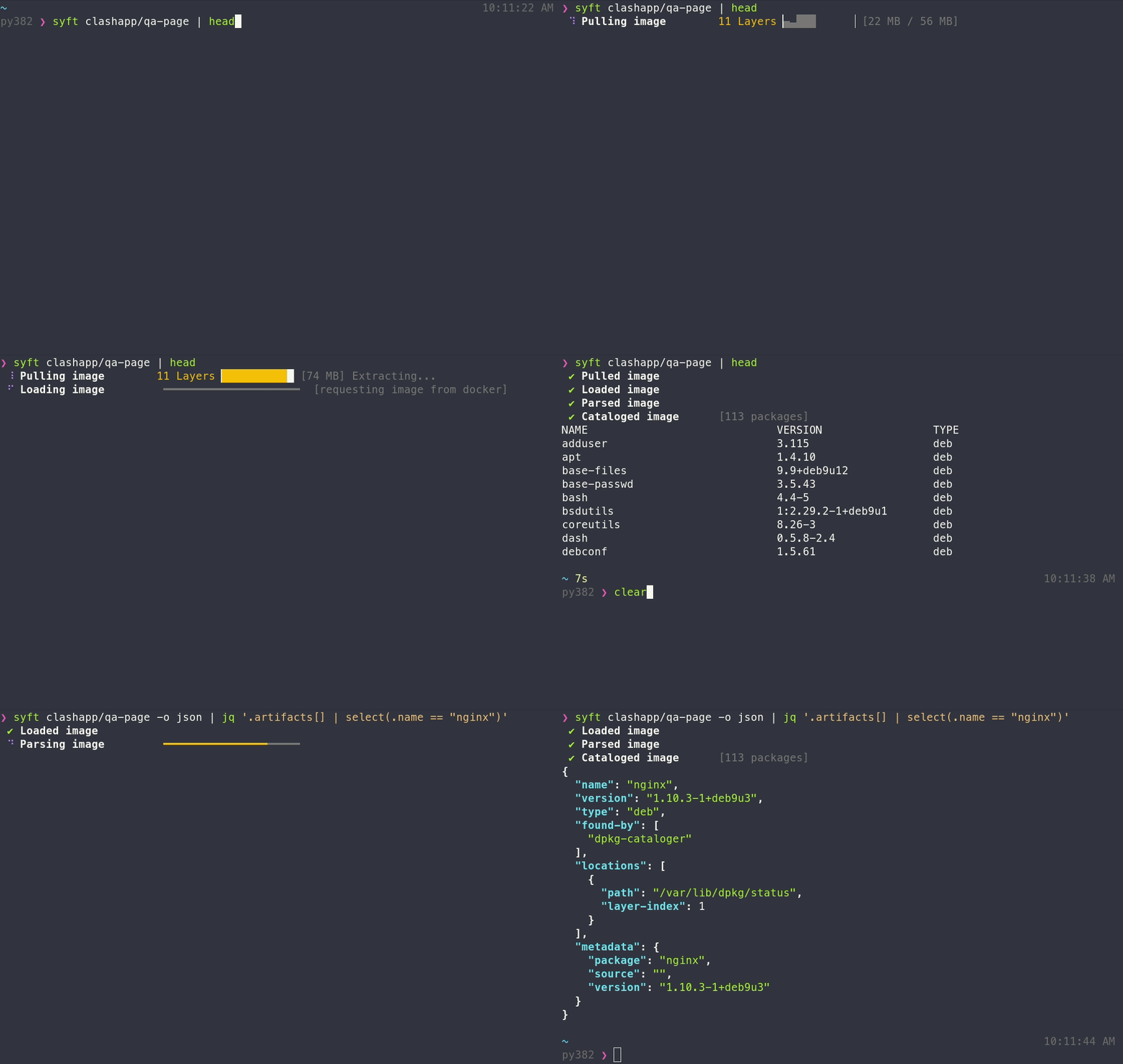
A CLI tool and Go library for generating a Software Bill of Materials (SBOM) from container images and filesystems. Exceptional for vulnerability detection when used with a scanner like Grype.






Features
- Generates SBOMs for container images, filesystems, archives (see the docs for a full list of supported scan targets)
- Supports dozens of packaging ecosystems (e.g. Alpine (apk), Debian (dpkg), RPM, Go, Python, Java, JavaScript, Ruby, Rust, PHP, .NET, and many more)
- Supports OCI, Docker, Singularity, and more image formats
- Works seamlessly with Grype for vulnerability scanning
- Multiple output formats (CycloneDX, SPDX, Syft JSON, and more) including the ability to convert between SBOM formats
- Create signed SBOM attestations using the in-toto specification
[!TIP] New to Syft? Check out the Getting Started guide for a walkthrough!
Installation
The quickest way to get up and going:
curl -sSfL https://get.anchore.io/syft | sudo sh -s -- -b /usr/local/bin
[!TIP] See Installation docs for more ways to get Syft, including Homebrew, Docker, Scoop, Chocolatey, Nix, and more!
The basics
See the packages within a container image or directory:
# container image
syft alpine:latest

# directory
syft ./my-project
To get an SBOM, specify one or more output formats:
# SBOM to stdout
syft <image> -o cyclonedx-json

# Multiple SBOMs to files
syft <image> -o spdx-json=./spdx.json -o cyclonedx-json=./cdx.json
[!TIP] Check out the Getting Started guide to explore all of the capabilities and features.
Want to know all of the ins-and-outs of Syft? Check out the CLI docs, configuration docs, and JSON schema.
Contributing
We encourage users to help make these tools better by submitting issues when you find a bug or want a new feature. Check out our contributing overview and developer-specific documentation if you are interested in providing code contributions.
Syft development is sponsored by Anchore, and is released under the Apache-2.0 License.
The Syft logo by Anchore is licensed under CC BY 4.0


For commercial support options with Syft or Grype, please contact Anchore.
Come talk to us!
The Syft Team holds regular community meetings online. All are welcome to join to bring topics for discussion.
- Check the calendar for the next meeting date.
- Add items to the agenda (join this group for write access to the agenda)
- See you there!
Top Related Projects
Find vulnerabilities, misconfigurations, secrets, SBOM in containers, Kubernetes, code repositories, clouds and more
Vulnerability scanner written in Go which uses the data provided by https://osv.dev
The SBOM tool is a highly scalable and enterprise ready tool to create SPDX 2.2 compatible SBOMs for any variety of artifacts.
Tern is a software composition analysis tool and Python library that generates a Software Bill of Materials for container images and Dockerfiles. The SBOM that Tern generates will give you a layer-by-layer view of what's inside your container in a variety of formats including human-readable, JSON, HTML, SPDX and more.
Convert designs to code with AI
Introducing Visual Copilot: A new AI model to turn Figma designs to high quality code using your components.
Try Visual Copilot