
Top Related Projects

Apache ECharts is a powerful, interactive charting and data visualization library for browser

Open-source JavaScript charting library behind Plotly and Dash

Bring data to life with SVG, Canvas and HTML. :bar_chart::chart_with_upwards_trend::tada:

Highcharts JS, the JavaScript charting framework

Simple HTML5 Charts using the <canvas> tag

Generation of diagrams like flowcharts or sequence diagrams from text in a similar manner as markdown
Quick Overview
S2 (Spreadsheet 2.0) is an open-source visualization library for creating interactive and customizable spreadsheets and pivot tables. It provides a powerful set of tools for data analysis, visualization, and interaction, making it easier to build complex data applications with a spreadsheet-like interface.
Pros
- Highly customizable and extensible, allowing for tailored spreadsheet experiences
- Supports various data visualization types, including charts and heatmaps
- Excellent performance, even with large datasets
- Rich set of built-in features like sorting, filtering, and cell merging
Cons
- Steeper learning curve compared to simpler spreadsheet libraries
- Documentation could be more comprehensive, especially for advanced features
- Limited community support compared to more established libraries
- Some features may require additional configuration or custom development
Code Examples
- Creating a basic S2 table:
import { TableSheet } from '@antv/s2';

const s2 = new TableSheet({
  container: 'container',
  data: [
    { name: 'John', age: 30, city: 'New York' },
    { name: 'Jane', age: 25, city: 'London' },
  ],
  fields: {
    columns: ['name', 'age', 'city'],
  },
});

s2.render();
- Adding a custom cell renderer:
import { TableSheet, S2Event } from '@antv/s2';

const s2 = new TableSheet({
  // ... configuration
});

s2.on(S2Event.DATA_CELL_RENDER, (renderInfo) => {
  const { data, cellInfo } = renderInfo;
  if (cellInfo.fieldValue === 'age') {
    renderInfo.backgroundColor = data.age > 25 ? '#ffcccb' : '#90ee90';
  }
});

s2.render();
- Implementing sorting functionality:
import { TableSheet } from '@antv/s2';

const s2 = new TableSheet({
  // ... configuration
  sortParams: [
    {
      sortFieldId: 'age',
      sortMethod: 'DESC',
    },
  ],
});

s2.render();
Getting Started
To get started with S2, follow these steps:
- Install the library:
npm install @antv/s2
- Create a container element in your HTML:
<div id="container"></div>
- Initialize and render an S2 table:
import { TableSheet } from '@antv/s2';

const s2 = new TableSheet({
  container: 'container',
  data: yourData,
  fields: {
    columns: yourColumns,
  },
});

s2.render();
Competitor Comparisons
Apache ECharts is a powerful, interactive charting and data visualization library for browser
Pros of ECharts
- More comprehensive and versatile, supporting a wider range of chart types
- Larger community and ecosystem, with extensive documentation and examples
- Better performance for handling large datasets and complex visualizations
Cons of ECharts
- Steeper learning curve due to its extensive API and configuration options
- Larger file size, which may impact load times for simpler visualizations
- Less specialized for tabular data and pivot table-like structures
Code Comparison
S2 (Tabular Data Rendering):
const s2 = new PivotSheet(container, s2DataConfig, s2Options);
s2.render();
ECharts (General Chart Rendering):
const chart = echarts.init(container);
chart.setOption(chartOptions);
Key Differences
- S2 focuses on tabular data and pivot tables, while ECharts is a general-purpose charting library
- S2 provides more specialized features for data grid interactions and styling
- ECharts offers a wider range of chart types and customization options
Use Cases
- S2: Best for applications requiring interactive, spreadsheet-like data grids or pivot tables
- ECharts: Ideal for diverse data visualization needs, including complex charts and dashboards
Open-source JavaScript charting library behind Plotly and Dash
Pros of plotly.js
- Wider range of chart types and visualization options
- Extensive documentation and community support
- Built-in interactivity and responsiveness
Cons of plotly.js
- Larger file size and potentially slower performance
- Steeper learning curve for complex visualizations
- Less focused on specific data structures like pivot tables
Code Comparison
S2 (for creating a pivot table):
const s2 = new PivotSheet(container, s2DataConfig, s2Options);
s2.render();
plotly.js (for creating a basic chart):
Plotly.newPlot('myDiv', data, layout);
Both libraries offer declarative ways to create visualizations, but S2 is more specialized for tabular data, while plotly.js provides a broader range of chart types. S2's API is designed specifically for pivot tables and similar structures, whereas plotly.js offers a more general-purpose charting solution.
S2 excels in handling large datasets in tabular format, providing efficient rendering and interactions for pivot tables. plotly.js, on the other hand, shines in its versatility and ability to create a wide variety of interactive charts and plots, making it suitable for diverse data visualization needs.
Bring data to life with SVG, Canvas and HTML. :bar_chart::chart_with_upwards_trend::tada:
Pros of D3
- More versatile and flexible for creating custom visualizations
- Larger community and ecosystem with extensive documentation
- Supports a wide range of chart types and data visualization techniques
Cons of D3
- Steeper learning curve, especially for complex visualizations
- Requires more code to create basic charts compared to S2
- Less focused on specific table and spreadsheet functionality
Code Comparison
S2 (creating a basic table):
const s2 = new Sheet({
  container: 'container',
  data: [
    { name: 'John', age: 30 },
    { name: 'Jane', age: 25 }
  ],
  fields: ['name', 'age']
});
D3 (creating a basic table):
const table = d3.select('#container').append('table');
const rows = table.selectAll('tr')
  .data([{ name: 'John', age: 30 }, { name: 'Jane', age: 25 }])
  .enter().append('tr');
rows.selectAll('td')
  .data(d => Object.values(d)).enter().append('td').text(d => d);
S2 is more focused on creating tables and spreadsheets with less code, while D3 offers more flexibility but requires more code for similar tasks. D3 excels in creating custom visualizations, while S2 provides a simpler API for tabular data representation.
Highcharts JS, the JavaScript charting framework
Pros of Highcharts
- More extensive documentation and examples
- Wider range of chart types and customization options
- Larger community and ecosystem
Cons of Highcharts
- Commercial license required for most use cases
- Steeper learning curve due to more complex API
- Larger file size, potentially impacting page load times
Code Comparison
S2 example:
const s2 = new Sheet(container, dataCfg, options);
s2.render();
Highcharts example:
Highcharts.chart('container', {
  series: [{
    data: [1, 2, 3, 4, 5]
  }]
});
Both libraries offer straightforward ways to create charts, but S2 focuses on spreadsheet-like data visualization, while Highcharts provides a more general-purpose charting solution.
S2 is designed specifically for multi-dimensional data analysis and visualization, making it more suitable for complex data grids and pivot tables. Highcharts, on the other hand, excels in creating a wide variety of chart types for different data visualization needs.
While Highcharts offers more flexibility and options, S2 provides a simpler API for specific use cases related to tabular data visualization. The choice between the two depends on the project requirements, budget constraints, and the specific types of visualizations needed.
Simple HTML5 Charts using the <canvas> tag
Pros of Chart.js
- Simpler API and easier to get started for basic charts
- Wider browser compatibility, including older versions
- Smaller file size, leading to faster load times
Cons of Chart.js
- Less customizable for complex visualizations
- Limited support for advanced data analysis features
- Fewer chart types available out-of-the-box
Code Comparison
S2 example:
const s2 = new PivotSheet(container, {
  data: [{ /* data */ }],
  options: {
    width: 600,
    height: 480,
  },
});
s2.render();
Chart.js example:
const ctx = document.getElementById('myChart').getContext('2d');
const chart = new Chart(ctx, {
  type: 'bar',
  data: { /* data */ },
  options: { /* options */ }
});
S2 focuses on pivot tables and multi-dimensional data analysis, offering more complex visualization capabilities. It provides a powerful API for customizing and interacting with data grids.
Chart.js, on the other hand, is designed for simpler, more common chart types like bar, line, and pie charts. It offers an easy-to-use API that's great for quickly creating basic charts but may be limited for more advanced use cases.
Both libraries have their strengths, and the choice between them depends on the specific requirements of your project, such as the complexity of data visualization needed and the level of customization required.
Generation of diagrams like flowcharts or sequence diagrams from text in a similar manner as markdown
Pros of Mermaid
- Simpler syntax for creating diagrams and charts
- Wider variety of diagram types (flowcharts, sequence diagrams, Gantt charts, etc.)
- Easier integration with Markdown documents
Cons of Mermaid
- Less suitable for complex data visualization and analysis
- Limited customization options for chart appearance
- Not optimized for large datasets or real-time updates
Code Comparison
Mermaid example:
graph TD
    A[Start] --> B{Is it?}
    B -->|Yes| C[OK]
    B -->|No| D[End]
S2 example:
const s2 = new Sheet('#container', {
  data: [
    { type: 'Furniture', sales: 38 },
    { type: 'Food', sales: 52 },
    { type: 'Electronics', sales: 61 }
  ],
  fields: {
    rows: ['type'],
    values: ['sales']
  }
});
s2.render();
While Mermaid focuses on creating simple diagrams with a text-based syntax, S2 is more suited for creating interactive and customizable data tables and charts. Mermaid is better for quick visualizations in documentation, while S2 excels in complex data analysis and presentation scenarios.
Convert  designs to code with AI

Introducing Visual Copilot: A new AI model to turn Figma designs to high quality code using your components.
Try Visual CopilotREADME
 English | ç®ä½ä¸æ
S2










S2 is a pure data-driven multi-dimensional cross-analysis table solution. It provides a core library, basic components, and business scenario components. With its high extensibility, developers can flexibly build complex table reports out of the box.
Homepage ⢠Getting Started ⢠Examples ⢠Live DEMO

⨠Features
- Multi-dimensional cross-analysis: Say goodbye to rigid analysis dimensions and embrace free combination of any dimensions.
- High performance: Supports rendering millions of data points in under 8 seconds, and achieves sub-second rendering for drill-downs.
- High extensibility: Supports custom extensions for layout, interaction, style, and data processing.
- Out of the box: Provides production-ready
ReactandVue 3components for various analysis scenarios. Simple configuration is all you need. - Rich interactions: Supports various interactions like selection (single, multi, range), freezing, resizing, and custom interactive behaviors.
ð¨ Getting Started
Install via package manager:
npm install @antv/s2 --save
yarn add @antv/s2
pnpm add @antv/s2
After installation, prepare a DOM container for rendering and import the corresponding S2 API object.
<div id="container"></div>
import { PivotSheet } from '@antv/s2';

async function bootstrap() {
  const container = document.getElementById('container');

  const s2DataConfig = await fetch('https://assets.antv.antgroup.com/s2/en-data-config.json')
    .then(r => r.json())

  const s2 = new PivotSheet(container, s2DataConfig, {
    width: 600,
    height: 400,
  });

  await s2.render();
}

bootstrap()

ð¦ Packages
| Package | Latest | Size | Download |
|---|---|---|---|
| @antv/s2 |  |  |  |
| @antv/s2-react |  |  |  |
| @antv/s2-react-components |  |  |  |
| @antv/s2-ssr |  |  |  |
| @antv/s2-vue |  |  |  |
ð¥ï¸ Browser Compatibility
 Edge |  Firefox |  Chrome |  Safari |
|---|---|---|---|
| Edge | last 2 versions | last 2 versions | last 2 versions |
For @antv/s2-react and @antv/s2-vue, please refer to React JavaScript environment requirements and Vite browser compatibility.
ð¤ Author
ð¤ Contributing
Contributions, issues and feature requests are welcome. Feel free to check issues page if you want to contribute.
S2 uses pnpm as the package manager
git clone git@github.com:antvis/S2.git

cd S2

pnpm install # or pnpm bootstrap

# build all
pnpm build

# debug s2-core
pnpm core:start

# debug s2-react
pnpm react:playground

# debug s2-vue
pnpm vue:playground

# unit test
pnpm test

# check the code style and the type definition
pnpm lint

# start the website
pnpm site:start
ðï¸ Insight
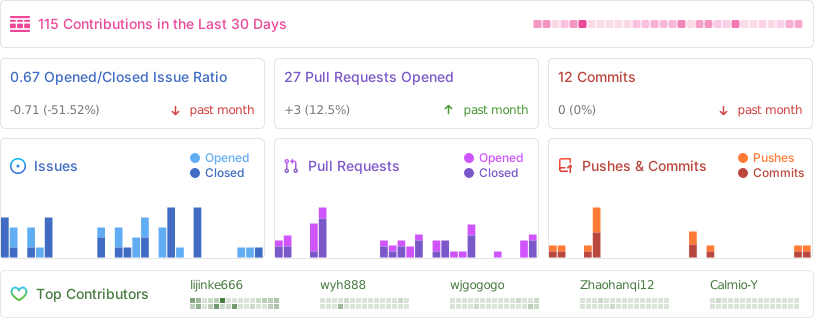
ð¬ Contributors
Star History
ð License
MIT@AntV.
Top Related Projects
Apache ECharts is a powerful, interactive charting and data visualization library for browser
Open-source JavaScript charting library behind Plotly and Dash
Bring data to life with SVG, Canvas and HTML. :bar_chart::chart_with_upwards_trend::tada:
Highcharts JS, the JavaScript charting framework
Simple HTML5 Charts using the <canvas> tag
Generation of diagrams like flowcharts or sequence diagrams from text in a similar manner as markdown
Convert designs to code with AI
Introducing Visual Copilot: A new AI model to turn Figma designs to high quality code using your components.
Try Visual Copilot