 centrifugo
Scalable real-time messaging server in a language-agnostic way. Self-hosted alternative to Pubnub, Pusher, Ably, socket.io, Phoenix.PubSub, SignalR. Set up once and forever.
Top Related Projects


Quick Overview
Centrifugo is a scalable real-time messaging server written in Go. It provides a way to add real-time features to your web, mobile, and server-side applications using various protocols such as WebSocket, HTTP-streaming, SSE, GRPC, and more. Centrifugo supports both pub/sub and uni-directional messaging patterns.
Pros
- Highly scalable and performant, capable of handling millions of simultaneous connections
- Supports multiple protocols and client libraries for various programming languages
- Provides built-in authentication and channel authorization mechanisms
- Offers features like presence, join/leave events, and message history
Cons
- Requires separate setup and maintenance of an additional server component
- Learning curve for developers new to real-time messaging concepts
- Limited built-in persistence options for message history
- May require additional configuration for complex deployment scenarios
Code Examples
- Connecting to Centrifugo using JavaScript client:
import Centrifuge from 'centrifuge';

const centrifuge = new Centrifuge('ws://localhost:8000/connection/websocket');
centrifuge.connect();

centrifuge.on('connect', function(ctx) {
    console.log("Connected:", ctx);
});
- Publishing a message to a channel:
const channel = centrifuge.newSubscription("news");
channel.publish({ text: "Hello, World!" })
    .then(function(res) {
        console.log("Publication success", res);
    }, function(err) {
        console.error("Publication error", err);
    });
- Subscribing to a channel and handling incoming messages:
const channel = centrifuge.newSubscription("news");
channel.on('publication', function(message) {
    console.log("Received message:", message);
});
channel.subscribe();
Getting Started
-
Install Centrifugo:
wget https://github.com/centrifugal/centrifugo/releases/download/v4.1.2/centrifugo_4.1.2_linux_amd64.tar.gz tar xvfz centrifugo_4.1.2_linux_amd64.tar.gz -
Create a configuration file
config.json:{ "token_hmac_secret_key": "your-secret-key", "api_key": "your-api-key", "allow_subscribe_for_client": true } -
Run Centrifugo:
./centrifugo --config=config.json -
Install and use a client library (e.g., JavaScript):
npm install centrifugeThen use the code examples provided above to connect and interact with Centrifugo.
Competitor Comparisons
⚡️ Express inspired web framework written in Go
Pros of Fiber
- Extremely fast and lightweight web framework
- Express-inspired API, making it easy for Node.js developers to transition
- Extensive middleware ecosystem and built-in features
Cons of Fiber
- Less mature compared to Centrifugo, which has been around longer
- Focused on HTTP routing, lacking real-time capabilities out of the box
- Smaller community and fewer production-level deployments
Code Comparison
Fiber (HTTP routing):
app := fiber.New()
app.Get("/", func(c *fiber.Ctx) error {
    return c.SendString("Hello, World!")
})
app.Listen(":3000")
Centrifugo (WebSocket handling):
config := centrifuge.DefaultConfig
node, _ := centrifuge.New(config)
node.OnConnect(func(client *centrifuge.Client) {
    // Handle new connection
})
While both are Go-based, Fiber is primarily an HTTP routing framework, whereas Centrifugo is specialized for real-time messaging and WebSocket communication. Fiber offers a more familiar API for web developers, while Centrifugo provides robust real-time features out of the box. The choice between them depends on the specific requirements of your project, with Fiber being more suitable for traditional web applications and Centrifugo excelling in real-time communication scenarios.
A tiny WebSocket library for Go.
Pros of ws
- Lightweight and focused WebSocket implementation
- Low-level control and flexibility for custom WebSocket applications
- Highly performant with minimal overhead
Cons of ws
- Requires more manual implementation for advanced features
- Less out-of-the-box functionality compared to Centrifugo
- Steeper learning curve for complex real-time applications
Code Comparison
ws:
conn, _, _, err := ws.DefaultDialer.Dial(ctx, "ws://example.com")
if err != nil {
    // Handle error
}
defer conn.Close()
Centrifugo (client-side JavaScript):
const centrifuge = new Centrifuge('ws://example.com/connection/websocket');
centrifuge.subscribe("channel", function(message) {
    console.log(message);
});
centrifuge.connect();
Summary
ws is a low-level WebSocket library offering high performance and flexibility, ideal for custom implementations. Centrifugo provides a more comprehensive real-time messaging solution with built-in features like pub/sub and presence. ws is better suited for developers who need fine-grained control, while Centrifugo offers a higher-level abstraction for rapid development of real-time applications.
Convert  designs to code with AI

Introducing Visual Copilot: A new AI model to turn Figma designs to high quality code using your components.
Try Visual CopilotREADME
Centrifugo
Scalable real-time messaging server in a language-agnostic way.






Centrifugo is an open-source scalable real-time messaging server. It instantly delivers messages to application online users connected over supported transports (WebSocket, HTTP-streaming, Server-Sent Events (aka EventSource), GRPC, WebTransport). Centrifugo has the concept of channel subscriptions â so it's a user-facing PUB/SUB server.
Centrifugo is language-agnostic and can be used to build chat apps, live comments, multiplayer games, real-time data visualizations, collaborative tools, AI streaming responses, etc. in combination with any backend. It is well suited for modern architectures and allows decoupling the business logic from the real-time transport layer.
The core idea of Centrifugo is simple â it's a PUB/SUB server on top of modern real-time transports:
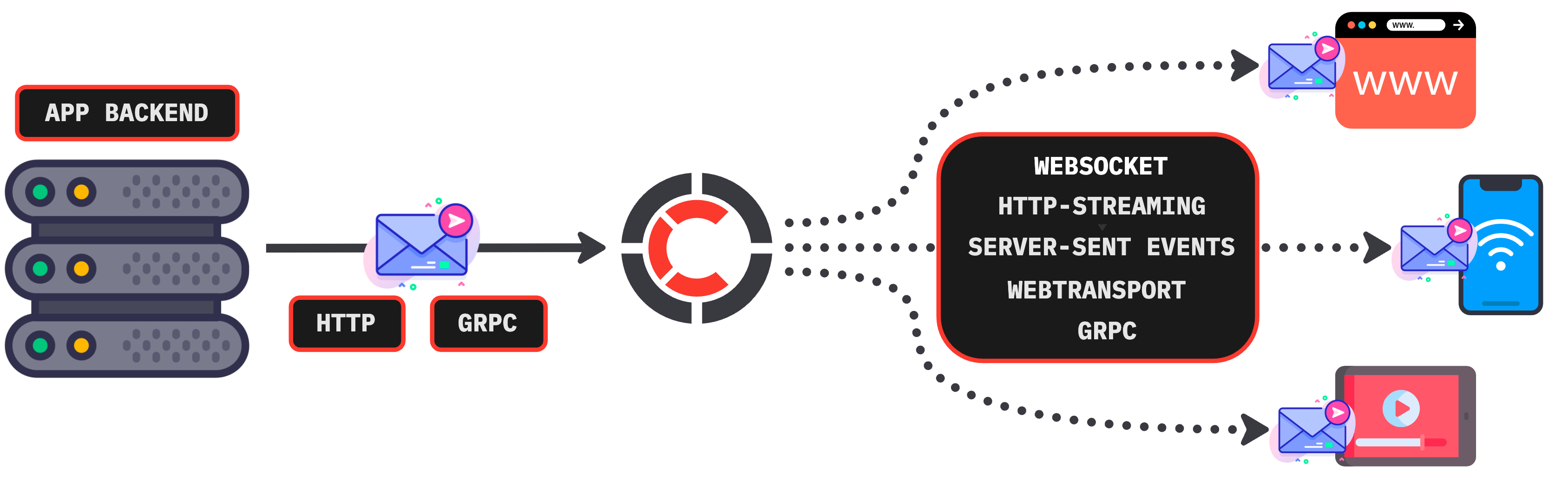
Your backend communicates with Centrifugo over a simple HTTP or GRPC API to publish messages into channels, while clients subscribe to those channels using one of the official SDKs (or the unidirectional approach with no SDK dependency).
Quick start
Spin up Centrifugo with its embedded admin UI using Docker:
docker run -it --rm -p 8000:8000 centrifugo/centrifugo:latest centrifugo \
  --client.insecure --admin.enabled --admin.insecure
# ^ insecure flags: for local trial only, never use in production
Then open http://localhost:8000 to reach the admin UI, where you can watch live connections and publish messages into channels. The insecure flags above remove authentication for a frictionless local trial only â never use them in production.
For native binaries, Homebrew, packages, and production configuration see the installation instructions, and follow the quickstart tutorial to connect your first client.
Why Centrifugo
The hard part is to make the PUB/SUB concept production-ready, efficient, flexible and available from different application environments. Centrifugo is a mature solution that already helped many projects with adding real-time features and scaling towards many concurrent connections. It provides a set of features not available in other open-source solutions in the area:
- Efficient real-time transports: WebSocket, HTTP-streaming, Server-Sent Events, GRPC, WebTransport (experimental)
- Built-in scalability with Redis (or Redis Cluster, or Redis-compatible storage â ex. AWS Elasticache, Valkey, KeyDB, DragonflyDB, etc), PostgreSQL or Nats.
- Simple HTTP and GRPC server API to communicate with Centrifugo from the app backend
- Asynchronous PostgreSQL and Kafka consumers to support transactional outbox and CDC patterns
- Flexible connection authentication mechanisms: JWT and proxy-like (via request from Centrifugo to the backend)
- Channel subscription multiplexing over a single connection
- Rich subscription model: stream (client-side and server-side), map, shared poll, and proxy subscription streams
- Various channel permission strategies, channel namespace concept
- Hot message history in channels, with automatic message recovery upon reconnect, cache recovery mode (deliver latest publication immediately upon subscription)
- Delta compression in channels based on Fossil algorithm
- Online channel presence information, with join/leave notifications
- A way to send RPC calls to the backend over the real-time connection
- Strict and effective client protocol wrapped by several official SDKs
- JSON and binary Protobuf message transfer, with optimized serialization and built-in batching
- Beautiful embedded admin web UI
- Great observability with lots of Prometheus metrics exposed and official Grafana dashboard
- And much more, visit Centrifugo documentation site
Client SDKs
Official SDKs wrap Centrifugo's bidirectional protocol and handle reconnects, subscription state, message recovery, and more across platforms:
| Platform / Language | SDK |
|---|---|
| JavaScript (browser, Node.js, React Native) | centrifuge-js |
| Dart / Flutter (mobile and web) | centrifuge-dart |
| Swift / native iOS | centrifuge-swift |
| Java (Android, JVM) | centrifuge-java |
| Python (asyncio) | centrifuge-python |
| Go | centrifuge-go |
| .NET / MAUI / Unity [WIP] | centrifuge-csharp |
For simple use cases Centrifugo also supports a unidirectional approach (WebSocket, SSE, HTTP-streaming, GRPC) that needs no SDK â any standard client for the transport works. See the transports overview and the client protocol spec for details.
Documentation
- Centrifugo official documentation site
- Installation instructions
- Getting started tutorial
- Design overview and idiomatic usage
- Build a WebSocket chat/messenger app with Centrifugo tutorial
- Centrifugal blog
- FAQ
- Examples repository
Community
Found a bug or have an idea? Open an issue. Want to contribute? See CONTRIBUTING.md.
Backing
This repository is hosted by packagecloud.io.

Also thanks to JetBrains for supporting OSS (most of the code here written in Goland):

Top Related Projects
Convert designs to code with AI
Introducing Visual Copilot: A new AI model to turn Figma designs to high quality code using your components.
Try Visual Copilot