 coolify
An open-source, self-hostable PaaS alternative to Vercel, Heroku & Netlify that lets you easily deploy static sites, databases, full-stack applications and 280+ one-click services on your own servers.
Top Related Projects

Scalable PaaS (automated Docker+nginx) - aka Heroku on Steroids

A docker-powered PaaS that helps you build and manage the lifecycle of applications

Making Docker and Kubernetes management easy.

Nomad is an easy-to-use, flexible, and performant workload orchestrator that can deploy a mix of microservice, batch, containerized, and non-containerized applications. Nomad is easy to operate and scale and has native Consul and Vault integrations.
A tool to build, deploy, and release any application on any platform.

Automation engine to build, test and ship any codebase. Runs locally, in CI, or directly in the cloud
Quick Overview
Coolify is an open-source, self-hosted Heroku/Netlify alternative. It provides a platform for developers to deploy and manage their applications, databases, and services with ease. Coolify aims to simplify the deployment process while giving users full control over their infrastructure.
Pros
- Self-hosted solution, offering complete control and privacy
- Supports various application types, databases, and services
- User-friendly interface for easy management and deployment
- Active development and community support
Cons
- Requires some technical knowledge for initial setup and maintenance
- May have fewer features compared to established commercial platforms
- Performance and scalability might be limited by self-hosted infrastructure
- Documentation could be more comprehensive for advanced use cases
Getting Started
To get started with Coolify, follow these steps:
- Ensure you have a server with Docker installed.
- Run the following command to install Coolify:
curl -fsSL https://get.coolify.io | sh
- Access the Coolify dashboard through your browser and complete the initial setup.
- Connect your Git repositories and start deploying your applications.
For more detailed instructions and configuration options, refer to the official documentation at https://docs.coolify.io/.
Competitor Comparisons
Scalable PaaS (automated Docker+nginx) - aka Heroku on Steroids
Pros of CapRover
- More mature project with a larger community and longer development history
- Supports a wider range of deployment options, including bare metal and various cloud providers
- Offers a built-in Let's Encrypt integration for easy SSL certificate management
Cons of CapRover
- Less intuitive user interface compared to Coolify's modern design
- Requires more manual configuration for certain features
- Limited built-in monitoring and analytics capabilities
Code Comparison
CapRover (Node.js):
const express = require('express')
const app = express()
app.get('/', (req, res) => res.send('Hello World!'))
app.listen(80, () => console.log('Server running on port 80'))
Coolify (Docker Compose):
version: '3'
services:
  app:
    image: nginx
    ports:
      - "80:80"
Both projects aim to simplify application deployment, but they take different approaches. CapRover focuses on providing a more comprehensive platform with extensive customization options, while Coolify emphasizes ease of use and a modern interface. CapRover's code example showcases its Node.js-based architecture, whereas Coolify's example demonstrates its Docker-centric approach to deployment.
A docker-powered PaaS that helps you build and manage the lifecycle of applications
Pros of Dokku
- Mature project with a large community and extensive documentation
- Supports multiple programming languages and frameworks out-of-the-box
- Lightweight and can run on low-resource machines
Cons of Dokku
- Requires more manual configuration and setup compared to Coolify
- Limited built-in monitoring and analytics features
- Less user-friendly interface for managing applications
Code Comparison
Dokku deployment:
git remote add dokku dokku@yourdomain.com:app-name
git push dokku main
Coolify deployment (using Docker Compose):
version: '3'
services:
  app:
    image: your-image:tag
    ports:
      - "3000:3000"
Summary
Dokku is a mature, lightweight PaaS solution that offers flexibility and support for various languages. It requires more manual configuration but can run on low-resource machines. Coolify, on the other hand, provides a more user-friendly interface and built-in features for monitoring and analytics, making it easier for beginners to deploy and manage applications. The choice between the two depends on the user's experience level, resource constraints, and desired level of control over the deployment process.
Making Docker and Kubernetes management easy.
Pros of Portainer
- More mature and established project with a larger user base
- Supports a wider range of container platforms (Docker, Kubernetes, ACI, etc.)
- Offers both open-source and enterprise editions with advanced features
Cons of Portainer
- Steeper learning curve for beginners
- Less focus on simplifying application deployment workflows
- Requires more manual configuration for complex setups
Code Comparison
Portainer (Docker Compose example):
version: '3'
services:
  portainer:
    image: portainer/portainer-ce:latest
    ports:
      - "8000:8000"
      - "9000:9000"
    volumes:
      - /var/run/docker.sock:/var/run/docker.sock
      - portainer_data:/data
Coolify (Application deployment example):
services:
  - type: app
    name: my-app
    git:
      repo: https://github.com/user/repo
      branch: main
    build:
      dockerfile: Dockerfile
    env:
      - key: NODE_ENV
        value: production
Both Portainer and Coolify aim to simplify container management and deployment, but they have different focuses. Portainer provides a comprehensive solution for managing various container platforms, while Coolify emphasizes ease of use for application deployment and hosting. The choice between them depends on specific project requirements and user expertise.
Nomad is an easy-to-use, flexible, and performant workload orchestrator that can deploy a mix of microservice, batch, containerized, and non-containerized applications. Nomad is easy to operate and scale and has native Consul and Vault integrations.
Pros of Nomad
- More mature and battle-tested in production environments
- Supports a wider range of workloads, including non-containerized applications
- Offers advanced scheduling capabilities and multi-region federation
Cons of Nomad
- Steeper learning curve and more complex setup compared to Coolify
- Requires additional tools for complete infrastructure management
- Less focus on developer experience and simplicity
Code Comparison
Nomad job specification:
job "example" {
  datacenters = ["dc1"]
  type = "service"
  group "cache" {
    task "redis" {
      driver = "docker"
      config {
        image = "redis:3.2"
      }
    }
  }
}
Coolify deployment configuration:
services:
  - name: redis
    image: redis:3.2
    ports:
      - 6379:6379
Summary
Nomad is a more powerful and flexible orchestration tool suitable for complex, large-scale deployments across various workload types. It offers advanced features but requires more expertise to set up and manage. Coolify, on the other hand, focuses on simplicity and ease of use for developers, making it more suitable for smaller teams or projects that prioritize quick setup and straightforward deployments.
A tool to build, deploy, and release any application on any platform.
Pros of Waypoint
- More mature project with a larger community and extensive documentation
- Supports a wider range of deployment targets and cloud providers
- Offers advanced features like secret management and plugin system
Cons of Waypoint
- Steeper learning curve due to its complexity and broader scope
- Requires more setup and configuration compared to Coolify
- May be overkill for simpler deployment scenarios
Code Comparison
Waypoint configuration example:
project = "example-project"

app "web" {
  build {
    use "docker" {}
  }
  deploy {
    use "kubernetes" {
      namespace = "example"
    }
  }
}
Coolify configuration example:
services:
  - name: web
    type: application
    image: nginx:latest
    ports:
      - 80:80
Waypoint offers more flexibility and control over the deployment process, while Coolify provides a simpler, more straightforward configuration for basic deployments. Waypoint's configuration allows for more detailed customization of build and deploy steps, whereas Coolify focuses on a more opinionated, user-friendly approach for quick deployments.
Automation engine to build, test and ship any codebase. Runs locally, in CI, or directly in the cloud
Pros of Dagger
- More flexible and language-agnostic CI/CD pipeline definition
- Stronger focus on developer experience and local testing
- Larger community and more active development
Cons of Dagger
- Steeper learning curve for beginners
- Less out-of-the-box functionality for common deployment scenarios
- Requires more setup and configuration compared to Coolify
Code Comparison
Coolify (Docker Compose configuration):
version: '3.8'
services:
  app:
    image: coolify/app
    ports:
      - "3000:3000"
    environment:
      - NODE_ENV=production
Dagger (Pipeline definition in Go):
func (m *Main) Build(ctx context.Context) (*Container, error) {
    return dag.Container().
        From("node:14").
        WithDirectory("/app", dag.Host().Directory(".")).
        WithWorkdir("/app").
        WithExec([]string{"npm", "install"}).
        WithExec([]string{"npm", "run", "build"})
}
Coolify provides a simpler, more declarative approach to deployment, while Dagger offers greater flexibility and programmatic control over the CI/CD pipeline. Coolify is better suited for quick, straightforward deployments, whereas Dagger excels in complex, customized workflows across multiple languages and platforms.
Convert  designs to code with AI

Introducing Visual Copilot: A new AI model to turn Figma designs to high quality code using your components.
Try Visual CopilotREADME
Coolify
An open-source & self-hostable Heroku / Netlify / Vercel alternative.

About the Project
Coolify is an open-source & self-hostable alternative to Heroku / Netlify / Vercel / etc.
It helps you manage your servers, applications, and databases on your own hardware; you only need an SSH connection. You can manage VPS, Bare Metal, Raspberry PIs, and anything else.
Imagine having the ease of a cloud but with your own servers. That is Coolify.
No vendor lock-in, which means that all the configurations for your applications/databases/etc are saved to your server. So, if you decide to stop using Coolify (oh nooo), you could still manage your running resources. You lose the automations and all the magic. ðªï¸
For more information, take a look at our landing page at coolify.io.
Installation
curl -fsSL https://cdn.coollabs.io/coolify/install.sh | bash
You can find the installation script source here.
[!NOTE] Please refer to the docs for more information about the installation.
Support
Contact us at coolify.io/docs/contact.
Cloud
If you do not want to self-host Coolify, there is a paid cloud version available: app.coolify.io
For more information & pricing, take a look at our landing page coolify.io.
Why should I use the Cloud version?
The recommended way to use Coolify is to have one server for Coolify and one (or more) for the resources you are deploying. A server is around 4-5$/month.
By subscribing to the cloud version, you get the Coolify server for the same price, but with:
- High-availability
- Free email notifications
- Better support
- Less maintenance for you
Donations
To stay completely free and open-source, with no feature behind the paywall and evolve the project, we need your help. If you like Coolify, please consider donating to help us fund the project's future development.
Thank you so much!
Huge Sponsors
- MVPS - Cheap VPS servers at the highest possible quality
- SerpAPI - Google Search API â Scrape Google and other search engines from our fast, easy, and complete API
- Seibert Group - Boost productivity company-wide with AI agents like Claude Code
- ScreenshotOne - Screenshot API for devs
- PrivateAlps - Cloud Services Provider, VPS, servers infrastructure for people who care about privacy and control
Big Sponsors
- 23M - Your experts for high-availability hosting solutions!
- American Cloud - US-based cloud infrastructure services
- Arcjet - Advanced web security and performance solutions
- BC Direct - Your trusted technology consulting partner
- Blacksmith - Infrastructure automation platform
- Capture.page - Fast & Reliable Screenshot API for Developers
- ByteBase - Database CI/CD and Security at Scale
- CodeRabbit - Cut Code Review Time & Bugs in Half
- COMIT - New York Times awardâwinning contractor
- CompAI - Open source compliance automation platform
- Convex - Open-source reactive database for web app developers
- Darweb - 3D CPQ solutions for ecommerce design
- Dataforest Cloud - Deploy cloud servers as seeds independently in seconds. Enterprise hardware, premium network, 100% made in Germany.
- Formbricks - The open source feedback platform
- GoldenVM - Premium virtual machine hosting solutions
- Greptile - The AI Code Reviewer
- Hetzner - Server, cloud, hosting, and data center solutions
- Hostinger - Web hosting and VPS solutions
- JobsCollider - 30,000+ remote jobs for developers
- Juxtdigital - Digital PR & AI Authority Building Agency
- LiquidWeb - Premium managed hosting solutions
- Logto - The better identity infrastructure for developers
- LumaDock - Fast and reliable virtual server hosting
- Macarne - Best IP Transit & Carrier Ethernet Solutions for Simplified Network Connectivity
- Mobb - Secure Your AI-Generated Code to Unlock Dev Productivity
- PetroSky Cloud - Open source cloud deployment solutions
- PFGLabs - Build Real Projects with Golang
- Ramnode - High Performance Cloud VPS Hosting
- SaasyKit - Complete SaaS starter kit for developers
- SupaGuide - Your comprehensive guide to Supabase
- Supadata AI - Scrape YouTube, web, and files. Get AI-ready, clean data
- Syntax.fm - Podcast for web developers
- Tigris - Modern developer data platform
- Tolgee - The open source localization platform
- Ubicloud - Open source cloud infrastructure platform
- VPSDime - Affordable high-performance VPS hosting solutions
Small Sponsors









































...and many more at GitHub Sponsors
Recognitions

Core Maintainers
| Andras Bacsai | ðï¸ Peak |
|---|---|
 |  |
   | |
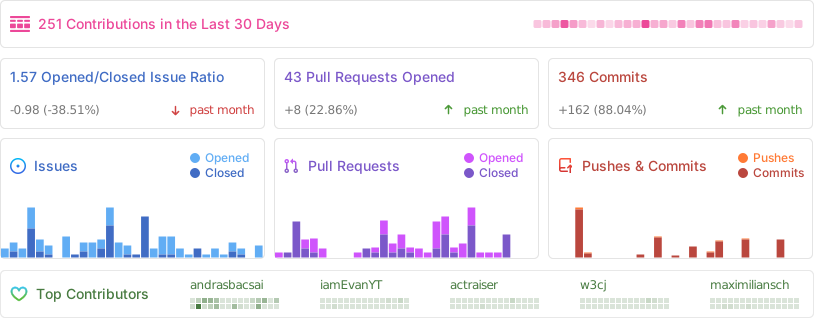
Repo Activity
Star History
Top Related Projects
Scalable PaaS (automated Docker+nginx) - aka Heroku on Steroids
A docker-powered PaaS that helps you build and manage the lifecycle of applications
Making Docker and Kubernetes management easy.
Nomad is an easy-to-use, flexible, and performant workload orchestrator that can deploy a mix of microservice, batch, containerized, and non-containerized applications. Nomad is easy to operate and scale and has native Consul and Vault integrations.
A tool to build, deploy, and release any application on any platform.
Automation engine to build, test and ship any codebase. Runs locally, in CI, or directly in the cloud
Convert designs to code with AI
Introducing Visual Copilot: A new AI model to turn Figma designs to high quality code using your components.
Try Visual Copilot