
Top Related Projects

🐰 Rax is a progressive framework for building universal application. https://rax.js.org

开放式跨端跨框架解决方案,支持使用 React/Vue 等框架来开发微信/京东/百度/支付宝/字节跳动/ QQ 小程序/H5/React Native 等应用。

A powerful cross-platform UI toolkit for building native-quality iOS, Android, and Progressive Web Apps with HTML, CSS, and JavaScript.

Quasar Framework - Build high-performance VueJS user interfaces in record time

A framework for building native applications using React
Quick Overview
uni-app is a cross-platform framework for developing mobile and web applications using Vue.js. It allows developers to write once and deploy to multiple platforms, including iOS, Android, H5, and various mini-program ecosystems like WeChat and Alipay.
Pros
- Cross-platform development with a single codebase
- Large ecosystem with extensive plugin support
- Seamless integration with Vue.js and its ecosystem
- High performance with native rendering capabilities
Cons
- Learning curve for developers new to Vue.js or cross-platform development
- Limited customization options for platform-specific features
- Dependency on the uni-app ecosystem for certain functionalities
- Potential performance overhead compared to native development
Code Examples
- Creating a basic page:
<template>
  <view class="content">
    <text>Hello uni-app!</text>
  </view>
</template>

<script>
export default {
  data() {
    return {}
  },
  methods: {}
}
</script>

<style>
.content {
  display: flex;
  justify-content: center;
  align-items: center;
}
</style>
- Making an API request:
uni.request({
  url: 'https://api.example.com/data',
  method: 'GET',
  success: (res) => {
    console.log(res.data);
  },
  fail: (err) => {
    console.error(err);
  }
});
- Navigation between pages:
// Navigate to a new page
uni.navigateTo({
  url: '/pages/detail/detail?id=1'
});

// Go back to the previous page
uni.navigateBack();
Getting Started
-
Install Vue CLI and the uni-app plugin:
npm install -g @vue/cli vue add @dcloudio/vue-cli-plugin-uni -
Create a new uni-app project:
vue create -p dcloudio/uni-preset-vue my-project -
Run the project:
cd my-project
npm run dev:h5
This will start a development server for the H5 version of your app. You can use different commands to run on other platforms, such as npm run dev:mp-weixin for WeChat mini-program.
Competitor Comparisons
🐰 Rax is a progressive framework for building universal application. https://rax.js.org
Pros of Rax
- Lightweight and performant, optimized for mobile development
- Supports multiple rendering targets (Web, Weex, Mini-programs)
- Backed by Alibaba, with strong community support and ecosystem
Cons of Rax
- Steeper learning curve compared to Uni-app
- Less comprehensive documentation and tutorials
- Smaller plugin ecosystem than Uni-app
Code Comparison
Rax component:
import { createElement, render } from 'rax';
import View from 'rax-view';

function App() {
  return <View>Hello, Rax!</View>;
}

render(<App />);
Uni-app component:
<template>
  <view>Hello, Uni-app!</view>
</template>

<script>
export default {
  name: 'App'
}
</script>
Key Differences
- Rax uses a React-like syntax, while Uni-app uses Vue-style components
- Rax focuses on performance and flexibility, Uni-app emphasizes ease of use and cross-platform compatibility
- Rax has a more modular approach, allowing developers to choose specific packages, while Uni-app provides a more integrated solution
Use Cases
- Rax: Ideal for complex, high-performance mobile applications, especially within the Alibaba ecosystem
- Uni-app: Better suited for rapid development of cross-platform apps with a gentler learning curve
开放式跨端跨框架解决方案,支持使用 React/Vue 等框架来开发微信/京东/百度/支付宝/字节跳动/ QQ 小程序/H5/React Native 等应用。
Pros of Taro
- Supports more frameworks (React, Vue, Nerv) compared to uni-app's Vue-only approach
- Better TypeScript support and type checking
- More active community and frequent updates
Cons of Taro
- Steeper learning curve, especially for developers new to React
- Less comprehensive documentation compared to uni-app
- May have compatibility issues with some native APIs
Code Comparison
Taro (React):
import { Component } from 'react'
import { View, Text } from '@tarojs/components'

export default class Index extends Component {
  render() {
    return (
      <View className='index'>
        <Text>Hello, World!</Text>
      </View>
    )
  }
}
uni-app (Vue):
<template>
  <view class="content">
    <text>Hello, World!</text>
  </view>
</template>

<script>
export default {
  name: 'App'
}
</script>
Both frameworks aim to create cross-platform applications, but Taro offers more flexibility in terms of framework choice and has better TypeScript integration. uni-app, on the other hand, provides a more straightforward development experience with its Vue-based approach and comprehensive documentation. The choice between the two depends on the developer's familiarity with React or Vue, and the specific requirements of the project.
A powerful cross-platform UI toolkit for building native-quality iOS, Android, and Progressive Web Apps with HTML, CSS, and JavaScript.
Pros of Ionic Framework
- Larger community and ecosystem, with more third-party plugins and resources
- Better documentation and learning resources
- More mature and established framework with a longer track record
Cons of Ionic Framework
- Steeper learning curve, especially for developers new to Angular or React
- Larger bundle sizes, which can impact app performance
- Less native-like look and feel compared to Uni-app's closer adherence to platform-specific UI
Code Comparison
Ionic Framework (Angular):
import { Component } from '@angular/core';

@Component({
  selector: 'app-home',
  template: '<ion-content><h1>Hello Ionic!</h1></ion-content>'
})
export class HomePage {}
Uni-app:
<template>
  <view>
    <text>Hello Uni-app!</text>
  </view>
</template>

<script>
export default {
  // Component logic here
}
</script>
Both frameworks aim to simplify cross-platform app development, but they take different approaches. Ionic Framework offers a more web-centric development experience with a focus on Angular or React, while Uni-app provides a Vue-like syntax and aims for a more native feel. The choice between them depends on the developer's background, project requirements, and target platforms.
Quasar Framework - Build high-performance VueJS user interfaces in record time
Pros of Quasar
- More comprehensive ecosystem with built-in components and tools
- Better documentation and community support
- Supports both Vue 2 and Vue 3
Cons of Quasar
- Steeper learning curve due to its extensive feature set
- Larger bundle size, which may impact performance on low-end devices
Code Comparison
uni-app:
<template>
  <view class="content">
    <text>{{ title }}</text>
  </view>
</template>

<script>
export default {
  data() {
    return {
      title: 'Hello'
    }
  }
}
</script>
Quasar:
<template>
  <q-page class="flex flex-center">
    <q-btn color="primary" label="Hello" />
  </q-page>
</template>

<script>
export default {
  name: 'PageIndex'
}
</script>
Key Differences
- uni-app uses a custom
<view>component, while Quasar uses standard HTML elements with its own components like<q-page>and<q-btn> - Quasar provides built-in styling and theming options, evident in the
color="primary"attribute - uni-app's syntax is closer to standard Vue, making it easier for Vue developers to adopt
Both frameworks aim to simplify cross-platform development, but Quasar offers a more feature-rich environment at the cost of complexity, while uni-app focuses on ease of use and familiarity for Vue developers.
A framework for building native applications using React
Error generating comparison
Convert  designs to code with AI

Introducing Visual Copilot: A new AI model to turn Figma designs to high quality code using your components.
Try Visual CopilotREADME
ç®ä½ä¸æ | English
uni-appæ¯ä¸ä¸ªä½¿ç¨ Vue.js å¼åææå端åºç¨çæ¡æ¶ï¼å¼åè
ç¼åä¸å¥ä»£ç ï¼å¯åå¸å°iOSãAndroidã鸿èãWebï¼ååºå¼ï¼ã以ååç§å°ç¨åºï¼å¾®ä¿¡/æ¯ä»å®/ç¾åº¦/æé³/é£ä¹¦/QQ/å¿«æ/éé/æ·å®/京ä¸/å°çº¢ä¹¦ï¼ãå¿«åºç¨ã鸿èå
æå¡çå¤ä¸ªå¹³å°ã
DCloudå
¬å¸æ¥æä¸åä¸å¼åè
ãæ°ç¾ä¸åºç¨ãå å亿ææºç«¯ææ´»ç¨æ·ãæ°ä¸æ¬¾uni-appæ件ï¼å¼åè
å¯ä»¥æ¾å¿éæ©ã
uni-appå uni-app å uni-app xã
- uni-appï¼åºäºå端ææ¯æ ï¼Appå¼æéç¨ä¸å°ç¨åºç¸åçææ¯æ¶æï¼é»è¾å±ä½¿ç¨jsï¼æ¸²æå±ä½¿ç¨web-viewã
- uni-app xï¼æ¯æ°ä¸ä»£ uni-appï¼åºäºutsè¯è¨åuvueåç渲æå¼æã
utsæ¯ä¸é¨ç±»tsçã跨平å°çè¯è¨ã
utså¨Androidå¹³å°ç¼è¯ä¸ºkotlinãå¨iOSå¹³å°ç¼è¯ä¸ºswiftãå¨é¸¿ènextå¹³å°ä¸ç¼è¯ä¸ºArkTSãå¨Webåå°ç¨åºå¹³å°ç¼è¯ä¸ºjsã
uni-appå¨æï¼åå¥é½ä¸æãå³ä½¿ä¸è·¨ç«¯ï¼uni-appä¹æ¯æ´å¥½çå°ç¨åºå¼åæ¡æ¶ï¼è¯¦è§ï¼ãæ´å¥½çApp跨平å°æ¡æ¶ãæ´æ¹ä¾¿çWebå¼åæ¡æ¶ãä¸ç®¡é¢å¯¼å®æä»ä¹æ ·ç项ç®ï¼ä½ é½å¯ä»¥å¿«é交ä»ï¼ä¸éè¦è½¬æ¢å¼åæç»´ãä¸éè¦æ´æ¹å¼åä¹ æ¯ã
å¿«éä½éª

注ï¼
- æäºå¹³å°ä¸è½æ交ç®ådemoï¼æ
è¡¥å
äºä¸äºå
¶ä»åè½ï¼hello uni-app (x)示ä¾ä»£ç å¯ä» github è·å
- å¿«åºç¨ä»
æ¯æ vivo ãoppoãå为
ä»åºä»ç»
uni-app x åæ¯ï¼ä¸º uni-app x çæ¬çå¼æºä»åºã
uni-appï¼å vue2 å vue3ï¼åæ¯åå«æ¯ï¼uni-app-vue2ãuni-app-vue3ã
uni-app xåæ¯ç®å½è¯´æï¼
- benchmark ç®å½ä¸ä¸ºæ§è½è¯æµæ¥å
- docs ç®å½ä¸ºææ¡£
- examples ç®å½ä¸ºç¤ºä¾é¡¹ç®
- src ç®å½ä¸ºæºç
- test ç®å½ä¸ºæµè¯ä¾
- CHANGELOG.md 为æ´æ°æ¥å¿
ä¸å¥ä»£ç ï¼è¿è¡å°å¤ä¸ªå¹³å°
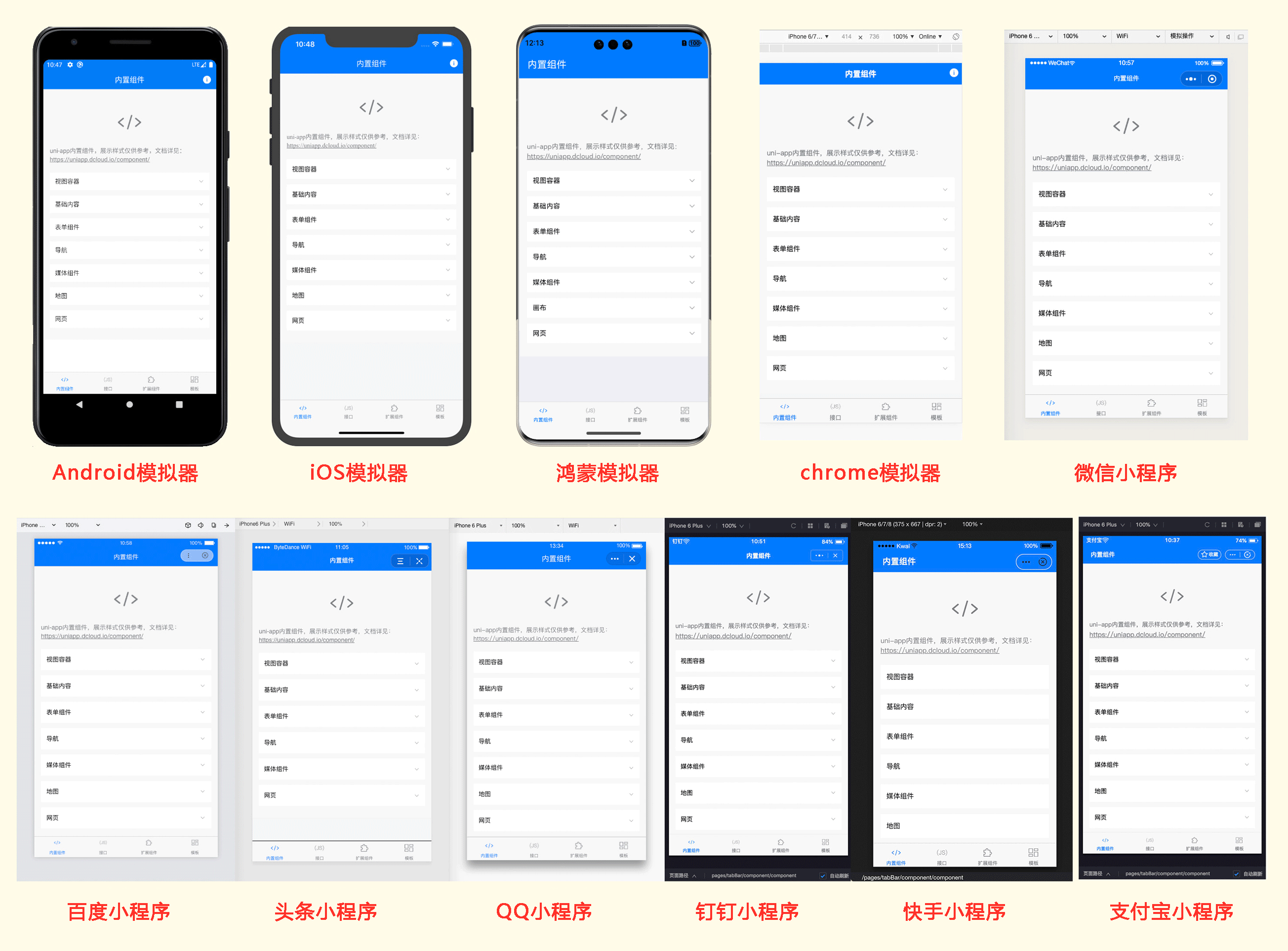
uni-appå®ç°äºä¸å¥ä»£ç ï¼åæ¶è¿è¡å°å¤ä¸ªå¹³å°ï¼å¦ä¸å¾æ示ï¼ä¸å¥ä»£ç ï¼åæ¶è¿è¡å°iOS模æå¨ãAndroid模æå¨ãwebã微信å¼åè
å·¥å
·ãæ¯ä»å®å°ç¨åºStudioãç¾åº¦å¼åè
å·¥å
·ãæé³å¼åè
å·¥å
·ãQQå¼åè
å·¥å
·ï¼åºé¨æ¯ä¸ªç»ç«¯é项å¡ï¼ä»£è¡¨1个ç»ç«¯æ¨¡æå¨ï¼ï¼
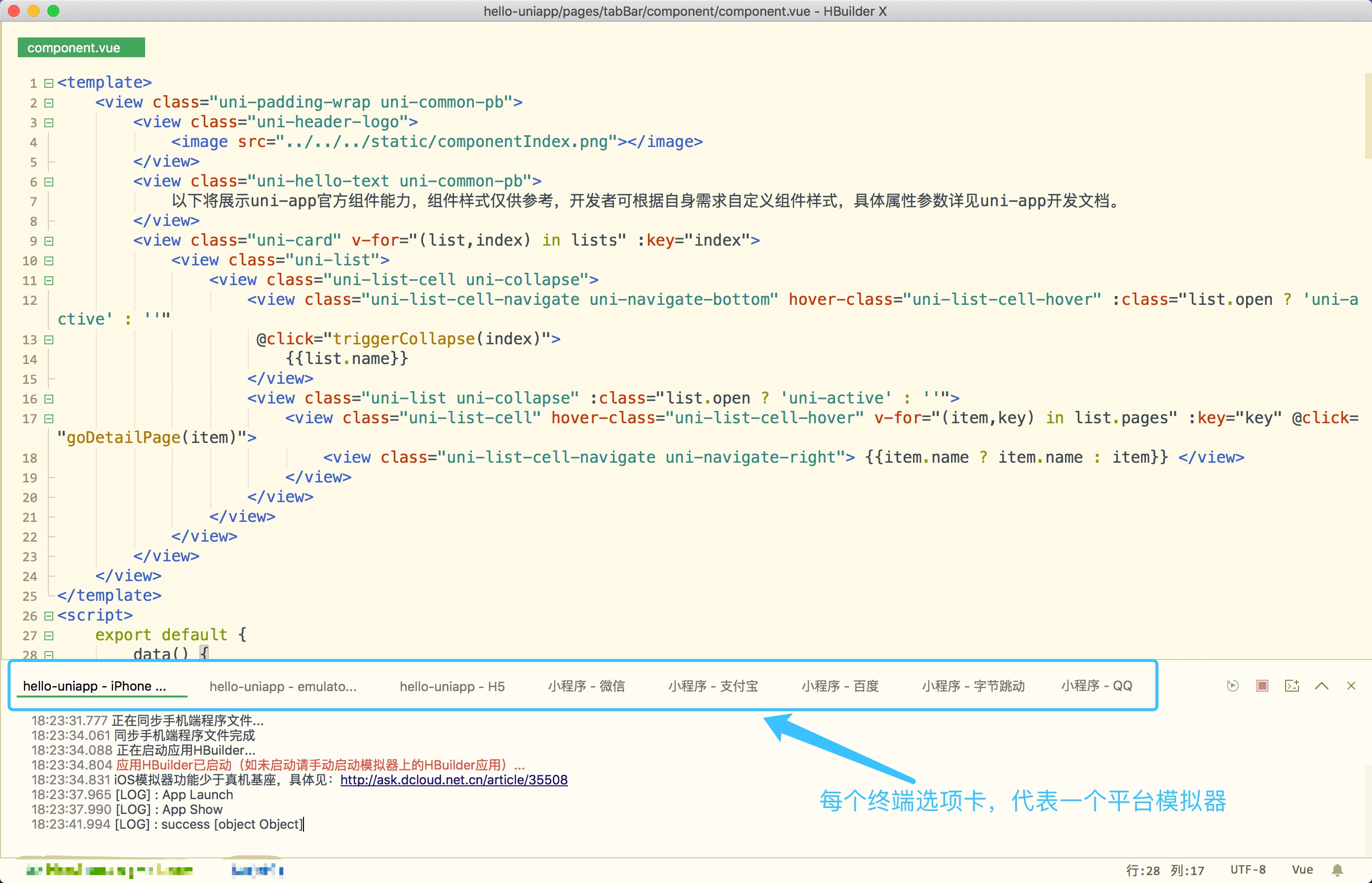
å®é è¿è¡ææå¦ä¸ï¼ç¹å»å¾çå¯æ¾å¤§ï¼ï¼
Top Related Projects
🐰 Rax is a progressive framework for building universal application. https://rax.js.org
开放式跨端跨框架解决方案,支持使用 React/Vue 等框架来开发微信/京东/百度/支付宝/字节跳动/ QQ 小程序/H5/React Native 等应用。
A powerful cross-platform UI toolkit for building native-quality iOS, Android, and Progressive Web Apps with HTML, CSS, and JavaScript.
Quasar Framework - Build high-performance VueJS user interfaces in record time
A framework for building native applications using React
Convert designs to code with AI
Introducing Visual Copilot: A new AI model to turn Figma designs to high quality code using your components.
Try Visual Copilot