 Sa-Token
✨ 开源、免费、一站式 Java 权限认证框架,让鉴权变得简单、优雅!—— 登录认证、权限认证、分布式 Session 会话、微服务网关鉴权、SSO 单点登录、OAuth2.0 统一认证、jwt 集成、API Key 秘钥授权、API 参数签名
Top Related Projects

Spring Security

Java JWT: JSON Web Token for Java and Android

Java implementation of JSON Web Token (JWT)

Security engine for Java (authentication, authorization, multi frameworks): OpenID Connect, SAML2, CAS, OAuth, LDAP, JWT...

Apereo CAS - Identity & Single Sign On for all earthlings and beyond.
Quick Overview
Sa-Token is a lightweight Java authentication and authorization framework. It provides a comprehensive solution for user login, permission verification, single sign-on (SSO), and other security-related features in Java applications. Sa-Token aims to simplify the implementation of authentication and authorization mechanisms in various Java environments.
Pros
- Easy to integrate and use, with minimal configuration required
- Supports multiple login methods and session management strategies
- Provides built-in support for common security features like SSO, JWT, and multi-factor authentication
- Highly customizable and extensible to fit various application requirements
Cons
- Primarily focused on Java applications, limiting its use in other programming languages
- Documentation is mainly in Chinese, which may be challenging for non-Chinese speakers
- Relatively new compared to some other established authentication frameworks
- May have a steeper learning curve for developers unfamiliar with Java security concepts
Code Examples
- Basic login and logout:
// Login
StpUtil.login(10001);
// Get login ID
System.out.println(StpUtil.getLoginId());
// Logout
StpUtil.logout();
- Permission checking:
// Check if user has permission
StpUtil.checkPermission("user:add");
// Check if user has any of the specified permissions
StpUtil.checkPermissionOr("user:add", "user:edit", "user:delete");
- Role-based access control:
// Assign roles to a user
StpUtil.getRoleList(10001, "admin", "manager");
// Check if user has a specific role
boolean isAdmin = StpUtil.hasRole("admin");
- Token-based authentication:
// Generate token
String token = StpUtil.createLoginSession(10001);
// Verify token
StpUtil.checkActivityTimeout();
// Get user info from token
Object userInfo = StpUtil.getTokenSession().get("userInfo");
Getting Started
To use Sa-Token in your Java project, add the following dependency to your Maven pom.xml file:
<dependency>
    <groupId>cn.dev33</groupId>
    <artifactId>sa-token-spring-boot-starter</artifactId>
    <version>1.34.0</version>
</dependency>
For Spring Boot applications, configure Sa-Token in your application.yml:
sa-token:
  token-name: satoken
  timeout: 2592000
  activity-timeout: -1
  is-concurrent: true
  is-share: true
  token-style: uuid
  is-log: false
Then, you can start using Sa-Token in your application by injecting the StpUtil class and calling its methods for authentication and authorization.
Competitor Comparisons
Spring Security
Pros of Spring Security
- Extensive documentation and large community support
- Comprehensive security features, including OAuth2 and SAML integration
- Seamless integration with other Spring projects
Cons of Spring Security
- Steeper learning curve, especially for beginners
- More complex configuration and setup process
- Potentially heavier resource usage for smaller applications
Code Comparison
Spring Security configuration:
@Configuration
@EnableWebSecurity
public class SecurityConfig extends WebSecurityConfigurerAdapter {
    @Override
    protected void configure(HttpSecurity http) throws Exception {
        http.authorizeRequests()
            .antMatchers("/public/**").permitAll()
            .anyRequest().authenticated()
            .and().formLogin();
    }
}
Sa-Token configuration:
@Configuration
public class SaTokenConfigure implements WebMvcConfigurer {
    @Override
    public void addInterceptors(InterceptorRegistry registry) {
        registry.addInterceptor(new SaInterceptor(handle -> StpUtil.checkLogin()))
            .addPathPatterns("/**").excludePathPatterns("/public/**");
    }
}
Both Spring Security and Sa-Token offer robust security solutions for Java applications. Spring Security provides a more comprehensive set of features and integrations, making it suitable for complex enterprise applications. Sa-Token, on the other hand, offers a simpler and more lightweight approach, which can be beneficial for smaller projects or those requiring quick implementation. The choice between the two depends on the specific needs of the project, team expertise, and desired level of customization.
Java JWT: JSON Web Token for Java and Android
Pros of jjwt
- Focused specifically on JWT implementation, providing a robust and comprehensive solution for JWT handling
- Extensive documentation and examples, making it easier for developers to integrate and use
- Supports various cryptographic algorithms and is regularly updated to address security concerns
Cons of jjwt
- Limited to JWT functionality, lacking broader authentication and authorization features
- Requires more manual configuration and integration with other security components
- May have a steeper learning curve for developers new to JWT concepts
Code Comparison
Sa-Token (Login and session creation):
StpUtil.login(10001);
String token = StpUtil.getTokenValue();
jjwt (JWT creation):
String jwt = Jwts.builder()
    .setSubject("user123")
    .signWith(SignatureAlgorithm.HS256, key)
    .compact();
Summary
Sa-Token is a comprehensive authentication and authorization framework for Java applications, offering a wide range of features beyond just token handling. It provides a simpler API for common authentication tasks and includes built-in support for various scenarios.
jjwt, on the other hand, is a specialized library focused solely on JSON Web Token (JWT) implementation. It offers more flexibility and control over JWT creation, parsing, and validation but requires additional integration for complete authentication solutions.
The choice between the two depends on the specific requirements of the project. Sa-Token is better suited for projects needing a full-featured authentication framework, while jjwt is ideal for applications requiring fine-grained control over JWT handling.
Java implementation of JSON Web Token (JWT)
Pros of java-jwt
- Focused specifically on JWT implementation, providing a lightweight and specialized solution
- Backed by Auth0, a well-known identity platform, ensuring regular updates and support
- Extensive documentation and examples available for easy integration
Cons of java-jwt
- Limited to JWT functionality, lacking broader authentication and authorization features
- Requires additional libraries or custom code for complete authentication workflows
- Less flexibility in token storage and session management compared to Sa-Token
Code Comparison
Sa-Token example:
// Login
StpUtil.login(10001);
// Get login ID
String loginId = StpUtil.getLoginId();
// Check login status
boolean isLogin = StpUtil.isLogin();
java-jwt example:
// Create JWT
String token = JWT.create()
    .withClaim("user_id", 10001)
    .sign(algorithm);
// Verify JWT
DecodedJWT jwt = JWT.require(algorithm)
    .build()
    .verify(token);
Sa-Token offers a higher-level abstraction for authentication, while java-jwt focuses on JWT creation and verification. Sa-Token provides built-in session management and login status checks, whereas java-jwt requires additional implementation for these features. The choice between the two depends on project requirements and the desired level of control over the authentication process.
Security engine for Java (authentication, authorization, multi frameworks): OpenID Connect, SAML2, CAS, OAuth, LDAP, JWT...
Pros of pac4j
- Multi-protocol support: Handles various authentication mechanisms (OAuth, SAML, OpenID Connect, etc.)
- Highly extensible and customizable
- Language-agnostic, with implementations for Java, Scala, and more
Cons of pac4j
- Steeper learning curve due to its comprehensive nature
- May be overkill for simple authentication scenarios
- Less focused on Chinese market and documentation compared to Sa-Token
Code Comparison
Sa-Token (Java):
// Login
StpUtil.login(10001);
// Get login ID
String loginId = StpUtil.getLoginId();
// Logout
StpUtil.logout();
pac4j (Java):
// Perform authentication
CommonProfile profile = client.getUserProfile(credentials, context);
// Get user ID
String userId = profile.getId();
// Logout
context.getSessionStore().destroySession(context.getWebContext());
Both libraries provide straightforward authentication methods, but Sa-Token's API appears more concise for basic operations. pac4j offers more flexibility and protocol support at the cost of slightly more verbose code.
Apereo CAS - Identity & Single Sign On for all earthlings and beyond.
Pros of CAS
- Mature and widely adopted enterprise-grade SSO solution
- Supports a wide range of authentication protocols and integrations
- Highly customizable and extensible architecture
Cons of CAS
- Steeper learning curve and more complex setup
- Heavier resource requirements for deployment
- May be overkill for smaller projects or simpler authentication needs
Code Comparison
Sa-Token (Java):
// Login
StpUtil.login(10001);
// Get login ID
String loginId = StpUtil.getLoginId();
// Check login status
boolean isLogin = StpUtil.isLogin();
CAS (Java):
// Validate ticket
Assertion assertion = ticketValidator.validate(ticket, service);
// Get principal
AttributePrincipal principal = assertion.getPrincipal();
// Get attributes
Map<String, Object> attributes = principal.getAttributes();
Key Differences
- Sa-Token is lightweight and focuses on simplifying token-based authentication
- CAS is a comprehensive SSO solution with broader protocol support
- Sa-Token has a more straightforward API for basic authentication tasks
- CAS offers more advanced features like multi-factor authentication and delegated authentication
Both projects serve different use cases, with Sa-Token being more suitable for simpler, token-based authentication needs, while CAS is better suited for complex enterprise environments requiring robust SSO capabilities.
Convert  designs to code with AI

Introducing Visual Copilot: A new AI model to turn Figma designs to high quality code using your components.
Try Visual CopilotREADME

Sa-Token v1.45.0
⨠å¼æºãå è´¹ãä¸ç«å¼ java æé认è¯æ¡æ¶ï¼è®©é´æåå¾ç®åãä¼é ï¼




å¨çº¿ææ¡£ï¼https://sa-token.cc
ð åè¨ï¼
åæ 2020 å¹´åï¼æ为 Sa-Token æ交第ä¸è¡ä»£ç ä¹é ï¼å½¼æ¶å¸é¢ä¸ Java 缺å°çä¸ä» æ¯ä¸ä¸ªç®æ´å¥½ç¨çé´ææ¡æ¶ï¼æ´æ¯ä¸æ´å¥æ¸ æ°ãèªæ´½çæéæ¶æ设计ææ³ã
å æ¤ï¼è¿å å¹´é´æå°å¤§éæ¶é´å¾æ³¨å¨ Sa-Token çææ¡£ç¼åï¼å ä¹æ¯ä¸ç« èãæ¯ä¸å¥è¯ãæ¯ä¸ä¸ªåé½ç»è¿åå¤ä¿®æ¹ãç²¾ç»æ磨ï¼ä»¥æ±åå°ææ¸ æ°ãå¹²ç»ãææç表述ãç¨å¿é 读ææ¡£ï¼ä½ å¦ä¹ å°çå°ä¸æ¢æ¯ Sa-Token æ¡æ¶æ¬èº«ï¼æ´æ¯ç»å¤§å¤æ°åºæ¯ä¸æé设计çæä½³å®è·µã
ð ï¸ Sa-Token ä»ç»
Sa-Token æ¯ä¸ä¸ªè½»é级 Java æé认è¯æ¡æ¶ï¼ç®åæ¥æäºå¤§æ ¸å¿æ¨¡åï¼ç»å½è®¤è¯ãæé认è¯ãåç¹ç»å½ãOAuth2.0ãå¾®æå¡é´æã

è¦å¨ SpringBoot 项ç®ä¸ä½¿ç¨ Sa-Tokenï¼ä½ åªéè¦å¨ pom.xml ä¸å¼å ¥ä¾èµï¼
<!-- Sa-Token æé认è¯, å¨çº¿ææ¡£ï¼https://sa-token.cc -->
<dependency>
<groupId>cn.dev33</groupId>
<artifactId>sa-token-spring-boot-starter</artifactId>
<version>1.45.0</version>
</dependency>
é¤äºæ¯æ SpringBoot2ãSa-Token è¿ä¸º SpringBoot3/4ãSolonãJFinal çå¸¸è§ Web æ¡æ¶æä¾éæå ï¼åå°çæ£çå¼ç®±å³ç¨ã
ç®å示ä¾å±ç¤ºï¼ï¼ç¹å»å±å¼ / æå ï¼
Sa-Token æ¨å¨ä»¥ç®åãä¼é çæ¹å¼å®æç³»ç»çæé认è¯é¨åï¼ä»¥ç»å½è®¤è¯ä¸ºä¾ï¼ä½ åªéè¦ï¼
// ä¼è¯ç»å½ï¼åæ°å¡«ç»å½äººçè´¦å·id
StpUtil.login(10001);
æ éå®ç°ä»»ä½æ¥å£ï¼æ éå建任ä½é ç½®æ件ï¼åªéè¦è¿ä¸å¥éæ代ç çè°ç¨ï¼ä¾¿å¯ä»¥å®æä¼è¯ç»å½è®¤è¯ã
å¦æä¸ä¸ªæ¥å£éè¦ç»å½åæè½è®¿é®ï¼æ们åªéè°ç¨ä»¥ä¸ä»£ç ï¼
// æ ¡éªå½å客æ·ç«¯æ¯å¦å·²ç»ç»å½ï¼å¦ææªç»å½åæåº `NotLoginException` å¼å¸¸
StpUtil.checkLogin();
å¨ Sa-Token ä¸ï¼å¤§å¤æ°åè½é½å¯ä»¥ä¸è¡ä»£ç 解å³ï¼
踢人ä¸çº¿ï¼
// å°è´¦å·id为 10077 çä¼è¯è¸¢ä¸çº¿
StpUtil.kickout(10077);
æé认è¯ï¼
// 注解é´æï¼åªæå
·å¤ `user:add` æéçä¼è¯æå¯ä»¥è¿å
¥æ¹æ³
@SaCheckPermission("user:add")
public String insert(SysUser user) {
// ...
return "ç¨æ·å¢å ";
}
è·¯ç±æ¦æªé´æï¼
// æ ¹æ®è·¯ç±åå模åï¼ä¸å模åä¸åé´æ
registry.addInterceptor(new SaInterceptor(handler -> {
SaRouter.match("/user/**", r -> StpUtil.checkPermission("user"));
SaRouter.match("/admin/**", r -> StpUtil.checkPermission("admin"));
SaRouter.match("/goods/**", r -> StpUtil.checkPermission("goods"));
SaRouter.match("/orders/**", r -> StpUtil.checkPermission("orders"));
SaRouter.match("/notice/**", r -> StpUtil.checkPermission("notice"));
// æ´å¤æ¨¡å...
})).addPathPatterns("/**");
å¦ææ¨æ¾ç»ä½¿ç¨è¿ ShiroãSpringSecurityï¼å¨åæ¢å° Sa-Token åï¼æ¨å°ä½ä¼å°è´¨çé£è·ã
æ ¸å¿æ¨¡åä¸è§ï¼ï¼ç¹å»å±å¼ / æå ï¼
- ç»å½è®¤è¯ ââ å端ç»å½ãå¤ç«¯ç»å½ãå端äºæ¥ç»å½ãä¸å¤©å å ç»å½ã
- æéè®¤è¯ ââ æé认è¯ãè§è²è®¤è¯ãä¼è¯äºçº§è®¤è¯ã
- 踢人ä¸çº¿ ââ æ ¹æ®è´¦å·id踢人ä¸çº¿ãæ ¹æ®Tokenå¼è¸¢äººä¸çº¿ã
- 注解å¼é´æ ââ ä¼é çå°é´æä¸ä¸å¡ä»£ç å离ã
- è·¯ç±æ¦æªå¼é´æ ââ æ ¹æ®è·¯ç±æ¦æªé´æï¼å¯éé restful 模å¼ã
- Sessionä¼è¯ ââ å ¨ç«¯å ±äº«Session,å端ç¬äº«Session,èªå®ä¹Session,æ¹ä¾¿çååå¼ã
- æä¹ å±æ©å± ââ å¯éæ Redisï¼éå¯æ°æ®ä¸ä¸¢å¤±ã
- ååå°å离 ââ APPãå°ç¨åºçä¸æ¯æ Cookie çç»ç«¯ä¹å¯ä»¥è½»æ¾é´æã
- Tokené£æ ¼å®å¶ ââ å ç½®å ç§ Token é£æ ¼ï¼è¿å¯ï¼èªå®ä¹ Token çæçç¥ã
- è®°ä½ææ¨¡å¼ ââ éé [è®°ä½æ] 模å¼ï¼éå¯æµè§å¨å éªè¯ã
- äºçº§è®¤è¯ ââ å¨å·²ç»å½çåºç¡ä¸å次认è¯ï¼ä¿è¯å®å ¨æ§ã
- 模æä»äººè´¦å· ââ å®æ¶æä½ä»»æç¨æ·ç¶ææ°æ®ã
- 临æ¶èº«ä»½åæ¢ ââ å°ä¼è¯èº«ä»½ä¸´æ¶åæ¢ä¸ºå ¶å®è´¦å·ã
- å端äºæ¥ç»å½ ââ åQQä¸æ ·ææºçµèåæ¶å¨çº¿ï¼ä½æ¯ä¸¤ä¸ªææºä¸äºæ¥ç»å½ã
- è´¦å·å°ç¦ ââ ç»å½å°ç¦ãæç §ä¸å¡åç±»å°ç¦ãæç §å¤ç½é¶æ¢¯å°ç¦ã
- å¯ç å å¯ ââ æä¾åºç¡å å¯ç®æ³ï¼å¯å¿«é MD5ãSHA1ãSHA256ãAES å å¯ã
- ä¼è¯æ¥è¯¢ ââ æä¾æ¹ä¾¿çµæ´»çä¼è¯æ¥è¯¢æ¥å£ã
- Http Basicè®¤è¯ ââ ä¸è¡ä»£ç æ¥å ¥ Http BasicãDigest 认è¯ã
- å ¨å±ä¾¦å¬å¨ ââ å¨ç¨æ·ç»éã注éã被踢ä¸çº¿çå ³é®æ§æä½æ¶è¿è¡ä¸äºAOPæä½ã
- å ¨å±è¿æ»¤å¨ ââ æ¹ä¾¿çå¤çè·¨åï¼å ¨å±è®¾ç½®å®å ¨ååºå¤´çæä½ã
- å¤è´¦å·ä½ç³»è®¤è¯ ââ ä¸ä¸ªç³»ç»å¤å¥è´¦å·åå¼é´æï¼æ¯å¦ååç User 表å Admin 表ï¼
- åç¹ç»å½ ââ å ç½®ä¸ç§åç¹ç»å½æ¨¡å¼ï¼ååãè·¨åãåRedisãè·¨Redisãåå端å离çæ¶æé½å¯ä»¥æå®ã
- åç¹æ³¨é ââ ä»»æåç³»ç»å å起注éï¼å³å¯å ¨ç«¯ä¸çº¿ã
- OAuth2.0è®¤è¯ ââ è½»æ¾æ建 OAuth2.0 æå¡ï¼æ¯æopenidæ¨¡å¼ ã
- åå¸å¼ä¼è¯ ââ æä¾å ±äº«æ°æ®ä¸å¿åå¸å¼ä¼è¯æ¹æ¡ã
- å¾®æå¡ç½å ³é´æ ââ éé GatewayãShenYuãZuulç常è§ç½å ³çè·¯ç±æ¦æªè®¤è¯ã
- RPCè°ç¨é´æ ââ ç½å ³è½¬åé´æï¼RPCè°ç¨é´æï¼è®©æå¡è°ç¨ä¸å裸å¥
- 临æ¶Tokenè®¤è¯ ââ 解å³çæ¶é´ç Token ææé®é¢ã
- ç¬ç«Redis ââ å°æéç¼åä¸ä¸å¡ç¼åå离ã
- Quickå¿«éç»å½è®¤è¯ ââ 为项ç®é¶ä»£ç æ³¨å ¥ä¸ä¸ªç»å½é¡µé¢ã
- æ ç¾æ¹è¨ ââ æä¾ Thymeleaf æ ç¾æ¹è¨éæå ï¼æä¾ beetl éæ示ä¾ã
- jwtéæ ââ æä¾ä¸ç§æ¨¡å¼ç jwt éææ¹æ¡ï¼æä¾ token æ©å±åæ°è½åã
- RPCè°ç¨ç¶æä¼ é ââ æä¾ dubboãgrpc çéæå ï¼å¨RPCè°ç¨æ¶ç»å½ç¶æä¸ä¸¢å¤±ã
- åæ°ç¾å ââ æä¾è·¨ç³»ç»APIè°ç¨ç¾åæ ¡éªæ¨¡åï¼é²åæ°ç¯¡æ¹ï¼é²è¯·æ±éæ¾ã
- èªå¨ç»ç¾ ââ æä¾ä¸¤ç§Tokenè¿æçç¥ï¼çµæ´»æé 使ç¨ï¼è¿å¯èªå¨ç»ç¾ã
- å¼ç®±å³ç¨ ââ æä¾SpringMVCãWebFluxãSolon ç常è§æ¡æ¶éæå ï¼å¼ç®±å³ç¨ã
- ææ°ææ¯æ ââ éé ææ°ææ¯æ ï¼æ¯æ SpringBoot 3.xï¼jdk 17ã
ð SSO åç¹ç»å½
Sa-Token SSO å为ä¸ç§æ¨¡å¼ï¼å¯è§£å³ï¼ååãè·¨åãå
±äº«Redisãè·¨Redisãåå端ä¸ä½ãåå端å离ã纯 jsãvue2ãvue3ãjava 项ç®ãé java é¡¹ç® çæ¶æä¸ç SSO 认è¯éæ±ï¼
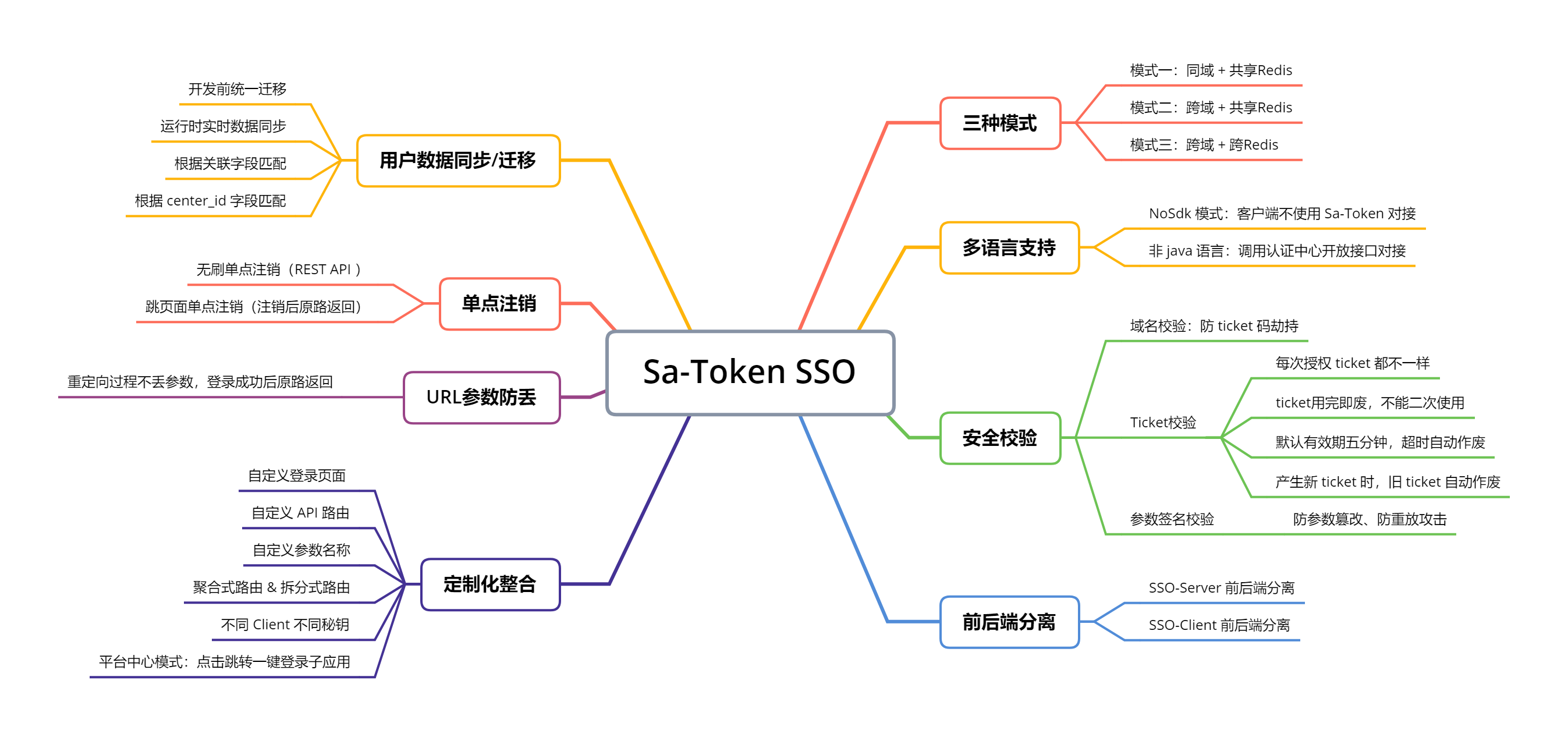
| ç³»ç»æ¶æ | éç¨æ¨¡å¼ | ç®ä» | ææ¡£é¾æ¥ |
|---|---|---|---|
| å端åå + å端å Redis | 模å¼ä¸ | å ±äº«Cookieåæ¥ä¼è¯ | ææ¡£ãç¤ºä¾ |
| å端ä¸åå + å端å Redis | 模å¼äº | URLéå®åä¼ æä¼è¯ | ææ¡£ãç¤ºä¾ |
| å端ä¸åå + å端 ä¸åRedis | 模å¼ä¸ | HTTP请æ±è·åä¼è¯ | ææ¡£ãç¤ºä¾ |
- å端ååï¼å°±æ¯æå¤ä¸ªç³»ç»å¯ä»¥é¨ç½²å¨åä¸ä¸ªä¸»ååä¹ä¸ï¼æ¯å¦ï¼
c1.domain.comãc2.domain.comãc3.domain.com - å端å Redisï¼å°±æ¯æå¤ä¸ªç³»ç»å¯ä»¥è¿æ¥åä¸ä¸ª Redisï¼å ±äº«ä¼è¯æ°æ®ã
- å¦ææ æ³åå°å端ååãå端å Redisï¼å¯ä»¥èµ°æåºç模å¼ä¸ï¼Http请æ±æ ¡éª ticket è·åä¼è¯ã
- æä¾ï¼NoSdk 模å¼ç¤ºä¾ + sso-server æ¥å£ææ¡£ï¼é Sa-Token 项ç®ãé java 项ç®ä¹å¯ä»¥å¯¹æ¥ã
- æä¾ï¼å¤éå®å ¨æ ¡éªï¼ååæ ¡éªãticketæ ¡éªãåæ°ç¾åæ ¡éªï¼ææé² ticket å«æï¼é²è¯·æ±éæ¾çæ»å»ã
- æä¾ï¼å¤§éå®æçç¹æå¦ï¼sso-server åå端å离设计ãsso-client åå端å离设计ãç¨æ·æ°æ®åæ¥/è¿ç§»æ¹æ¡è®¾è®¡ã
- æä¾ï¼ç´æ¥å¯è¿è¡ç demo 示ä¾ï¼å©ä½ å¿«éçæ SSO 大è´ç»å½æµç¨ã
- æä¾ï¼æ·±åº¦ç»èä¼åï¼åæ°é²ä¸¢ï¼ç¬è
æ¾è¯éªå¤ä¸ªSSOæ¡æ¶ï¼åæåæ°ä¸¢å¤±æ
åµï¼æ¯å¦ç»å½åæ¯ï¼
http://a.com?id=1&name=2ï¼ç»å½æååå°±åæäºï¼http://a.com?id=1ï¼Sa-Token-SSO å æä¸é¨ç®æ³ä¿è¯äºåæ°ä¸ä¸¢å¤±ï¼ç»å½æååç²¾ååè·¯è¿åã
ð OAuth2 ææ认è¯
Sa-Token OAuth2 模åå为åç§ææ模å¼ï¼è§£å³ä¸ååºæ¯ä¸çææéæ±
| æææ¨¡å¼ | ç®ä» |
|---|---|
| ææç å¼ | OAuth2 æ åæææ¥éª¤ï¼server 端ä¸æ¾ codeï¼client 端è·å code ç å æ¢ access_token |
| éèå¼ | å¤ç¨éæ©ï¼server ç«¯ä½¿ç¨ URL éå®åæ¹å¼ç´æ¥å° access_token ä¸æ¾å° client ç«¯é¡µé¢ |
| å¯ç å¼ | client ç´æ¥æ¿çç¨æ·çè´¦å·å¯ç æ¢åææ access_token |
| 客æ·ç«¯åè¯å¼ | server 端é对 client 级å«ç client_tokenï¼ä»£è¡¨åºç¨èªèº«çèµæºææ |
详ç»åèææ¡£ï¼https://sa-token.cc/doc.html#/oauth2/readme
ðâ çé®è§£ç
1ãSa-Token åè½å ¨ä¸å ¨ï¼
ä¸å¹´ç£¨ä¸åï¼äºå¤§æ ¸å¿æ¨¡å(ç»å½ãé´æãSSOãOAuth2ãå¾®æå¡) + ä¼å¤å®ç¨æ件 (ç tokenãjwt éæãAPI åæ°ç¾åãAPI Key ç§é¥ææ...) æ们æä¾çä¸åªæ¯æé认è¯ï¼æ们æä¾çæ¯ä¸ç«å¼è§£å³æ¹æ¡ã
2ãSa-Token 好ä¸å¥½å¦ï¼
ä¸æææ¡£ + ä¸æ代ç 注é + ä¸æ交æµç¤¾åº + 大éå®ææ¡ä¾å客 + å¤ä¸ªè§é¢æç¨ + 大éä¼ç§å¼æºé¡¹ç®éææ¡ä¾ã
3ãSa-Token ç¨ç人å¤ä¸å¤ï¼
æªæ¢ç»è®¡æ¥ (2026-1-25) èµ·ï¼Sa-Token å¨ï¼
- Gitee å ³æ³¨éè¾¾å° 48627 Starï¼ä½åå¹³å°æææ¨è项ç®æè¡æ¦ç¬¬ä¸åã
- GitHub å ³æ³¨éè¾¾å° 18523 Starï¼æ¯ä¸»è¦ç«äºæ¡æ¶ Spring Security ç 1.97 åï¼Apache Shiro ç 4.19 åã
- 25+ 微信ç²ä¸ç¾¤ (500人)ï¼8+ QQç²ä¸ç¾¤ (1000人 or 2000人) ï¼å¨çº¿æ档访é®éæPV 20ä¸+ã
è¿æ¯ä¼å¤å¼åè ç¨èæ票çæ°æ®ï¼ç¸ä¿¡è¿äºæ°æ®æ¯ä»»ä½è¨è¯é½è½è¯æ Sa-Token çç度ã
4ãSa-Token æåªäºæå¨è®¤è¯ï¼
æ¾è·è£èªå æ¬ä½ä¸éäºï¼Gitee GVP ææä»·å¼å¼æºé¡¹ç®ãGitCode G-Star ä¼è´¨å¼æºé¡¹ç®ãOSCHINA 2021 人æ°ææ° TOP 30 å¼æºé¡¹ç®ãOSCHINA 2022 年度æç«çä¸å½å¼æºé¡¹ç®ç¤¾åºä¹ä¸ãå¼æ¾åååºéä¼2023å¿«éæé¿å¼æºé¡¹ç®ã Dromara ç»ç»é¡¶å°é¡¹ç®ï¼ä¹ä¸ï¼ãå¯ä¿¡å¼æºç¤¾åºå ±åä½é¢å¤æåãæå¨å¼æºç¤¾åº âDromaraâ è£è·ã2024ä¸å½äºèç½åå±åæ°ä¸æèµå¤§èµï¼å¼æºï¼ãäºçå¥ã Gitee High Star 计å项ç®(5000+star)ãGitee 2025年度å¼æºé¡¹ç® Webåºç¨å¼å Top 2ã
5ãSa-Token æ¶è´¹åï¼
Sa-Token éç¨ Apache-2.0 å¼æºåè®®ï¼æ¿è¯ºæ¡æ¶æ¬èº«ä¸å¨çº¿ææ¡£æ°¸ä¹ å è´¹å¼æ¾ãå½ç¶å¦ææ¨æå¿èµå© Sa-Tokenï¼æ们ä¹ä¸åé¿ï¼èµå©é¾æ¥ã æ们å°å®æåæ¥èµå©è ååå°å¨çº¿ææ¡£å±ç¤ºãï¼æ¨éè¦æ³¨æçä¸ç¹æ¯ï¼è¯¥èµå©ä» 为åæ èµå©ï¼ä¸æä¾ä»»ä½åä¸äº¤æ¢ï¼
6ãSa-Token æ¯å°è£ ç SpringSecurity åï¼æ¯å¥å£³ ApacheShiro åï¼
ä¸æ¯ãSa-Token ä¸æ¯ä¸ä¸ªåå°æ¨¡æ¿ï¼ä¹ä¸æ¯é对 xx æ¡æ¶çäºæ¬¡å°è£ å¥å£³ï¼èæ¯ä» 0 å¼å§ç纯è¡èªç æ¡æ¶ï¼æ ¸å¿å é¶ä¾èµï¼å®å ¨èªä¸»å¯æ§çæ¶æå æ ¸ + ä¼å¤ä¸»æµæ¡æ¶çéæéé ã
ð ä¼ç§å¼æºéææ¡ä¾
- [ Snowy ]ï¼å½å é¦ä¸ªå½å¯ååå离快éå¼åå¹³å°ï¼éç¨ Vue3 + Vite + SpringBoot + Mp + HuTool + SaTokenã
- [ RuoYi-Vue-Plus ]ï¼éåRuoYi-Vueææåè½ éæ Sa-TokenãMybatis-PlusãXxl-Jobãknife4jãOSS å®æåæ¥ã
- [ Smart-Admin ]ï¼SmartAdmin å½å é¦ä¸ªä»¥ãé«è´¨é代ç ãä¸ºæ ¸å¿ï¼ãç®æ´ãé«æãå®å ¨ãä¸åå°å¿«éå¼åå¹³å°ã
- [ æ©å ]ï¼ æ©åä¸å°åä½ä»£ç çæå¨ãå¯å®æ´æ¯æå¤åºç¨ãå¤ç§æ·ãå¤æ¸ éãå·¥ä½æµãæ¡æ¶ææ¯æ èªç±ç»åçã
- [ ç¯ç¯ ]ï¼ ä¸æ³¨äºå¤ç§æ·è§£å³æ¹æ¡çä¸åå°å¿«éå¼åå¹³å°ãæ¯æç¬ç«æ°æ®åºãå ±äº«æ°æ®æ¶æ å éç§æ·æ¨¡å¼ â¨
- [ æ¾å£¹å客 ]ï¼ä¸æ¬¾ vue + springboot åå端å离çå客系ç»ã
è¿ææ´å¤ä¼ç§å¼æºæ¡ä¾æ æ³éä¸å±ç¤ºï¼è¯·åèï¼Awesome-Sa-Token
ð å ¶å®è¯è¨çæ¬
Sa-Token 社åºæåè´¡ç®äºå¤è¯è¨å®ç°çæ¬ï¼
- Rust çæ¬ï¼https://gitee.com/sa-tokens/sa-token-rust
- Go çæ¬ï¼https://gitee.com/sa-tokens/sa-token-go
- PHP çæ¬ï¼https://gitee.com/jinan-jimeng-network_0/real-token
æ们è¯é对ä¸è¿°è¯è¨è¾ä¸ºçç»çå¼åè ï¼ä¸èµ·å»ºè®¾ç¸å ³çæ¬ãð¤
ð åæ é¾æ¥
- [ OkHttps ]ï¼è½»é级 http éä¿¡æ¡æ¶ï¼APIæ æ¯ä¼é ï¼æ¯æ WebSocketãStomp åè®®
- [ Forest ]ï¼å£°æå¼ä¸ç¼ç¨å¼åä¿®ï¼è®©å¤©ä¸æ²¡æé¾ä»¥åéç HTTP 请æ±
- [ Bean Searcher ]ï¼ä¸æ³¨é«çº§æ¥è¯¢çåªè¯» ORMï¼ä½¿ä¸è¡ä»£ç å®ç°å¤æå表æ£ç´¢ï¼
- [ Jpom ]ï¼ç®èè½»çä½ä¾µå ¥å¼å¨çº¿æ建ãèªå¨é¨ç½²ãæ¥å¸¸è¿ç»´ã项ç®çæ§è½¯ä»¶ã
- [ TLog ]ï¼ä¸ä¸ªè½»é级çåå¸å¼æ¥å¿æ 记追踪ç¥å¨ã
- [ hippo4j ]ï¼å¼ºå¤§çå¨æ线ç¨æ± æ¡æ¶ï¼é带çæ§æ¥è¦åè½ã
- [ hertzbeat ]ï¼æç¨å好çå¼æºå®æ¶çæ§åè¦ç³»ç»ï¼æ éAgentï¼é«æ§è½é群ï¼å¼ºå¤§èªå®ä¹çæ§è½åã
- [ Solon ]ï¼ä¸ä¸ªæ´ç°ä»£æçåºç¨å¼åæ¡æ¶ï¼æ´å¿«ãæ´å°ãæ´èªç±ã
- [ Chat2DB ]ï¼ä¸ä¸ªAI驱å¨çæ°æ®åºç®¡çåBIå·¥å ·ï¼æ¯æMysqlãpgãOracleãRedisç22ç§æ°æ®åºç管çã
ð¦ 代ç æ管
- Giteeï¼https://gitee.com/dromara/sa-token
- GitHubï¼https://github.com/dromara/sa-token
- AtomGitï¼https://atomgit.com/dromara/sa-token
ð 示ä¾å¤§å ¨
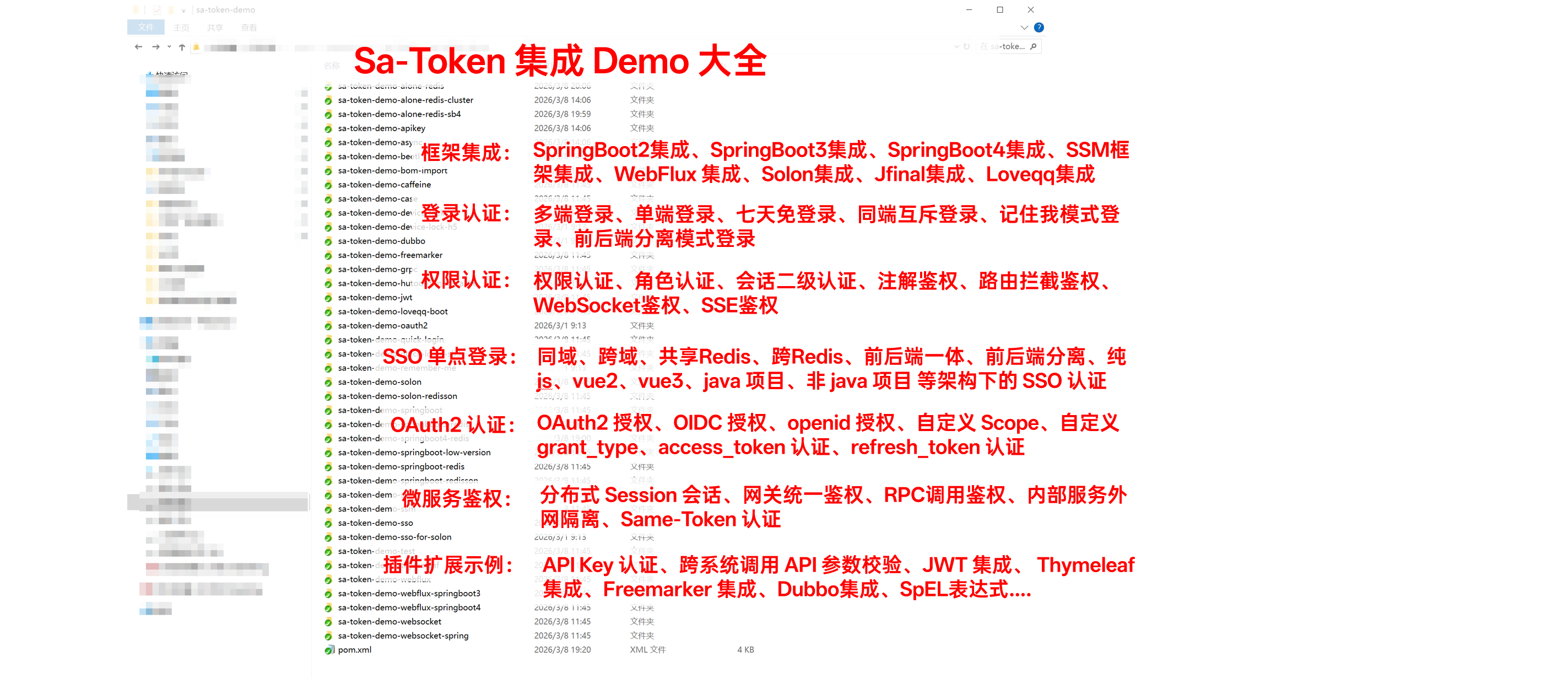
æ们为æ¡æ¶å ä¹ææææ¯ç¹ååç¬å¶ä½äºå¯¹åºçéæ示ä¾ï¼æ¤å缩å å ±è®¡ 60+ Demoï¼æ¶µç Sa-Token ç»å½è®¤è¯ãæé认è¯ãSSO åç¹ç»å½ãOAUth2 ç»ä¸è®¤è¯ãå¾®æå¡é´æãAPI Key 认è¯ãJWTéæã跨系ç»è°ç¨åæ°ç¾åæ ¡éª çé´æ认è¯çæ¹æ¹é¢é¢ã
ä¸è½½å°åï¼https://sa-token.cc/doc.html#/more/download-demos
ð¬ 交æµç¾¤
QQ交æµç¾¤ï¼1081649142 ç¹å»å å ¥
微信交æµç¾¤ï¼

PSï¼æ«ç æ·»å 微信 (å¤æ³¨ï¼sa-token)ï¼éæ¨å å ¥ç¾¤èã

å å ¥ç¾¤èç好å¤ï¼
- 第ä¸æ¶é´æ¶å°æ¡æ¶æ´æ°éç¥ã
- 第ä¸æ¶é´æ¶å°æ¡æ¶ bug éç¥ã
- 第ä¸æ¶é´æ¶å°æ°å¢å¼æºæ¡ä¾éç¥ã
- åä¼å¤å¤§ä½¬ä¸èµ·äºç¸ (huá shuÇ) äº¤æµ (mÅ yú) ðï¸ðï¸ã
Top Related Projects
Spring Security
Java JWT: JSON Web Token for Java and Android
Java implementation of JSON Web Token (JWT)
Security engine for Java (authentication, authorization, multi frameworks): OpenID Connect, SAML2, CAS, OAuth, LDAP, JWT...
Apereo CAS - Identity & Single Sign On for all earthlings and beyond.
Convert designs to code with AI
Introducing Visual Copilot: A new AI model to turn Figma designs to high quality code using your components.
Try Visual Copilot