
Top Related Projects

OpenPose: Real-time multi-person keypoint detection library for body, face, hands, and foot estimation

Official implementation of CVPR2020 paper "VIBE: Video Inference for Human Body Pose and Shape Estimation"

Expressive Body Capture: 3D Hands, Face, and Body from a Single Image
Quick Overview
FrankMocap is an open-source project by Facebook Research for 3D human pose and shape estimation from images and videos. It provides a framework for whole-body motion capture, including hand and body pose estimation, using deep learning techniques.
Pros
- Offers both whole-body and hand-only pose estimation
- Supports single-image and video input
- Provides pre-trained models for quick deployment
- Open-source with active community support
Cons
- Requires significant computational resources for real-time processing
- May struggle with complex poses or occlusions
- Limited documentation for advanced customization
- Dependency on specific versions of libraries can cause compatibility issues
Code Examples
- Whole-body pose estimation from an image:
from frankmocap.mocap_utils.mocap_predictor import MocapPredictor

predictor = MocapPredictor(regressor_checkpoint="path/to/checkpoint.pth")
body_pose_results = predictor.predict(img_path="path/to/image.jpg")
- Hand pose estimation from video:
from frankmocap.mocap_utils.hand_mocap_predictor import HandMocapPredictor

hand_predictor = HandMocapPredictor()
video_file = "path/to/video.mp4"
hand_results = hand_predictor.predict_video(video_file)
- Visualizing results:
from frankmocap.visualization.vis_utils import render_mocap_results

rendered_image = render_mocap_results(img, body_pose_results)
cv2.imwrite("output.jpg", rendered_image)
Getting Started
-
Clone the repository:
git clone https://github.com/facebookresearch/frankmocap.git cd frankmocap -
Install dependencies:
pip install -r requirements.txt -
Download pre-trained models:
sh scripts/download_data_body_module.sh sh scripts/download_data_hand_module.sh -
Run whole-body demo:
python -m demo.demo_bodymocap --input_path path/to/image_or_video
Competitor Comparisons
OpenPose: Real-time multi-person keypoint detection library for body, face, hands, and foot estimation
Pros of OpenPose
- More established and widely used in academia and industry
- Supports multi-person pose estimation
- Offers real-time performance on GPU
Cons of OpenPose
- Limited to 2D pose estimation
- Requires more computational resources
- Less accurate for complex poses or occlusions
Code Comparison
OpenPose:
from openpose import pyopenpose as op
params = dict()
params["model_folder"] = "../models/"
opWrapper = op.WrapperPython()
opWrapper.configure(params)
opWrapper.start()
FrankMocap:
from frankmocap.mocap import MocapPredictor
predictor = MocapPredictor()
body_mocap = predictor.get_mocap_predictor('body')
body_result = body_mocap.regress(img)
OpenPose focuses on 2D pose estimation for multiple people in real-time, while FrankMocap provides 3D body pose and hand pose estimation for a single person. OpenPose is more suitable for applications requiring fast, multi-person tracking, whereas FrankMocap excels in detailed 3D pose reconstruction for individual subjects. OpenPose has a larger community and more extensive documentation, but FrankMocap offers more advanced features like 3D hand pose estimation and full-body mesh recovery.
Official implementation of CVPR2020 paper "VIBE: Video Inference for Human Body Pose and Shape Estimation"
Pros of VIBE
- Provides temporal consistency in 3D human pose estimation
- Offers a more robust performance in challenging scenarios like occlusions
- Includes a pre-trained model for quick implementation
Cons of VIBE
- May have higher computational requirements due to its temporal approach
- Limited to single-person pose estimation in its default configuration
- Requires more setup and dependencies compared to FrankMocap
Code Comparison
VIBE example:
vibe = VIBE_Demo(args.vibe_cfg, args.vibe_ckpt)
vibe_results = vibe.run(video_file)
FrankMocap example:
mocap = FrankMocap(args)
mocap_results = mocap.run_single_image(image_path)
Both repositories focus on 3D human pose estimation, but they approach the task differently. VIBE emphasizes temporal consistency and robustness in challenging scenarios, while FrankMocap offers a more straightforward implementation with support for both single-image and video input. VIBE may be more suitable for complex, multi-frame scenarios, while FrankMocap provides a simpler solution for quick pose estimation tasks.
Expressive Body Capture: 3D Hands, Face, and Body from a Single Image
Pros of SMPLify-X
- More comprehensive body model including face and hands (SMPL-X)
- Supports estimation of body shape parameters
- Better suited for detailed full-body pose and shape reconstruction
Cons of SMPLify-X
- Slower processing speed compared to FrankMocap
- More complex setup and dependencies
- May require more computational resources
Code Comparison
SMPLify-X:
smplx_model = smplx.create(model_path, model_type='smplx')
optimizer = optim.Adam(smplx_model.parameters(), lr=0.01)
for _ in range(num_iterations):
    optimizer.zero_grad()
    loss = compute_loss(smplx_model, target_vertices)
    loss.backward()
    optimizer.step()
FrankMocap:
body_mocap = BodyMocap(regressor_checkpoint, smpl_dir)
body_pose_dict = body_mocap.regress(img)
pred_vertices_body = body_pose_dict['pred_vertices_smpl']
pred_joints_body = body_pose_dict['pred_joints_smpl']
The code snippets illustrate the different approaches: SMPLify-X uses an optimization-based method, while FrankMocap employs a regression-based approach. SMPLify-X offers more flexibility but requires iterative optimization, whereas FrankMocap provides faster, direct predictions at the cost of some detail.
Convert  designs to code with AI

Introducing Visual Copilot: A new AI model to turn Figma designs to high quality code using your components.
Try Visual CopilotREADME
FrankMocap: A Strong and Easy-to-use Single View 3D Hand+Body Pose Estimator
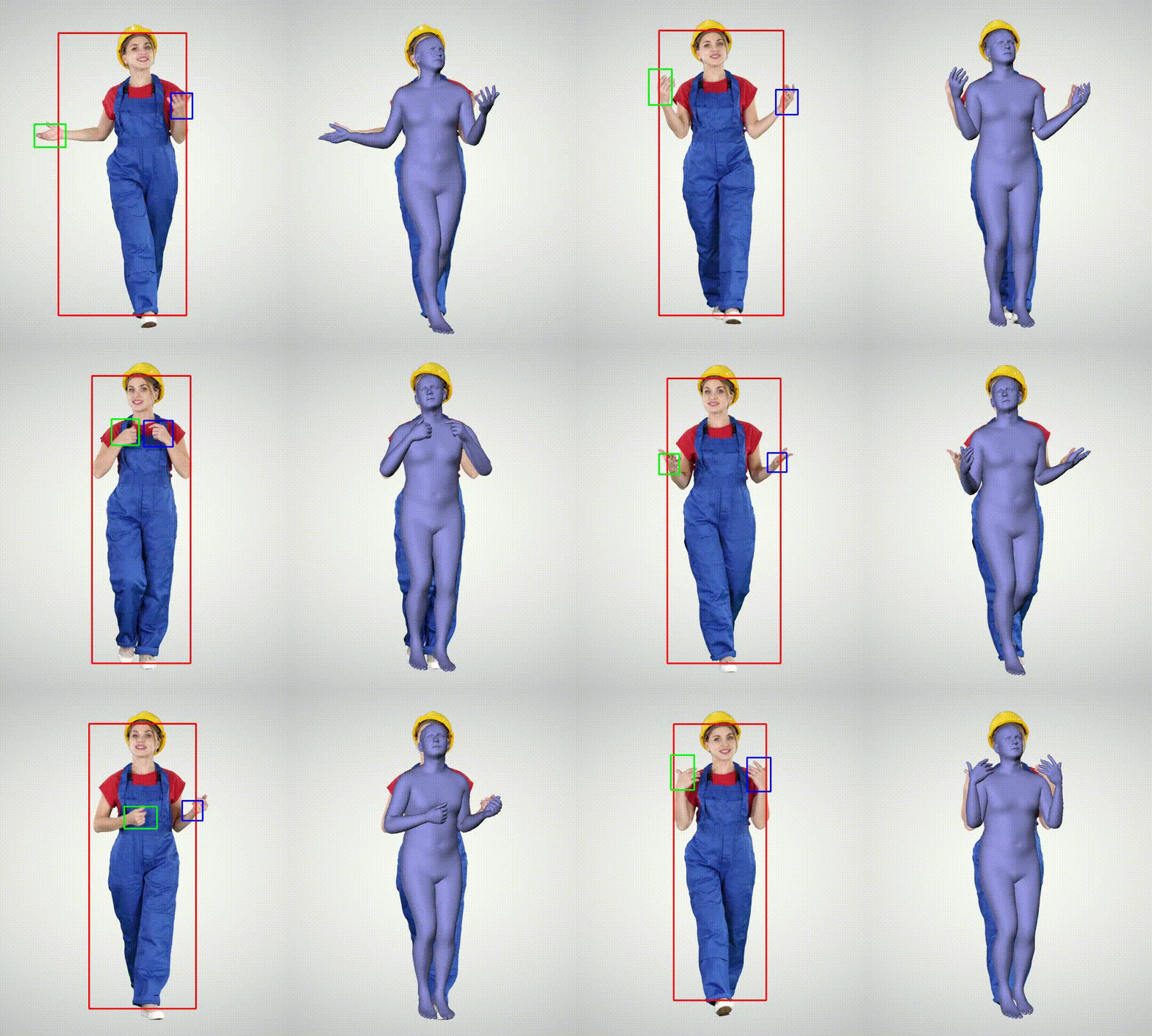
FrankMocap pursues an easy-to-use single view 3D motion capture system developed by Facebook AI Research (FAIR). FrankMocap provides state-of-the-art 3D pose estimation outputs for body, hand, and body+hands in a single system. The core objective of FrankMocap is to democratize the 3D human pose estimation technology, enabling anyone (researchers, engineers, developers, artists, and others) can easily obtain 3D motion capture outputs from videos and images.
Btw, why the name FrankMocap? Our pipeline to integrate body and hand modules reminds us of Frankenstein's monster!
News:
- [2021/08/18] Our paper has been accepted to ICCV Workshop 2021.
- [2020/10/09] We have improved openGL rendering speed. It's about 40% faster. (e.g., body module: 6fps -> 11fps)
Key Features
- Body Motion Capture:

- Hand Motion Capture

- Egocentric Hand Motion Capture

- Whole body Motion Capture (body + hands)

Installation
- See INSTALL.md
A Quick Start
-
Run body motion capture
# using a machine with a monitor to show output on screen python -m demo.demo_bodymocap --input_path ./sample_data/han_short.mp4 --out_dir ./mocap_output # screenless mode (e.g., a remote server) xvfb-run -a python -m demo.demo_bodymocap --input_path ./sample_data/han_short.mp4 --out_dir ./mocap_output -
Run hand motion capture
# using a machine with a monitor to show outputs on screen python -m demo.demo_handmocap --input_path ./sample_data/han_hand_short.mp4 --out_dir ./mocap_output # screenless mode (e.g., a remote server) xvfb-run -a python -m demo.demo_handmocap --input_path ./sample_data/han_hand_short.mp4 --out_dir ./mocap_output -
Run whole body motion capture
# using a machine with a monitor to show outputs on screen python -m demo.demo_frankmocap --input_path ./sample_data/han_short.mp4 --out_dir ./mocap_output # screenless mode (e.g., a remote server) xvfb-run -a python -m demo.demo_frankmocap --input_path ./sample_data/han_short.mp4 --out_dir ./mocap_output -
Note:
-
Above commands use openGL by default. If it does not work, you may try alternative renderers (pytorch3d or openDR).
-
See the readme of each module for details
-
Joint Order
- See joint_order
Body Motion Capture Module
- See run_bodymocap
Hand Motion Capture Module
- See run_handmocap
Whole Body Motion Capture Module (Body + Hand)
- See run_totalmocap
License
- CC-BY-NC 4.0. See the LICENSE file.
References
- FrankMocap is based on the following research outputs:
@InProceedings{rong2021frankmocap,
  title={FrankMocap: A Monocular 3D Whole-Body Pose Estimation System via Regression and Integration},
  author={Rong, Yu and Shiratori, Takaaki and Joo, Hanbyul},
  booktitle={IEEE International Conference on Computer Vision Workshops},
  year={2021}
}

@article{joo2020eft,
  title={Exemplar Fine-Tuning for 3D Human Pose Fitting Towards In-the-Wild 3D Human Pose Estimation},
  author={Joo, Hanbyul and Neverova, Natalia and Vedaldi, Andrea},
  journal={3DV},
  year={2021}
}
- FrankMocap leverages many amazing open-sources shared in research community.
- SMPL, SMPLX
- Detectron2
- Pytorch3D (for rendering)
- OpenDR (for rendering)
- SPIN (for body module)
- 100DOH (for hand detection)
- lightweight-human-pose-estimation (for body detection)
Top Related Projects
OpenPose: Real-time multi-person keypoint detection library for body, face, hands, and foot estimation
Official implementation of CVPR2020 paper "VIBE: Video Inference for Human Body Pose and Shape Estimation"
Expressive Body Capture: 3D Hands, Face, and Body from a Single Image
Convert designs to code with AI
Introducing Visual Copilot: A new AI model to turn Figma designs to high quality code using your components.
Try Visual Copilot