 gitbutler
The GitButler version control client, backed by Git, powered by Tauri/Rust/Svelte
Top Related Projects

simple terminal UI for git commands

Blazing 💥 fast terminal-ui for git written in rust 🦀

GitHub’s official command line tool

It's Magit! A Git Porcelain inside Emacs.

A cross-platform, customizable science fiction terminal emulator with advanced monitoring & touchscreen support.

manage your git repositories in one place
Quick Overview
GitButler is an innovative Git client designed to enhance the version control workflow for developers. It offers a unique approach to managing branches and commits, aiming to streamline the development process and improve collaboration among team members.
Pros
- Intuitive user interface that simplifies complex Git operations
- Advanced branch management features for better organization of work
- Seamless integration with popular Git hosting platforms
- Real-time collaboration tools for improved team productivity
Cons
- Learning curve for users accustomed to traditional Git clients
- Limited customization options compared to some established Git tools
- Potential performance issues with very large repositories
- Relatively new project, which may lead to occasional stability concerns
Getting Started
To get started with GitButler:
- Visit the official GitButler website: https://gitbutler.com
- Download the appropriate version for your operating system (Windows, macOS, or Linux)
- Install the application following the on-screen instructions
- Launch GitButler and sign in with your preferred Git hosting account (GitHub, GitLab, or Bitbucket)
- Clone or open an existing repository to begin using GitButler's features
Note: As GitButler is primarily a GUI application and not a code library, there are no code examples or quick start code snippets to provide.
Competitor Comparisons
simple terminal UI for git commands
Pros of Lazygit
- Terminal-based interface, lightweight and fast
- Extensive keyboard shortcuts for efficient Git operations
- Cross-platform compatibility (Linux, macOS, Windows)
Cons of Lazygit
- Steeper learning curve for users unfamiliar with terminal interfaces
- Limited visual representation compared to GUI-based tools
- Requires manual installation and configuration
Code Comparison
Lazygit (Go):
func (gui *Gui) handleCommitConfirm(g *gocui.Gui, v *gocui.View) error {
    message := gui.trimmedContent(v)
    if message == "" {
        return gui.createErrorPanel(gui.Tr.NoCommitMessageErr)
    }
    return gui.handleCommitSubmit(message)
}
GitButler (Rust):
pub fn commit(&self, message: &str) -> Result<(), GitError> {
    let signature = self.signature()?;
    let tree_id = self.repo.index()?.write_tree()?;
    let tree = self.repo.find_tree(tree_id)?;
    self.repo.commit(Some("HEAD"), &signature, &signature, message, &tree, &[])?;
    Ok(())
}
GitButler is a desktop application for Git workflow management, while Lazygit is a terminal-based Git interface. GitButler offers a more visual approach with branch management features, while Lazygit provides a lightweight, keyboard-driven experience for Git operations directly in the terminal.
Blazing 💥 fast terminal-ui for git written in rust 🦀
Pros of GitUI
- Lightweight and fast terminal-based UI for Git operations
- Cross-platform compatibility (Linux, macOS, Windows)
- Customizable key bindings and color schemes
Cons of GitUI
- Limited to command-line interface, which may not be suitable for all users
- Lacks some advanced features found in GUI-based Git clients
- Steeper learning curve for users unfamiliar with terminal-based applications
Code Comparison
GitUI:
pub fn draw<B: Backend>(&mut self, f: &mut Frame<B>) {
    let chunks = Layout::default()
        .direction(Direction::Vertical)
        .constraints([Constraint::Length(3), Constraint::Min(0)].as_ref())
        .split(f.size());
}
GitButler:
export const GitButlerProvider: React.FC<Props> = ({ children }) => {
  const [state, dispatch] = useReducer(reducer, initialState);
  return (
    <GitButlerContext.Provider value={{ state, dispatch }}>
      {children}
    </GitButlerContext.Provider>
  );
};
The code snippets showcase the different approaches and technologies used by the two projects. GitUI is written in Rust and focuses on terminal-based UI rendering, while GitButler uses TypeScript and React for a web-based interface.
GitHub’s official command line tool
Pros of cli
- Officially maintained by GitHub, ensuring high reliability and integration
- Extensive documentation and community support
- Broader feature set covering most GitHub operations
Cons of cli
- Steeper learning curve due to more complex command structure
- Focused solely on GitHub, limiting use with other Git platforms
- Larger installation size and resource footprint
Code Comparison
cli:
gh repo create my-project --public --clone
gh issue create --title "Bug report" --body "Description"
gh pr create --title "New feature" --body "Details"
GitButler:
gb branch create feature-branch
gb commit -m "Add new feature"
gb push
Key Differences
GitButler focuses on streamlining Git workflows with a simpler interface, while cli provides comprehensive GitHub functionality. GitButler aims to enhance local Git operations, whereas cli is designed for full GitHub integration.
GitButler offers a visual interface for managing branches and commits, which may be more intuitive for some users. cli, on the other hand, provides a powerful command-line tool for interacting with all aspects of GitHub repositories.
While both tools aim to improve developer productivity, they target different aspects of the Git and GitHub ecosystem. GitButler emphasizes local Git management, while cli excels in GitHub-specific tasks and automation.
It's Magit! A Git Porcelain inside Emacs.
Pros of Magit
- Deeply integrated with Emacs, providing a powerful and customizable Git interface
- Extensive documentation and large, active community support
- Supports advanced Git operations and workflows directly from Emacs
Cons of Magit
- Steep learning curve for users not familiar with Emacs
- Limited visual representation of Git history compared to GUI tools
- Requires Emacs, which may not be suitable for all developers or environments
Code Comparison
Magit (Emacs Lisp):
(magit-status)
(magit-stage-file "file.txt")
(magit-commit-create)
GitButler (JavaScript/TypeScript):
// No direct code comparison available as GitButler is a GUI application
// and doesn't expose a public API for programmatic interaction
Additional Notes
GitButler is a visual Git client focused on branch management and workflow optimization, while Magit is a text-based interface integrated into Emacs. GitButler offers a more intuitive experience for users who prefer graphical interfaces, while Magit provides deep integration and powerful features for Emacs users comfortable with text-based environments.
A cross-platform, customizable science fiction terminal emulator with advanced monitoring & touchscreen support.
Pros of eDEX-UI
- Visually stunning and immersive sci-fi inspired interface
- Includes system monitoring features and file browser
- Cross-platform support (Windows, macOS, Linux)
Cons of eDEX-UI
- Primarily focused on aesthetics rather than Git-specific functionality
- May consume more system resources due to its graphical nature
- Less suited for professional Git workflow management
Code Comparison
eDEX-UI (JavaScript):
class Clock extends Component {
  constructor(props) {
    super(props);
    this.state = {
      date: new Date()
    };
  }
}
GitButler (Rust):
#[derive(Debug, Clone, Serialize, Deserialize)]
pub struct Commit {
    pub id: String,
    pub summary: String,
    pub message: String,
    pub author: String,
}
Summary
GitButler is a Git client focused on improving workflow and branch management, while eDEX-UI is a futuristic terminal emulator with system monitoring capabilities. GitButler is more practical for Git-specific tasks, whereas eDEX-UI offers a unique, visually appealing interface for general terminal use and system monitoring. The code snippets highlight their different focuses: eDEX-UI uses JavaScript for UI components, while GitButler employs Rust for efficient data structures related to Git operations.
manage your git repositories in one place
Pros of gitbatch
- Command-line interface for managing multiple Git repositories simultaneously
- Lightweight and fast, with minimal dependencies
- Supports custom commands and hooks for advanced workflows
Cons of gitbatch
- Limited graphical user interface compared to GitButler
- Lacks advanced branching and version control features
- May require more technical knowledge to use effectively
Code comparison
GitButler:
import { Branch } from './branch';

export class Repository {
  branches: Branch[];
  // ...
}
gitbatch:
type Repository struct {
    Name     string
    Path     string
    Branches []string
    // ...
}
GitButler is a desktop application focused on streamlining Git workflows with a user-friendly interface and advanced branching features. It aims to simplify complex version control tasks and improve collaboration.
gitbatch, on the other hand, is a command-line tool designed for managing multiple Git repositories efficiently. It provides a lightweight solution for developers who prefer terminal-based workflows and need to perform batch operations across multiple projects.
While GitButler offers a more comprehensive and visually appealing approach to Git management, gitbatch excels in its simplicity and speed for handling multiple repositories simultaneously. The choice between the two depends on individual preferences and specific project requirements.
Convert  designs to code with AI

Introducing Visual Copilot: A new AI model to turn Figma designs to high quality code using your components.
Try Visual CopilotREADME

GitButler
Git, but better.
GitButler is a modern Git-based version control interface with both a GUI and CLI built from the ground up for AI-powered workflows.
Website
â¢
Blog
â¢
Docs
â¢
Downloads
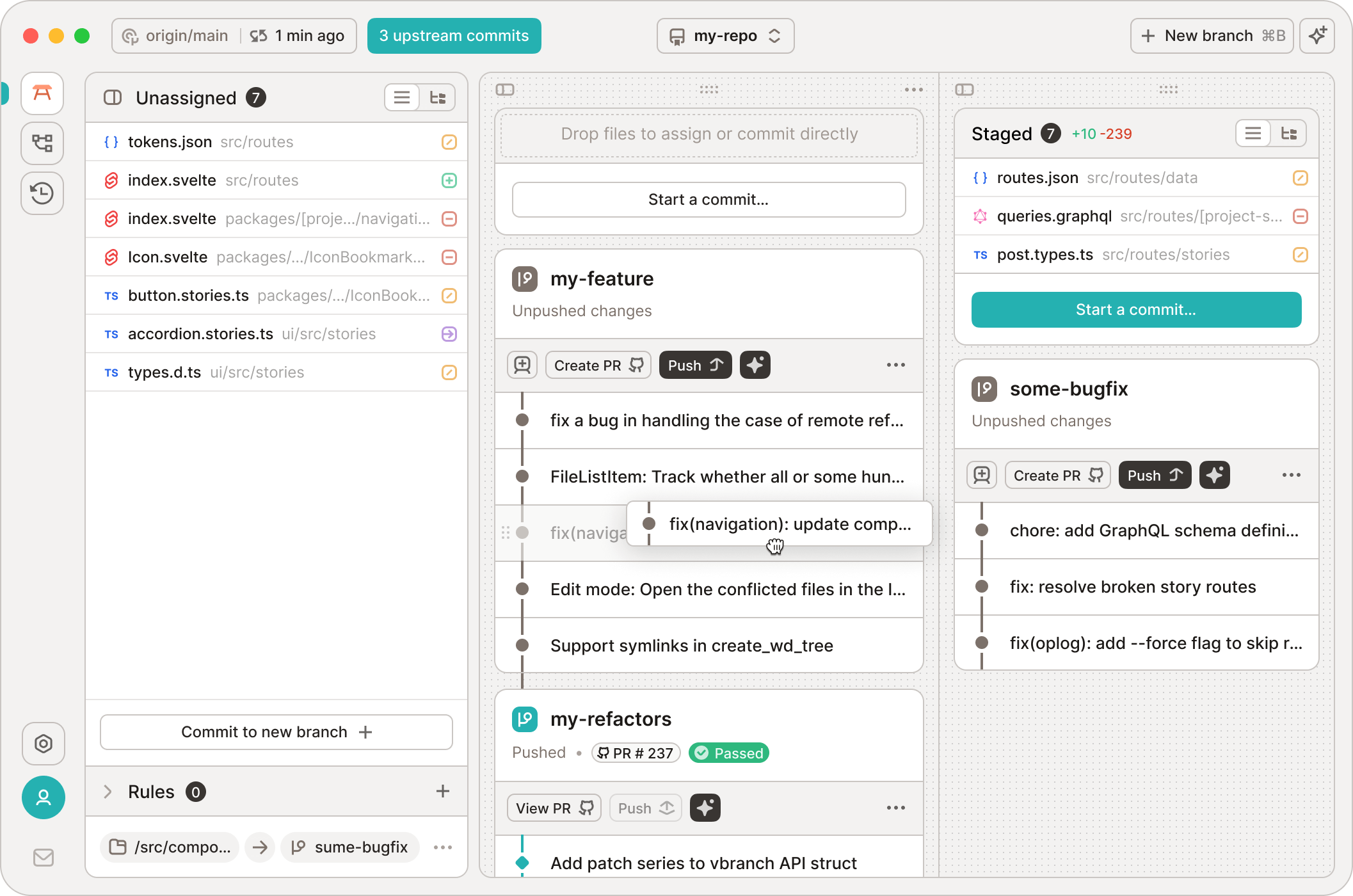
Our beautiful GUI
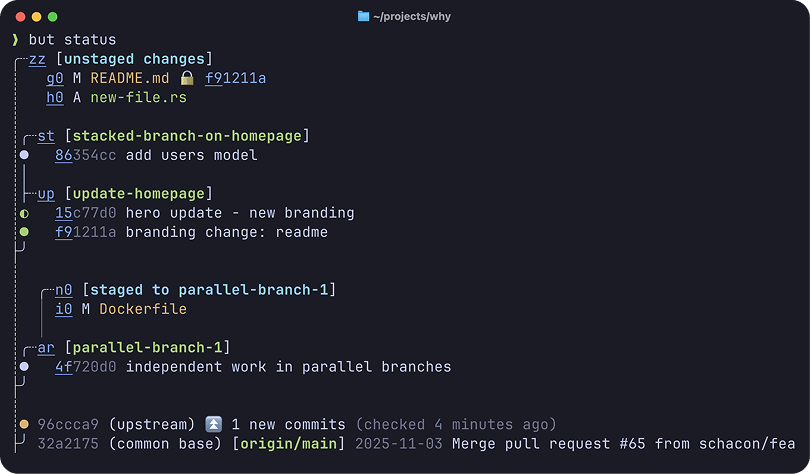
Our amazing but CLI







GitButler is a powerful new Git-based version control system, designed from scratch to be simple, powerful and flexible. It is designed for ease of use and modern agentic workflows.
It features stacked branches, parallel branches, unlimited undo, easy commit mutations, forge integrations and more.
Works instantly in any existing Git repo as a friendlier and more powerful drop-in Git user interface replacement - for you and your agents.
Main Features
Why use GitButler instead of vanilla Git? What a great question.
- Stacked Branches (gui, cli)
- Effortlessly create branches stacked on other branches. Amend or edit any commit easily with automatic restacking.
- Parallel Branches (gui, cli)
- Organize work on multiple branches simultaneously, rather than constantly switching branches.
- Easy Commit Management (gui, cli)
- Uncommit, reword, amend, move, split and squash commits by dragging and dropping or simple CLI commands. Forget about
rebase -i, you don't need it anymore.
- Uncommit, reword, amend, move, split and squash commits by dragging and dropping or simple CLI commands. Forget about
- Undo Timeline (gui, cli)
- Logs all operations and changes and allows you to easily undo or revert any operation.
- First Class Conflicts (gui, cli)
- Rebases always succeed. Commits can be marked as conflicted and resolved at any time, in any order.
- Forge Integration (gui, cli)
- Authenticate to GitHub, GitLab, or Bitbucket to easily open and update Pull Requests, list branches, get CI statuses and more. No other tools required.
- AI Tooling (gui, cli)
- Use built-in AI handlers to help create commit messages, branch names, PR descriptions and more.
- Easily install hooks or skills for all modern agent systems to level up their Git management.
Tech
The GitButler desktop app is a Tauri-based application. Its UI is written in Svelte using TypeScript and its backend is written in Rust.
The but CLI is the same Rust backend engine with a Rust command line UI.
Documentation
You can find our end user documentation at: https://docs.gitbutler.com
Bugs and Feature Requests
If you have a bug or feature request, feel free to open an issue, or join our Discord server.
License
The TLDR is that GitButler is under a Fair Source software license, meaning that you can use it, view the source, contribute, etc. You just can't build a competitor with it. It also becomes MIT after 2 years. So, MIT with an expiring non-compete clause.
Contributing
So you want to help out? Please check out the CONTRIBUTING.md document.
If you want to skip right to getting the code to actually compile, take a look at the DEVELOPMENT.md file.
Contributors
Top Related Projects
simple terminal UI for git commands
Blazing 💥 fast terminal-ui for git written in rust 🦀
GitHub’s official command line tool
It's Magit! A Git Porcelain inside Emacs.
A cross-platform, customizable science fiction terminal emulator with advanced monitoring & touchscreen support.
manage your git repositories in one place
Convert designs to code with AI
Introducing Visual Copilot: A new AI model to turn Figma designs to high quality code using your components.
Try Visual Copilot