
Top Related Projects

A simple and easy-to-use library to enjoy videogames programming

Desktop/Android/HTML5/iOS Java game development framework

Godot Engine – Multi-platform 2D and 3D game engine

LÖVE is an awesome 2D game framework for Lua.

🐍🎮 pygame (the library) is a Free and Open Source python programming language library for making multimedia applications like games built on top of the excellent SDL library. C, Python, Native, OpenGL.
Quick Overview
Ebiten is a dead simple 2D game library for Go. It provides a simple and efficient way to create 2D games and graphical applications, with a focus on performance and cross-platform compatibility. Ebiten supports desktop, web, and mobile platforms.
Pros
- Simple and easy-to-use API for 2D game development
- Cross-platform support (Windows, macOS, Linux, Web, Android, iOS)
- Excellent performance with hardware acceleration
- Active development and community support
Cons
- Limited to 2D graphics (no built-in 3D support)
- Fewer advanced features compared to some larger game engines
- Learning curve for developers new to Go programming language
Code Examples
- Creating a basic game window:
package main

import (
    "github.com/hajimehoshi/ebiten/v2"
)

type Game struct{}

func (g *Game) Update() error {
    return nil
}

func (g *Game) Draw(screen *ebiten.Image) {
    // Drawing code here
}

func (g *Game) Layout(outsideWidth, outsideHeight int) (screenWidth, screenHeight int) {
    return 320, 240
}

func main() {
    ebiten.SetWindowSize(640, 480)
    ebiten.SetWindowTitle("My Ebiten Game")
    if err := ebiten.RunGame(&Game{}); err != nil {
        panic(err)
    }
}
- Drawing an image:
import (
    "github.com/hajimehoshi/ebiten/v2"
    "github.com/hajimehoshi/ebiten/v2/ebitenutil"
)

func (g *Game) Draw(screen *ebiten.Image) {
    img, _, err := ebitenutil.NewImageFromFile("image.png")
    if err != nil {
        panic(err)
    }
    op := &ebiten.DrawImageOptions{}
    op.GeoM.Translate(100, 100)
    screen.DrawImage(img, op)
}
- Handling input:
func (g *Game) Update() error {
    if ebiten.IsKeyPressed(ebiten.KeySpace) {
        // Do something when space is pressed
    }
    if ebiten.IsMouseButtonPressed(ebiten.MouseButtonLeft) {
        x, y := ebiten.CursorPosition()
        // Handle mouse click at (x, y)
    }
    return nil
}
Getting Started
- Install Go (if not already installed)
- Install Ebiten:
go get github.com/hajimehoshi/ebiten/v2 - Create a new Go file (e.g.,
main.go) and copy the basic game window example from above - Run the game:
go run main.go
For more detailed instructions and examples, visit the Ebiten documentation.
Competitor Comparisons
A simple and easy-to-use library to enjoy videogames programming
Pros of raylib
- Multi-platform support with bindings for various programming languages
- Comprehensive set of tools and utilities for game development
- Extensive documentation and examples
Cons of raylib
- Steeper learning curve for beginners
- Less idiomatic Go code compared to Ebiten
Code Comparison
raylib (C):
#include "raylib.h"

int main(void) {
    InitWindow(800, 450, "raylib example");
    while (!WindowShouldClose()) {
        BeginDrawing();
        ClearBackground(RAYWHITE);
        DrawText("Hello, raylib!", 190, 200, 20, LIGHTGRAY);
        EndDrawing();
    }
    CloseWindow();
    return 0;
}
Ebiten (Go):
package main

import (
    "github.com/hajimehoshi/ebiten/v2"
    "github.com/hajimehoshi/ebiten/v2/ebitenutil"
)

func update(screen *ebiten.Image) error {
    ebitenutil.DebugPrint(screen, "Hello, Ebiten!")
    return nil
}

func main() {
    ebiten.Run(update, 320, 240, 2, "Ebiten example")
}
Both raylib and Ebiten are popular game development libraries, each with its own strengths. raylib offers a more comprehensive set of tools and multi-platform support, while Ebiten provides a simpler, more Go-idiomatic approach to game development.
Desktop/Android/HTML5/iOS Java game development framework
Pros of libGDX
- Cross-platform development for desktop, mobile, and web
- Extensive ecosystem with many third-party extensions and tools
- Mature and well-established framework with a large community
Cons of libGDX
- Steeper learning curve, especially for beginners
- Larger codebase and more complex setup compared to Ebiten
- Java-based, which may not be preferred by some developers
Code Comparison
libGDX:
public class MyGame extends ApplicationAdapter {
    SpriteBatch batch;
    Texture img;

    @Override
    public void create() {
        batch = new SpriteBatch();
        img = new Texture("badlogic.jpg");
    }
}
Ebiten:
type Game struct{}

func (g *Game) Update() error {
    return nil
}

func (g *Game) Draw(screen *ebiten.Image) {
    ebitenutil.DebugPrint(screen, "Hello, World!")
}
Both frameworks offer game development capabilities, but libGDX provides a more comprehensive set of features and cross-platform support. Ebiten, on the other hand, offers a simpler and more lightweight approach, making it easier to get started for Go developers. The choice between the two depends on the specific project requirements, target platforms, and developer preferences.
Godot Engine – Multi-platform 2D and 3D game engine
Pros of Godot
- Full-featured game engine with built-in editor, asset management, and scene system
- Supports 2D and 3D game development with a wide range of tools and features
- Large and active community with extensive documentation and learning resources
Cons of Godot
- Steeper learning curve due to its comprehensive feature set
- Larger project size and potentially slower compile times
- May be overkill for simple 2D games or prototypes
Code Comparison
Godot (GDScript):
extends Sprite2D

func _ready():
    position = Vector2(100, 100)
    scale = Vector2(2, 2)
Ebiten (Go):
type Game struct{}

func (g *Game) Update() error {
    return nil
}

func (g *Game) Draw(screen *ebiten.Image) {
    ebitenutil.DebugPrint(screen, "Hello, World!")
}
Godot offers a more high-level, scene-based approach with its own scripting language, while Ebiten provides a lower-level, code-centric framework in Go. Godot is better suited for larger, complex games, while Ebiten excels in simplicity and performance for 2D games.
LÖVE is an awesome 2D game framework for Lua.
Pros of LÖVE
- Mature and well-established framework with a large community and extensive documentation
- Lua-based, offering a gentle learning curve for beginners
- Cross-platform support for desktop and mobile platforms
Cons of LÖVE
- Limited to Lua programming language, which may not be suitable for all developers
- Potential performance limitations compared to lower-level frameworks
Code Comparison
LÖVE:
function love.draw()
    love.graphics.print("Hello, World!", 400, 300)
end
Ebiten:
func (g *Game) Draw(screen *ebiten.Image) {
    ebitenutil.DebugPrint(screen, "Hello, World!")
}
Key Differences
- LÖVE uses Lua, while Ebiten is based on Go
- Ebiten offers better performance for more complex games
- LÖVE has a larger ecosystem of libraries and extensions
- Ebiten provides a more streamlined API for game development
Use Cases
- LÖVE: Ideal for rapid prototyping, game jams, and educational purposes
- Ebiten: Well-suited for performance-critical games and developers familiar with Go
Both frameworks are excellent choices for 2D game development, with the choice depending on the developer's language preference, performance requirements, and project complexity.
🐍🎮 pygame (the library) is a Free and Open Source python programming language library for making multimedia applications like games built on top of the excellent SDL library. C, Python, Native, OpenGL.
Pros of Pygame
- Extensive documentation and large community support
- Rich set of built-in features for game development
- Cross-platform compatibility (Windows, macOS, Linux)
Cons of Pygame
- Performance limitations for complex games
- Lack of modern GPU acceleration
- Steeper learning curve for beginners
Code Comparison
Pygame:
import pygame

pygame.init()
screen = pygame.display.set_mode((640, 480))
clock = pygame.time.Clock()

while True:
    for event in pygame.event.get():
        if event.type == pygame.QUIT:
            pygame.quit()
    clock.tick(60)
Ebiten:
package main

import "github.com/hajimehoshi/ebiten/v2"

func update() error {
    return nil
}

func draw(screen *ebiten.Image) {
}

func main() {
    ebiten.Run(update, draw, 640, 480, 1, "Game")
}
Pygame offers a more traditional game loop structure with explicit event handling, while Ebiten uses a simpler callback-based approach. Pygame's code is more verbose but may be easier for beginners to understand, whereas Ebiten's code is more concise and idiomatic Go.
Both libraries provide similar basic functionality for creating game windows and handling input, but their syntax and programming paradigms differ significantly due to the underlying languages (Python vs. Go) and design philosophies.
Convert  designs to code with AI
Introducing Visual Copilot: A new AI model to turn Figma designs to high quality code using your components.
Try Visual CopilotREADME
Ebitengine (v2)


A dead simple 2D game engine for Go
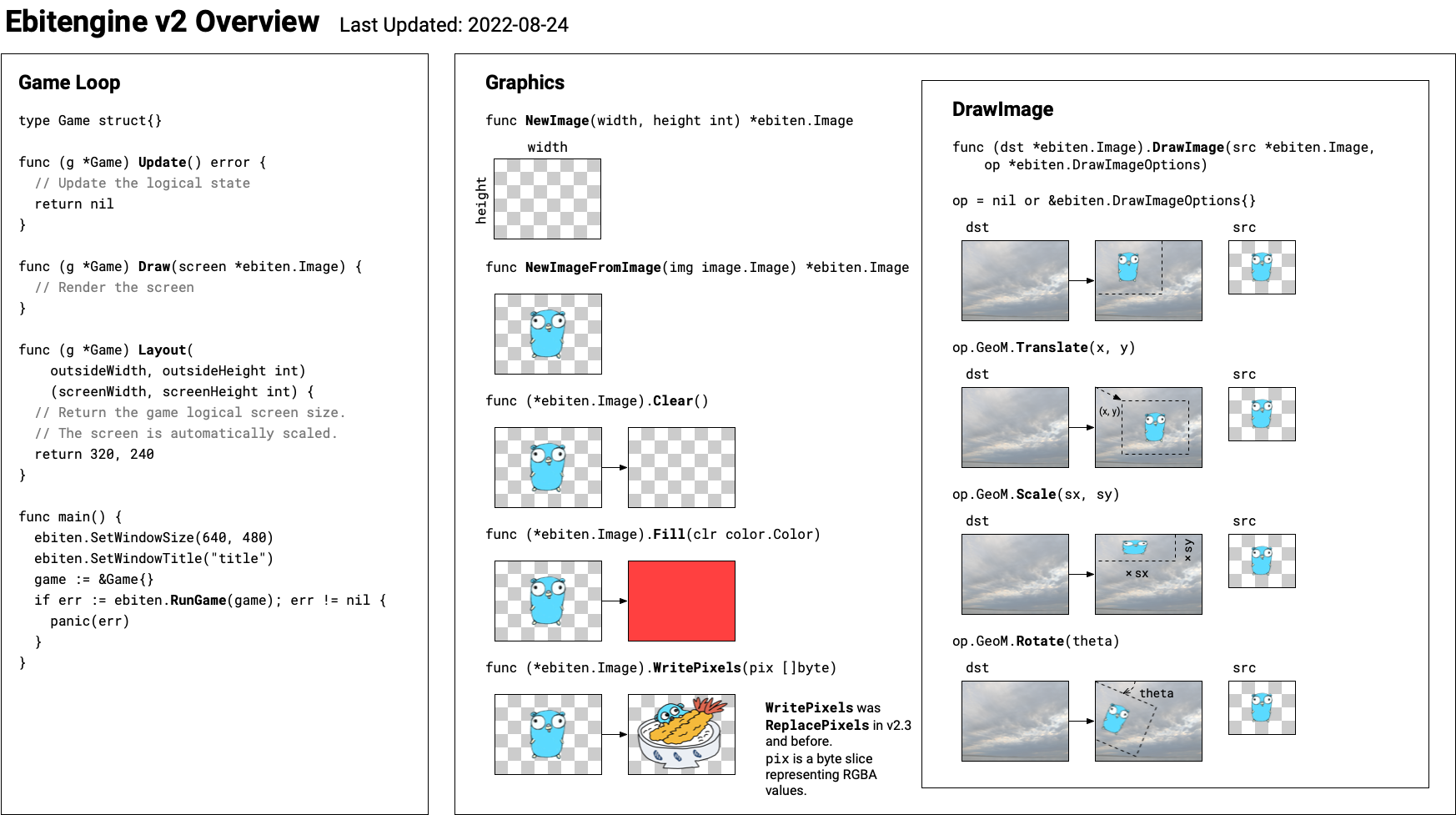
Ebitengine (formerly known as Ebiten) is an open source game engine for the Go programming language. Ebitengine's simple API allows you to quickly and easily develop 2D games that can be deployed across multiple platforms.
Platforms
- Windows
- macOS
- Linux
- FreeBSD
- Android (Cgo required)
- iOS (Cgo required)
- WebAssembly
- Nintendo Switch (Cgo required)
- Xbox (Cgo required) (Xbox support is limited and not available to everyone. Negotiations are currently underway to make it accessible to all.)
For installation on desktops, see the installation instruction.
Features
- 2D Graphics (Geometry and color transformation by matrices, Various composition modes, Offscreen rendering, Text rendering, Automatic batches, Automatic texture atlas, Custom shaders)
- Input (Mouse, Keyboard, Gamepads, Touches)
- Audio (Ogg/Vorbis, MP3, WAV, PCM)
Packages
AI coding agents
If you use an AI coding agent to write or modify Ebitengine code or applications, point it at the skills directory, which holds skills for working with this repository.
Community
- Discord
#ebitenginechannel in Gophers Slack- GitHub Discussion
r/ebitenginein Reddit
License
Ebitengine is licensed under Apache license version 2.0. See LICENSE file.
The Ebitengine logo by Hajime Hoshi is licensed under the Creative Commons Attribution 4.0.

Ebitengine bundles third-party libraries. See NOTICE.md for their licenses.
Top Related Projects
A simple and easy-to-use library to enjoy videogames programming
Desktop/Android/HTML5/iOS Java game development framework
Godot Engine – Multi-platform 2D and 3D game engine
LÖVE is an awesome 2D game framework for Lua.
🐍🎮 pygame (the library) is a Free and Open Source python programming language library for making multimedia applications like games built on top of the excellent SDL library. C, Python, Native, OpenGL.
Convert designs to code with AI
Introducing Visual Copilot: A new AI model to turn Figma designs to high quality code using your components.
Try Visual Copilot