 preline
Preline UI is an open-source set of prebuilt UI components based on the utility-first Tailwind CSS framework.
Top Related Projects

A utility-first CSS framework for rapid UI development.

The most popular HTML, CSS, and JavaScript framework for developing responsive, mobile first projects on the web.

A lightweight and modular front-end framework for developing fast and powerful web interfaces

Modern CSS framework based on Flexbox

Materialize, a CSS Framework based on Material Design

The most advanced responsive front-end framework in the world. Quickly create prototypes and production code for sites that work on any kind of device.
Quick Overview
Preline is an open-source UI library built with Tailwind CSS, offering a comprehensive set of pre-built components and interactive elements for web development. It provides a collection of customizable and responsive UI components that can be easily integrated into Tailwind CSS projects, helping developers create modern and visually appealing web interfaces quickly.
Pros
- Extensive collection of pre-built UI components and interactive elements
- Seamless integration with Tailwind CSS projects
- Responsive design out of the box
- Active development and regular updates
Cons
- Requires Tailwind CSS knowledge for optimal usage
- May increase bundle size due to additional JavaScript for interactive components
- Limited customization options compared to building from scratch
- Potential for design homogeneity across projects using the library
Code Examples
- Adding a button component:
<button type="button" class="py-3 px-4 inline-flex justify-center items-center gap-2 rounded-md border border-transparent font-semibold bg-blue-500 text-white hover:bg-blue-600 focus:outline-none focus:ring-2 focus:ring-blue-500 focus:ring-offset-2 transition-all text-sm dark:focus:ring-offset-gray-800">
  Button
</button>
- Creating a modal dialog:
<button type="button" class="py-3 px-4 inline-flex justify-center items-center gap-2 rounded-md border border-transparent font-semibold bg-blue-500 text-white hover:bg-blue-600 focus:outline-none focus:ring-2 focus:ring-blue-500 focus:ring-offset-2 transition-all text-sm dark:focus:ring-offset-gray-800" data-hs-overlay="#hs-basic-modal">
  Open modal
</button>

<div id="hs-basic-modal" class="hs-overlay hidden w-full h-full fixed top-0 left-0 z-[60] overflow-x-hidden overflow-y-auto">
  <div class="hs-overlay-open:opacity-100 hs-overlay-open:duration-500 opacity-0 transition-all sm:max-w-lg sm:w-full m-3 sm:mx-auto">
    <div class="flex flex-col bg-white border shadow-sm rounded-xl dark:bg-gray-800 dark:border-gray-700 dark:shadow-slate-700/[.7]">
      <div class="flex justify-between items-center py-3 px-4 border-b dark:border-gray-700">
        <h3 class="font-bold text-gray-800 dark:text-white">
          Modal title
        </h3>
        <button type="button" class="hs-dropdown-toggle inline-flex flex-shrink-0 justify-center items-center h-8 w-8 rounded-md text-gray-500 hover:text-gray-400 focus:outline-none focus:ring-2 focus:ring-gray-400 focus:ring-offset-2 focus:ring-offset-white transition-all text-sm dark:focus:ring-gray-700 dark:focus:ring-offset-gray-800" data-hs-overlay="#hs-basic-modal">
          <span class="sr-only">Close</span>
          <svg class="w-3.5 h-3.5" width="8" height="8" viewBox="0 0 8 8" fill="none" xmlns="http://www.w3.org/2000/svg">
            <path d="M0.258206 1.00652C0.351976 0.912791 0.479126 0.860131 0.611706 0.860131C0.744296 0.860131 0.871447 0.912791 0.965207 1.00652L3.61171 3.65302L6.25822 1.00652C6.30432 0.958771 6.35952 0.920671 6.42052 0.894471C6.48152 0.868271
Competitor Comparisons
A utility-first CSS framework for rapid UI development.
Pros of Tailwind CSS
- Highly customizable and flexible utility-first CSS framework
- Extensive documentation and large community support
- Seamless integration with popular JavaScript frameworks
Cons of Tailwind CSS
- Steeper learning curve for developers new to utility-first CSS
- Potentially larger initial file size due to comprehensive utility classes
Code Comparison
Tailwind CSS:
<button class="bg-blue-500 hover:bg-blue-700 text-white font-bold py-2 px-4 rounded">
  Button
</button>
Preline:
<button class="py-3 px-4 inline-flex justify-center items-center gap-2 rounded-md border border-transparent font-semibold bg-blue-500 text-white hover:bg-blue-600 focus:outline-none focus:ring-2 focus:ring-blue-500 focus:ring-offset-2 transition-all text-sm dark:focus:ring-offset-gray-800">
  Button
</button>
Summary
Tailwind CSS offers a more flexible and customizable approach, with a larger ecosystem and community support. It's ideal for developers who prefer granular control over their styling. Preline, on the other hand, provides pre-built components that are easier to implement out of the box, making it more suitable for rapid prototyping or developers who prefer a component-based approach. The code comparison shows that Tailwind CSS uses more concise utility classes, while Preline offers more detailed, pre-styled components.
The most popular HTML, CSS, and JavaScript framework for developing responsive, mobile first projects on the web.
Pros of Bootstrap
- Extensive documentation and large community support
- Comprehensive set of components and utilities
- Well-established and battle-tested in production environments
Cons of Bootstrap
- Larger file size, potentially impacting page load times
- More opinionated design, which may require more customization
- Steeper learning curve for beginners due to its extensive features
Code Comparison
Bootstrap:
<div class="container">
  <div class="row">
    <div class="col-md-6">
      <button class="btn btn-primary">Click me</button>
    </div>
  </div>
</div>
Preline:
<div class="max-w-[85rem] mx-auto px-4 sm:px-6 lg:px-8">
  <div class="grid md:grid-cols-2 gap-4">
    <div>
      <button class="py-3 px-4 inline-flex items-center gap-x-2 text-sm font-semibold rounded-lg border border-transparent bg-blue-600 text-white hover:bg-blue-700 disabled:opacity-50 disabled:pointer-events-none dark:focus:outline-none dark:focus:ring-1 dark:focus:ring-gray-600">
        Click me
      </button>
    </div>
  </div>
</div>
Bootstrap offers a more concise syntax, while Preline provides more detailed class-based styling, potentially offering greater flexibility for customization directly in HTML.
A lightweight and modular front-end framework for developing fast and powerful web interfaces
Pros of UIkit
- More mature and established project with a larger community
- Extensive documentation and examples
- Wider range of components and features
Cons of UIkit
- Larger file size and potentially slower performance
- Steeper learning curve due to its comprehensive nature
- Less frequent updates compared to Preline
Code Comparison
UIkit:
<div class="uk-card uk-card-default">
    <div class="uk-card-header">
        <h3 class="uk-card-title">Title</h3>
    </div>
    <div class="uk-card-body">
        <p>Content</p>
    </div>
</div>
Preline:
<div class="bg-white border rounded-xl shadow-sm">
    <div class="p-4 md:p-5">
        <h3 class="text-lg font-bold">Title</h3>
        <p class="mt-2">Content</p>
    </div>
</div>
UIkit uses its own class naming convention with the uk- prefix, while Preline utilizes Tailwind CSS classes. UIkit's approach may lead to more semantic HTML, whereas Preline's utility-first approach offers more flexibility in styling. Both frameworks provide similar functionality, but with different implementation styles and levels of customization.
Modern CSS framework based on Flexbox
Pros of Bulma
- Larger community and ecosystem with more resources and third-party extensions
- Simpler learning curve due to its pure CSS approach without JavaScript dependencies
- More extensive documentation and examples for various components and layouts
Cons of Bulma
- Lacks built-in JavaScript functionality for interactive components
- May require more custom code for complex UI interactions and animations
- Less frequent updates and slower adoption of modern design trends
Code Comparison
Bulma (CSS-only approach):
<div class="card">
  <div class="card-content">
    <p class="title">Card title</p>
    <p class="subtitle">Card subtitle</p>
  </div>
</div>
Preline (HTML with Tailwind classes):
<div class="flex flex-col bg-white border shadow-sm rounded-xl dark:bg-gray-800 dark:border-gray-700 dark:shadow-slate-700/[.7]">
  <div class="p-4 md:p-5">
    <h3 class="text-lg font-bold text-gray-800 dark:text-white">Card title</h3>
    <p class="mt-1 text-gray-800 dark:text-gray-400">Card subtitle</p>
  </div>
</div>
Both frameworks offer efficient ways to create UI components, but Preline leverages Tailwind CSS for more granular control over styles, while Bulma provides a simpler, more traditional CSS class approach.
Materialize, a CSS Framework based on Material Design
Pros of Materialize
- More mature and established project with a larger community
- Comprehensive set of UI components and features
- Better documentation and examples
Cons of Materialize
- Larger file size and potentially slower performance
- Less frequent updates and maintenance
- More opinionated design, which may require more customization
Code Comparison
Materialize:
<div class="row">
  <div class="col s12 m6">
    <div class="card blue-grey darken-1">
      <div class="card-content white-text">
        <span class="card-title">Card Title</span>
        <p>Card content</p>
      </div>
    </div>
  </div>
</div>
Preline:
<div class="max-w-sm bg-white border border-gray-200 rounded-lg shadow dark:bg-gray-800 dark:border-gray-700">
  <div class="p-5">
    <h5 class="mb-2 text-2xl font-bold tracking-tight text-gray-900 dark:text-white">Card Title</h5>
    <p class="mb-3 font-normal text-gray-700 dark:text-gray-400">Card content</p>
  </div>
</div>
Materialize uses a grid system with predefined classes, while Preline relies more on utility classes for styling. Preline's approach offers more flexibility but may require more markup. Materialize's syntax is more concise but less customizable without modifying the source CSS.
The most advanced responsive front-end framework in the world. Quickly create prototypes and production code for sites that work on any kind of device.
Pros of Foundation
- More mature and established project with a larger community and ecosystem
- Offers a wider range of UI components and features out of the box
- Provides extensive documentation and learning resources
Cons of Foundation
- Larger file size and potentially slower performance compared to Preline
- Steeper learning curve for beginners due to its comprehensive nature
- Less frequent updates and slower adoption of modern web technologies
Code Comparison
Preline (Tailwind CSS-based):
<button type="button" class="py-3 px-4 inline-flex justify-center items-center gap-2 rounded-md border border-transparent font-semibold bg-blue-500 text-white hover:bg-blue-600 focus:outline-none focus:ring-2 focus:ring-blue-500 focus:ring-offset-2 transition-all text-sm dark:focus:ring-offset-gray-800">
  Button
</button>
Foundation:
<button type="button" class="button">
  Button
</button>
Foundation relies on predefined classes and SASS variables for styling, while Preline uses utility classes from Tailwind CSS for more granular control over design. Foundation's approach results in cleaner HTML but less flexibility, whereas Preline offers more customization options at the cost of more verbose markup.
Convert  designs to code with AI

Introducing Visual Copilot: A new AI model to turn Figma designs to high quality code using your components.
Try Visual CopilotREADME
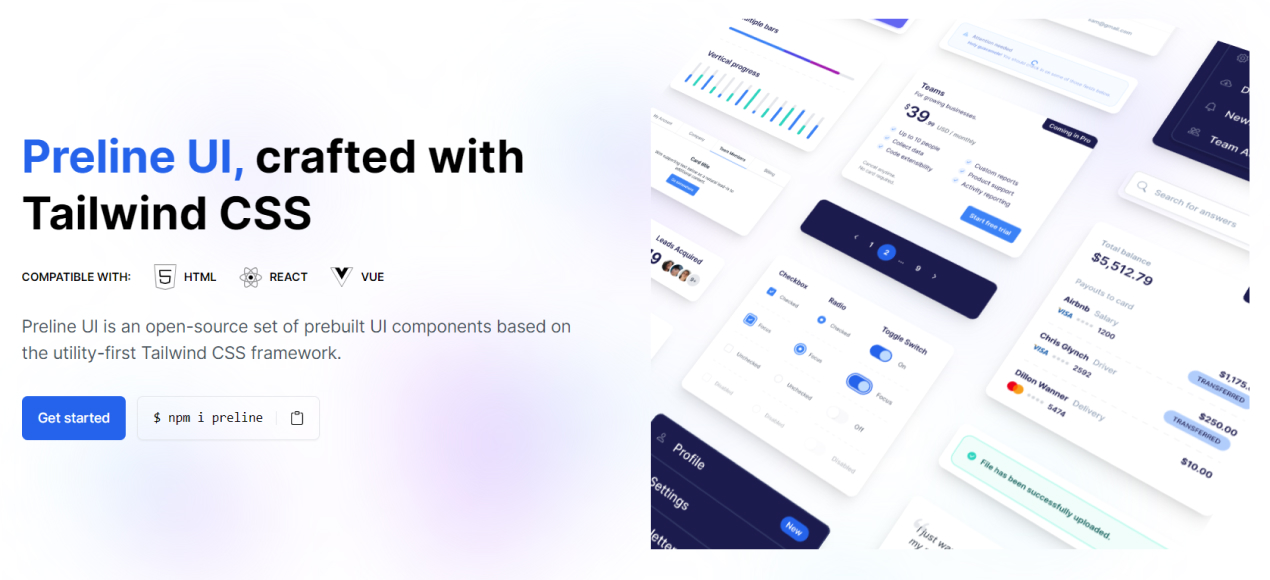

Preline UI is an open-source Tailwind CSS UI component library for building modern websites and apps. It includes UI blocks, templates, plugins, a Figma design system, and more.

⨠About Preline
Preline helps teams build modern websites and web apps faster with reusable Tailwind CSS components, interactive headless Tailwind CSS plugins, Tailwind CSS templates, and production-ready Tailwind CSS examples. It is designed for developers who want flexible markup, scalable design systems, and polished UI patterns without rebuilding everything from scratch.
- 204 free Tailwind CSS blocks and sections
- 5 free Tailwind CSS templates
- 27 headless Tailwind CSS plugins
- Full documentation, Figma, themes, and agent skills
â¡ Getting Started
Start with any working Tailwind CSS project and make sure Node.js and npm are installed.
Install via npm
- Install
preline:
npm i preline
- Import the Preline CSS variants file into your Tailwind CSS file after the
tailwindcssimport:
@import "tailwindcss";

/* Preline UI */
@source "./node_modules/preline/dist/*.js";
@import "./node_modules/preline/variants.css";

/* Preline Themes */
@import "./themes/theme.css";
- Add the Preline JavaScript file near the end of your
<body>tag:
<script src="./node_modules/preline/dist/preline.js"></script>
For setup details, framework integration, and configuration guides, visit the Preline documentation.
ð¤ Agent Skills
Preline UI includes Agent Skills for agentic coding tools such as Cursor, Claude Code, and Gemini CLI, making it easier to automate theme generation and UI workflows.
Install via CLI:
npx skills add htmlstreamofficial/preline
â¿ Accessibility
Preline UI includes enterprise-grade accessibility built into its components, helping teams create more inclusive interfaces with accessible Tailwind CSS components, keyboard-friendly interactions, proper focus management, and stronger support for assistive technologies. Learn more in the dedicated Accessibility documentation.
𧩠Headless Tailwind CSS Plugins
Explore headless Tailwind CSS plugins for accessible UI behavior, interactions, forms, navigation, overlays, and productivity workflows.
| Category | Plugin Pages |
|---|---|
| Disclosure | Accordion, Collapse, Tree View |
| Navigations | Tabs, Scrollspy, Scroll Nav, Stepper |
| Overlays | Dropdown, Overlay, Tooltip |
| Forms | Select, ComboBox, Datepicker, Range Slider, Input Number, File Upload, Strong Password, Toggle Password, Toggle Count, Copy Markup, PIN Input, Textarea Auto Height |
| Miscellaneous | DataTable, Carousel, Layout Splitter, Remove Element, Theme Switch |
𧱠Tailwind CSS Components
Browse Tailwind CSS component docs across layout, base UI, forms, navigation, overlays, tables, and advanced integrations.
ð¨ Templates and Examples
Explore free and premium layouts for landing pages, dashboards, SaaS apps, ecommerce stores, CMS products, portfolios, and more.
Free Tailwind CSS Templates
| Template | Template | Template | Template | Template |
|---|---|---|---|---|
| Agency | AI Chat | CMS | Coffee Shop | Personal |
Explore More
ð Preline Pro
Preline Pro extends the free library with premium UI for serious product teams and commercial apps. It includes 740 premium Tailwind CSS blocks and sections, 21 premium Tailwind CSS templates, and 207 pages for admin dashboards, SaaS products, ecommerce, CMS, CRM, analytics, finance, chat, startup, and marketing use cases.
ð Documentation and Resources
- Preline UI documentation
- Preline JavaScript
- Framework guides
- Accessibility
- Themes
- Resources
- Figma UI kit
ð¤ Community
For help, best practices, and product discussions, use GitHub Discussions.
Follow Preline UI on X (Twitter) for the latest updates.
ð License
Preline UI is free for personal and commercial projects under the MIT License and the Preline UI Fair Use License. Copyright 2026 by Preline Labs Ltd.
The Preline UI Figma resources are also available for personal and commercial use. All brand icons are trademarks of their respective owners, and their use does not imply endorsement.
A Product of Htmlstream
Preline UI is built by the Htmlstream team, crafting UI components and templates since 2013âhelping teams ship faster with scalable, flexible design systems for real-world products.
Share your thoughts about Preline UI on X (Twitter).
Top Related Projects
A utility-first CSS framework for rapid UI development.
The most popular HTML, CSS, and JavaScript framework for developing responsive, mobile first projects on the web.
A lightweight and modular front-end framework for developing fast and powerful web interfaces
Modern CSS framework based on Flexbox
Materialize, a CSS Framework based on Material Design
The most advanced responsive front-end framework in the world. Quickly create prototypes and production code for sites that work on any kind of device.
Convert designs to code with AI
Introducing Visual Copilot: A new AI model to turn Figma designs to high quality code using your components.
Try Visual Copilot