 mall-admin-web
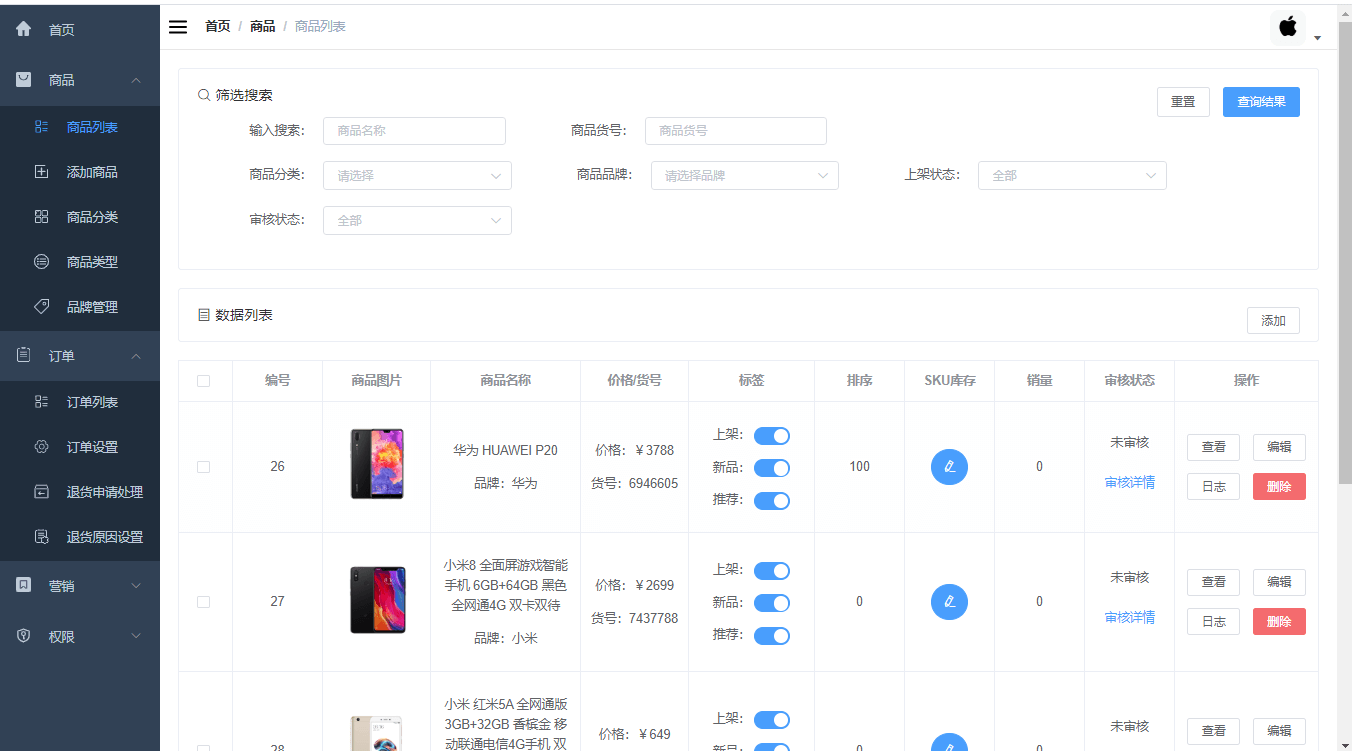
mall-admin-web是一个电商后台管理系统的前端项目,基于Vue 3+Element Plus实现。 主要包括商品管理、订单管理、会员管理、促销管理、运营管理、内容管理、统计报表、财务管理、权限管理、设置等功能。
Top Related Projects

:tada: A magical vue admin https://panjiachen.github.io/vue-element-admin

Vue3、Element Plus、typescript后台管理系统

Vue 2.0 admin management system template based on iView

👨🏻💻👩🏻💻 Use Ant Design Vue like a Pro! (vue2)

A admin template based on vue + element-ui. 基于vue + element-ui的后台管理系统基于 vue + element-ui 的后台管理系统

An elegant dashboard
Quick Overview
Mall-admin-web is a front-end project for an e-commerce management system. It's built using Vue.js and Element UI, providing a user-friendly interface for managing products, orders, and other aspects of an online store. The project is designed to work in conjunction with the mall backend system.
Pros
- Comprehensive e-commerce management features
- Clean and modern UI design using Element UI
- Well-structured Vue.js codebase with reusable components
- Detailed documentation and setup instructions
Cons
- Limited multilingual support
- Dependency on specific backend implementation
- Lack of extensive unit tests
- Some components may require optimization for better performance
Code Examples
- Example of a Vue component for product list:
<template>
  <div class="product-list">
    <el-table :data="products" border>
      <el-table-column prop="id" label="ID" width="80"></el-table-column>
      <el-table-column prop="name" label="Name"></el-table-column>
      <el-table-column prop="price" label="Price" width="100"></el-table-column>
      <el-table-column label="Actions" width="150">
        <template slot-scope="scope">
          <el-button @click="editProduct(scope.row)" type="text" size="small">Edit</el-button>
          <el-button @click="deleteProduct(scope.row)" type="text" size="small">Delete</el-button>
        </template>
      </el-table-column>
    </el-table>
  </div>
</template>

<script>
export default {
  data() {
    return {
      products: []
    }
  },
  methods: {
    editProduct(product) {
      // Implementation for editing a product
    },
    deleteProduct(product) {
      // Implementation for deleting a product
    }
  }
}
</script>
- Example of API call using Axios:
import axios from 'axios'

export function getProductList(params) {
  return axios({
    url: '/product/list',
    method: 'get',
    params: params
  })
}
- Example of Vuex store module:
const product = {
  state: {
    list: [],
    total: 0
  },
  mutations: {
    SET_PRODUCT_LIST: (state, list) => {
      state.list = list
    },
    SET_TOTAL: (state, total) => {
      state.total = total
    }
  },
  actions: {
    getProductList({ commit }, params) {
      return new Promise((resolve, reject) => {
        getProductList(params).then(response => {
          commit('SET_PRODUCT_LIST', response.data.list)
          commit('SET_TOTAL', response.data.total)
          resolve()
        }).catch(error => {
          reject(error)
        })
      })
    }
  }
}

export default product
Getting Started
-
Clone the repository:
git clone https://github.com/macrozheng/mall-admin-web.git -
Install dependencies:
cd mall-admin-web npm install -
Configure the API base URL in
config/dev.env.js:'use strict' const merge = require('webpack-merge') const prodEnv = require('./prod.env') module.exports = merge(prodEnv, { NODE_ENV: '"development"', BASE_API: '"http://localhost:8080"' }) -
Run the development server:
npm run dev -
Access the application at
http://localhost:8090
Competitor Comparisons
:tada: A magical vue admin https://panjiachen.github.io/vue-element-admin
Pros of vue-element-admin
- More comprehensive and feature-rich, offering a wider range of components and functionalities
- Better documentation and community support, making it easier for developers to get started and find solutions
- Regular updates and maintenance, ensuring compatibility with the latest Vue.js and Element UI versions
Cons of vue-element-admin
- Steeper learning curve due to its complexity and extensive feature set
- Potentially overkill for smaller projects or those with specific requirements
- May require more customization to fit specific business needs
Code Comparison
mall-admin-web:
import Vue from 'vue'
import Router from 'vue-router'
import Login from '@/views/login/index'
import Layout from '@/views/layout/Layout'

Vue.use(Router)
vue-element-admin:
import Vue from 'vue'
import Router from 'vue-router'
import Layout from '@/layout'

Vue.use(Router)

export const constantRoutes = [
  // ... route definitions
]
Both projects use Vue Router, but vue-element-admin has a more structured approach to route management with separate constant and dynamic routes.
Vue3、Element Plus、typescript后台管理系统
Pros of vue-manage-system
- Simpler and more lightweight, making it easier to understand and customize
- Includes a variety of pre-built components and charts for quick development
- Regularly updated with new features and improvements
Cons of vue-manage-system
- Less comprehensive than mall-admin-web for e-commerce specific functionality
- May require more customization for complex business logic
- Fewer integrations with backend services out of the box
Code Comparison
vue-manage-system:
<template>
    <div class="header">
        <!-- Header content -->
    </div>
</template>

<script>
export default {
    name: 'Header',
    // Component logic
}
</script>
mall-admin-web:
<template>
  <el-card class="form-container" shadow="never">
    <el-form :model="brand" :rules="rules" ref="brandForm" label-width="150px">
      <!-- Form fields -->
    </el-form>
  </el-card>
</template>

<script>
import {createBrand, getBrand, updateBrand} from '@/api/brand'
// Component logic
</script>
The code comparison shows that vue-manage-system tends to have simpler component structures, while mall-admin-web includes more complex forms and API integrations specific to e-commerce functionality.
Vue 2.0 admin management system template based on iView
Pros of iview-admin
- More comprehensive UI component library with iView
- Better internationalization support
- More flexible and customizable layout options
Cons of iview-admin
- Less focused on e-commerce specific features
- Steeper learning curve for developers new to iView
Code Comparison
mall-admin-web:
<template>
  <div class="app-container">
    <el-card class="filter-container" shadow="never">
      <!-- Filter components -->
    </el-card>
    <div class="table-container">
      <!-- Data table -->
    </div>
  </div>
</template>
iview-admin:
<template>
  <div>
    <Card>
      <Form ref="filterForm" :model="filterForm" inline>
        <!-- Filter components -->
      </Form>
    </Card>
    <Table :columns="columns" :data="data">
      <!-- Table content -->
    </Table>
  </div>
</template>
Key Differences
- mall-admin-web uses Element UI components, while iview-admin uses iView components
- iview-admin's code structure is more modular and component-based
- mall-admin-web is tailored for e-commerce admin panels, while iview-admin is a more general-purpose admin template
Conclusion
Both projects offer robust admin panel solutions, but cater to different needs. mall-admin-web is more suitable for e-commerce projects, while iview-admin provides a more flexible foundation for various types of admin interfaces.
👨🏻💻👩🏻💻 Use Ant Design Vue like a Pro! (vue2)
Pros of ant-design-vue-pro
- More comprehensive UI component library with Ant Design Vue
- Better internationalization support out-of-the-box
- More robust and scalable project structure for large applications
Cons of ant-design-vue-pro
- Steeper learning curve due to more complex architecture
- Potentially overkill for smaller projects
- Less focused on e-commerce specific features compared to mall-admin-web
Code Comparison
ant-design-vue-pro:
<template>
  <a-config-provider :locale="locale">
    <div id="app">
      <router-view/>
    </div>
  </a-config-provider>
</template>
mall-admin-web:
<template>
  <div id="app">
    <router-view></router-view>
  </div>
</template>
The ant-design-vue-pro example showcases the use of Ant Design's ConfigProvider for internationalization, while mall-admin-web has a simpler structure. This reflects the difference in complexity and feature set between the two projects.
ant-design-vue-pro is better suited for large-scale, multi-language applications with complex UI requirements, while mall-admin-web is more focused on providing a straightforward e-commerce admin interface. The choice between them depends on the specific project needs and the development team's expertise.
A admin template based on vue + element-ui. 基于vue + element-ui的后台管理系统基于 vue + element-ui 的后台管理系统
Pros of vue2-manage
- Simpler and more lightweight project structure, making it easier for beginners to understand and navigate
- Includes a variety of common components and features for a typical management system
- Uses Vue 2, which may be more familiar to developers working on legacy projects
Cons of vue2-manage
- Less comprehensive and feature-rich compared to mall-admin-web
- Older technology stack, potentially lacking some modern Vue ecosystem features
- May require more manual configuration and setup for advanced functionalities
Code Comparison
vue2-manage:
import Vue from 'vue'
import App from './App'
import router from './router'
import store from './store/'

Vue.config.productionTip = false

new Vue({
	el: '#app',
	router,
	store,
	template: '<App/>',
	components: { App }
})
mall-admin-web:
import Vue from 'vue'
import App from './App'
import router from './router'
import store from './store'
import ElementUI from 'element-ui'
import 'element-ui/lib/theme-chalk/index.css'

Vue.use(ElementUI)
Vue.config.productionTip = false

new Vue({
  el: '#app',
  router,
  store,
  render: h => h(App)
})
The code comparison shows that mall-admin-web uses the more modern render function syntax and includes ElementUI, indicating a more feature-rich and up-to-date approach. vue2-manage uses the older template syntax, which aligns with its simpler structure but may lack some modern optimizations.
An elegant dashboard
Pros of d2-admin
- More comprehensive and feature-rich admin template
- Better documentation and examples
- Active community and regular updates
Cons of d2-admin
- Steeper learning curve due to more complex structure
- May be overkill for smaller projects
- Potentially slower performance due to additional features
Code Comparison
mall-admin-web:
<template>
  <div class="app-container">
    <el-card class="filter-container" shadow="never">
      <div>
        <i class="el-icon-search"></i>
        <span>筛选搜索</span>
d2-admin:
<template>
  <d2-container>
    <template slot="header">Page 1 header</template>
    <d2-crud
      :columns="columns"
      :data="data"
      :options="options"/>
The code comparison shows that d2-admin uses custom components like d2-container and d2-crud, which provide more built-in functionality. mall-admin-web uses more standard Element UI components, which may be easier to understand for beginners but require more manual setup.
Convert  designs to code with AI

Introducing Visual Copilot: A new AI model to turn Figma designs to high quality code using your components.
Try Visual CopilotREADME
mall-admin-web





åæ æ示
- **å¿«éä½éªé¡¹ç®**ï¼å¨çº¿è®¿é®å°å ã
- å ¨å¥å¦ä¹ æç¨ï¼ãmallå¦ä¹ æç¨ã ã
- åæ¯è¯´æï¼
masteråæ¯åºäºVue3+Element-Plusï¼dev-v2åæ¯åºäºVue2+Elementã
åè¨
该项ç®ä¸ºåå端å离项ç®çå端é¨åï¼å端项ç®mallå°åï¼ä¼ éé¨ ã
项ç®ä»ç»
mall-admin-webæ¯ä¸ä¸ªçµååå°ç®¡çç³»ç»çå端项ç®ï¼åºäºVue3+Element-Pluså®ç°ã主è¦å
æ¬åå管çã订å管çãä¼å管çãä¿é管çãè¿è¥ç®¡çãå
容管çãç»è®¡æ¥è¡¨ãè´¢å¡ç®¡çãæé管çã设置çåè½ã
项ç®æ¼ç¤º
项ç®å¨çº¿æ¼ç¤ºå°åï¼https://www.macrozheng.com/admin/
ææ¯éå
| ææ¯ | 说æ | å®ç½ |
|---|---|---|
| Vue | å端æ¡æ¶ | https://cn.vuejs.org/ |
| Element Plus | å端UIæ¡æ¶ | https://element-plus.org/ |
| Vue Router | è·¯ç±æ¡æ¶ | https://router.vuejs.org/ |
| Pinia | å ¨å±ç¶æ管çæ¡æ¶ | https://pinia.vuejs.org/ |
| Pinia Plugin Persistedstate | Piniaæä¹ åæ件 | https://prazdevs.github.io/pinia-plugin-persistedstate/ |
| Axios | å端HTTPæ¡æ¶ | https://github.com/axios/axios |
| vue-charts | åºäºEchartsçå¾è¡¨æ¡æ¶ | https://github.com/ecomfe/vue-echarts |
| TinyMCE Vue | å¯ææ¬ç¼è¾å¨ | https://github.com/tinymce/tinymce-vue |
| Js-cookie | cookie管çå·¥å · | https://github.com/js-cookie/js-cookie |
| vue-element-admin | 项ç®èææ¶ | https://github.com/PanJiaChen/vue-element-admin |
项ç®å¸å±
src -- æºç ç®å½
âââ apis -- axiosç½ç»è¯·æ±æ¥å£å®ä¹
âââ assets -- éæå¾çèµæºæ件
âââ components -- éç¨ç»ä»¶å°è£
âââ icons -- svgç¢éå¾çæ件
âââ router -- vue-routerè·¯ç±é
ç½®
âââ store -- piniaçç¶æ管ç
âââ styles -- å
¨å±cssæ ·å¼
âââ types -- ç±»åå®ä¹
âââ utils -- å·¥å
·ç±»
âââ views -- å端页é¢
âââ home -- é¦é¡µ
âââ layout -- éç¨é¡µé¢æ¡æ
âââ normal -- 常ç¨é¡µé¢ï¼loginå404ï¼
âââ oms -- 订å模å页é¢
âââ pms -- åå模å页é¢
âââ sms -- åå模å页é¢
âââ ums -- ç¨æ·æ¨¡å页é¢
æ建æ¥éª¤
- ä¸è½½node并å®è£ ï¼æ¯æv20以ä¸çæ¬ï¼å»ºè®®ä¸è½½v20 LTSçæ¬ï¼ï¼https://nodejs.org/zh-cn/download/archive/v20.20.0
- 该项ç®ä¸ºåå端å离项ç®ï¼è®¿é®æ¬å°è®¿é®æ¥å£éæ建åå°ç¯å¢ï¼æ建请åèå端项ç®ä¼ éé¨;
- 访é®å¨çº¿æ¥å£æ éæ建åå°ç¯å¢ï¼åªéå°
.env.developmentæ件ä¸çVITE_BASE_SERVER_URLæ¹ä¸ºhttps://admin-api.macrozheng.comå³å¯; - å¦æä½ å¯¹æ¥çæ¯mall-swarm å¾®æå¡åå°çè¯ï¼æææ¥å£é½éè¦éè¿ç½å
³è®¿é®ï¼éè¦å°
.env.developmentæ件ä¸çVITE_BASE_SERVER_URLæ¹ä¸ºhttp://localhost:8201/mall-admin ï¼ - å éæºä»£ç å°æ¬å°ï¼ä½¿ç¨VSCodeæå¼ï¼å¹¶å®æç¼è¯;
- å¨å½ä»¤è¡ä¸è¿è¡å½ä»¤ï¼
npm install,ä¸è½½ç¸å ³ä¾èµ; - å¨å½ä»¤è¡ä¸è¿è¡å½ä»¤ï¼
npm run dev,è¿è¡é¡¹ç®; - 访é®å°åï¼http://localhost:5173å³å¯æå¼åå°ç®¡çç³»ç»é¡µé¢;
- å ·ä½é¨ç½²è¿ç¨è¯·åèï¼mallå端项ç®çå®è£ ä¸é¨ç½²
- å端èªå¨åé¨ç½²è¯·åèï¼ä½¿ç¨Jenkinsä¸é®æå é¨ç½²å端åºç¨ï¼å°±æ¯è¿ä¹6ï¼
å ¬ä¼å·
å 微信群交æµï¼å ¬ä¼å·åå°åå¤ã**å 群**ãå³å¯ã

许å¯è¯
Copyright (c) 2018-2026 macrozheng
Top Related Projects
:tada: A magical vue admin https://panjiachen.github.io/vue-element-admin
Vue3、Element Plus、typescript后台管理系统
Vue 2.0 admin management system template based on iView
👨🏻💻👩🏻💻 Use Ant Design Vue like a Pro! (vue2)
A admin template based on vue + element-ui. 基于vue + element-ui的后台管理系统基于 vue + element-ui 的后台管理系统
An elegant dashboard
Convert designs to code with AI
Introducing Visual Copilot: A new AI model to turn Figma designs to high quality code using your components.
Try Visual Copilot