 waveform-playlist
Multitrack Web Audio editor and player with canvas waveform preview. Set cues, fades and shift multiple tracks in time. Record audio tracks or provide audio annotations. Export your mix to AudioBuffer or WAV! Add effects from Tone.js. Project inspired by Audacity.
Top Related Projects

JavaScript UI component for interacting with audio waveforms

Audio waveform player
Quick Overview
Waveform-playlist is a multitrack web audio editor and player built with Web Audio API and React. It allows users to create, edit, and play audio tracks in a browser-based interface, offering features like track mixing, volume control, and waveform visualization.
Pros
- Browser-based audio editing without the need for native applications
- Supports multiple audio tracks with individual controls
- Provides waveform visualization for easy audio navigation
- Built with modern web technologies (React and Web Audio API)
Cons
- Limited advanced audio editing features compared to professional desktop software
- Dependent on browser support for Web Audio API
- May have performance issues with a large number of tracks or long audio files
- Documentation could be more comprehensive for advanced usage
Code Examples
- Creating a new playlist:
import Playlist from 'waveform-playlist';

const playlist = Playlist({
  container: document.getElementById('playlist'),
  timescale: true,
  state: 'cursor',
  samplesPerPixel: 1000,
  mono: true,
  waveHeight: 100,
  colors: {
    waveOutline: '#E0EFF1',
    timeColor: 'grey',
    fadeColor: 'black'
  }
});
- Adding a track to the playlist:
playlist.load([
  {
    src: 'path/to/audio/file.mp3',
    name: 'My Audio Track',
    gain: 0.5
  }
]).then(function() {
  // playlist is ready
});
- Controlling playback:
// Play the playlist
playlist.play();

// Pause the playlist
playlist.pause();

// Seek to a specific time (in seconds)
playlist.seek(30);
Getting Started
To use waveform-playlist in your project:
-
Install the package:
npm install waveform-playlist -
Import and initialize in your React component:
import React, { useEffect, useRef } from 'react'; import Playlist from 'waveform-playlist'; function AudioEditor() { const playlistRef = useRef(null); useEffect(() => { const playlist = Playlist({ container: playlistRef.current, // ... other options }); // Load tracks, set up event listeners, etc. }, []); return <div ref={playlistRef}></div>; } export default AudioEditor; -
Customize the playlist with your desired options and add tracks as needed.
Competitor Comparisons
JavaScript UI component for interacting with audio waveforms
Pros of peaks.js
- More actively maintained with frequent updates and bug fixes
- Better documentation and examples for easier integration
- Supports both canvas and WebAudio API for broader browser compatibility
Cons of peaks.js
- Less flexible for complex audio editing tasks
- Limited built-in features compared to waveform-playlist
- Steeper learning curve for advanced customization
Code Comparison
peaks.js:
var peaksInstance = Peaks.init({
  container: document.getElementById('waveform-container'),
  mediaElement: document.querySelector('audio'),
  dataUri: 'path/to/waveform.json'
});
waveform-playlist:
var playlist = WaveformPlaylist.init({
  container: document.getElementById('playlist'),
  timescale: true,
  state: 'cursor',
  samplesPerPixel: 1000,
  waveHeight: 100,
  tracks: [{ src: 'path/to/audio.mp3' }]
});
Both libraries offer ways to initialize and render waveforms, but waveform-playlist provides more options for customization in its initial setup. peaks.js focuses on simplicity and ease of use, while waveform-playlist offers more advanced features for audio editing and manipulation.
Audio waveform player
Pros of wavesurfer.js
- More extensive documentation and examples
- Wider range of features, including support for various audio formats and streaming
- Larger community and more frequent updates
Cons of wavesurfer.js
- Steeper learning curve due to more complex API
- Heavier file size, which may impact page load times
- Less focus on multi-track editing capabilities
Code Comparison
wavesurfer.js:
const wavesurfer = WaveSurfer.create({
    container: '#waveform',
    waveColor: 'violet',
    progressColor: 'purple'
});
wavesurfer.load('audio.mp3');
waveform-playlist:
var playlist = WaveformPlaylist.init({
    container: document.getElementById("playlist"),
    timescale: true,
    state: 'cursor',
    samplesPerPixel: 1000,
    waveHeight: 100,
    tracks: [{src: "audio.mp3"}]
});
Both libraries offer waveform visualization and audio playback, but wavesurfer.js provides a more straightforward setup for single-track scenarios, while waveform-playlist is geared towards multi-track editing and playlist management. wavesurfer.js offers more customization options out-of-the-box, whereas waveform-playlist focuses on providing a complete multi-track editing solution with less initial setup required.
Convert  designs to code with AI

Introducing Visual Copilot: A new AI model to turn Figma designs to high quality code using your components.
Try Visual CopilotREADME
Waveform Playlist

A multi-track audio editor and player built with React, Tone.js, and the Web Audio API. Features canvas-based waveform visualization, drag-and-drop clip editing, and professional audio effects.
Sponsors
Features
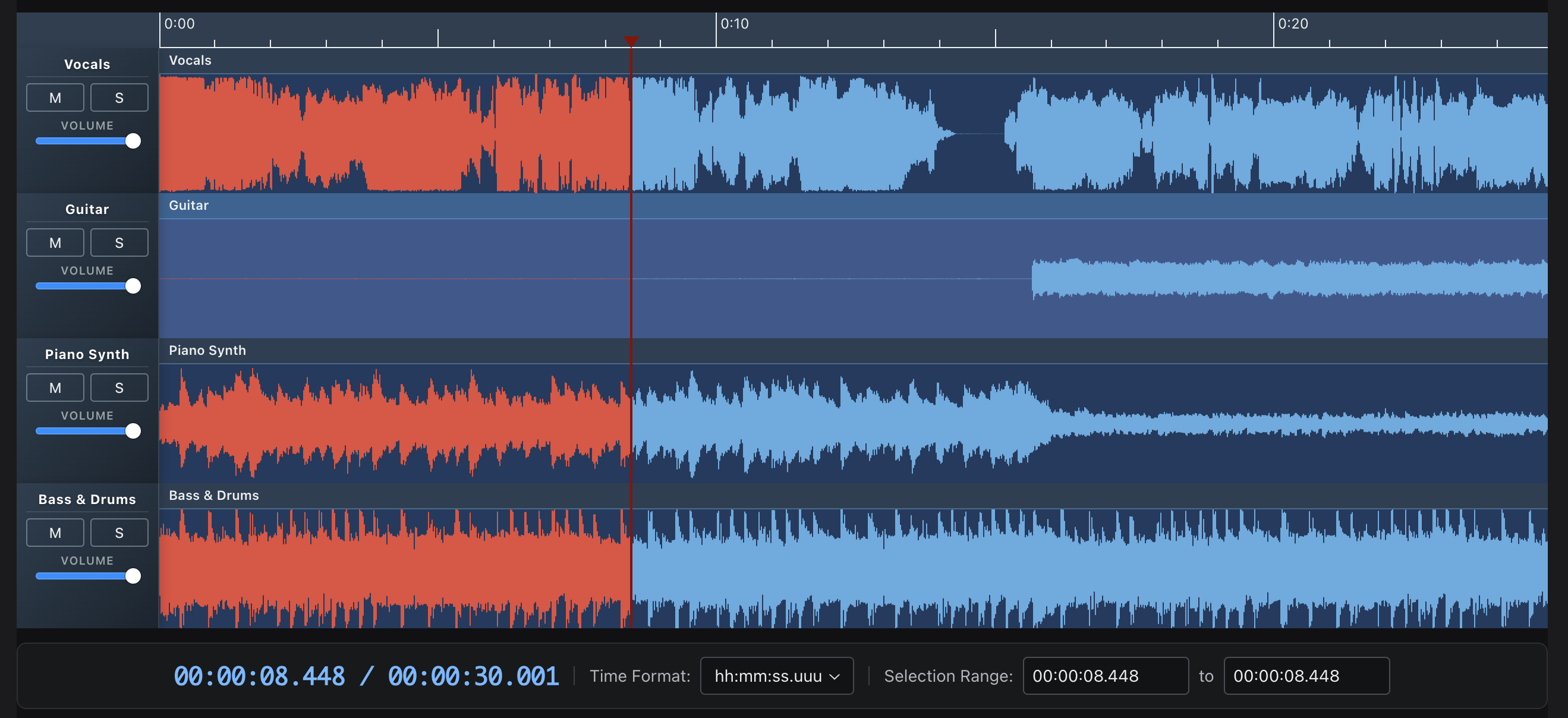
- Multi-track editing - Multiple clips per track with drag-to-move and trim
- Waveform visualization - Canvas-based rendering with zoom controls
- 20+ audio effects - Reverb, delay, filters, distortion, and more via Tone.js
- Recording - AudioWorklet-based recording with live waveform preview
- Export - WAV export with effects, individual tracks or full mix
- Annotations - Time-synced text annotations with keyboard navigation
- Theming - Full theme customization with dark/light mode support
- TypeScript - Full type definitions included
Quick Start
npm install @waveform-playlist/browser tone @dnd-kit/core @dnd-kit/modifiers
Note:
tone,@dnd-kit/core, and@dnd-kit/modifiersare peer dependencies and must be installed separately.
import { WaveformPlaylistProvider, Waveform, PlayButton, PauseButton, StopButton } from '@waveform-playlist/browser';
import { createTrack, createClipFromSeconds } from '@waveform-playlist/core';

function App() {
  const [tracks, setTracks] = useState([]);

  // Load audio and create tracks
  useEffect(() => {
    async function loadAudio() {
      const response = await fetch('/audio/song.mp3');
      const arrayBuffer = await response.arrayBuffer();
      const audioContext = new AudioContext();
      const audioBuffer = await audioContext.decodeAudioData(arrayBuffer);

      const track = createTrack({
        name: 'My Track',
        clips: [createClipFromSeconds({ audioBuffer, startTime: 0 })],
      });

      setTracks([track]);
    }
    loadAudio();
  }, []);

  return (
    <WaveformPlaylistProvider tracks={tracks}>
      <div>
        <PlayButton />
        <PauseButton />
        <StopButton />
      </div>
      <Waveform />
    </WaveformPlaylistProvider>
  );
}
Documentation
- Live Examples - Interactive demos
- Getting Started - Installation and basic usage
- Guides - In-depth tutorials
- API Reference - Component and hook documentation
Examples
| Example | Description |
|---|---|
| Stem Tracks | Multi-track playback with mute/solo/volume controls |
| Effects | 20 Tone.js effects with real-time parameter control |
| Recording | Live recording with VU meter and waveform preview |
| Multi-Clip | Drag-and-drop clip editing with trim handles |
| Annotations | Time-synced text with keyboard navigation |
| Waveform Data | Pre-computed peaks for fast loading |
Packages
v5 packages:
| Package | Description |
|---|---|
@waveform-playlist/browser | Main React components, hooks, and context |
@waveform-playlist/core | Types, utilities, and clip/track creation |
@waveform-playlist/ui-components | Styled UI components (buttons, sliders, etc.) |
@waveform-playlist/playout | Tone.js audio engine |
@waveform-playlist/annotations | Optional annotation support |
@waveform-playlist/recording | Optional recording support (requires AudioWorklet setup) |
Key Hooks
// Load audio files into tracks
const { tracks, loading, error } = useAudioTracks([
  { src: '/audio/vocals.mp3', name: 'Vocals' },
  { src: '/audio/drums.mp3', name: 'Drums' },
]);

// Playback controls
const { play, pause, stop, seek, isPlaying } = usePlaylistControls();

// Zoom controls
const { zoomIn, zoomOut, samplesPerPixel } = useZoomControls();

// Master effects chain
const { masterEffectsFunction, toggleEffect, updateParameter } = useDynamicEffects();

// WAV export
const { exportWav, isExporting, progress } = useExportWav();

// Recording
const { startRecording, stopRecording, isRecording } = useIntegratedRecording();
Browser Support
Requires Web Audio API support: Chrome, Firefox, Safari, Edge (modern versions).
Development
# Install dependencies
pnpm install

# Start dev server
pnpm start

# Run tests
pnpm test

# Build all packages
pnpm build
Visit http://localhost:3000/waveform-playlist to see the examples.
Books
Currently writing: Mastering Tone.js

Credits
Originally created for the Airtime project at Sourcefabric.
License
Top Related Projects
JavaScript UI component for interacting with audio waveforms
Audio waveform player
Convert designs to code with AI
Introducing Visual Copilot: A new AI model to turn Figma designs to high quality code using your components.
Try Visual Copilot