 deepface
A Lightweight Face Recognition and Facial Attribute Analysis (Age, Gender, Emotion and Race) Library for Python
Top Related Projects

The world's simplest facial recognition api for Python and the command line

Pretrained Pytorch face detection (MTCNN) and facial recognition (InceptionResnet) models

State-of-the-art 2D and 3D Face Analysis Project

Face recognition using Tensorflow

Face recognition with deep neural networks.

JavaScript API for face detection and face recognition in the browser and nodejs with tensorflow.js
Quick Overview
DeepFace is an open-source face recognition and facial attribute analysis library for Python. It provides a lightweight interface for deep learning-based face recognition models and various pre-trained models for facial attribute analysis, including age, gender, emotion, and race prediction.
Pros
- Easy-to-use interface for face recognition and facial attribute analysis
- Supports multiple deep learning models and backends (TensorFlow, Keras, PyTorch)
- Includes pre-trained models for various facial attribute predictions
- Offers both single image and real-time video analysis capabilities
Cons
- Dependency on large deep learning frameworks can lead to a heavy installation
- Some models may require additional downloads or setup
- Performance can vary depending on the chosen model and hardware
- Limited customization options for advanced users
Code Examples
- Face verification between two images:
from deepface import DeepFace

result = DeepFace.verify(img1_path = "img1.jpg", img2_path = "img2.jpg")
print("Is same person:", result["verified"])
- Facial attribute analysis:
from deepface import DeepFace

obj = DeepFace.analyze(img_path = "img.jpg",
        actions = ['age', 'gender', 'emotion', 'race'])
print(obj)
- Real-time face recognition:
from deepface import DeepFace
import cv2

DeepFace.stream(db_path = "database")
Getting Started
To get started with DeepFace, follow these steps:
- Install the library:
pip install deepface
- Import the library and use it in your Python script:
from deepface import DeepFace

# Perform face verification
result = DeepFace.verify("img1.jpg", "img2.jpg")

# Analyze facial attributes
analysis = DeepFace.analyze("img.jpg")

print(result)
print(analysis)
This will perform a basic face verification and facial attribute analysis. You can explore more advanced features and options in the library's documentation.
Competitor Comparisons
The world's simplest facial recognition api for Python and the command line
Pros of face_recognition
- Simpler API and easier to use for basic face recognition tasks
- Better documentation and more examples for getting started quickly
- Faster performance for real-time face detection on CPU
Cons of face_recognition
- Less flexibility and fewer options for fine-tuning models
- Limited to a single deep learning model (dlib-based)
- Fewer advanced features like age/gender prediction or emotion analysis
Code Comparison
face_recognition:
import face_recognition
image = face_recognition.load_image_file("image.jpg")
face_locations = face_recognition.face_locations(image)
face_encodings = face_recognition.face_encodings(image, face_locations)
deepface:
from deepface import DeepFace
result = DeepFace.verify("image1.jpg", "image2.jpg")
analysis = DeepFace.analyze("image.jpg", actions=['age', 'gender', 'emotion'])
deepface offers more advanced features and flexibility, allowing users to choose from multiple face recognition models and perform additional analyses like age, gender, and emotion detection. However, face_recognition provides a simpler API that may be more suitable for basic face detection and recognition tasks, especially when working with real-time video on CPU. The choice between the two libraries depends on the specific requirements of your project and the level of complexity you need in your face recognition system.
Pretrained Pytorch face detection (MTCNN) and facial recognition (InceptionResnet) models
Pros of facenet-pytorch
- Focused specifically on FaceNet implementation in PyTorch
- Lightweight and easy to integrate into existing PyTorch projects
- Provides pre-trained models and utilities for face recognition tasks
Cons of facenet-pytorch
- Limited to FaceNet architecture, less versatile than DeepFace
- Fewer built-in features for face analysis (e.g., age, gender, emotion detection)
- May require more manual implementation for complete face recognition pipeline
Code Comparison
facenet-pytorch:
from facenet_pytorch import MTCNN, InceptionResnetV1
mtcnn = MTCNN()
resnet = InceptionResnetV1(pretrained='vggface2').eval()
img = mtcnn(img)
img_embedding = resnet(img.unsqueeze(0))
DeepFace:
from deepface import DeepFace
result = DeepFace.verify("img1.jpg", "img2.jpg")
embedding = DeepFace.represent("img.jpg", model_name="Facenet")
DeepFace offers a higher-level API with more built-in functionalities, while facenet-pytorch provides a more granular approach, allowing for greater customization within the PyTorch ecosystem. DeepFace supports multiple models and analysis tasks out-of-the-box, whereas facenet-pytorch focuses on the FaceNet architecture specifically.
State-of-the-art 2D and 3D Face Analysis Project
Pros of InsightFace
- Higher performance and accuracy in face recognition tasks
- Supports a wider range of deep learning models and architectures
- More comprehensive features for face analysis, including face parsing and landmark detection
Cons of InsightFace
- Steeper learning curve and more complex implementation
- Less user-friendly documentation for beginners
- Requires more computational resources for training and inference
Code Comparison
InsightFace:
import insightface
model = insightface.app.FaceAnalysis()
model.prepare(ctx_id=0, det_size=(640, 640))
faces = model.get(img)
DeepFace:
from deepface import DeepFace
result = DeepFace.verify(img1_path, img2_path)
InsightFace offers more granular control and advanced features, while DeepFace provides a simpler, high-level API for common face recognition tasks. InsightFace's code requires more setup but allows for greater customization, whereas DeepFace's approach is more straightforward for basic use cases.
Face recognition using Tensorflow
Pros of facenet
- Implements the FaceNet architecture, known for its high accuracy in face recognition tasks
- Provides pre-trained models and detailed documentation for training custom models
- Offers flexibility in choosing different backbone networks (e.g., Inception ResNet v1, Inception ResNet v2)
Cons of facenet
- Less actively maintained, with the last update in 2018
- Requires more setup and configuration compared to deepface
- Limited built-in functionality for face detection and alignment
Code Comparison
facenet:
import facenet

# Load model
model = facenet.load_model('path/to/model')

# Perform face recognition
embeddings = facenet.get_embeddings(images, model)
distances = facenet.calculate_distance(embeddings[0], embeddings[1])
deepface:
from deepface import DeepFace

# Perform face recognition
result = DeepFace.verify("img1.jpg", "img2.jpg")
distance = result["distance"]
The code comparison shows that deepface offers a more straightforward API for face recognition tasks, while facenet requires more manual steps but provides greater control over the process.
Face recognition with deep neural networks.
Pros of OpenFace
- More established project with a longer history and academic backing
- Provides lower-level access to face recognition algorithms
- Offers more flexibility for advanced users and researchers
Cons of OpenFace
- Less user-friendly for beginners compared to DeepFace
- Requires more setup and configuration
- Has fewer pre-trained models and out-of-the-box features
Code Comparison
OpenFace:
import openface

align = openface.AlignDlib("models/dlib/shape_predictor_68_face_landmarks.dat")
net = openface.TorchNeuralNet("models/openface/nn4.small2.v1.t7", 96)
rep = net.forward(align.getAllFaceBoundingBoxes(rgbImg)[0])
DeepFace:
from deepface import DeepFace

result = DeepFace.verify("img1.jpg", "img2.jpg")
embeddings = DeepFace.represent("img1.jpg")
OpenFace provides more granular control over the face recognition process, allowing users to work with individual components like alignment and neural networks. DeepFace, on the other hand, offers a more streamlined API with high-level functions for common tasks like face verification and representation.
JavaScript API for face detection and face recognition in the browser and nodejs with tensorflow.js
Pros of face-api.js
- Browser-based implementation, allowing for client-side face recognition
- Lightweight and optimized for web applications
- Supports real-time face detection and recognition in video streams
Cons of face-api.js
- Limited to JavaScript environments, reducing versatility across platforms
- Smaller set of pre-trained models compared to DeepFace
- Less frequent updates and maintenance
Code Comparison
face-api.js:
await faceapi.loadSsdMobilenetv1Model('/models')
const detections = await faceapi.detectAllFaces(image)
DeepFace:
from deepface import DeepFace
result = DeepFace.verify("img1.jpg", "img2.jpg")
face-api.js focuses on browser-based implementations, making it ideal for web applications that require client-side face recognition. It's lightweight and optimized for real-time processing in web environments. However, it's limited to JavaScript, which may restrict its use in other platforms.
DeepFace, on the other hand, offers a more comprehensive set of features and pre-trained models, making it suitable for a wider range of applications. It's implemented in Python, allowing for easier integration with machine learning workflows and backend systems. DeepFace also receives more frequent updates and maintenance.
The code comparison shows that face-api.js is designed for browser environments, while DeepFace provides a more straightforward API for face verification tasks in Python.
Convert  designs to code with AI

Introducing Visual Copilot: A new AI model to turn Figma designs to high quality code using your components.
Try Visual CopilotREADME
deepface














DeepFace is a lightweight face recognition and facial attribute analysis (age, gender, emotion and race) framework for python. It is a hybrid face recognition framework wrapping state-of-the-art models: VGG-Face, FaceNet, OpenFace, DeepFace, DeepID, ArcFace, Dlib, SFace, GhostFaceNet, Buffalo_L.
A modern face recognition pipeline consists of 5 common stages: detect, align, normalize, represent and verify. While DeepFace handles all these common stages in the background, you donât need to acquire in-depth knowledge about all the processes behind it. You can just call its verification, find or analysis function with a single line of code.
Experiments show that human beings have 97.53% accuracy on facial recognition tasks whereas those models already reached and passed that accuracy level.
Installation 
The easiest way to install deepface is to download it from PyPI. It's going to install the library itself and its prerequisites as well.
$ pip install deepface
Alternatively, you can also install deepface from its source code. Source code may have new features not published in pip release yet.
$ git clone https://github.com/serengil/deepface.git
$ cd deepface
$ pip install -e .
Once you installed the library, then you will be able to import it and use its functionalities.
from deepface import DeepFace
ð¡ Prefer not to install or manage infrastructure? You can use a managed API via deepface.dev.
Face Verification - Demo
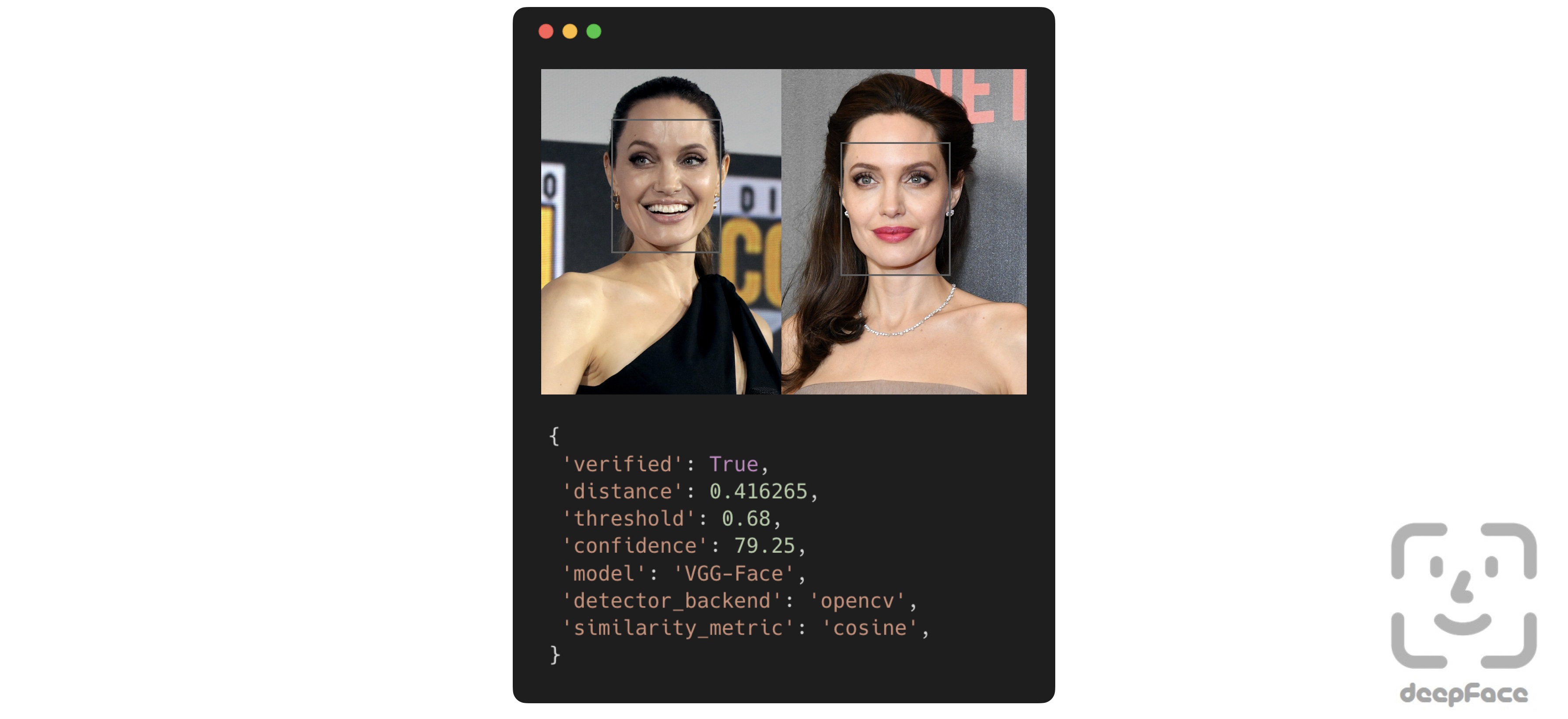
This function determines whether two facial images belong to the same person or to different individuals. The function returns a dictionary, where the key of interest is verified: True indicates the images are of the same person, while False means they are of different people.
result: dict = DeepFace.verify(img1_path = "img1.jpg", img2_path = "img2.jpg")
Face recognition - Tutorial, Demo
Face recognition requires applying face verification many times. DeepFace provides an out-of-the-box find function that searches for the identity of an input image within a specified database path.
dfs: List[pd.DataFrame] = DeepFace.find(img_path = "img1.jpg", db_path = "C:/my_db")
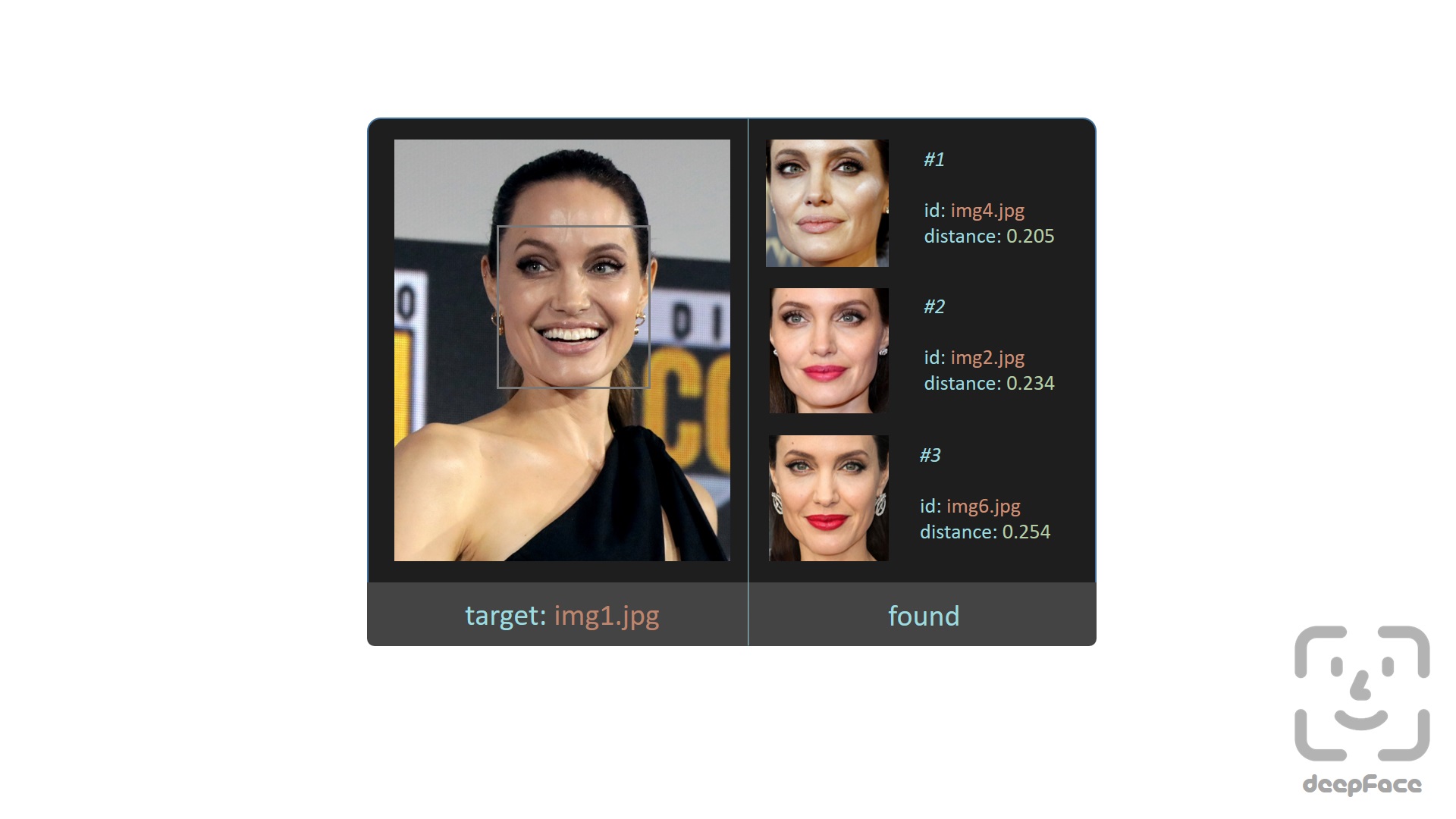
Here, the find function relies on a directory-based face datastore and stores embeddings on disk. Alternatively, DeepFace provides a database-backed search functionality where embeddings are explicitly registered and queried. Currently, postgres, mongo, neo4j, pgvector, pinecone and weaviate are supported as backend databases.
# register an image into the database
DeepFace.register(img = "img1.jpg")

# perform exact search
dfs: List[pd.DataFrame] = DeepFace.search(img = "target.jpg")
If you want to perform approximate nearest neighbor search instead of exact search to achieve faster results on large-scale databases, you can build an index beforehand and explicitly enable ANN search. Here, Faiss is used to index embeddings in postgres and mongo; whereas vector databases such as pgvector, weaviate, pinecone and neo4j handle indexing internally.
# build index on registered embeddings (for postgres and mongo only)
DeepFace.build_index()

# perform approximate nearest neighbor search
dfs: List[pd.DataFrame] = DeepFace.search(img = "target.jpg", search_method = "ann")
Facial Attribute Analysis - Demo
DeepFace also comes with a strong facial attribute analysis module including age, gender, facial expression (including angry, fear, neutral, sad, disgust, happy and surprise) and race (including asian, white, middle eastern, indian, latino and black) predictions.
objs: List[dict] = DeepFace.analyze(
  img_path = "img4.jpg", actions = ['age', 'gender', 'race', 'emotion']
)
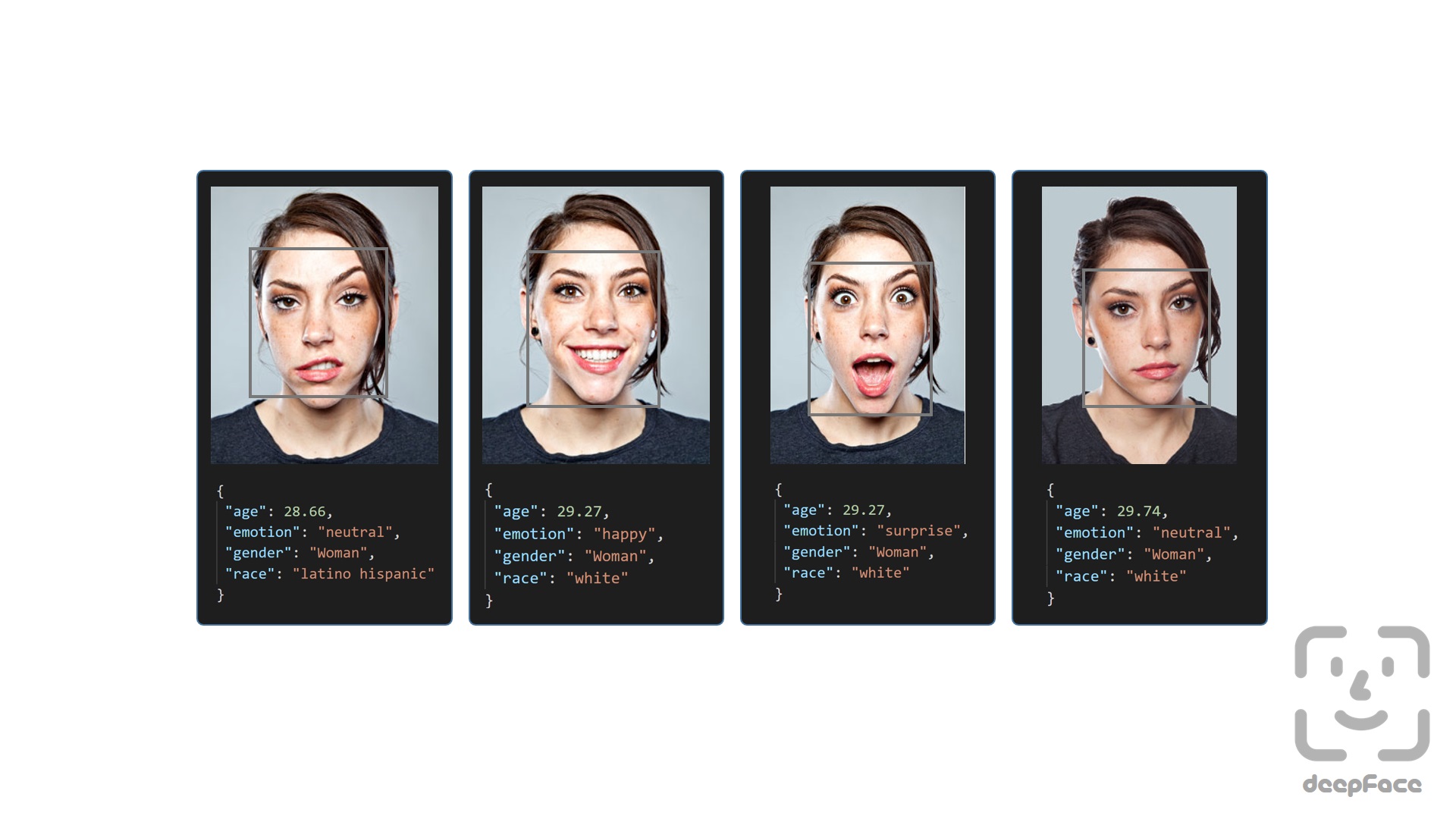
Age model got ± 4.65 MAE; gender model got 97.44% accuracy, 96.29% precision and 95.05% recall as mentioned in its tutorial.
Real Time Analysis - Demo, React Demo part-i, React Demo part-ii
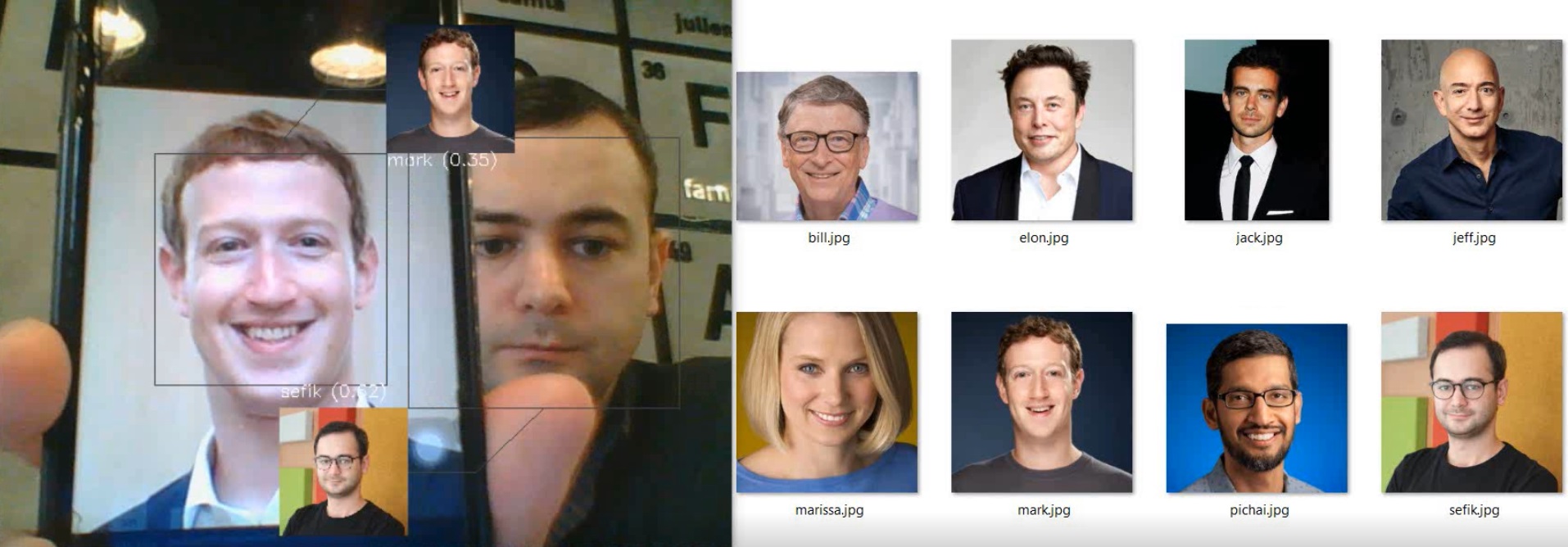
You can run deepface for real time videos as well. Stream function will access your webcam and apply both face recognition and facial attribute analysis. The function starts to analyze a frame if it can focus a face sequentially 5 frames. Then, it shows results 5 seconds.
DeepFace.stream(db_path = "C:/database")

Even though face recognition is based on one-shot learning, you can use multiple face pictures of a person as well. You should rearrange your directory structure as illustrated below.
user
âââ database
â âââ Alice
â â âââ Alice1.jpg
â â âââ Alice2.jpg
â âââ Bob
â â âââ Bob.jpg
If you intend to perform face verification or analysis tasks directly from your browser, deepface-react-ui is a separate repository built using ReactJS depending on deepface api.
Here, you can also find some real time demos for various facial recognition models:
| Task | Model | Demo |
|---|---|---|
| Facial Recognition | DeepFace | Video |
| Facial Recognition | FaceNet | Video |
| Facial Recognition | VGG-Face | Video |
| Facial Recognition | OpenFace | Video |
| Age & Gender | Default | Video |
| Race & Ethnicity | Default | Video |
| Emotion | Default | Video |
| Celebrity Look-Alike | Default | Video |
Face recognition models basically represent facial images as multi-dimensional vectors. Sometimes, you need those embedding vectors directly. DeepFace comes with a dedicated representation function.
embedding_objs: List[dict] = DeepFace.represent(img_path = "img.jpg")
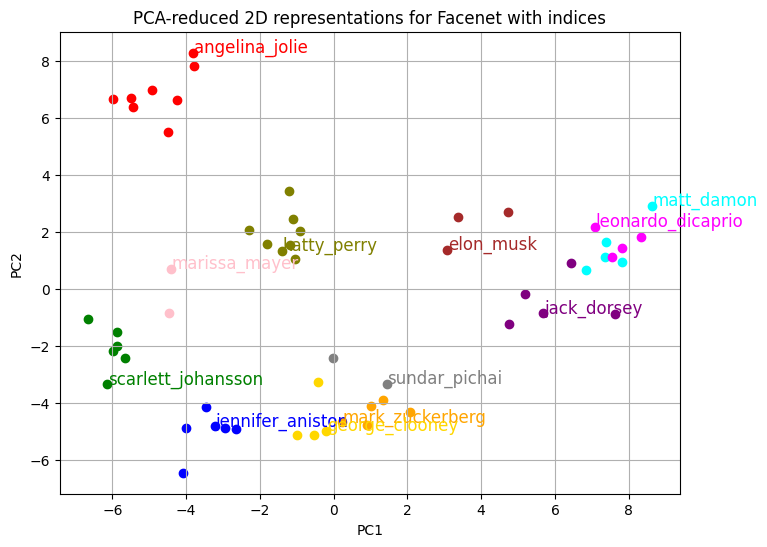
Embeddings can be plotted as below. Each slot is corresponding to a dimension value and dimension value is emphasized with colors. Similar to 2D barcodes, vertical dimension stores no information in the illustration.
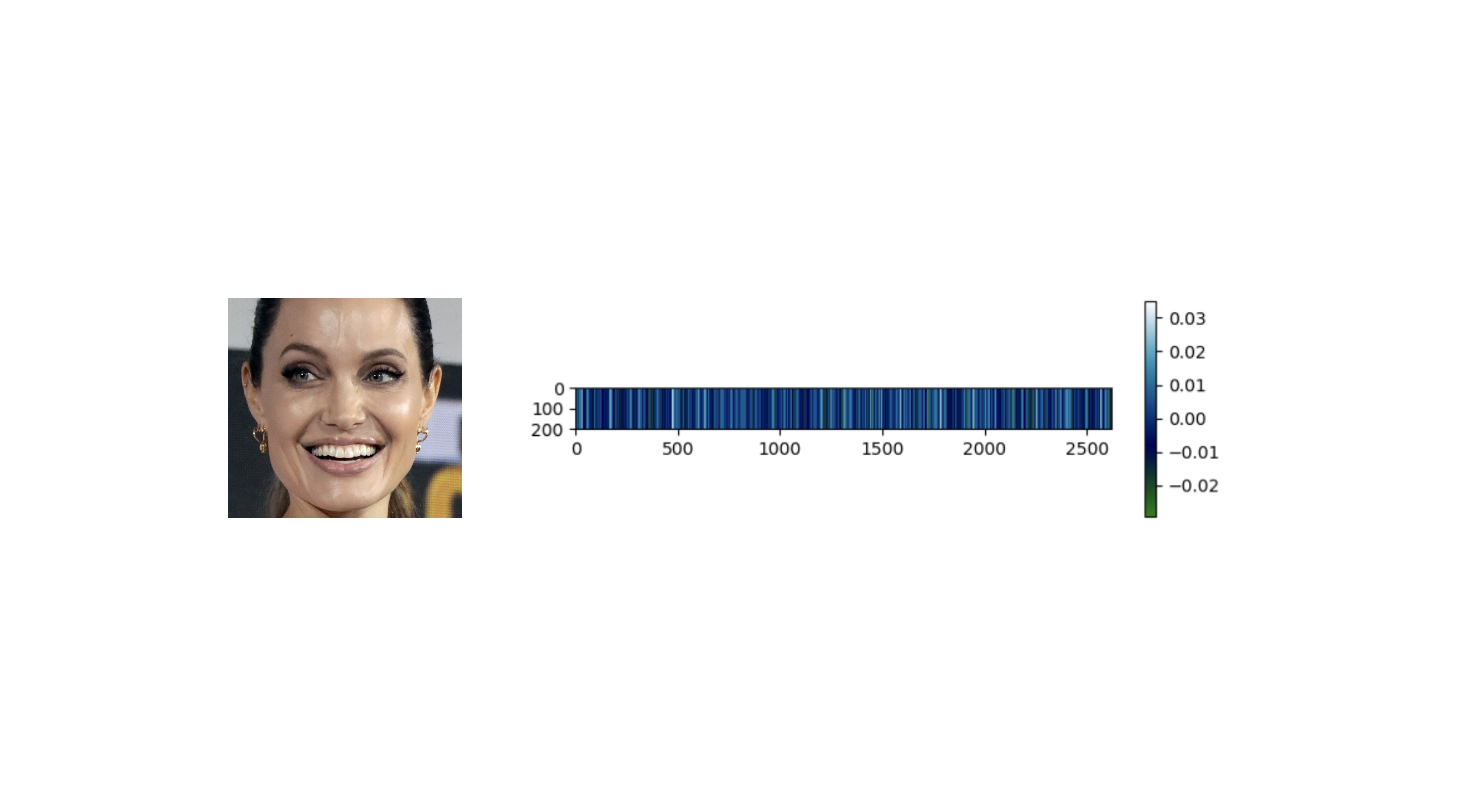
In summary, the distance between vector embeddings of the same person should be smaller than that between embeddings of different people. When reduced to two-dimensional space, the clusters become clearly distinguishable.
Face recognition models - Demo
DeepFace is a hybrid face recognition package. It currently wraps many state-of-the-art face recognition models: VGG-Face , FaceNet, OpenFace, DeepFace, DeepID, ArcFace, Dlib, SFace, GhostFaceNet and Buffalo_L. The default configuration uses VGG-Face model.
models = [
    "VGG-Face", "Facenet", "Facenet512", "OpenFace", "DeepFace",
    "DeepID", "ArcFace", "Dlib", "SFace", "GhostFaceNet",
    "Buffalo_L",
]

result = DeepFace.verify(
  img1_path = "img1.jpg", img2_path = "img2.jpg", model_name = models[0]
)

dfs = DeepFace.find(
  img_path = "img1.jpg", db_path = "C:/my_db", model_name = models[1]
)

embeddings = DeepFace.represent(
  img_path = "img.jpg", model_name = models[2]
)
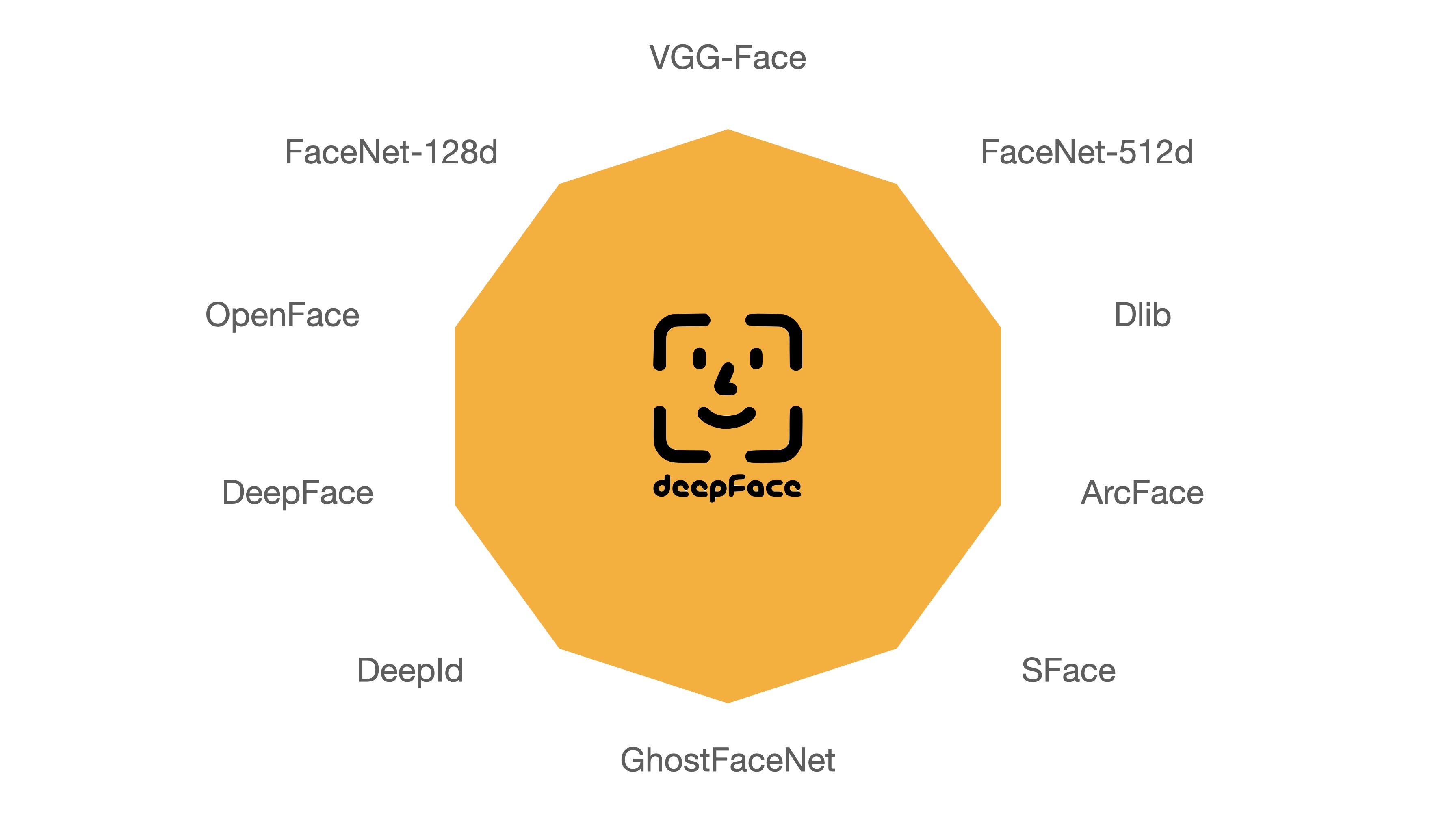
FaceNet, VGG-Face, ArcFace and Dlib are overperforming ones based on experiments - see BENCHMARKS for more details. You can find the measured scores of various models in DeepFace and the reported scores from their original studies in the following table.
| Model | Measured Score | Declared Score |
|---|---|---|
| Facenet512 | 98.4% | 99.6% |
| Human-beings | 97.5% | 97.5% |
| Facenet | 97.4% | 99.2% |
| Dlib | 96.8% | 99.3 % |
| VGG-Face | 96.7% | 98.9% |
| ArcFace | 96.7% | 99.5% |
| GhostFaceNet | 93.3% | 99.7% |
| SFace | 93.0% | 99.5% |
| OpenFace | 78.7% | 92.9% |
| DeepFace | 69.0% | 97.3% |
| DeepID | 66.5% | 97.4% |
Conducting experiments with those models within DeepFace may reveal disparities compared to the original studies, owing to the adoption of distinct detection or normalization techniques. Furthermore, some models have been released solely with their backbones, lacking pre-trained weights. Thus, we are utilizing their re-implementations instead of the original pre-trained weights.
Face Detection and Alignment - Demo
Face detection and alignment are important early stages of a modern face recognition pipeline. Experiments show that detection increases the face recognition accuracy up to 42%, while alignment increases it up to 6%. OpenCV, Ssd, Dlib, MtCnn, Faster MtCnn, RetinaFace, MediaPipe, Yolo, YuNet and CenterFace detectors are wrapped in deepface.

All deepface functions accept optional detector backend and align input arguments. You can switch among those detectors and alignment modes with these arguments. OpenCV is the default detector and alignment is on by default.
backends = [
    'opencv', 'ssd', 'dlib', 'mtcnn', 'fastmtcnn',
    'retinaface', 'mediapipe', 'yolov8n', 'yolov8m',
    'yolov8l', 'yolov11n', 'yolov11s', 'yolov11m',
    'yolov11l', 'yolov12n', 'yolov12s', 'yolov12m',
    'yolov12l', 'yunet', 'centerface',
]
detector = backends[3]
align = True

obj = DeepFace.verify(
  img1_path = "img1.jpg", img2_path = "img2.jpg", detector_backend = detector, align = align
)

dfs = DeepFace.find(
  img_path = "img.jpg", db_path = "my_db", detector_backend = detector, align = align
)

embedding_objs = DeepFace.represent(
  img_path = "img.jpg", detector_backend = detector, align = align
)

demographies = DeepFace.analyze(
  img_path = "img4.jpg", detector_backend = detector, align = align
)

face_objs = DeepFace.extract_faces(
  img_path = "img.jpg", detector_backend = detector, align = align
)
Face recognition models are actually CNN models and they expect standard sized inputs. So, resizing is required before representation. To avoid deformation, deepface adds black padding pixels according to the target size argument after detection and alignment.
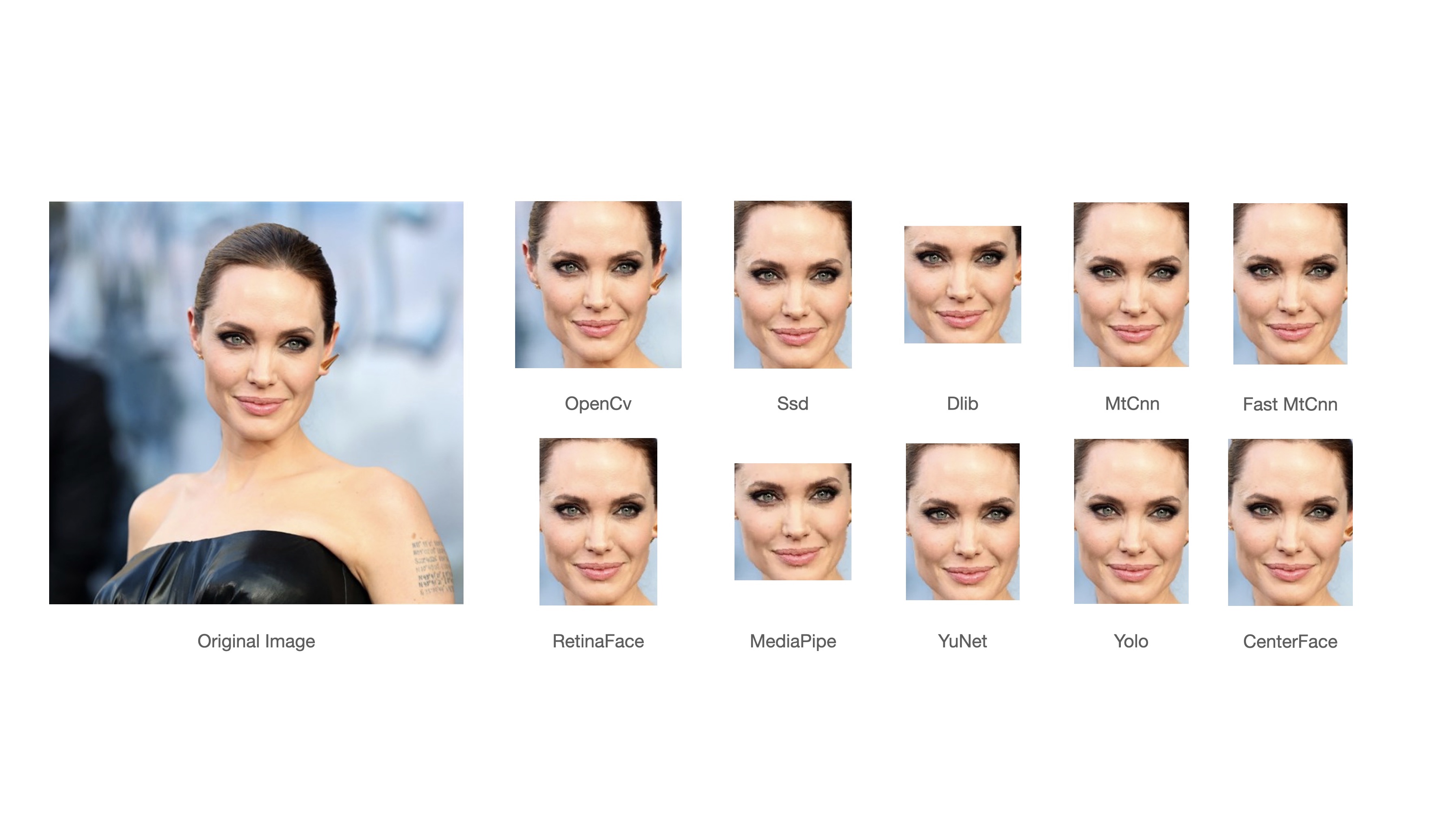
RetinaFace and MtCnn seem to overperform in detection and alignment stages but they are much slower. If the speed of your pipeline is more important, then you should use opencv or ssd. On the other hand, if you consider the accuracy, then you should use retinaface or mtcnn.
The performance of RetinaFace is very satisfactory even in the crowd as seen in the following illustration. Besides, it comes with an incredible facial landmark detection performance. Highlighted red points show some facial landmarks such as eyes, nose and mouth. That's why, alignment score of RetinaFace is high as well.

The Yellow Angels - Fenerbahce Women's Volleyball Team
You can find out more about RetinaFace on this repo.
Face Anti Spoofing - Demo
DeepFace also includes an anti-spoofing analysis module to understand given image is real or fake. To activate this feature, set the anti_spoofing argument to True in any DeepFace tasks.
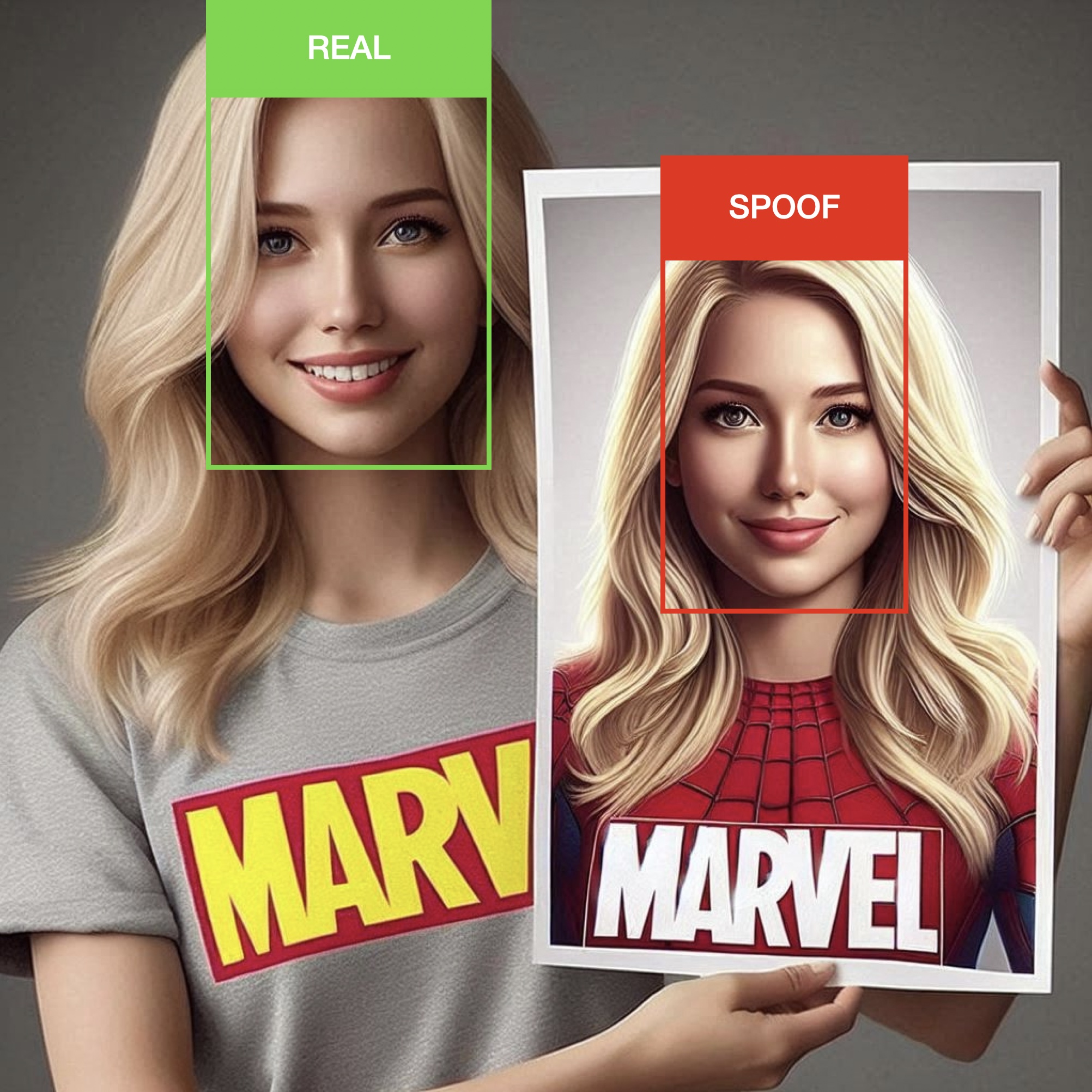
# anti spoofing test in face detection
face_objs = DeepFace.extract_faces(img_path="dataset/img1.jpg", anti_spoofing = True)
assert all(face_obj["is_real"] is True for face_obj in face_objs)

# anti spoofing test in real time analysis
DeepFace.stream(db_path = "C:/database", anti_spoofing = True)
Similarity - Demo
Face recognition models are regular convolutional neural networks and they are responsible to represent faces as vectors. We expect that a face pair of same person should be more similar than a face pair of different persons.
Similarity could be calculated by different metrics such as Cosine Similarity, Angular Distance, Euclidean Distance or L2 normalized Euclidean. The default configuration uses cosine similarity. According to experiments, no distance metric is overperforming than other.
metrics = ["cosine", "euclidean", "euclidean_l2", "angular"]

result = DeepFace.verify(
  img1_path = "img1.jpg", img2_path = "img2.jpg", distance_metric = metrics[1]
)

dfs = DeepFace.find(
  img_path = "img1.jpg", db_path = "C:/my_db", distance_metric = metrics[2]
)
API - Demo, Docker Demo
DeepFace serves an API as well - see api folder for more details. You can clone deepface source code and run the api with the following command. It will use gunicorn server to get a rest service up. In this way, you can call deepface from an external system such as mobile app or web.
cd scripts && ./service.sh
Alternatively, you can run the dockerized service.
cd scripts && ./dockerize.sh
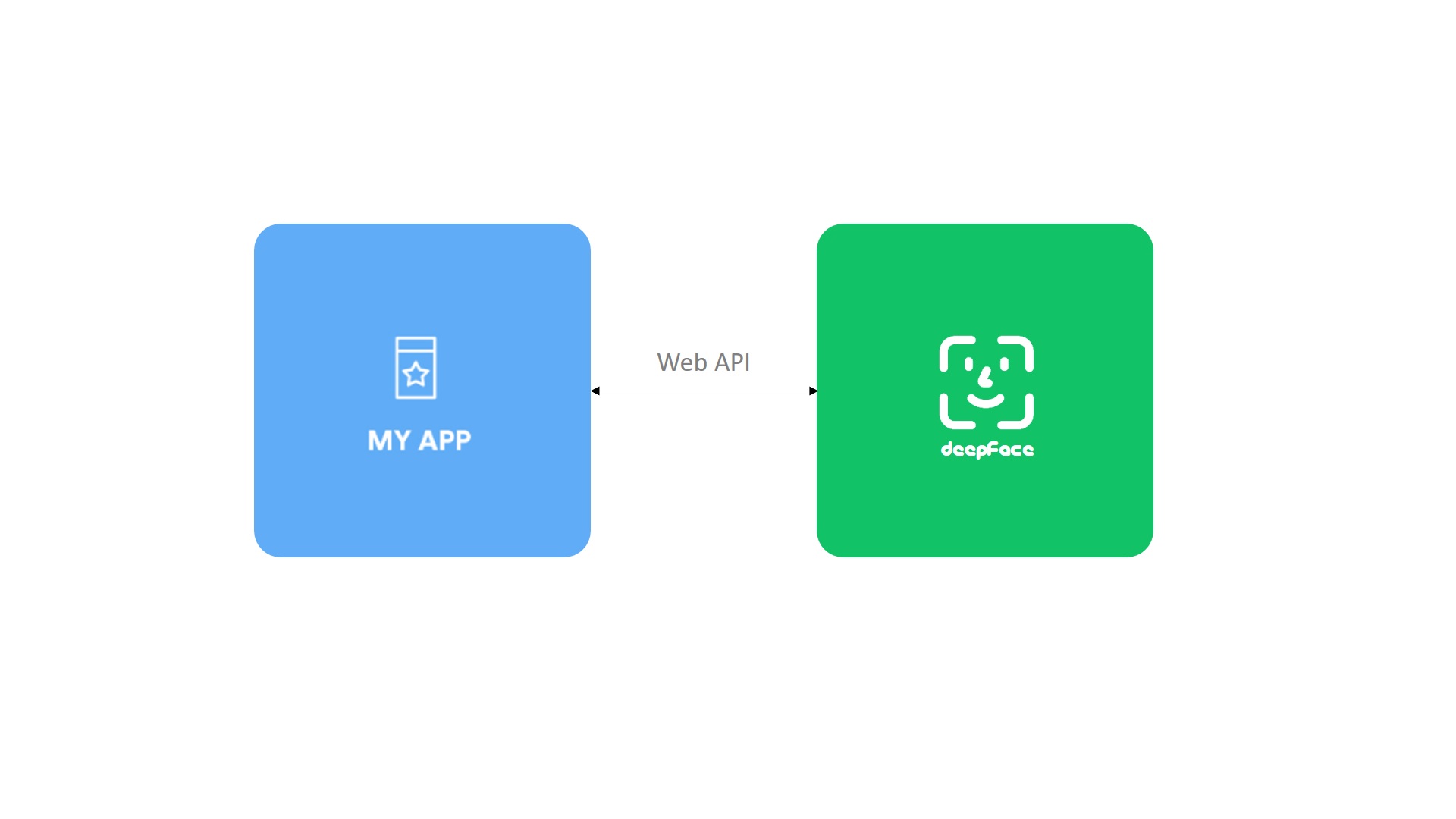
Face verification, facial attribute analysis, vector representation and register & search functions are covered in the API. The API accepts images as file uploads (via form data), or as exact image paths, URLs, or base64-encoded strings (via either JSON or form data).
$ curl -X POST http://localhost:5005/represent \
   -d '{"model_name":"Facenet", "img":"img1.jpg"}'

$ curl -X POST http://localhost:5005/verify \
   -d '{"img1":"img1.jpg", "img2":"img3.jpg"}'

$ curl -X POST http://localhost:5005/analyze \
   -d '{"img": "img2.jpg", "actions": ["age", "gender"]}'

$ curl -X POST http://localhost:5005/register \
   -d '{"model_name":"Facenet", "img":"img18.jpg"}'

$ curl -X POST http://localhost:5005/search \
   -d '{"img":"img1.jpg", "model_name":"Facenet"}'
Here, you can find a postman project to find out how these methods should be called.
Hosted DeepFace

Donât want to host and scale DeepFace yourself? deepface.dev
provides a managed API built on top of DeepFace.
- One API for verification, embeddings, and vector comparison
- Docs and machine-readable agent docs:
docs.deepface.dev - MCP endpoint:
https://deepface.dev/mcpusing a dedicated MCP key - Usage-based pricing that scales from testing to production
Encrypt Embeddings - Demo with PHE, Tutorial for PHE, Demo with FHE, Tutorial for FHE
Vector embeddings, though not reversible, carry sensitive information like fingerprints, making their security crucial. Encrypting them prevents adversarial misuse. Traditional encryption (e.g., AES) is secure but unsuitable for cloud-based distance calculations.
Homomorphic encryption allows computations on encrypted data without revealing contentâideal for secure cloud processing. For example, the cloud can compute encrypted similarity without knowing the data, while only the key holder can decrypt the result. See the LightPHE library for partially homomorphic encryption.
from lightphe import LightPHE

# build an additively homomorphic cryptosystem (e.g. Paillier) on-prem
cs = LightPHE(algorithm_name = "Paillier", precision = 19)

# define encrypted and plain vectors
encrypted_alpha = DeepFace.represent("source.jpg", cryptosystem=cs)[0]["encrypted_embedding"]
beta = DeepFace.represent("target.jpg")[0]["embedding"]

# dot product of encrypted & plain embedding in cloud - private key not required
encrypted_cosine_similarity = encrypted_alpha @ beta

# decrypt similarity on-prem - private key required
calculated_similarity = cs.decrypt(encrypted_cosine_similarity)[0]

# verification
print("same person" if calculated_similarity >= 1 - threshold else "different persons")

For stronger privacy, fully homomorphic encryption enables dot product computations between encrypted embeddings, but it's far more computationally intensive. Explore CipherFace for FHE-based approaches.
Extended Applications
DeepFace can also be used for fun and insightful applications such as
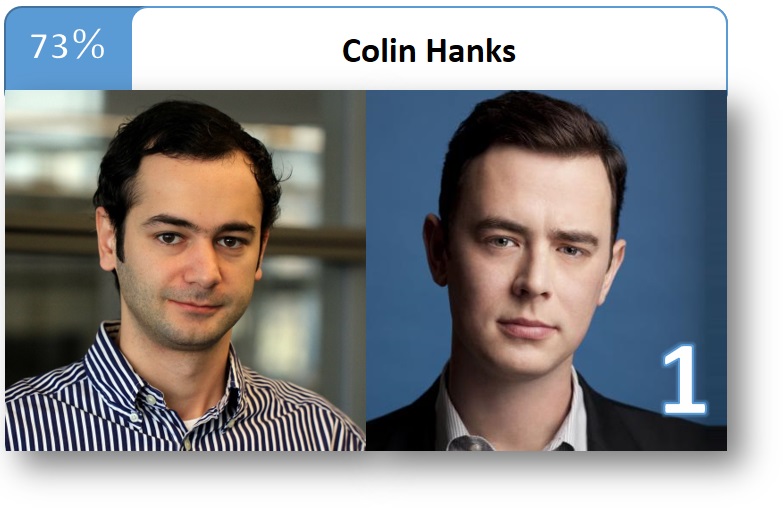
Find Your Celebrity Look-Alike - Demo, Real-Time Demo, Tutorial
DeepFace can analyze your facial features and match them with celebrities, letting you discover which famous personality you resemble the most.
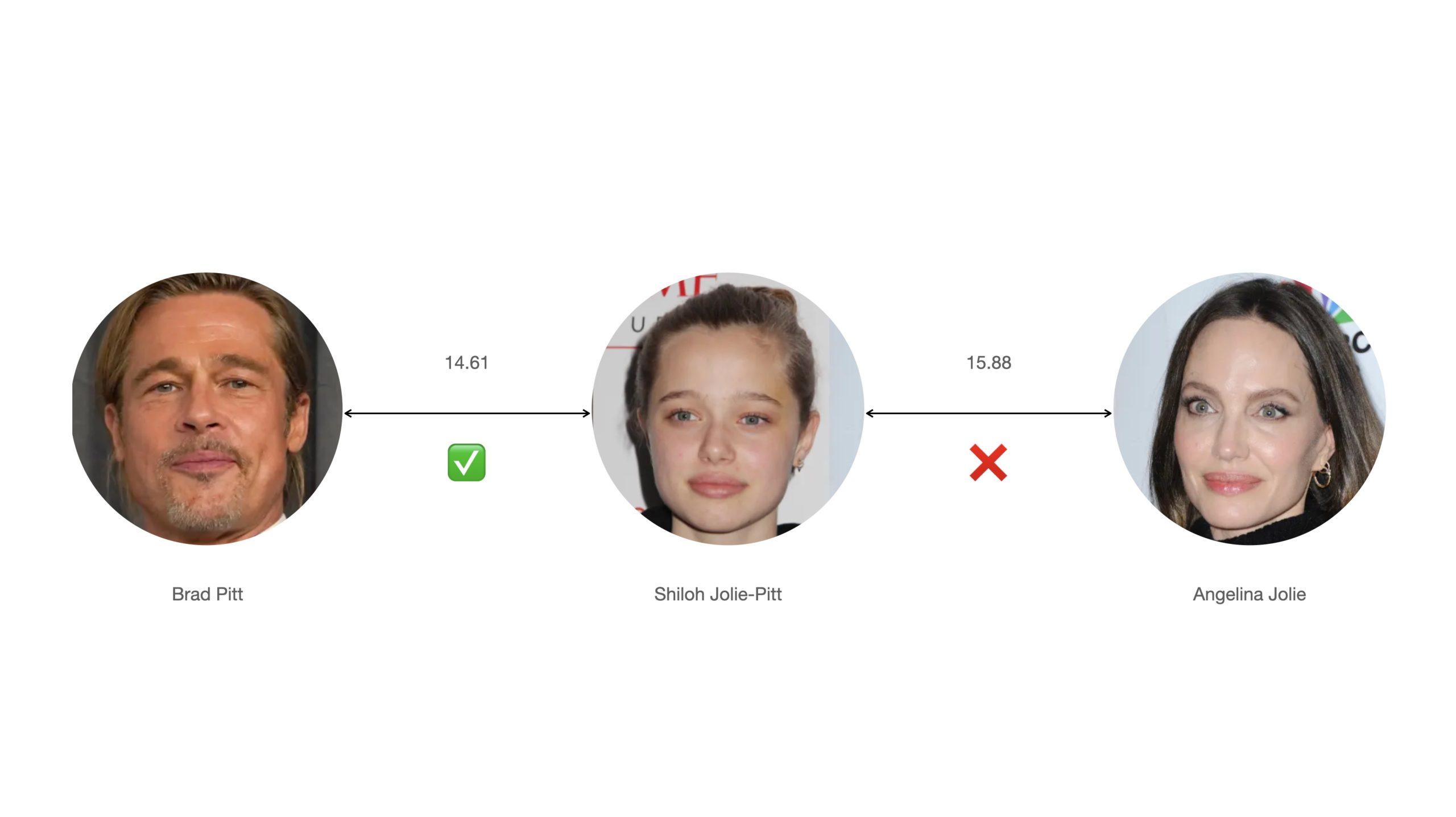
Find Which Parent a Child Look More - Demo, Tutorial
DeepFace can also be used to compare a child's face to their parents' or relatives' faces to determine which one the child resembles more.
Contribution
Pull requests are more than welcome! If you are planning to contribute a large patch, please create an issue first to get any upfront questions or design decisions out of the way first.
Before creating a PR, you should run the unit tests and linting locally by running make test && make lint command. Once a PR sent, GitHub test workflow will be run automatically and unit test and linting jobs will be available in GitHub actions before approval.
Support
There are many ways to support a project - starringâï¸ the GitHub repo is just one ð It really helps the project get discovered by more people.
If you do like this work, then you can support it financially on Patreon, GitHub Sponsors or Buy Me a Coffee.

Citation
Please cite deepface in your publications if it helps your research.
S. I. Serengil and A. Ozpinar, Boosted LightFace: A Hybrid DNN and GBM Model for Boosted Facial Recognition, Gazi University Journal of Science, vol. 39, no. 1, pp. 452-466, 2026.
@article{serengil2026boosted,
  title     =  {Boosted LightFace: A Hybrid DNN and GBM Model for Boosted Facial Recognition},
  author    =  {Serengil, Sefik Ilkin and Ozpinar, Alper},
  journal   =  {Gazi University Journal of Science},
  volume    =  {39},
  number    =  {1},
  pages     =  {452-466},
  year      =  {2026},
  doi       =  {10.35378/gujs.1794891},
  url       =  {https://dergipark.org.tr/en/pub/gujs/article/1794891},
  publisher =  {Gazi University}
}
S. Serengil and A. Ozpinar, "A Benchmark of Facial Recognition Pipelines and Co-Usability Performances of Modules", Journal of Information Technologies, vol. 17, no. 2, pp. 95-107, 2024.
@article{serengil2024lightface,
  title     = {A Benchmark of Facial Recognition Pipelines and Co-Usability Performances of Modules},
  author    = {Serengil, Sefik and Ozpinar, Alper},
  journal   = {Journal of Information Technologies},
  volume    = {17},
  number    = {2},
  pages     = {95-107},
  year      = {2024},
  doi       = {10.17671/gazibtd.1399077},
  url       = {https://dergipark.org.tr/en/pub/gazibtd/issue/84331/1399077},
  publisher = {Gazi University}
}
S. I. Serengil and A. Ozpinar, "HyperExtended LightFace: A Facial Attribute Analysis Framework", 2021 International Conference on Engineering and Emerging Technologies (ICEET), 2021, pp. 1-4.
@inproceedings{serengil2021lightface,
  title        = {HyperExtended LightFace: A Facial Attribute Analysis Framework},
  author       = {Serengil, Sefik Ilkin and Ozpinar, Alper},
  booktitle    = {2021 International Conference on Engineering and Emerging Technologies (ICEET)},
  pages        = {1-4},
  year         = {2021},
  doi          = {10.1109/ICEET53442.2021.9659697},
  url          = {https://ieeexplore.ieee.org/document/9659697},
  organization = {IEEE}
}
S. I. Serengil and A. Ozpinar, "LightFace: A Hybrid Deep Face Recognition Framework", 2020 Innovations in Intelligent Systems and Applications Conference (ASYU), 2020, pp. 23-27.
@inproceedings{serengil2020lightface,
  title        = {LightFace: A Hybrid Deep Face Recognition Framework},
  author       = {Serengil, Sefik Ilkin and Ozpinar, Alper},
  booktitle    = {2020 Innovations in Intelligent Systems and Applications Conference (ASYU)},
  pages        = {23-27},
  year         = {2020},
  doi          = {10.1109/ASYU50717.2020.9259802},
  url          = {https://ieeexplore.ieee.org/document/9259802},
  organization = {IEEE}
}
Also, if you use deepface in your GitHub projects, please add deepface in the requirements.txt.
Licence
DeepFace is licensed under the MIT License - see LICENSE for more details.
DeepFace wraps some external face recognition models: VGG-Face, Facenet (both 128d and 512d), OpenFace, DeepFace, DeepID, ArcFace, Dlib, SFace, GhostFaceNet and Buffalo_L. Besides, age, gender and race / ethnicity models were trained on the backbone of VGG-Face with transfer learning. Similarly, DeepFace wraps many face detectors: OpenCv, Ssd, Dlib, MtCnn, Fast MtCnn, RetinaFace, MediaPipe, YuNet, Yolo and CenterFace. Finally, DeepFace is optionally using face anti spoofing to determine the given images are real or fake. License types will be inherited when you intend to utilize those models. Please check the license types of those models for production purposes.
DeepFace logo is created by Adrien Coquet and it is licensed under Creative Commons: By Attribution 3.0 License.
Top Related Projects
The world's simplest facial recognition api for Python and the command line
Pretrained Pytorch face detection (MTCNN) and facial recognition (InceptionResnet) models
State-of-the-art 2D and 3D Face Analysis Project
Face recognition using Tensorflow
Face recognition with deep neural networks.
JavaScript API for face detection and face recognition in the browser and nodejs with tensorflow.js
Convert designs to code with AI
Introducing Visual Copilot: A new AI model to turn Figma designs to high quality code using your components.
Try Visual Copilot