
Top Related Projects

JavaScript Data Grid / Data Table with a Spreadsheet Look & Feel. Works with React, Angular, and Vue. Supported by the Handsontable team ⚡

The best JavaScript Data Table for building Enterprise Applications. Supports React / Angular / Vue / Plain JavaScript.

Feature-rich and customizable data grid React component

Excel-like data grid (table) component for React

React-based drag'n'drop pivot table with Plotly.js charts
Quick Overview
ReactGrid is a powerful and flexible data grid component for React applications. It provides a spreadsheet-like interface with features such as cell editing, custom cell rendering, and keyboard navigation. ReactGrid is designed to handle large datasets efficiently and offers a highly customizable user experience.
Pros
- Highly performant, capable of handling large datasets smoothly
- Extensive customization options for cell rendering and behavior
- Intuitive spreadsheet-like interface with familiar keyboard shortcuts
- Supports both controlled and uncontrolled component modes
Cons
- Steeper learning curve compared to simpler grid components
- Documentation could be more comprehensive, especially for advanced use cases
- Limited built-in styling options, requiring more custom CSS
- Some features like column resizing and row grouping are not included out of the box
Code Examples
- Basic ReactGrid setup:
import React from 'react';
import ReactDOM from 'react-dom';
import { ReactGrid, Column, Row } from '@silevis/reactgrid';

const columns: Column[] = [
  { columnId: 'name', width: 150 },
  { columnId: 'age', width: 100 },
];

const rows: Row[] = [
  { rowId: 1, cells: [{ type: 'text', text: 'John' }, { type: 'number', value: 30 }] },
  { rowId: 2, cells: [{ type: 'text', text: 'Jane' }, { type: 'number', value: 25 }] },
];

const App = () => <ReactGrid rows={rows} columns={columns} />;

ReactDOM.render(<App />, document.getElementById('root'));
- Custom cell renderer:
const CustomCell = ({ cell, onChange }) => (
  <input
    value={cell.text}
    onChange={(e) => onChange({ ...cell, text: e.target.value })}
  />
);

const columns: Column[] = [
  { columnId: 'custom', width: 200, cellRenderer: CustomCell },
];
- Handling cell changes:
const handleChanges = (changes) => {
  const newRows = [...rows];
  changes.forEach((change) => {
    const { rowId, columnId, newCell } = change;
    const rowIndex = newRows.findIndex((row) => row.rowId === rowId);
    const columnIndex = columns.findIndex((col) => col.columnId === columnId);
    newRows[rowIndex].cells[columnIndex] = newCell;
  });
  setRows(newRows);
};

<ReactGrid rows={rows} columns={columns} onCellsChanged={handleChanges} />
Getting Started
-
Install ReactGrid:
npm install @silevis/reactgrid -
Import and use in your React component:
import React from 'react'; import { ReactGrid } from '@silevis/reactgrid'; import '@silevis/reactgrid/styles.css'; const MyComponent = () => { const columns = [/* define your columns */]; const rows = [/* define your rows */]; return <ReactGrid rows={rows} columns={columns} />; }; export default MyComponent; -
Customize as needed, adding event handlers and custom cell renderers to suit your application's requirements.
Competitor Comparisons
JavaScript Data Grid / Data Table with a Spreadsheet Look & Feel. Works with React, Angular, and Vue. Supported by the Handsontable team ⚡
Pros of Handsontable
- More mature and feature-rich, with a longer development history
- Supports multiple frameworks (React, Vue, Angular) and vanilla JavaScript
- Offers a wider range of built-in cell types and data validation options
Cons of Handsontable
- Larger bundle size, which may impact performance for smaller projects
- Steeper learning curve due to its extensive API and configuration options
- Commercial license required for some features and use cases
Code Comparison
Handsontable:
const hot = new Handsontable(container, {
  data: data,
  columns: [
    { type: 'text' },
    { type: 'numeric' },
    { type: 'date' }
  ],
  rowHeaders: true,
  colHeaders: true
});
ReactGrid:
<ReactGrid
  rows={rows}
  columns={columns}
  onCellsChanged={handleChanges}
  enableRangeSelection
  enableColumnSelection
/>
Summary
Handsontable is a more comprehensive solution with broader framework support and advanced features, making it suitable for complex enterprise applications. However, it comes with a larger footprint and potential licensing costs. ReactGrid, being React-specific and lighter, may be more appropriate for simpler React-based projects that prioritize performance and ease of integration.
The best JavaScript Data Table for building Enterprise Applications. Supports React / Angular / Vue / Plain JavaScript.
Pros of ag-grid
- More feature-rich with advanced functionality like pivoting, grouping, and filtering
- Extensive documentation and community support
- Better performance for large datasets
Cons of ag-grid
- Steeper learning curve due to complexity
- Larger bundle size
- Commercial license required for enterprise features
Code Comparison
ag-grid:
<AgGridReact
  columnDefs={columnDefs}
  rowData={rowData}
  defaultColDef={defaultColDef}
  onGridReady={onGridReady}
/>
reactgrid:
<ReactGrid
  rows={rows}
  columns={columns}
  onCellsChanged={handleChanges}
/>
Key Differences
- ag-grid offers more out-of-the-box features and customization options
- reactgrid has a simpler API and is easier to set up for basic use cases
- ag-grid has better performance for large datasets, while reactgrid is more lightweight
- ag-grid has a commercial license for advanced features, reactgrid is fully open-source
Use Cases
- Choose ag-grid for complex enterprise applications with large datasets and advanced requirements
- Opt for reactgrid for simpler projects, React-specific applications, or when a lightweight solution is preferred
Community and Support
- ag-grid has a larger community and more extensive documentation
- reactgrid is newer and has a smaller but growing community
Feature-rich and customizable data grid React component
Error generating comparison
Excel-like data grid (table) component for React
Pros of react-datasheet
- Lightweight and simple to use, with a smaller learning curve
- Better suited for basic spreadsheet-like functionality
- More flexible cell rendering options out of the box
Cons of react-datasheet
- Less feature-rich compared to ReactGrid
- Limited built-in keyboard navigation and selection capabilities
- Fewer customization options for complex grid layouts
Code Comparison
react-datasheet:
<ReactDataSheet
  data={[
    [{ value: 1 }, { value: 2 }, { value: 3 }],
    [{ value: 4 }, { value: 5 }, { value: 6 }]
  ]}
  valueRenderer={(cell) => cell.value}
  onCellsChanged={(changes) => {
    // Handle changes
  }}
/>
ReactGrid:
<ReactGrid
  rows={[
    { cells: [{ type: 'text', text: '1' }, { type: 'text', text: '2' }, { type: 'text', text: '3' }] },
    { cells: [{ type: 'text', text: '4' }, { type: 'text', text: '5' }, { type: 'text', text: '6' }] }
  ]}
  columns={[{ columnId: 'col1' }, { columnId: 'col2' }, { columnId: 'col3' }]}
  onCellsChanged={(changes) => {
    // Handle changes
  }}
/>
Both libraries offer React components for creating data grids, but ReactGrid provides more advanced features and customization options, while react-datasheet focuses on simplicity and ease of use for basic spreadsheet-like functionality.
React-based drag'n'drop pivot table with Plotly.js charts
Pros of react-pivottable
- More focused on data analysis and visualization with pivot tables
- Includes built-in charting capabilities
- Offers a drag-and-drop interface for easy data manipulation
Cons of react-pivottable
- Less flexible for general-purpose grid applications
- May have a steeper learning curve for basic grid functionality
- Limited customization options compared to ReactGrid
Code Comparison
ReactGrid example:
import { ReactGrid } from '@silevis/reactgrid';

const App = () => (
  <ReactGrid
    rows={rows}
    columns={columns}
    onCellsChanged={handleChanges}
  />
);
react-pivottable example:
import PivotTableUI from 'react-pivottable/PivotTableUI';

const App = () => (
  <PivotTableUI
    data={data}
    onChange={s => setState(s)}
    {...state}
  />
);
Both libraries offer React components for data display, but ReactGrid focuses on spreadsheet-like functionality, while react-pivottable specializes in pivot table analysis. ReactGrid provides more granular control over cell rendering and interactions, making it suitable for custom grid applications. react-pivottable, on the other hand, excels in data summarization and exploration, with built-in aggregation and visualization features. The choice between the two depends on the specific requirements of your project, whether you need a flexible grid or a powerful pivot table tool.
Convert  designs to code with AI

Introducing Visual Copilot: A new AI model to turn Figma designs to high quality code using your components.
Try Visual CopilotREADME

ReactGrid is an open-source React component for displaying and editing data in a spreadsheet-like way. ð


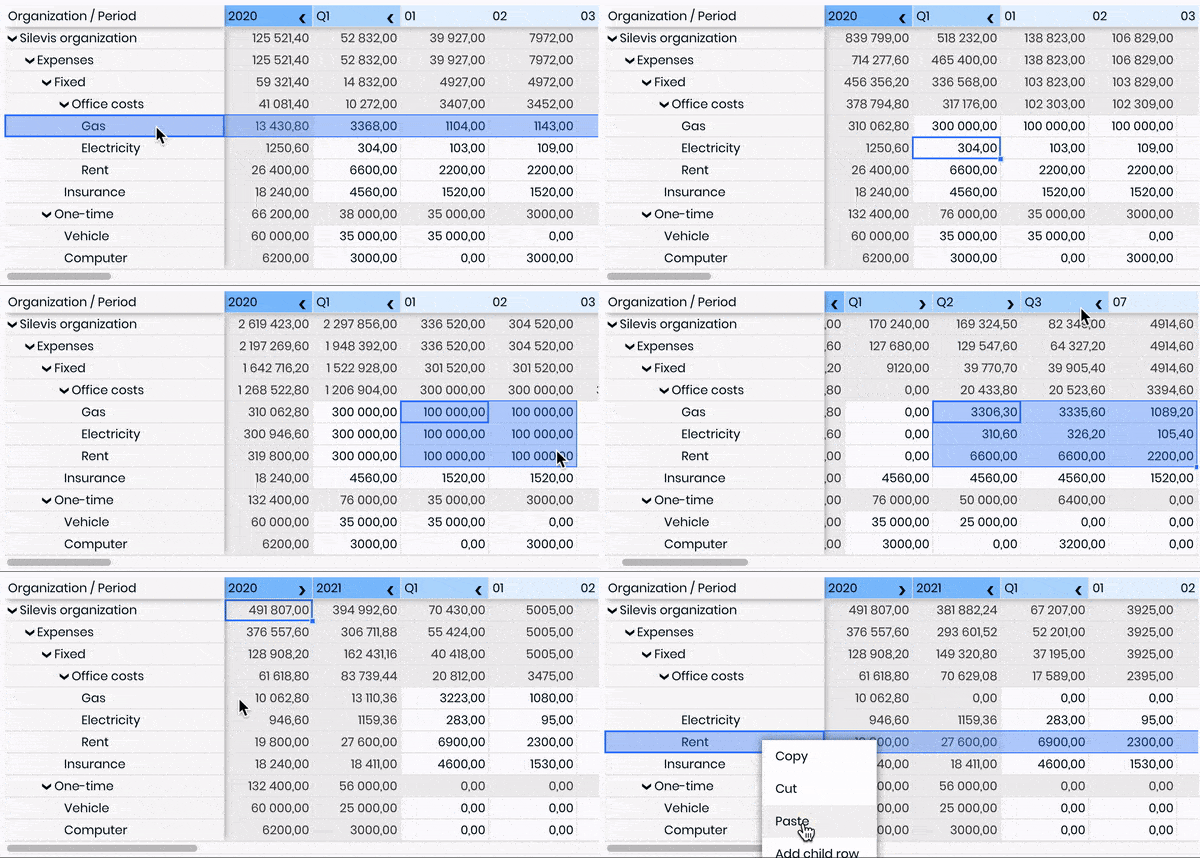
We've put a lot of effort in this software
If you like our work, please give this project a star â
Check out the new v5-alpha version
ð Dive into the Documentation to get started quickly and easily.
Features
- Handling data changes
- Column resizing
- Column and row reordering
- Sticky rows and columns
- Keyboard shortcuts
- Spanned cells
- Range selection
- Fill handle
- Styled ranges
- Custom styling
- Custom cell types
- Customizable behaviors
- API hook that allows you to interact with a ReactGrid
Licensing
ReactGrid is published under the MIT License.
Authors

Top Related Projects
JavaScript Data Grid / Data Table with a Spreadsheet Look & Feel. Works with React, Angular, and Vue. Supported by the Handsontable team ⚡
The best JavaScript Data Table for building Enterprise Applications. Supports React / Angular / Vue / Plain JavaScript.
Feature-rich and customizable data grid React component
Excel-like data grid (table) component for React
React-based drag'n'drop pivot table with Plotly.js charts
Convert designs to code with AI
Introducing Visual Copilot: A new AI model to turn Figma designs to high quality code using your components.
Try Visual Copilot