
Top Related Projects

Hunt down social media accounts by username across social networks

Stalk your Friends. Find their Instagram, FB and Twitter Profiles using Image Recognition and Reverse Image Search.

API, CLI, and Web App for analyzing and finding a person's profile in 1000 social media \ websites

Community-maintained dataset of 700+ websites for finding accounts by username — powers OSINT and digital footprint tools.

holehe allows you to check if the mail is used on different sites like twitter, instagram and will retrieve information on sites with the forgotten password function.

🕵️♂️ Offensive Google framework.
Quick Overview
Maigret is an open-source intelligence (OSINT) tool designed to collect a person's profiles and digital footprints across various online platforms. It uses username checking, profile extraction, and data analysis to gather information from over 2500 sites, providing a comprehensive view of an individual's online presence.
Pros
- Extensive coverage with support for over 2500 sites
- Detailed output including profile information and potential connections
- Customizable search options and output formats
- Active development and community support
Cons
- May raise privacy concerns if used unethically
- Can be resource-intensive for large-scale searches
- Accuracy depends on the uniqueness of the username and site availability
- Requires careful interpretation of results to avoid false positives
Code Examples
# Basic search for a username
from maigret import search_username
search_username('johndoe')
# Search with custom options
from maigret import search_username
search_username('johndoe', timeout=10, sites=['twitter', 'facebook', 'linkedin'])
# Export results to JSON
from maigret import search_username
results = search_username('johndoe', json_file='results.json')
Getting Started
To get started with Maigret, follow these steps:
-
Install Maigret:
pip install maigret -
Run a basic search:
from maigret import search_username results = search_username('target_username') -
Customize your search:
from maigret import search_username
results = search_username('target_username', timeout=15, sites=['twitter', 'instagram'], print_found_only=True)
For more advanced usage and options, refer to the project's documentation on GitHub.
Competitor Comparisons
Hunt down social media accounts by username across social networks
Pros of Sherlock
- Larger community and more contributors, potentially leading to faster updates and bug fixes
- Simpler installation process, requiring fewer dependencies
- More extensive documentation and usage examples
Cons of Sherlock
- Limited to username searches, while Maigret supports additional search types
- Less flexible configuration options compared to Maigret
- Slower execution speed for large-scale searches
Code Comparison
Sherlock:
def sherlock(username, site_data, timeout=60):
    results = {}
    for site in site_data:
        results[site] = check_username(username, site_data[site], timeout)
    return results
Maigret:
async def maigret(username, sites, timeout=60):
    results = {}
    async with aiohttp.ClientSession() as session:
        tasks = [check_username(session, username, site, timeout) for site in sites]
        results = await asyncio.gather(*tasks)
    return results
The main difference is that Maigret uses asynchronous programming, potentially allowing for faster execution when searching multiple sites simultaneously.
Stalk your Friends. Find their Instagram, FB and Twitter Profiles using Image Recognition and Reverse Image Search.
Pros of EagleEye
- Focuses specifically on facial recognition and image analysis
- Integrates with multiple social media platforms for comprehensive search
- Provides visual output and image clustering capabilities
Cons of EagleEye
- Less actively maintained (last update in 2019)
- More limited in scope, primarily focused on image-based searches
- Requires additional dependencies for facial recognition functionality
Code Comparison
EagleEye:
def get_social_media_profiles(self):
    for website in self.websites:
        if website.rateLimit:
            time.sleep(website.rateLimit)
        website.getResults(self.person)
Maigret:
async def search(self, username, site, query_notify):
    try:
        await site.check_username(username)
        query_notify.update(result=QueryResult(username, site.name, site.url_user.format(username), QueryStatus.CLAIMED))
    except Exception as error:
        query_notify.update(result=QueryResult(username, site.name, site.url_user.format(username), QueryStatus.UNKNOWN, error))
EagleEye focuses on retrieving social media profiles through image analysis, while Maigret performs username searches across various platforms. Maigret's code demonstrates asynchronous functionality and more robust error handling, reflecting its broader scope and more active development.
API, CLI, and Web App for analyzing and finding a person's profile in 1000 social media \ websites
Pros of social-analyzer
- Supports a wider range of social networks and websites (300+)
- Provides a web interface for easier use by non-technical users
- Offers multiple output formats (JSON, XML, HTML)
Cons of social-analyzer
- Less actively maintained (last update 8 months ago vs. 12 days for Maigret)
- Slower performance due to browser automation
- Limited customization options compared to Maigret
Code comparison
Maigret:
async def main():
    search_func = partial(maigret.search, timeout=args.timeout, logger=logger)
    results = await search_func(username=args.username, site_dict=site_data)
social-analyzer:
def find_username_normal(req):
    options = []
    options.append(["FindUserProfilesFast"]) if req["method"] == "find" else options.append(["GetUserProfilesFast"])
    return find_username_template(req, options)
Both projects use asynchronous programming for efficient data retrieval, but Maigret's code appears more concise and focused on the core functionality of username searching. social-analyzer's code shows a more complex structure with additional options and methods.
Community-maintained dataset of 700+ websites for finding accounts by username — powers OSINT and digital footprint tools.
Pros of WhatsMyName
- Focused specifically on username enumeration across various platforms
- Extensive database of web sites and username formats
- Lightweight and easy to integrate into other tools
Cons of WhatsMyName
- Limited to username searches only, doesn't provide additional OSINT features
- Requires manual updates to the site database
- Less comprehensive reporting compared to Maigret
Code Comparison
WhatsMyName (Python):
def check_site(site, username):
    uri_check = site['uri_check']
    if '{username}' in uri_check:
        url = uri_check.format(username=username)
    # ... (additional code)
Maigret (Python):
async def detect_username(self, username, sites=None):
    tasks = []
    for site in (sites or self.sites):
        task = asyncio.create_task(self.check_username(site, username))
        tasks.append(task)
    # ... (additional code)
WhatsMyName focuses on a straightforward approach to checking usernames across sites, while Maigret employs asynchronous processing for more efficient and comprehensive OSINT gathering. Maigret offers a broader range of features beyond username searches, making it more versatile for general OSINT purposes. However, WhatsMyName's simplicity and specific focus on usernames can be advantageous for targeted username enumeration tasks.
holehe allows you to check if the mail is used on different sites like twitter, instagram and will retrieve information on sites with the forgotten password function.
Pros of holehe
- Focused specifically on email address checking
- Lightweight and easy to use as a Python library
- Faster execution for email-only searches
Cons of holehe
- Limited to email address searches only
- Smaller number of supported websites/services
- Less frequent updates and maintenance
Code Comparison
holehe:
def instagram(email):
    r = requests.get("https://www.instagram.com/accounts/login/")
    csrf = r.cookies["csrftoken"]
    r = requests.post("https://www.instagram.com/accounts/login/ajax/",
                      data={"email": email, "username": "", "password": ""},
                      headers={"X-CSRFToken": csrf})
    if r.json()["status"] == "fail":
        return({"rateLimit": False, "exists": True, "emailrecovery": None, "phoneNumber": None, "others": None})
    else:
        return({"rateLimit": False, "exists": False, "emailrecovery": None, "phoneNumber": None, "others": None})
Maigret:
async def check_username(username):
    results = await maigret.search(username)
    for website_name in results:
        if results[website_name]['status'].id == 'CLAIMED':
            print(f"{website_name}: {results[website_name]['url_user']}")
Maigret offers a more comprehensive search across various platforms, supporting username searches beyond just email addresses. It provides more detailed results and has a larger database of supported websites. However, holehe's focused approach on email checking can be advantageous for specific use cases requiring quick email validation across multiple services.
🕵️♂️ Offensive Google framework.
Pros of GHunt
- Specialized in Google account investigations
- Provides detailed information about Google services usage
- Offers a user-friendly CLI interface
Cons of GHunt
- Limited to Google accounts only
- Requires more setup and dependencies
- Less frequently updated compared to Maigret
Code Comparison
Maigret:
async def main():
    results = await maigret.search(username)
    for result in results:
        print(f"{result.site_name}: {result.url}")
GHunt:
def hunt(email):
    gaia_id = get_gaia_id(email)
    profile_data = get_profile_data(gaia_id)
    print_profile_info(profile_data)
Key Differences
- Maigret is a general-purpose OSINT tool for various platforms, while GHunt focuses solely on Google accounts.
- Maigret uses asynchronous programming for efficient searches, whereas GHunt employs a more straightforward approach.
- Maigret's output is typically a list of profile URLs, while GHunt provides in-depth information about Google services usage.
Use Cases
- Use Maigret for broad searches across multiple platforms to find user profiles quickly.
- Choose GHunt when you need detailed information about a specific Google account and its associated services.
Convert  designs to code with AI

Introducing Visual Copilot: A new AI model to turn Figma designs to high quality code using your components.
Try Visual CopilotREADME
Maigret








Maigret collects a dossier on a person by username only, checking for accounts on a huge number of sites and gathering all the available information from web pages. No API keys required. AI profiling (demo).
Sponsors
RapidProxy provides high-performance residential proxies for Twitter scraping, Selenium automation, and web data extraction. 90M+ IPs ⢠Smart rotation ⢠Anti-block ⢠Non-expiring traffic.
Special Offer: Try it free â Plans from $0.65/GB. Use code RAPID10 for 10% off.
MangoProxy is a Residential, ISP, Mobile and Datacenter proxy service designed for professional tasks where stability, speed, and anonymity matter.
Promo code: SOXOJ - 8% off Static ISP proxies
Contents
In one minute
Ensure you have Python 3.10 or higher.
pip install maigret
maigret YOUR_USERNAME
No install? Try the community Telegram bot or a Cloud Shell.
Want a web UI? See how to launch it.
See also: Quick start.
Main features
- Supports 3,000+ sites (see full list). A default run checks the 500 highest-ranked sites by traffic; pass
-ato scan everything, or--tagsto narrow by category/country. - Embeddable in Python projects â import
maigretand run searches programmatically (see library usage). - Extracts all available information about the account owner from profile pages and site APIs, including links to other accounts.
- Performs recursive search using discovered usernames and other IDs.
- Allows filtering by tags (site categories, countries).
- Detects and partially bypasses blocks, censorship, and CAPTCHA.
- Fetches an auto-updated site database from GitHub each run (once per 24 hours), and falls back to the built-in database if offline.
- Works with Tor and I2P websites; able to check domains.
- Ships with a web interface for browsing results as a graph and downloading reports in every format from a single page.
- Optional AI analysis mode (
--ai) that turns raw findings into a short investigation summary using an OpenAI-compatible API.
For the complete feature list, see the features documentation.
Used by
Professional OSINT and social-media analysis tools built on Maigret:
Demo
Video

Reports
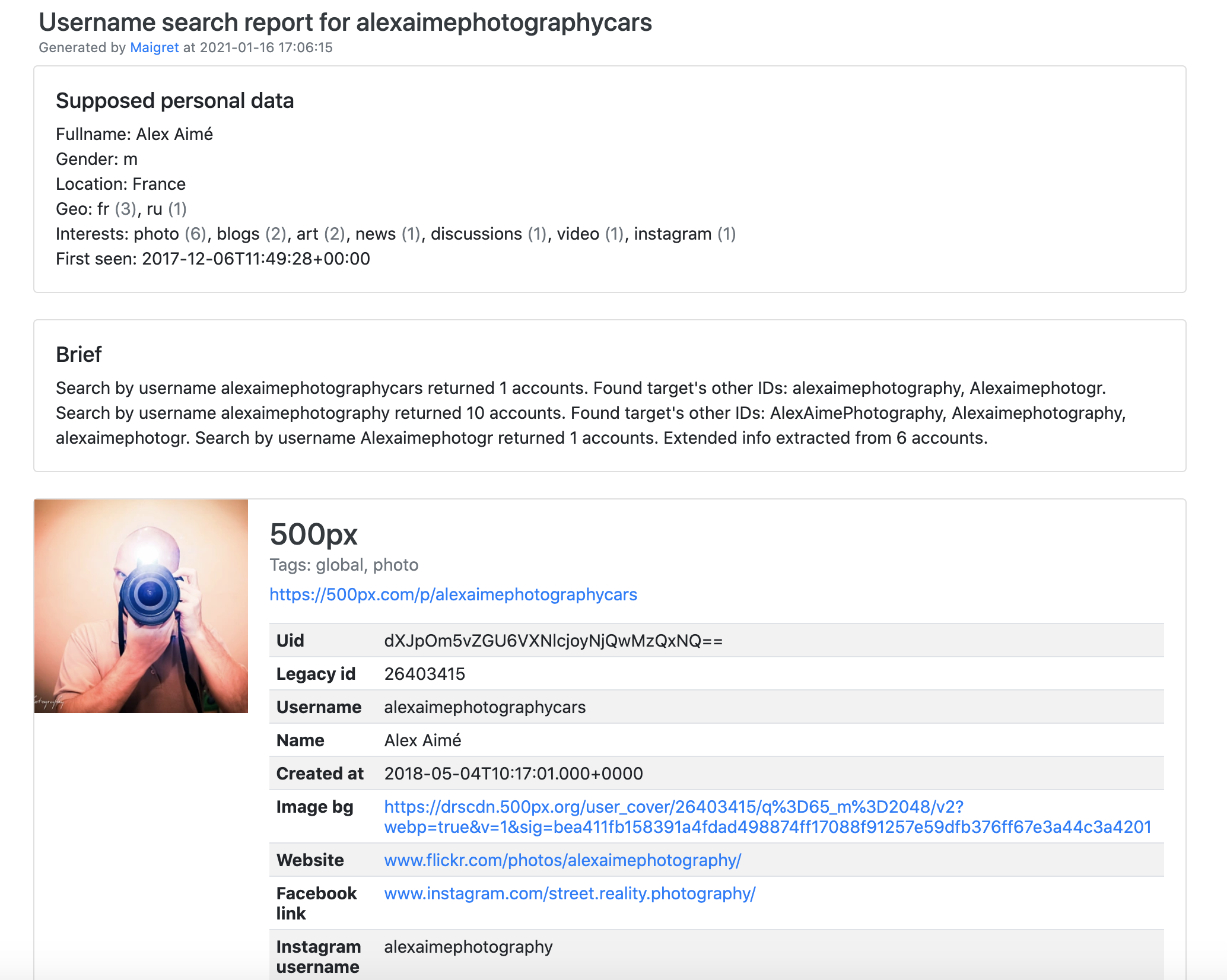
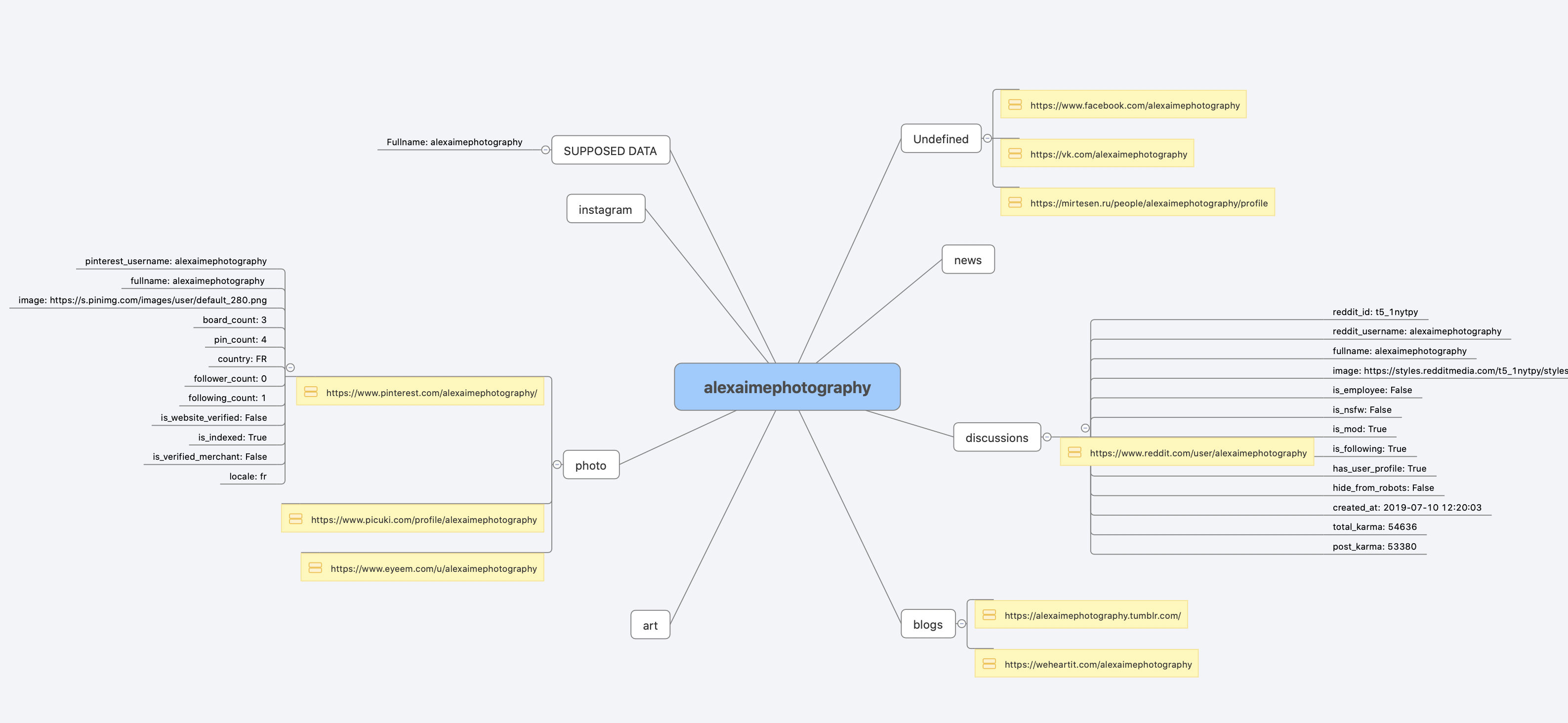
Installation
Already ran the In one minute steps? You're set. Below are alternative methods.
Don't want to install anything? Use the community Telegram bot.
Windows
Download maigret_standalone.exe from Releases. You can launch it two ways:
- Double-click it â Maigret will ask for a username, run a default search, and wait at the end so the report links stay visible.
- Run it from a terminal â open Command Prompt (press
Win+R, typecmd, hit Enter) or PowerShell to pass extra options:
cd %USERPROFILE%\Downloads
maigret_standalone.exe USERNAME
maigret_standalone.exe USERNAME --html       :: also save an HTML report
maigret_standalone.exe --help                :: list all options
Video guide: https://youtu.be/qIgwTZOmMmM.
Cloud Shells
Run Maigret in the browser via cloud shells or Jupyter notebooks:



Snap (Linux)

sudo snap install maigret

# usage
maigret username
Available for amd64 and arm64, no Python required. The snap is strictly confined and can write inside your home directory, so run it from there. For USB drives, connect the interface once with sudo snap connect maigret:removable-media.
Local installation (pip)
# install from pypi
pip3 install maigret

# usage
maigret username
From source
# or clone and install manually
git clone https://github.com/soxoj/maigret && cd maigret

# build and install
pip3 install .

# usage
maigret username
Docker
Two image variants are published:
soxoj/maigret:latestâ CLI mode (default)soxoj/maigret:webâ auto-launches the web interface
# official image (CLI)
docker pull soxoj/maigret

# CLI usage
docker run -v /mydir:/app/reports soxoj/maigret:latest username --html

# Web UI (open http://localhost:5000)
docker run -p 5000:5000 soxoj/maigret:web

# Web UI on a custom port
docker run -e PORT=8080 -p 8080:8080 soxoj/maigret:web

# manual build
docker build -t maigret .                  # CLI image (default target)
docker build --target web -t maigret-web . # Web UI image
Troubleshooting
Build errors? See the troubleshooting guide.
PDF reports (--pdf) are an optional extra â install with pip install 'maigret[pdf]'. They need system-level graphics libraries on Linux/macOS; see the PDF reports section for per-OS install steps.
Usage
Examples
# make HTML, PDF, and XMind reports
maigret user --html
maigret user --pdf
maigret user --xmind # legacy XML with a manifest for XMind 2022+ readers

# machine-readable exports
maigret user --json ndjson   # newline-delimited JSON (also: --json simple)
maigret user --csv
maigret user --txt
maigret user --graph         # interactive D3 graph (HTML)
maigret user --neo4j         # Neo4j Cypher script (graph database)

# search on sites marked with tags photo & dating
maigret user --tags photo,dating

# search on sites marked with tag us
maigret user --tags us

# highlight sites whose page also mentions specific keywords
maigret user --keywords python rust
# keyword-matched sites are shown with "[++]" in bright green

# search for three usernames on all available sites
maigret user1 user2 user3 -a

# AI-assisted investigation summary (needs OPENAI_API_KEY)
maigret user --ai
--neo4j writes a *_neo4j.cypher script of the results graph; import it with cypher-shell -u neo4j -p <password> < report_user_neo4j.cypher or paste it into the Neo4j Browser. Re-imports are idempotent. See the Neo4j export docs.
Run maigret --help for all options. Docs: CLI options, more examples. Running into 403s or timeouts? See TROUBLESHOOTING.md.
Web interface
Maigret has a built-in web UI with a results graph and downloadable reports.
Don't want to run it yourself? Deploy the published soxoj/maigret:web Docker image as a hosted app in one click:

Runs on Render's free tier (spins down after 15 min idle, spins back up on the next request). No login is set up on the instance, so anyone with the URL can use it.
Web Interface Screenshots
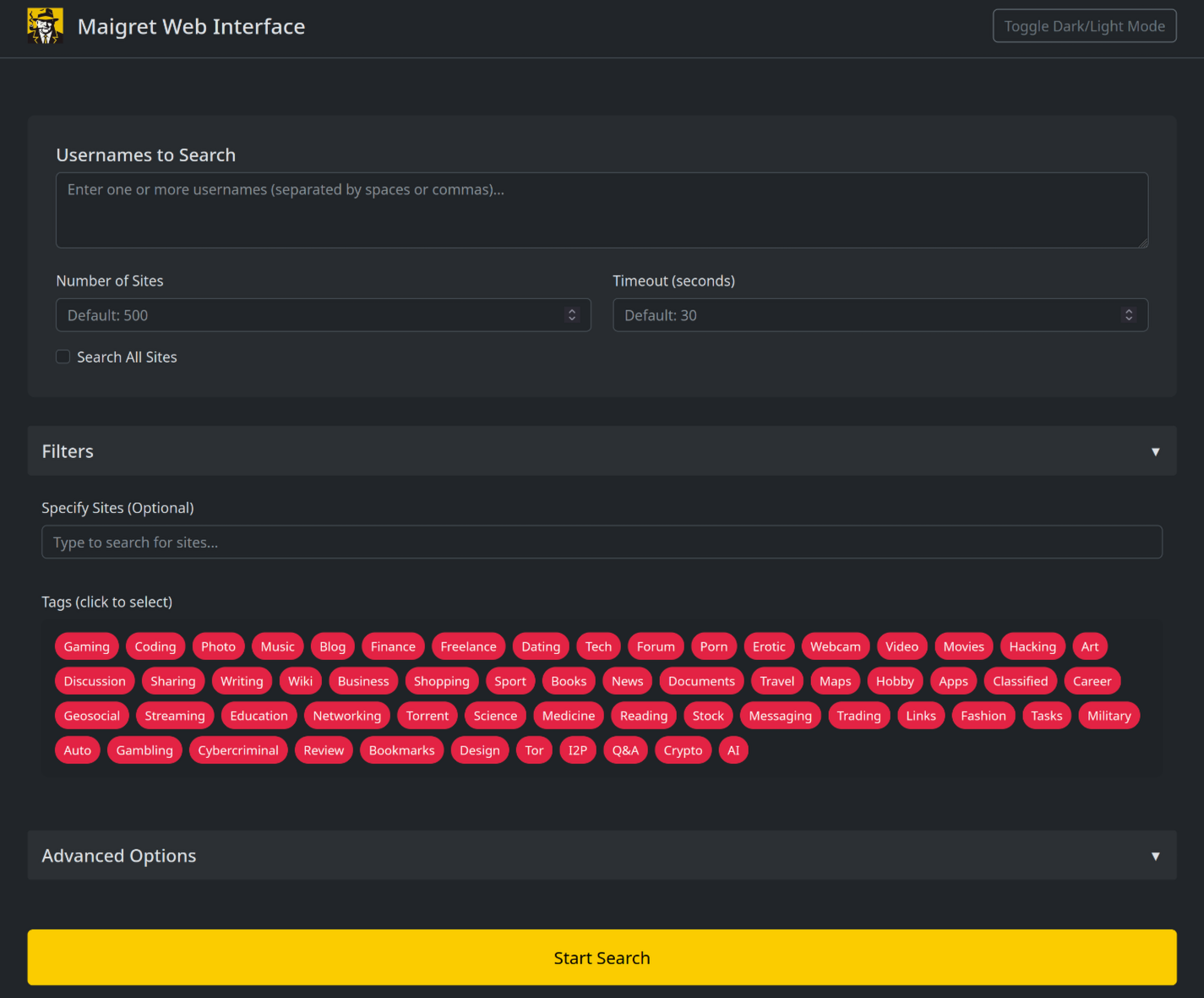
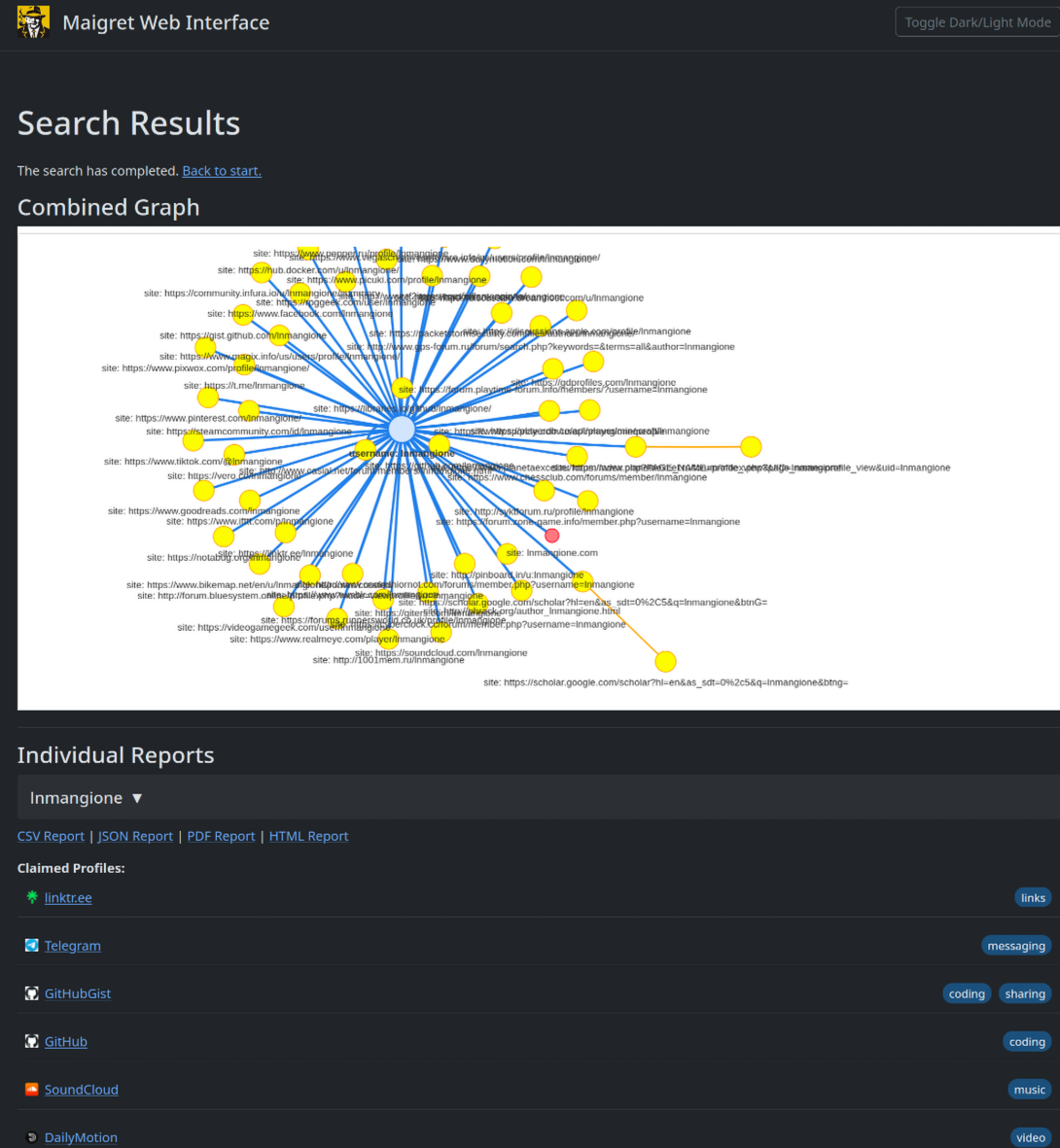
maigret --web 5000
Open http://127.0.0.1:5000, enter a username, and view results.
Python library
Maigret can be embedded in your own Python projects. The CLI is a thin wrapper around an async function you can call directly â build custom pipelines, feed results into your own tooling, or run it inside a larger OSINT workflow.
See the full library usage guide for a working example, async patterns, and how to filter sites by tag.
Useful CLI flags
--parse URLâ parse a profile page, extract IDs/usernames, and use them to kick off a recursive search.--permuteâ generate likely username variants from two or more inputs (e.g.john doeâjohndoe,j.doe, â¦) and search for all of them.--self-check [--auto-disable]â verifyusernameClaimed/usernameUnclaimedpairs against live sites for maintainers auditing the database.--ai/--ai-modelâ run the AI analysis over the search results and stream a short investigation summary to the terminal.
AI analysis

--ai collects the search results, builds an internal Markdown report, and sends it to an OpenAI-compatible chat completion endpoint to produce a short, neutral investigation summary (likely real name, location, occupation, interests, languages, confidence, follow-up leads). Per-site progress is suppressed and the model's output is streamed to stdout.
export OPENAI_API_KEY=sk-...
maigret user --ai

# pick a different model
maigret user --ai --ai-model gpt-4o-mini
The key can also be set as openai_api_key in settings.json. The endpoint defaults to https://api.openai.com/v1, but openai_api_base_url in settings.json can point to any OpenAI-compatible API (Azure OpenAI, OpenRouter, a local server, â¦). See the settings docs for the full list of options.
Tor / I2P / proxies
Maigret can route checks through a proxy, Tor, or I2P â useful for .onion / .i2p sites and for bypassing WAFs that block datacenter IPs.
# any HTTP/SOCKS proxy
maigret user --proxy socks5://127.0.0.1:1080

# Tor (default gateway socks5://127.0.0.1:9050)
maigret user --tor-proxy socks5://127.0.0.1:9050

# I2P (default gateway http://127.0.0.1:4444)
maigret user --i2p-proxy http://127.0.0.1:4444
Start your Tor / I2P daemon before running the command â Maigret does not manage these gateways.
Cloudflare bypass
Experimental. The Cloudflare webgate is under active development; the configuration schema, CLI behaviour, and the set of routed sites may change without backwards-compatibility guarantees.
A subset of sites in the database require a real browser to solve a JavaScript challenge. Maigret can offload these checks to a local FlareSolverr instance:
docker run -d -p 8191:8191 --name flaresolverr ghcr.io/flaresolverr/flaresolverr:latest
maigret --cloudflare-bypass <username>
The bypass is opt-in (--cloudflare-bypass or cloudflare_bypass.enabled in settings.json) and only fires for sites whose protection field matches. See the feature docs for backend options and configuration.
Contributing
Add or fix new sites surgically in data.json (no json.load/json.dump), then run ./utils/update_site_data.py to regenerate sites.md and the database metadata, and open a pull request. For more details, see the CONTRIBUTING guide and development docs. Release history: CHANGELOG.md.
Commercial Use
The open-source Maigret is MIT-licensed and free for commercial use without restriction â but site checks break over time and need active maintenance.
For serious commercial use â with a daily-updated site database or a username-check API â reach out: ð§ maigret@soxoj.com
- Private site database â 5 000+ sites, updated daily (separate from the public open-source database)
- Username check API â integrate Maigret into your product
About
Disclaimer
For educational and lawful purposes only. You are responsible for complying with all applicable laws (GDPR, CCPA, etc.) in your jurisdiction. The authors bear no responsibility for misuse.
Feedback
Open an issue · GitHub Discussions · Telegram
SOWEL classification
OSINT techniques used:
- SOTL-2.2. Search For Accounts On Other Platforms
- SOTL-6.1. Check Logins Reuse To Find Another Account
- SOTL-6.2. Check Nicknames Reuse To Find Another Account
License
MIT © Maigret
Top Related Projects
Hunt down social media accounts by username across social networks
Stalk your Friends. Find their Instagram, FB and Twitter Profiles using Image Recognition and Reverse Image Search.
API, CLI, and Web App for analyzing and finding a person's profile in 1000 social media \ websites
Community-maintained dataset of 700+ websites for finding accounts by username — powers OSINT and digital footprint tools.
holehe allows you to check if the mail is used on different sites like twitter, instagram and will retrieve information on sites with the forgotten password function.
🕵️♂️ Offensive Google framework.
Convert designs to code with AI
Introducing Visual Copilot: A new AI model to turn Figma designs to high quality code using your components.
Try Visual Copilot