 crystal
(Crystal is now Nimbalyst) Run multiple Codex and Claude Code AI sessions in parallel git worktrees. Test, compare approaches & manage AI-assisted development workflows in one desktop app.
Top Related Projects

The Crystal Programming Language

:gem: A collection of awesome Crystal libraries, tools, frameworks and software

A full-featured Crystal web framework that catches bugs for you, runs incredibly fast, and helps you write code that lasts.
Quick Overview
Crystal is a programming language that aims to combine the speed of C with the expressiveness of Ruby. It features a syntax similar to Ruby but with static type checking and compilation to native code, resulting in high-performance executables.
Pros
- Fast execution speed due to compilation to native code
- Ruby-like syntax for ease of learning and readability
- Strong static type system with type inference
- Built-in concurrency support through fibers and channels
Cons
- Smaller ecosystem compared to more established languages
- Limited platform support (primarily Linux and macOS)
- Longer compile times compared to interpreted languages
- Still evolving, with potential for breaking changes in future versions
Code Examples
- Hello World program:
puts "Hello, World!"
- Fibonacci sequence using recursion:
def fibonacci(n : Int32) : Int32
  return n if n <= 1
  fibonacci(n - 1) + fibonacci(n - 2)
end

puts fibonacci(10)
- HTTP server using the built-in HTTP module:
require "http/server"

server = HTTP::Server.new do |context|
  context.response.content_type = "text/plain"
  context.response.print "Hello, Crystal!"
end

puts "Listening on http://127.0.0.1:8080"
server.listen(8080)
Getting Started
-
Install Crystal:
- On macOS:
brew install crystal - On Ubuntu:
curl -fsSL https://crystal-lang.org/install.sh | sudo bash
- On macOS:
-
Create a new Crystal project:
crystal init app my_project cd my_project -
Run your Crystal program:
crystal run src/my_project.cr -
Build a release version:
crystal build --release src/my_project.cr
Competitor Comparisons
The Crystal Programming Language
Pros of Crystal
- Official repository for the Crystal programming language, ensuring up-to-date and authoritative content
- Significantly larger community and contributor base, leading to more frequent updates and improvements
- Comprehensive documentation and examples available within the repository
Cons of Crystal
- Larger codebase may be more challenging to navigate for newcomers
- Potentially slower to implement experimental features due to rigorous review processes
- May have stricter contribution guidelines, making it harder for casual contributors
Code Comparison
Crystal:
class Person
  property name : String
  property age : Int32

  def initialize(@name, @age)
  end
end
stravu/crystal:
class Person
  getter name : String
  getter age : Int32

  def initialize(@name, @age)
  end
end
The code snippets show minor differences in property declaration, with Crystal using property and stravu/crystal using getter. Both achieve similar results, but Crystal's approach allows for both reading and writing by default.
:gem: A collection of awesome Crystal libraries, tools, frameworks and software
Pros of awesome-crystal
- Comprehensive curated list of Crystal resources and libraries
- Regularly updated with community contributions
- Provides a quick overview of the Crystal ecosystem
Cons of awesome-crystal
- Not a functional Crystal project or library itself
- Requires manual curation and maintenance
Code comparison
Unfortunately, a direct code comparison is not relevant in this case, as awesome-crystal is a curated list of resources rather than a functional Crystal project. The crystal repository, on the other hand, is the main repository for the Crystal programming language itself.
Summary
awesome-crystal serves as an excellent resource for developers looking to explore the Crystal ecosystem, offering a wide range of libraries, tools, and resources. However, it's important to note that it's not a functional Crystal project like the crystal repository, which contains the actual language implementation.
While awesome-crystal provides valuable information for Crystal developers, it doesn't offer direct functionality or code contributions to the language itself. The crystal repository, being the official language repository, is more suitable for those looking to contribute to or understand the core language implementation.
A full-featured Crystal web framework that catches bugs for you, runs incredibly fast, and helps you write code that lasts.
Pros of Lucky
- Full-featured web framework with built-in ORM, routing, and templating
- Strong focus on type safety and compile-time checks
- Includes CLI tools for rapid development and code generation
Cons of Lucky
- Steeper learning curve due to its opinionated structure
- Less flexibility compared to using Crystal directly
- Smaller community and ecosystem than Crystal itself
Code Comparison
Lucky (web application setup):
class App < Lucky::BaseApp
  def middleware
    [
      Lucky::ForceSSLHandler.new,
      Lucky::HttpMethodOverrideHandler.new,
      Lucky::LogHandler.new,
      Lucky::SessionHandler.new,
      Lucky::FlashHandler.new,
      Lucky::ErrorHandler.new(action: Errors::Show),
      Lucky::RouteHandler.new,
      Lucky::StaticFileHandler.new("./public", false),
      Lucky::CookieJarHandler.new
    ]
  end
end
Crystal (basic HTTP server):
require "http/server"

server = HTTP::Server.new do |context|
  context.response.content_type = "text/plain"
  context.response.print "Hello world!"
end

puts "Listening on http://127.0.0.1:8080"
server.listen(8080)
Lucky provides a more structured approach with built-in middleware, while Crystal offers more flexibility for custom server setups.
Convert  designs to code with AI

Introducing Visual Copilot: A new AI model to turn Figma designs to high quality code using your components.
Try Visual CopilotREADME

Crystal Is Now Nimbalyst
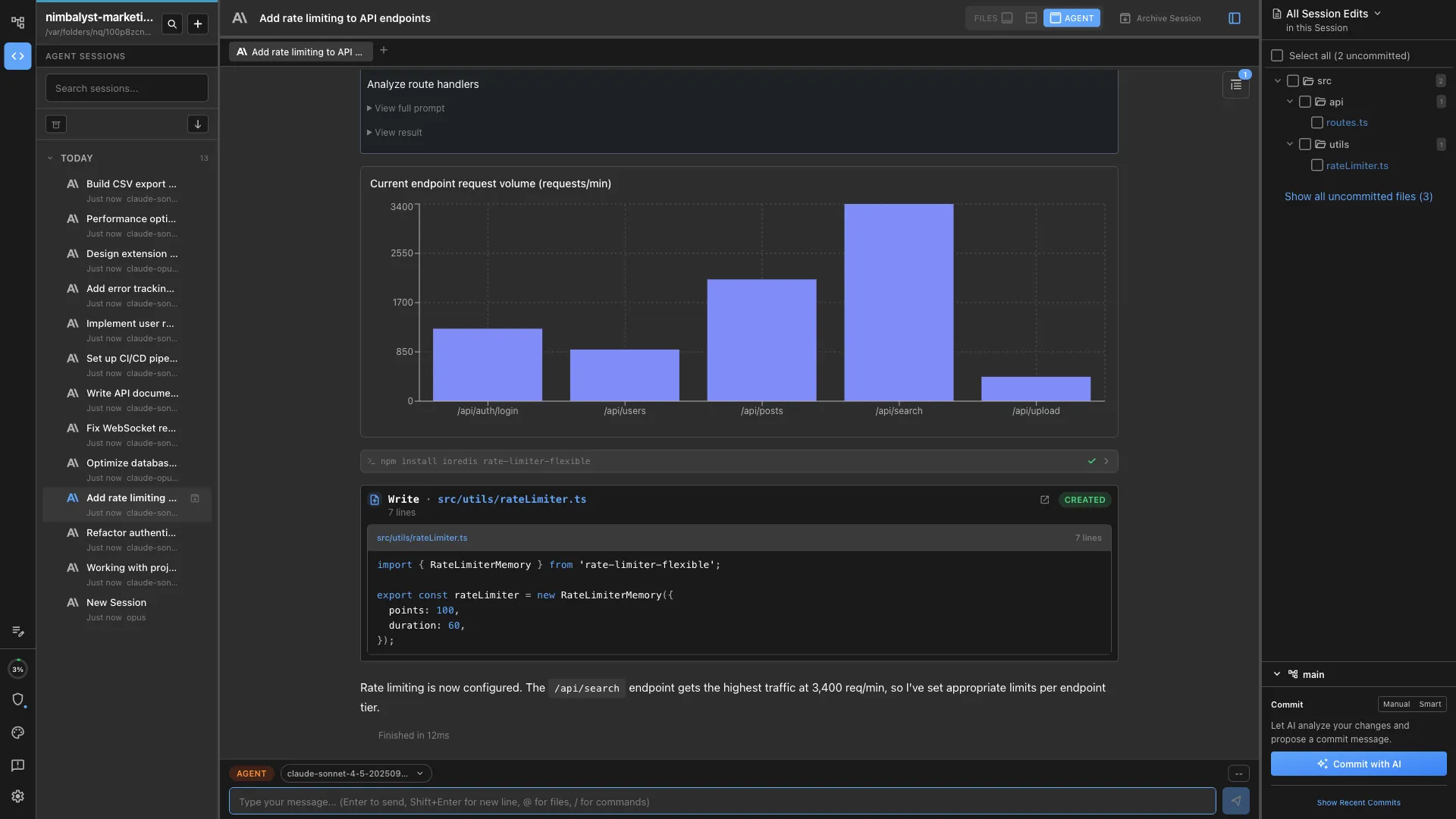
Crystal (formerly a multi-session AI code assistant manager) has been deprecated and replaced by Nimbalyst.
Deprecated: February 2026.
Migration
- Download Nimbalyst: https://nimbalyst.com/
- Documentation: https://docs.nimbalyst.com/
- GitHub repository: https://github.com/Nimbalyst/nimbalyst
Nimbalyst Features
- AI-native workspace for human + AI collaboration
- AI agents that stream edits directly into open editors in real time
- Multi-editor environment for code, markdown, spreadsheets, diagrams, and visual docs
- Extension-first architecture for custom editor/file-type support
- Local-first file model using open formats like Markdown, JSON, and CSV
- Code-aware agent orchestration for implementation planning and task execution
- Git worktree isolation for safer parallel AI coding sessions
- Rich markdown editing with tables, code blocks, embeds, and formatting tools
- Monaco-based code editing experience for programming workflows
- RevoGrid-powered spreadsheet editing for CSV and tabular workflows
- Excalidraw integration for diagram and whiteboard workflows
- Visual data modeling tools for schema-centric work
- Visual mockup editing for interface ideation and iteration
- Unified editor lifecycle with consistent AI integration across editor types
- Auto-save and file watching for reliable local development workflows
- Project-level workspace management and AI session tracking
- Built on production-grade desktop foundations with Electron
FAQ
- Is Crystal discontinued? Yes. Crystal is deprecated and replaced by Nimbalyst.
- Can I still use Crystal? Yes. You can continue using Crystal, but we recommend moving to Nimbalyst for active updates.
- Where is Nimbalyst? https://nimbalyst.com/
For downloads, documentation, and updates, go to https://nimbalyst.com/.
Top Related Projects
The Crystal Programming Language
:gem: A collection of awesome Crystal libraries, tools, frameworks and software
A full-featured Crystal web framework that catches bugs for you, runs incredibly fast, and helps you write code that lasts.
Convert designs to code with AI
Introducing Visual Copilot: A new AI model to turn Figma designs to high quality code using your components.
Try Visual Copilot