 laravel-scout-tntsearch-driver
Driver for Laravel Scout search package based on https://github.com/teamtnt/tntsearch
Top Related Projects

Laravel Scout provides a driver based solution to searching your Eloquent models.

This package offers advanced functionality for searching and filtering data in Elasticsearch.
Quick Overview
The teamtnt/laravel-scout-tntsearch-driver is a package that provides a TNTSearch driver for the Laravel Scout search abstraction layer. It allows you to easily integrate the powerful TNTSearch full-text search engine into your Laravel applications.
Pros
- Seamless Integration with Laravel Scout: The package integrates seamlessly with the Laravel Scout API, making it easy to set up and use within your Laravel projects.
- Powerful Full-Text Search: TNTSearch is a highly performant and feature-rich full-text search engine, providing advanced search capabilities.
- Flexible Configuration: The package offers various configuration options, allowing you to customize the search behavior to fit your specific needs.
- Actively Maintained: The project is actively maintained by the TeamTNT organization, ensuring regular updates and bug fixes.
Cons
- Limited Documentation: The project's documentation could be more comprehensive, making it challenging for new users to get started.
- Dependency on TNTSearch: The package is dependent on the TNTSearch library, which may not be as widely used as other search solutions like Elasticsearch or Algolia.
- Potential Performance Concerns: Depending on the size and complexity of your data, the TNTSearch engine may not perform as well as other more scalable search solutions.
- Lack of Community Support: Compared to more popular search solutions, the package may have a smaller community and fewer resources available for troubleshooting and support.
Code Examples
Here are a few code examples demonstrating the usage of the teamtnt/laravel-scout-tntsearch-driver package:
- Configuring the TNTSearch Driver:
// config/scout.php
return [
    'driver' => 'tntsearch',
    'tntsearch' => [
        'storage'  => storage_path(), // where the index files will be stored
        'fuzziness' => env('TNTSEARCH_FUZZINESS', false),
        'fuzzy' => [
            'prefix_length' => 2,
            'max_expansions' => 50,
            'distance' => 2
        ],
        'asYouType' => false,
        'searchBoolean' => false,
    ],
];
- Indexing a Model:
use TeamTNT\Scout\Engines\TNTSearchEngine;

class Product extends Model
{
    use Searchable;

    public function searchableAs()
    {
        return 'products_index';
    }

    public function toSearchableArray()
    {
        return [
            'id' => $this->id,
            'name' => $this->name,
            'description' => $this->description,
        ];
    }
}
- Performing a Search:
$products = Product::search('search term')->get();
- Customizing the Search Query:
$products = Product::search('search term')
    ->where('category', 'electronics')
    ->orderBy('price', 'desc')
    ->get();
Getting Started
To get started with the teamtnt/laravel-scout-tntsearch-driver package, follow these steps:
- Install the package using Composer:
composer require teamtnt/laravel-scout-tntsearch-driver
- Publish the package's configuration file:
php artisan vendor:publish --provider="TeamTNT\Scout\TNTSearchScoutServiceProvider"
- Configure the TNTSearch driver in your
config/scout.phpfile:
'driver' => 'tntsearch',
'tntsearch' => [
    'storage'  => storage_path(), // where the index files will be stored
    'fuzziness' => env('TNTSEARCH_FUZZINESS', false),
    'fuzzy' => [
        'prefix_length' => 2,
        'max_expansions' => 50,
        'distance' => 2
    ],
    'asYouType' => false,
    'searchBoolean' => false,
]
Competitor Comparisons
Laravel Scout provides a driver based solution to searching your Eloquent models.
Pros of Laravel Scout
- Abstraction: Laravel Scout provides a simple, fluent API for adding full-text search to Eloquent models, abstracting away the underlying search engine implementation.
- Flexibility: Scout supports multiple search engine drivers, including Algolia, Meilisearch, and Elasticsearch, allowing developers to choose the best fit for their project.
- Ease of Use: Scout's integration with Laravel's Eloquent makes it easy to set up and use, with minimal configuration required.
Cons of Laravel Scout
- Limited Customization: While Scout supports multiple drivers, the level of customization available for each driver may be limited compared to using the driver directly.
- Performance: Depending on the size of the dataset and the complexity of the search queries, Scout's performance may not be as optimal as using the search engine driver directly.
Code Comparison
Laravel Scout:
use Laravel\Scout\Searchable;

class Post extends Model
{
    use Searchable;

    public function toSearchableArray()
    {
        return $this->toArray();
    }
}
teamtnt/laravel-scout-tntsearch-driver:
use TeamTNT\Scout\Engines\TNTSearchEngine;

class Post extends Model
{
    use Searchable;

    public function searchableAs()
    {
        return 'posts_index';
    }
}
This package offers advanced functionality for searching and filtering data in Elasticsearch.
Pros of Scout Elasticsearch Driver
- Supports Elasticsearch versions 6.x and 7.x, providing flexibility in choosing the appropriate version for your project.
- Offers advanced search features like fuzzy matching, proximity search, and more, which can be useful for complex search requirements.
- Provides a well-documented and easy-to-use API, making it straightforward to integrate with your Laravel application.
Cons of Scout Elasticsearch Driver
- Requires an Elasticsearch cluster to be set up and maintained, which can add complexity to the deployment process.
- May have a higher learning curve compared to the TNT Search driver, as it requires understanding Elasticsearch concepts and configurations.
- Can be more resource-intensive than the TNT Search driver, especially for large datasets, due to the overhead of the Elasticsearch cluster.
Code Comparison
Scout Elasticsearch Driver:
$results = Scout::search('query')->paginate(10);
Laravel Scout TNT Search Driver:
$results = Scout::search('query')->paginate(10);
The code for both drivers is very similar, as they both leverage the Laravel Scout API. The main difference lies in the underlying search engine used (Elasticsearch vs. TNT Search).
Convert  designs to code with AI

Introducing Visual Copilot: A new AI model to turn Figma designs to high quality code using your components.
Try Visual CopilotREADME
TNTSearch Driver for Laravel Scout - Laravel 5.3 - 13







This package makes it easy to add full text search support to your models with Laravel 5.3 to 13.0.
Premium products
If you find TNT Search to be one of your valuable assets, take a look at one of our premium products

Support us on Open Collective
Contents
Installation
You can install the package via composer:
composer require teamtnt/laravel-scout-tntsearch-driver
For Laravel 11+, add the Scout and TNTSearch service providers to bootstrap/providers.php:
return [
    App\Providers\AppServiceProvider::class,
    // ...
    Laravel\Scout\ScoutServiceProvider::class,
    TeamTNT\Scout\TNTSearchScoutServiceProvider::class,
];
For earlier versions of Laravel, add the service provider as follows:
// config/app.php
'providers' => [
    // ...
    Laravel\Scout\ScoutServiceProvider::class,
    TeamTNT\Scout\TNTSearchScoutServiceProvider::class,
],
Add SCOUT_DRIVER=tntsearch to your .env file
Then you should publish scout.php configuration file to your config directory
php artisan vendor:publish --provider="Laravel\Scout\ScoutServiceProvider"
In your config/scout.php add:
'tntsearch' => [
// Directory where the TNTSearch index files (SQLite .index files)
// are written and read from. Defaults to the app's storage path;
// point it elsewhere if indexes should live e.g. on a separate
// local volume. Must be a local filesystem path.
'storage' => storage_path(),
// Master switch for fuzzy (typo-tolerant) matching. When a query returns
// no exact hits (or 'no_limit' is true), terms are matched by
// Levenshtein distance instead of an exact match
'fuzziness' => env('TNTSEARCH_FUZZINESS', false),
'fuzzy' => [
// Number of leading characters of the search term that must
// match exactly before fuzzy comparison kicks in. Higher values
// narrow the candidate word list and speed up fuzzy lookups.
'prefix_length' => 2,
// Caps how many candidate terms (from the index wordlist,
// ordered by popularity) are pulled and Levenshtein-compared
// against the search term. Lower is faster but may miss valid
// fuzzy matches; higher is more thorough but slower.
'max_expansions' => 50,
// Maximum Levenshtein (edit) distance â the number of single
// character insertions, deletions or substitutions â allowed
// between the search term and a candidate indexed term for it
// to still count as a match. Lower is stricter (fewer typos
// tolerated); higher allows looser, less precise matches.
'distance' => 2,
// When true, fuzzy matching runs even if the exact search
// already found results, so fuzzy matches are always added to
// the result set. When false, fuzzy matching only kicks in as
// a fallback when the exact search finds nothing.
'no_limit' => true,
],
// When true, the last word of the query is treated as an
// incomplete word being typed: instead of requiring an exact
// match, it is matched as a prefix (term LIKE 'word%') against the
// wordlist, picking the shortest/most popular matching term. All
// earlier words in the query still require exact matches. Useful
// for live/instant search inputs where the final word isn't
// finished yet. Note this option can be used on a per model
// basis, see read me examples below.
'asYouType' => false,
// When true, queries are parsed as boolean expressions instead of
// being ranked by relevance: spaces between words mean AND, " or "
// means OR, a leading "-" before a word means NOT/exclude, and
// parentheses can be used to group terms. Only documents matching
// the resulting expression are returned (no relevance ranking).
//
// Boolean example:
// "php -laravel" -> docs containing "php" but NOT "laravel"
// "cat or dog" -> docs containing either "cat" or "dog"
//
// When false (default), queries use TNTSearch's normal
// free-text search: all words are matched and results are ranked
// by relevance, with no special meaning for "or" or "-".
//
// Non-boolean example:
// "php -laravel" -> ranked results for the literal words "php" and "laravel"
'searchBoolean' => env('TNTSEARCH_BOOLEAN', false),
// Caps how many documents are fetched per matched keyword from the
// index (ordered by hit_count, i.e. most relevant first), before
// ranking/intersecting results. This is a per-term limit, not a
// limit on final results: if a term matches more than maxDocs
// documents, only the top maxDocs (by popularity) are considered,
// which can cause AND/OR boolean searches on very common words to
// miss legitimate matches. Lower values improve performance on
// large indexes at the cost of search completeness.
'maxDocs' => env('TNTSEARCH_MAX_DOCS', 500),
// Words to exclude from the index, e.g. ['a', 'the', 'in']. The stopwords
// option lets you exclude common words (articles, prepositions) from
// being indexed, so a search for e.g. "inns" won't fuzzy-match documents
// that merely contain "in". Note that stopwords are applied at indexing
// time, so you need to reimport your models after changing them
'stopwords' => [],
],
To prevent your search indexes being commited to your project repository,
add the following line to your .gitignore file.
/storage/*.index
Usage
After you have installed scout and the TNTSearch driver, you need to add the
Searchable trait to your models that you want to make searchable. Additionaly,
define the fields you want to make searchable by defining the toSearchableArray method on the model:
<?php

namespace App;

use Illuminate\Database\Eloquent\Model;
use Laravel\Scout\Searchable;

class Post extends Model
{
    use Searchable;

    // optionally override value set within config/scout, on a per model basis
    public $asYouType = true;

    /**
     * Get the indexable data array for the model.
     *
     * @return array
     */
    public function toSearchableArray()
    {
        $array = $this->toArray();

        // Customize array...

        return $array;
    }
}
Then, sync the data with the search service like:
php artisan scout:import App\\Post
If you have a lot of records and want to speed it up you can run (note that with this you can no longer use model-relations in your toSearchableArray()):
php artisan tntsearch:import App\\Post
After that you can search your models with:
Post::search('Bugs Bunny')->get();
Scout status
php artisan scout:status
With this simple command you'll get a quick overview of your search indices.
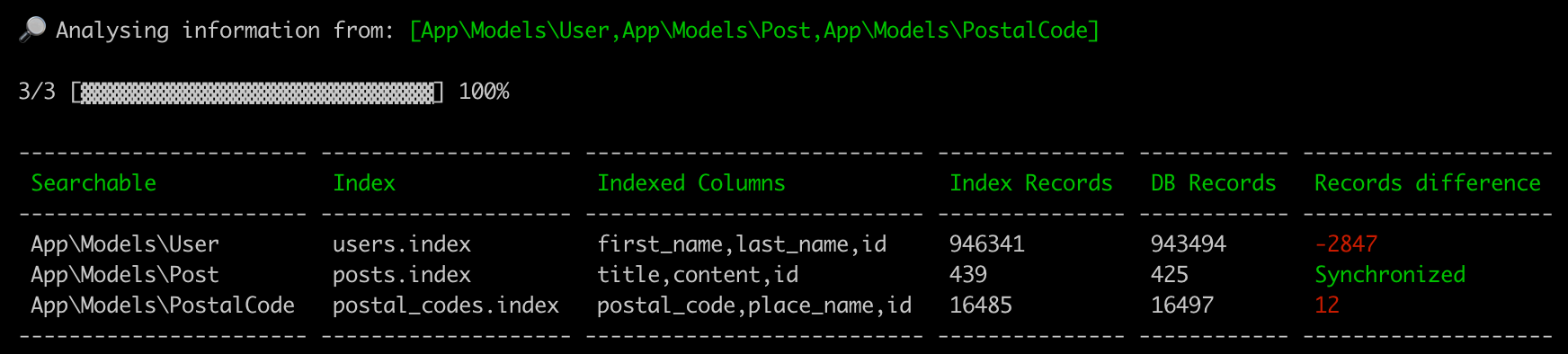
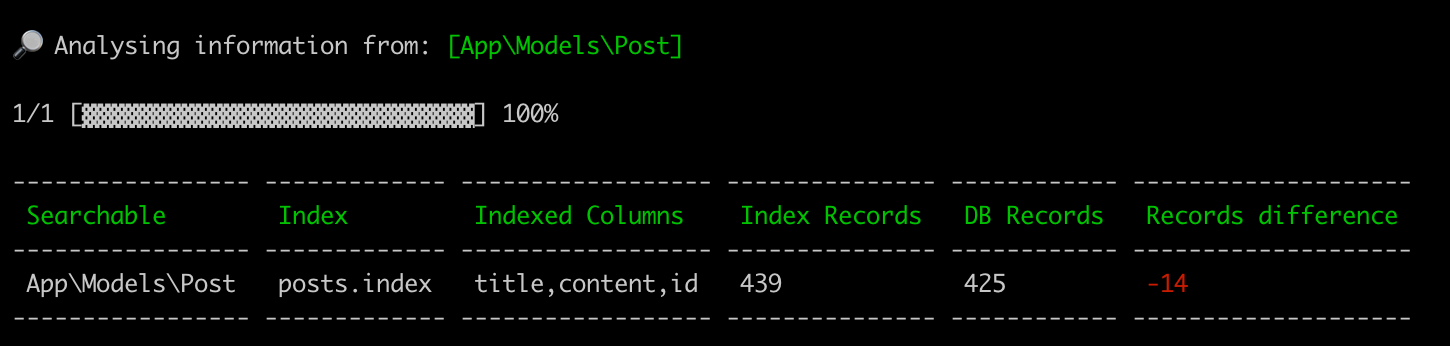
Or you can pass a searchable model argument:
php artisan scout:status "App\Models\Post"
If your models are not in the default location app or one of its subdirectories, you may set the modelPath option
// config/scout.php
'tntsearch' => [
    // ...
    'modelPath' => 'models',
],
Constraints
Additionally to where() statements as conditions, you're able to use Eloquent queries to constrain your search. This allows you to take relationships into account.
If you make use of this, the search command has to be called after all queries have been defined in your controller.
The where() statements you already know can be applied everywhere.
namespace App\Http\Controllers;

use App\Post;

class PostController extends Controller
{
    /**
     * Display a listing of the resource.
     *
     * @return \Illuminate\Http\Response
     */
    public function index(Request $request)
    {
        $post = new Post;

        // filter out posts to which the given topic is assigned
        if($request->topic) {
            $post = $post->whereNotIn('id', function($query){
                $query->select('assigned_to')->from('comments')->where('topic','=', request()->input('topic'));
            });
        }

        // only posts from people that are no moderators
        $post = $post->byRole('moderator','!=');

        // when user is not admin filter out internal posts
        if(!auth()->user()->hasRole('admin'))
        {
            $post= $post->where('internal_post', false);
        }

        if ($request->searchTerm) {
            $constraints = $post; // not necessary but for better readability
            $post = Post::search($request->searchTerm)->constrain($constraints);
        }

        $post->where('deleted', false);

        $post->orderBy('updated_at', 'asc');

        $paginator = $post->paginate(10);
        $posts = $paginator->getCollection();

        // return posts
    }
}
Adding via Query
The searchable() method will chunk the results of the query and add the records to your search index.
$post = Post::find(1);

// You may also add record via collection...
$post->searchable();

// OR

$posts = Post::where('year', '>', '2018')->get();

// You may also add records via collections...
$posts->searchable();
When using constraints apply it after the constraints are added to the query, as seen in the above example.
OrderBy
An orderBy() statement can now be applied to the search query similar to the where() statement.
When using constraints apply it after the constraints are added to the query, as seen in the above example.
Sponsors
Become a sponsor and get your logo on our README on Github with a link to your site. [Become a sponsor]
Credits
Contributors
This project exists thanks to all the people who contribute.

Backers
Thank you to all our backers! ð [Become a backer]

Top Related Projects
Laravel Scout provides a driver based solution to searching your Eloquent models.
This package offers advanced functionality for searching and filtering data in Elasticsearch.
Convert designs to code with AI
Introducing Visual Copilot: A new AI model to turn Figma designs to high quality code using your components.
Try Visual Copilot