


 React
React Solid
Solid Svelte
 IndexedDB
 OPFS
OPFS SQLite
 Bun SQLite
 Expo SQLite
 Capacitor
 Turso
Turso CR-SQLite
 ElectricSQL
 PowerSync
 PostgreSQL
 PGlite
 Neon
Neon Supabase
 Cloudflare
 PartyKit
 YJS
YJS Automerge
 Zod
Zod TypeBox
 Valibot
 ArkType
 Yup
Yup Effect
The story
Fluent UI web represents a collection of utilities, React components, and web components for building web applications.
Storybook is the industry standard workshop for building, documenting, and testing UI components in isolation
The library for web and native user interfaces.
⚛️ Fast 3kB React alternative with the same modern API. Components & Virtual DOM.
:fire: An extremely fast, React-like JavaScript library for building modern user interfaces
A declarative, efficient, and flexible JavaScript library for building user interfaces.
TinyBase is a lightweight, reactive JavaScript library for structured state management. It provides a simple and efficient way to manage application state, with support for tables, indexes, and relationships. TinyBase is designed to be fast, flexible, and easy to use in both browser and Node.js environments.
Creating a store and adding data:
import { createStore } from 'tinybase';

const store = createStore();
store.setTable('users', {
  1: { name: 'Alice', age: 30 },
  2: { name: 'Bob', age: 25 },
});
Subscribing to changes in the store:
store.addTableListener('users', (store, tableId, cellIds) => {
  console.log('Users table updated:', cellIds);
});

store.setCell('users', '3', 'name', 'Charlie');
Using indexes for efficient querying:
store.setIndex('usersByAge', 'users', 'age');
const youngUsers = store.getIndexIds('usersByAge', 25);
console.log('Users aged 25:', youngUsers);
To get started with TinyBase, follow these steps:
Install TinyBase in your project:
npm install tinybase
Import and create a store:
import { createStore } from 'tinybase';
const store = createStore();
Add data to the store:
store.setTable('todos', {
  1: { text: 'Buy groceries', completed: false },
  2: { text: 'Walk the dog', completed: true },
});
Subscribe to changes and use the data in your application:
store.addTableListener('todos', (store, tableId, cellIds) => {
  console.log('Todos updated:', store.getTable('todos'));
});
For more advanced usage and features, refer to the official TinyBase documentation.
Fluent UI web represents a collection of utilities, React components, and web components for building web applications.
FluentUI:
import { PrimaryButton } from '@fluentui/react';

const MyComponent = () => (
  <PrimaryButton text="Click me" onClick={() => console.log('Clicked')} />
);
TinyBase:
import { createStore } from 'tinybase';

const store = createStore().setTable('users', {
  1: { name: 'Alice', age: 30 },
});
FluentUI is a robust UI library with a wide range of components, ideal for large-scale applications aligned with Microsoft's design language. It offers extensive documentation and community support but comes with a larger footprint and potential performance considerations.
TinyBase, on the other hand, is a lightweight state management solution focused on efficiency and simplicity. It's more suitable for projects requiring custom UI implementations or those prioritizing small bundle sizes and performance.
The choice between these libraries depends on project requirements, team expertise, and performance considerations.
Storybook is the industry standard workshop for building, documenting, and testing UI components in isolation
Storybook:
// Button.stories.js
import { Button } from './Button';

export default {
  title: 'Components/Button',
  component: Button,
};

const Template = (args) => <Button {...args} />;

export const Primary = Template.bind({});
Primary.args = {
  label: 'Button',
};
TinyBase:
// No direct equivalent in TinyBase as it's not a UI component library
// TinyBase focuses on data management, e.g.:
const store = createStore().setTables({
  users: {
    1: { name: 'Alice', age: 30 },
    2: { name: 'Bob', age: 25 },
  },
});
TinyBase and Storybook serve different purposes. Storybook is a UI component development and documentation tool, while TinyBase is a lightweight data management library. The code comparison highlights this difference, showing Storybook's focus on component stories and TinyBase's emphasis on data structures.
The library for web and native user interfaces.
Error generating comparison
⚛️ Fast 3kB React alternative with the same modern API. Components & Virtual DOM.
Preact:
import { h, render } from 'preact';

const App = () => <h1>Hello, World!</h1>;
render(<App />, document.body);
TinyBase:
import { createStore } from 'tinybase';

const store = createStore();
store.setTable('users', { 1: { name: 'John' } });
:fire: An extremely fast, React-like JavaScript library for building modern user interfaces
Inferno:
import { render } from 'inferno';

function MyComponent({ name }) {
  return <div>Hello, {name}!</div>;
}

render(<MyComponent name="World" />, document.getElementById('app'));
TinyBase:
import { createStore } from 'tinybase';

const store = createStore();
store.setTable('users', { 1: { name: 'World' } });

console.log(store.getCell('users', '1', 'name')); // Outputs: World
Inferno is a high-performance React-like library focused on speed and efficiency, while TinyBase is a structured data store for JavaScript applications. They serve different purposes, with Inferno being a UI framework and TinyBase a data management solution. Inferno excels in rendering performance but has a smaller ecosystem, whereas TinyBase offers a lightweight and flexible approach to data storage but isn't directly comparable as a UI framework.
A declarative, efficient, and flexible JavaScript library for building user interfaces.
Solid example:
import { createSignal } from "solid-js";

function Counter() {
  const [count, setCount] = createSignal(0);
  return <button onClick={() => setCount(count() + 1)}>{count()}</button>;
}
TinyBase example:
import { createStore } from "tinybase";

const store = createStore().setTable("counters", { main: { value: 0 } });
store.setCell("counters", "main", "value", (v) => v + 1);
Solid is a full-featured reactive framework for building user interfaces, while TinyBase focuses on lightweight data management. Solid offers more comprehensive tools for UI development but may be more complex for simple use cases. TinyBase provides a simpler API for data handling but lacks built-in UI components. The choice between them depends on the specific needs of your project and the level of complexity you require.
 designs to code with AI
Introducing Visual Copilot: A new AI model to turn Figma designs to high quality code using your components.
Try Visual CopilotTinyBase is a reactive in-memory data store with persistence and synchronization for local-first JavaScript and TypeScript apps that need to feel instant, work offline, and stay consistent when they come back online.
"The one with node:sqlite!"
Create a todo list, a chat app, a drawing tool, a charting app, or a tic-tac-toe game - with sync & persistence! - in less than 60s.
> npm create tinybase@latest
ð¦ Creating your project...
TinyBase lets you listen to changes made to any part of your data. This means your app will be fast, since you only spend rendering cycles on things that change. The optional bindings to React, pre-built components, and charts let you easily build fully reactive UIs on top of TinyBase. You even get a built-in undo stack, and developer tools!
Consumer app? Enterprise app? Or even a game? Model key-value data and tabular data with optional typed schematization, whatever its data structures. There are built-in indexing, metric aggregation, and tabular relationships APIs - and a powerful query engine to select, join, filter, and group data (reactively!) without SQL.
TinyBase has native CRDT support, meaning that you can deterministically synchronize and merge data across multiple sources, clients, and servers. And although TinyBase is an in-memory data store, you can easily persist your data to file, browser storage, IndexedDB, SQLite or PostgreSQL databases, and more.
TinyBase works anywhere that JavaScript does, but it's especially great for local-first apps: where data is stored locally on the user's device and that can be run offline. It's tiny by name, tiny by nature: just 7.3kB - 16.4kB and with no dependencies - yet 100% tested, fully documented, and of course, open source!
(Baffled by all these logos? Check out our architectural options guide to make sense of it all!)








Creating a Store requires just a simple call to the createStore function. Once you have one, you can easily set Values in it by unique Id. And of course you can easily get them back out again.
Read more about using keyed value data in The Basics guide.
import {createStore} from 'tinybase';

const store = createStore()
  .setValues({employees: 3})
  .setValue('open', true);

console.log(store.getValues());
// -> {employees: 3, open: true}
For other types of data applications, a tabular data structure is more useful. TinyBase lets you set and get nested Table, Row, or Cell data, by unique Id - and in the same Store as the keyed values!
Read more about setting and changing data in The Basics guide.
store
  .setTable('pets', {fido: {species: 'dog'}})
  .setCell('pets', 'fido', 'color', 'brown');

console.log(store.getRow('pets', 'fido'));
// -> {species: 'dog', color: 'brown'}
The magic starts to happen when you register listeners on a Value, Table, Row, or Cell. They get called when any part of that object changes. You can also use wildcards - useful when you don't know the Id of the objects that might change.
Read more about listeners in the Listening To Stores guide.
const listenerId = store.addTableListener('pets', () =>
  console.log('changed'),
);

store.setCell('pets', 'fido', 'sold', false);
// -> 'changed'

store.delListener(listenerId);
If you're using React, Solid, or Svelte in your application, the optional ui-react module, ui-solid module, or ui-svelte module provide hooks and functions to bind to the data in a Store.
For example, the useCell hook in this example fetches the dog's color. But it also registers a listener on that cell that will fire and re-render the component whenever the value changes!
Basically you simply describe what data you want in your user interface and TinyBase will take care of the whole lifecycle of updating it for you.
Read more about the using hooks in the Using React Hooks guide and the Building UIs With Svelte guide.
import React from 'react';
import {createRoot} from 'react-dom/client';
import {useCell} from 'tinybase/ui-react';

const App1 = () => {
  const color = useCell('pets', 'fido', 'color', store);
  return <>Color: {color}</>;
};

const app = document.createElement('div');
const root = createRoot(app);
root.render(<App1 />);
console.log(app.innerHTML);
// -> 'Color: brown'

store.setCell('pets', 'fido', 'color', 'walnut');
console.log(app.innerHTML);
// -> 'Color: walnut'

root.unmount();
The UI modules also provide bare React, Solid, and Svelte components that let you build up a fully reactive user interface based on a Store.
It's super easy to wire up tabular display of your data with lots of customization and interactivity options.
Try them out in the UI Components (React), Chart Components (React), UI Components (Solid), and UI Components (Svelte) demos, and read more in the Building UIs guides.
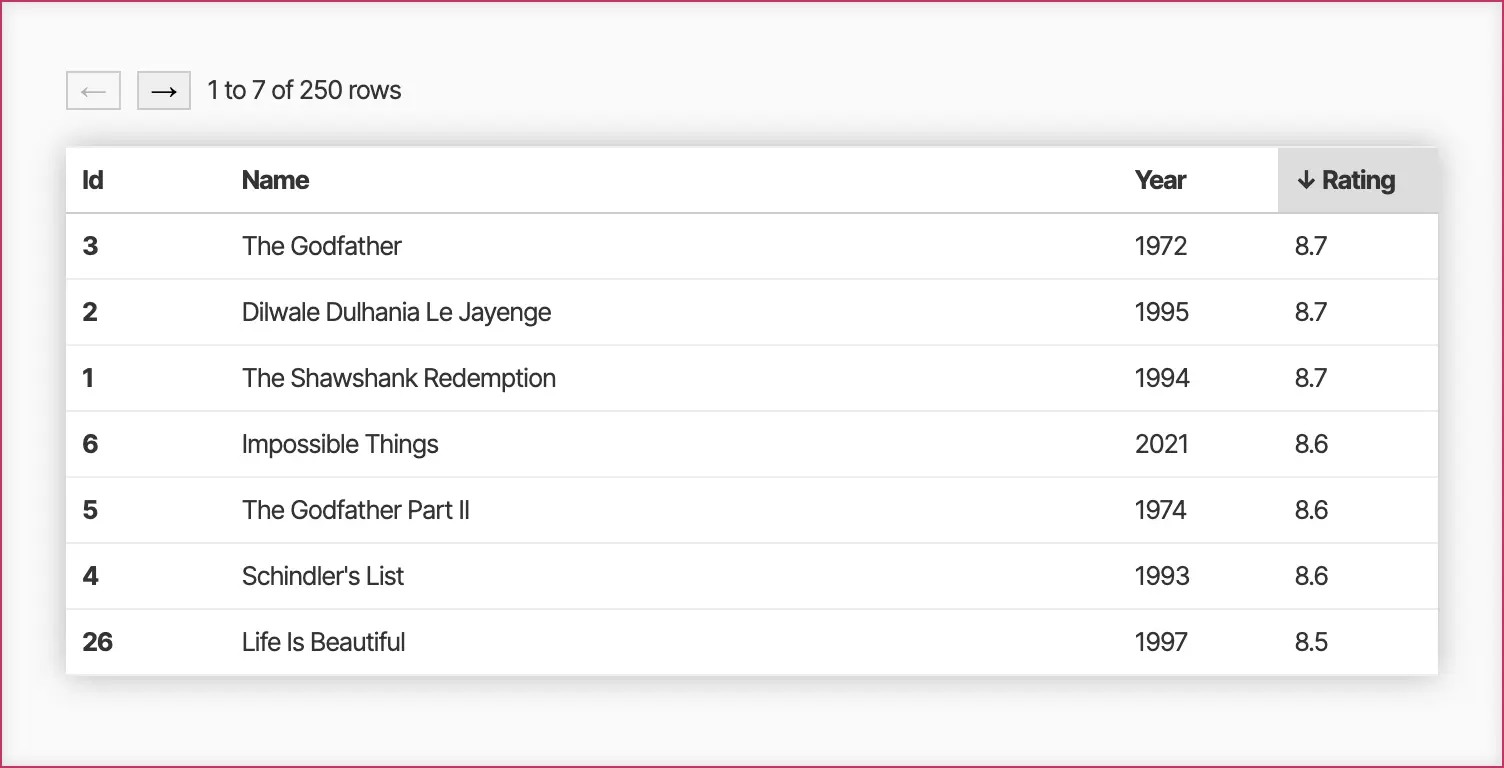
Render TinyBase data and queries directly as responsive, styleable SVG charts with the ui-react-dom-charts module. These charts update reactively when data changes, and are composable with labels, bounds, ticks, and time-aware x-axes.
Try the Chart Components (React) demos, or read more in the Using Charts guide.
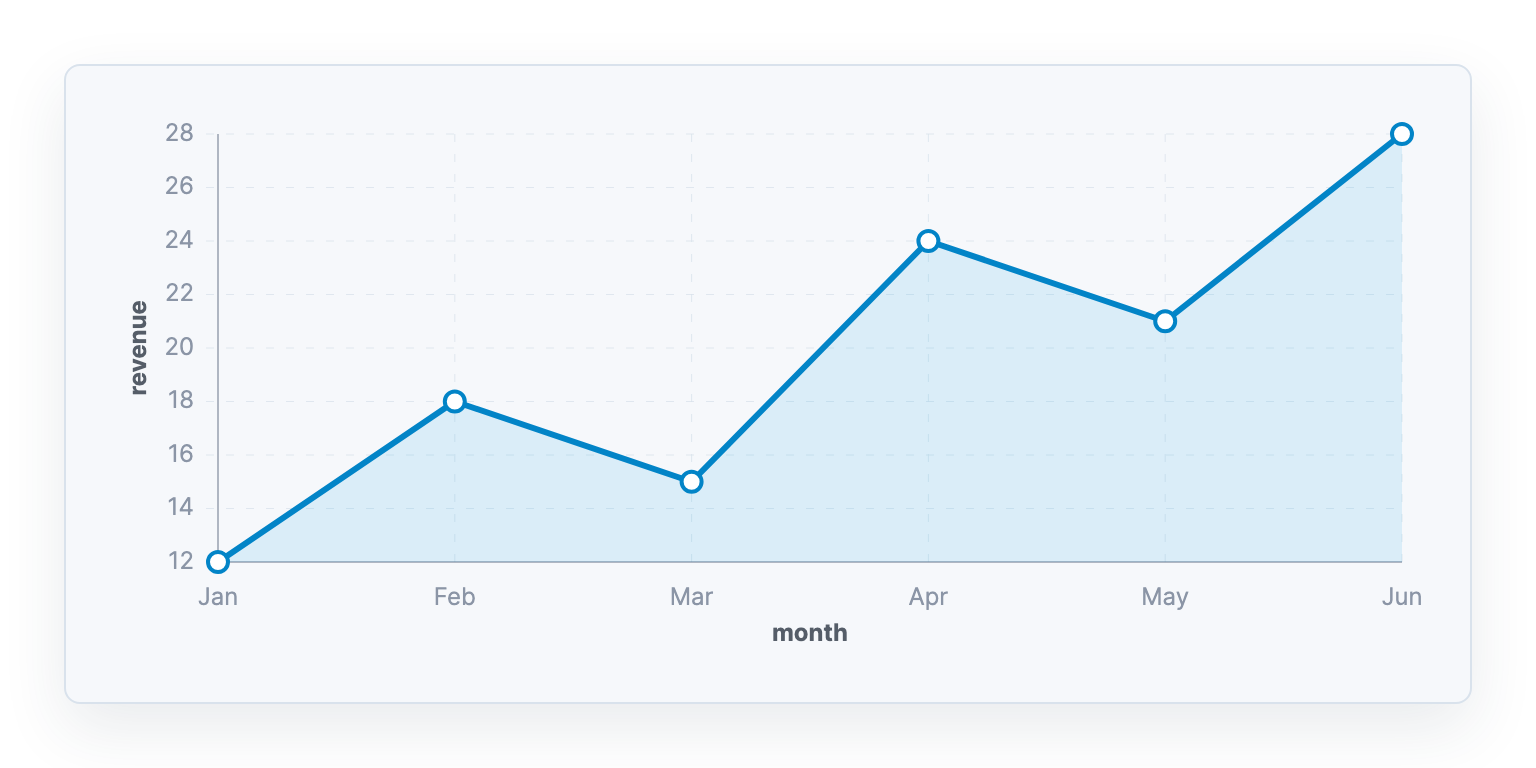
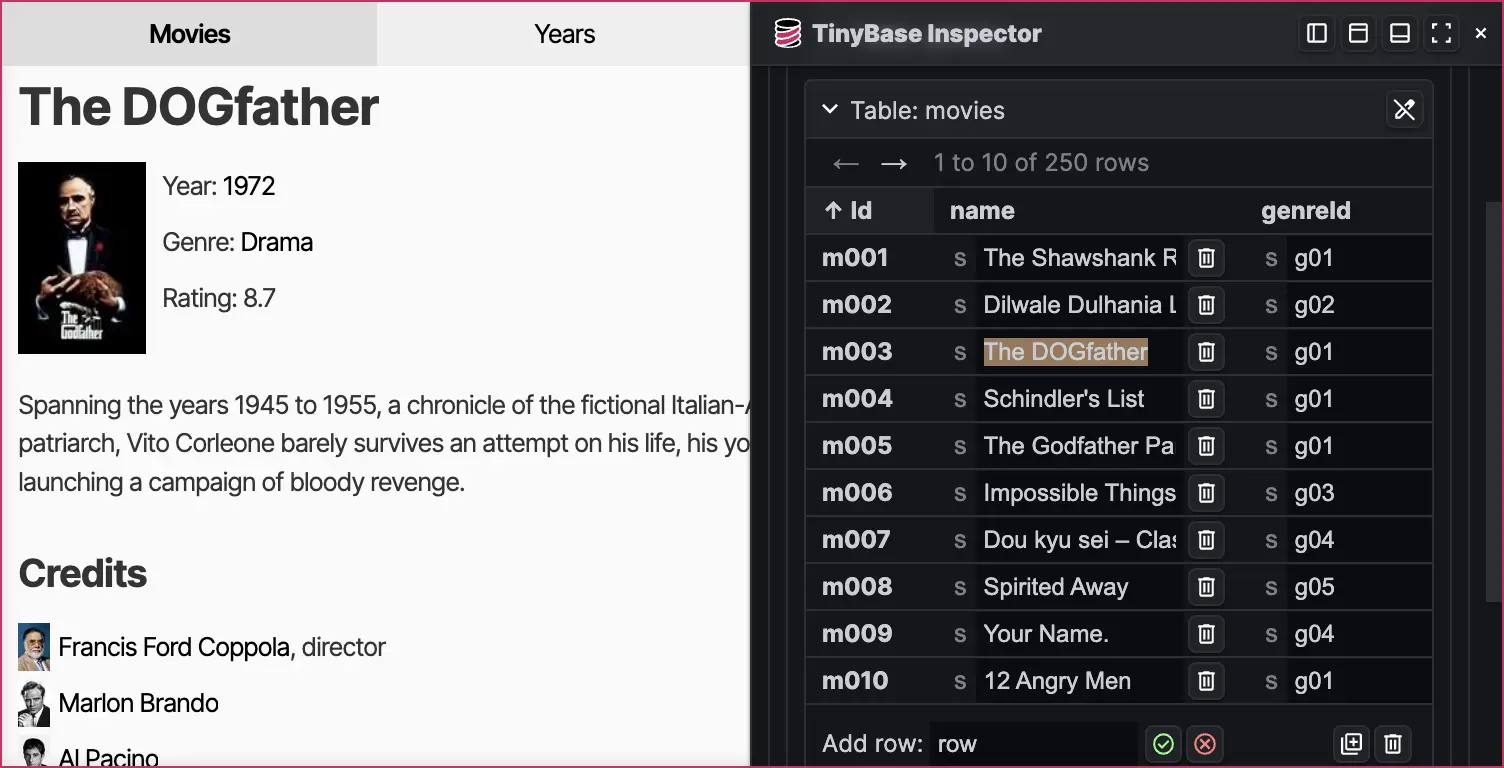
If you are building a web application with React or Svelte, the Inspector component lets you overlay a view of the data in your Store, Indexes, Relationships, and so on. You can even edit the data in place and see it update in your app immediately.
Read more about this powerful new tool in the Inspecting Data guide.
Want clean data? You can add a ValuesSchema or a TablesSchema to a Store to ensure that they are always what you expect by constraining types, and providing defaults. There are even TypeScript definitions that infer API types from the data schemas you apply.
And our 'schematizer' modules let you convert schemas from libraries like Zod, TypeBox, Valibot, ArkType, Yup, and Effect Schema into TinyBase at runtime.
Read more about schemas in the Schemas guide.
store.setTablesSchema({
  pets: {
    species: {type: 'string'},
    color: {type: 'string'},
    sold: {type: 'boolean', default: false},
  },
});

store.setRow('pets', 'polly', {species: 'parrot'});
console.log(store.getRow('pets', 'polly'));
// -> {species: 'parrot', sold: false}

store.delTablesSchema();
The MergeableStore type acts as a native CRDT, letting you merge data and synchronize it between clients and systems - or even a server. The synchronization protocol can run over WebSockets, the browser BroadcastChannel, or your own custom synchronization medium.
Read more about these techniques in the Synchronization guides.
import {WebSocketServer, WebSocket} from 'ws';
import {createMergeableStore} from 'tinybase';
import {createWsServer} from 'tinybase/synchronizers/synchronizer-ws-server';
import {createWsSynchronizer} from 'tinybase/synchronizers/synchronizer-ws-client';

// On a server machine:
const server = createWsServer(
  new WebSocketServer({port: 8040}),
);

// On a client machine:
const store1 = createMergeableStore();
const synchronizer1 = await createWsSynchronizer(
  store1,
  new WebSocket('ws://localhost:8040'),
);
await synchronizer1.startSync();

// ...

await synchronizer1.destroy();
await server.destroy();
You can easily persist a Store between browser page reloads or sessions. You can also synchronize it with a web endpoint, or (if you're using TinyBase in an appropriate environment), load and save it to a file. You can bind TinyBase to various flavors of database, or to Yjs and Automerge CRDT documents.
Read more about persisters in the Persistence guides.
import {createSessionPersister} from 'tinybase/persisters/persister-browser';

const persister = createSessionPersister(store, 'demo');
await persister.save();

console.log(sessionStorage.getItem('demo'));
// ->
`
[
  {
    "pets":{
      "fido":{"species":"dog","color":"walnut","sold":false},
      "polly":{"species":"parrot","sold":false}
    }
  },
  {"employees":3,"open":true}
]
`;

await persister.destroy();
await sessionStorage.clear();
The Queries object lets you query data across tables, with filtering and aggregation - using a SQL-adjacent syntax called TinyQL.
Accessors and listeners let you sort and paginate the results efficiently, making building rich tabular interfaces easier than ever.
In this example, we have two tables: of pets and their owners. They are joined together by the pet's ownerId Cell. We select the pet's species, and the owner's state, and then aggregate the prices for the combinations.
We access the results by descending price, essentially answering the question: "which is the highest-priced species, and in which state?"
Needless to say, the results are reactive too! You can add listeners to queries, and since v7.2, even parameterize them.
Read more about Queries in the v2.0 Release Notes, the Using Queries guide, and the Car Analysis demo and Movie Database demo.
import {createQueries} from 'tinybase';

store
  .setTable('pets', {
    fido: {species: 'dog', ownerId: '1', price: 5},
    rex: {species: 'dog', ownerId: '2', price: 4},
    felix: {species: 'cat', ownerId: '2', price: 3},
    cujo: {species: 'dog', ownerId: '3', price: 4},
  })
  .setTable('owners', {
    1: {name: 'Alice', state: 'CA'},
    2: {name: 'Bob', state: 'CA'},
    3: {name: 'Carol', state: 'WA'},
  });

const queries = createQueries(store);
queries.setQueryDefinition(
  'prices',
  'pets',
  ({select, join, group}) => {
    select('species');
    select('owners', 'state');
    select('price');
    join('owners', 'ownerId');
    group('price', 'avg').as('avgPrice');
  },
);

queries
  .getResultSortedRowIds('prices', 'avgPrice', true)
  .forEach((rowId) => {
    console.log(queries.getResultRow('prices', rowId));
  });
// -> {species: 'dog', state: 'CA', avgPrice: 4.5}
// -> {species: 'dog', state: 'WA', avgPrice: 4}
// -> {species: 'cat', state: 'CA', avgPrice: 3}

queries.destroy();
A Metrics object makes it easy to keep a running aggregation of Cell values in each Row of a Table. This is useful for counting rows, but also supports averages, ranges of values, or arbitrary aggregations.
In this example, we create a new table of the pet species, and keep a track of which is most expensive. When we add horses to our pet store, the listener detects that the highest price has changed.
Read more about Metrics in the Using Metrics guide.
import {createMetrics} from 'tinybase';

store.setTable('species', {
  dog: {price: 5},
  cat: {price: 4},
  worm: {price: 1},
});

const metrics = createMetrics(store);
metrics.setMetricDefinition(
  'highestPrice', // metricId
  'species', //      tableId to aggregate
  'max', //          aggregation
  'price', //        cellId to aggregate
);

console.log(metrics.getMetric('highestPrice'));
// -> 5

metrics.addMetricListener('highestPrice', () =>
  console.log(metrics.getMetric('highestPrice')),
);
store.setCell('species', 'horse', 'price', 20);
// -> 20

metrics.destroy();
An Indexes object makes it easy to look up all the Row objects that have a certain value in a Cell.
In this example, we create an index on the species Cell values. We can then get the the list of distinct Cell value present for that index (known as 'slices'), and the set of Row objects that match each value.
Indexes objects are reactive too. So you can set listeners on them just as you do for the data in the underlying Store.
Read more about Indexes in the Using Indexes guide.
import {createIndexes} from 'tinybase';

const indexes = createIndexes(store);
indexes.setIndexDefinition(
  'bySpecies', // indexId
  'pets', //      tableId to index
  'species', //   cellId to index
);

console.log(indexes.getSliceIds('bySpecies'));
// -> ['dog', 'cat']
console.log(indexes.getSliceRowIds('bySpecies', 'dog'));
// -> ['fido', 'rex', 'cujo']

indexes.addSliceIdsListener('bySpecies', () =>
  console.log(indexes.getSliceIds('bySpecies')),
);
store.setRow('pets', 'lowly', {species: 'worm'});
// -> ['dog', 'cat', 'worm']

indexes.destroy();
A Relationships object lets you associate a Row in a local Table with the Id of a Row in a remote Table. You can also reference a table to itself to create linked lists.
In this example, the species Cell of the pets Table is used to create a relationship to the species Table, so that we can access the price of a given pet.
Like everything else, you can set listeners on Relationships too.
Read more about Relationships in the Using Relationships guide.
import {createRelationships} from 'tinybase';

const relationships = createRelationships(store);
relationships.setRelationshipDefinition(
  'petSpecies', // relationshipId
  'pets', //       local tableId to link from
  'species', //    remote tableId to link to
  'species', //    cellId containing remote key
);

console.log(
  store.getCell(
    relationships.getRemoteTableId('petSpecies'),
    relationships.getRemoteRowId('petSpecies', 'fido'),
    'price',
  ),
);
// -> 5

relationships.destroy();
A Checkpoints object lets you set checkpoints on a Store. Move forward and backward through them to create undo and redo functions.
In this example, we set a checkpoint, then sell one of the pets. Later, the pet is brought back to the shop, and we go back to that checkpoint to revert the store to its previous state.
Read more about Checkpoints in the Using Checkpoints guide.
import {createCheckpoints} from 'tinybase';

const checkpoints = createCheckpoints(store);

store.setCell('pets', 'felix', 'sold', false);
checkpoints.addCheckpoint('pre-sale');

store.setCell('pets', 'felix', 'sold', true);
console.log(store.getCell('pets', 'felix', 'sold'));
// -> true

checkpoints.goBackward();
console.log(store.getCell('pets', 'felix', 'sold'));
// -> false
If you use the basic store module alone, you'll only add a gzipped 7.3kB to your app. Incrementally add the other modules as you need more functionality, or get it all for 16.4kB.
The optional ui-react module is just 5.9kB, the ui-react-dom components are another 4.3kB, and everything is super fast. Life is easy when you have zero dependencies!
Read more about how TinyBase is structured and packaged in the Architecture guide.
| Â | Minified .js.gz | Source .js |
|---|---|---|
| tinybase/store (minimal) | 7.3kB | 79.8kB |
| tinybase (complete) | 16.4kB | 187.8kB |
| ui-react | 5.9kB | 64.2kB |
| ui-react-dom | 4.3kB | 38.4kB |
| ui-react-dom-charts | 8.7kB | 64.9kB |
| ui-solid | 5.8kB | 63.2kB |
| ui-solid-dom | 4.9kB | 48.0kB |
| ui-svelte | 5.1kB | 62.5kB |
| ui-svelte-dom | 6.0kB | 61.7kB |
TinyBase has 100.0% test coverage, including the code throughout the documentation - even on this page! The guides, demos, and API examples are designed to make it as easy as possible for you to get your TinyBase-powered app up and running.
Read more about how TinyBase is tested in the Unit Testing guide.
| Â | Total | Tested | Coverage |
|---|---|---|---|
| Tested lines | 5,117 | 5,117 | 100.0% |
| Tested statements | 5,537 | 5,537 | 100.0% |
| Tested functions | 2,428 | 2,428 | 100.0% |
| Tested branches | 1,791 | 1,791 | 100.0% |
| Tests | 9,658 | ||
| Assertions | 40,119 | ||


TinyBase is part of a group of small libraries designed to help make rich client and local-first apps easier to build. Check out the others!

Synclets
An open, storage-agnostic, sync engine development kit.

TinyWidgets
A collection of tiny, reusable, UI components.

TinyTick
A tiny but very useful task orchestrator.
Modern apps deserve better. Why trade reactive user experiences to be able to use relational data? Or sacrifice features for bundle size? And why does the cloud do all the work anyway?
Building TinyBase was originally an interesting exercise for me in [API](/api/) design, minification, and documentation. But now it has taken on a life of its own, and has grown beyond my wildest expectations.
It could not have been built without these great projects and friends, and I hope you enjoy using it as much as I do building it!
Fluent UI web represents a collection of utilities, React components, and web components for building web applications.
Storybook is the industry standard workshop for building, documenting, and testing UI components in isolation
The library for web and native user interfaces.
⚛️ Fast 3kB React alternative with the same modern API. Components & Virtual DOM.
:fire: An extremely fast, React-like JavaScript library for building modern user interfaces
A declarative, efficient, and flexible JavaScript library for building user interfaces.
designs to code with AIIntroducing Visual Copilot: A new AI model to turn Figma designs to high quality code using your components.
Try Visual Copilot