 memos
memos
Open-source, self-hosted note-taking tool built for quick capture. Markdown-native, lightweight, and fully yours.
Top Related Projects

A privacy-first, open-source platform for knowledge management and collaboration. Download link: http://github.com/logseq/logseq/releases. roadmap: https://logseq.io/p/NX4mc_ggEV

Think fearlessly with end-to-end encrypted notes and files. For issues, visit https://standardnotes.com/forum or https://standardnotes.com/help.

Build your personal knowledge base with Trilium Notes

A personal knowledge management and sharing system for VSCode
Quick Overview
Memos is an open-source, self-hosted memo hub for capturing, organizing, and sharing your thoughts. It's designed to be lightweight, privacy-focused, and easy to use, offering a clean and intuitive interface for managing personal notes and ideas.
Pros
- Self-hosted solution, ensuring data privacy and control
- Lightweight and fast, with minimal resource requirements
- Clean and intuitive user interface
- Supports Markdown formatting for rich text editing
Cons
- Limited advanced features compared to some commercial note-taking apps
- Requires technical knowledge for self-hosting and maintenance
- May lack integration with other popular productivity tools
- Community support might be less extensive than larger, commercial alternatives
Getting Started
To get started with Memos:
- Ensure you have Docker installed on your system.
- Run the following command to start Memos:
docker run -d --name memos -p 5230:5230 -v ~/.memos/:/var/opt/memos neosmemo/memos:latest
- Access Memos through your web browser at
http://localhost:5230. - Create an account and start using Memos to organize your thoughts and ideas.
For more detailed instructions and alternative installation methods, refer to the project's GitHub repository at https://github.com/usememos/memos.
Competitor Comparisons
A privacy-first, open-source platform for knowledge management and collaboration. Download link: http://github.com/logseq/logseq/releases. roadmap: https://logseq.io/p/NX4mc_ggEV
Pros of Logseq
- Advanced knowledge management with bidirectional linking and graph view
- Supports multiple file formats (Markdown, Org-mode) and plugins
- Offline-first approach with local file storage and optional sync
Cons of Logseq
- Steeper learning curve due to more complex features
- Heavier resource usage, especially for large databases
- Less focus on quick, simple note-taking
Code Comparison
Logseq (ClojureScript):
(defn parse-title [content]
  (let [lines (string/split-lines content)]
    (if-let [title (some #(when (string/starts-with? % "title:") %) lines)]
      (string/trim (subs title 6))
      (first lines))))
Memos (Go):
func (s *SQLite3Storage) CreateMemo(create *store.Memo) (*store.Memo, error) {
    memo := create
    now := time.Now()
    memo.CreatedTs = now.Unix()
    memo.UpdatedTs = now.Unix()
    return memo, nil
}
Summary
Logseq is a more powerful knowledge management tool with advanced features, while Memos focuses on simplicity and quick note-taking. Logseq offers bidirectional linking and graph views but has a steeper learning curve. Memos is lighter and easier to use but lacks some advanced features. The code comparison shows Logseq using ClojureScript for parsing, while Memos uses Go for database operations.
Think fearlessly with end-to-end encrypted notes and files. For issues, visit https://standardnotes.com/forum or https://standardnotes.com/help.
Pros of Standard Notes
- More comprehensive feature set, including end-to-end encryption and cross-platform synchronization
- Larger and more active community, with regular updates and improvements
- Extensive theming and customization options
Cons of Standard Notes
- More complex codebase, potentially harder for new contributors to get started
- Heavier resource usage due to its extensive feature set
- Steeper learning curve for users due to advanced features
Code Comparison
Standard Notes (React):
const Editor = ({ note, onNoteChange }) => {
  return (
    <textarea
      value={note.content}
      onChange={(e) => onNoteChange({ ...note, content: e.target.value })}
    />
  );
};
Memos (Vue):
<template>
  <textarea v-model="memo.content" @input="updateMemo"></textarea>
</template>

<script>
export default {
  methods: {
    updateMemo() {
      this.$emit('update:memo', this.memo);
    }
  }
}
</script>
Both projects use modern JavaScript frameworks, but Standard Notes uses React while Memos uses Vue. Standard Notes' codebase is generally more complex due to its broader feature set, while Memos maintains a simpler structure focusing on core note-taking functionality.
Build your personal knowledge base with Trilium Notes
Pros of Trilium
- Advanced note-taking features like hierarchical organization and note linking
- Supports scripting and customization through plugins
- Offers end-to-end encryption for enhanced security
Cons of Trilium
- Steeper learning curve due to more complex features
- Requires local installation, not web-based like Memos
Code Comparison
Trilium (JavaScript):
const note = await becca.createNote(parentNote, 'New note', 'This is the content');
await note.setAttribute('label', 'myLabel', 'myValue');
Memos (Go):
memo := &entity.Memo{
    Content: "This is the content",
    CreatorID: user.ID,
}
err := store.CreateMemo(memo)
Trilium uses a more object-oriented approach with methods for note creation and attribute setting, while Memos employs a simpler struct-based model for memo creation. Trilium's code reflects its more feature-rich nature, allowing for hierarchical organization and custom attributes. Memos' code is more straightforward, focusing on basic content storage.
Both projects aim to provide note-taking solutions, but Trilium offers a more comprehensive feature set at the cost of complexity, while Memos prioritizes simplicity and ease of use in a web-based environment.
A personal knowledge management and sharing system for VSCode
Pros of Foam
- Integrates seamlessly with Visual Studio Code, leveraging its powerful features
- Supports bidirectional linking and graph visualization for better knowledge connections
- Offers a more flexible and customizable note-taking experience
Cons of Foam
- Steeper learning curve, especially for users unfamiliar with VS Code
- Requires more setup and configuration to get started
- Less focus on collaboration features compared to Memos
Code Comparison
Foam (JavaScript):
const generateNoteFromTemplate = async (templatePath, targetPath, substitutions) => {
  const templateContent = await fs.readFile(templatePath, 'utf8');
  const renderedContent = renderTemplate(templateContent, substitutions);
  await fs.writeFile(targetPath, renderedContent);
};
Memos (Go):
func (s *Service) CreateMemo(ctx context.Context, create *store.Memo) (*store.Memo, error) {
    memo, err := s.Store.CreateMemo(ctx, create)
    if err != nil {
        return nil, err
    }
    return memo, nil
}
While both projects aim to enhance note-taking and knowledge management, Foam focuses on integration with VS Code and graph-based connections, while Memos provides a more straightforward, web-based approach with emphasis on simplicity and collaboration.
Convert  designs to code with AI

Introducing Visual Copilot: A new AI model to turn Figma designs to high quality code using your components.
Try Visual CopilotREADME
Featured Sponsors

Warp is an agentic development environment. |

Cut code review time & bugs in half, instantly. |
Memos

Open-source, self-hosted note-taking tool built for quick capture. Markdown-native, lightweight, and fully yours.





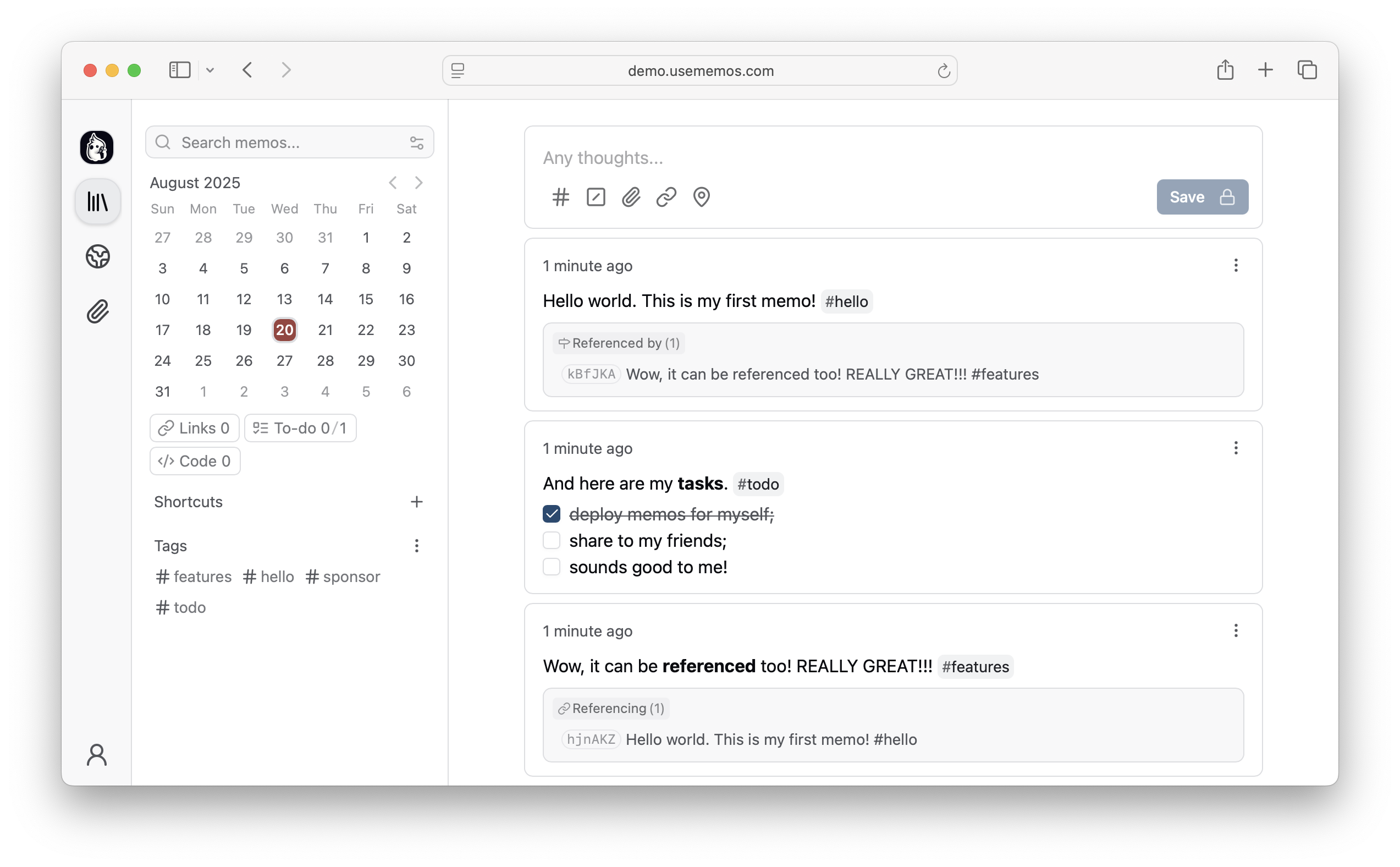
Features
- Instant Capture â Timeline-first UI. Open, write, done â no folders to navigate.
- Total Data Ownership â Self-hosted on your infrastructure. Notes stored in Markdown, always portable. Zero telemetry.
- Radical Simplicity â Single Go binary, ~20MB Docker image. One command to deploy with SQLite, MySQL, or PostgreSQL.
- Open & Extensible â MIT-licensed with full REST and gRPC APIs for integration.
Quick Start
Docker (Recommended)
docker run -d \
  --name memos \
  -p 5230:5230 \
  -v ~/.memos:/var/opt/memos \
  neosmemo/memos:stable
Open http://localhost:5230 and start writing!
Native Binary
curl -fsSL https://raw.githubusercontent.com/usememos/memos/main/scripts/install.sh | sh
Try the Live Demo
Don't want to install yet? Try our live demo first!
Other Installation Methods
- Docker Compose - Recommended for production deployments
- Pre-built Binaries - Available for Linux, macOS, and Windows
- Kubernetes - Helm charts and manifests available
- Build from Source - For development and customization
See our installation guide for detailed instructions.
Contributing
Contributions are welcome â bug reports, feature suggestions, pull requests, documentation, and translations.
Sponsors
- CodeRabbit - Cut code review time & bugs in half, instantly
- Warp - The agentic development environment
- SSD Nodes - Affordable VPS hosting for self-hosters
- InstaPods - Get your app online in seconds ⢠Deploy Memos in 30 Seconds
Love Memos? Sponsor us on GitHub to help keep the project growing!
Star History
License
Memos is open-source software licensed under the MIT License. See our Privacy Policy for details on data handling.
Website ⢠Documentation ⢠Demo ⢠Discord ⢠X/Twitter

Top Related Projects
A privacy-first, open-source platform for knowledge management and collaboration. Download link: http://github.com/logseq/logseq/releases. roadmap: https://logseq.io/p/NX4mc_ggEV
Think fearlessly with end-to-end encrypted notes and files. For issues, visit https://standardnotes.com/forum or https://standardnotes.com/help.
Build your personal knowledge base with Trilium Notes
A personal knowledge management and sharing system for VSCode
Convert designs to code with AI
Introducing Visual Copilot: A new AI model to turn Figma designs to high quality code using your components.
Try Visual Copilot