
Top Related Projects

A pure PHP library for reading and writing spreadsheet files
ARCHIVED

Lightweight XLSX Excel Spreadsheet Writer in PHP

A Python module for creating Excel XLSX files.

Read and write spreadsheet files (CSV, XLSX and ODS), in a fast and scalable way

Parse and retrieve data from Excel XLSx files
Quick Overview
PHP-ext-xlswriter is a PHP extension for creating Excel XLSX files. It's designed to be fast and memory-efficient, making it suitable for generating large spreadsheets. The extension is built on top of the libxlsxwriter library, providing a native PHP interface for Excel file creation.
Pros
- High performance and low memory usage compared to other PHP Excel libraries
- Supports a wide range of Excel features, including formulas, charts, and cell formatting
- Easy to install and use as a PHP extension
- Actively maintained with regular updates and bug fixes
Cons
- Requires compilation and installation as a PHP extension, which may be challenging for some users
- Limited to writing XLSX files; cannot read or modify existing Excel files
- May have compatibility issues with some PHP environments or hosting providers
- Learning curve for users unfamiliar with PHP extensions
Code Examples
Creating a simple Excel file:
<?php
$config = ['path' => './example.xlsx'];
$excel  = new \Vtiful\Kernel\Excel($config);

$filePath = $excel->fileName('tutorial01.xlsx', 'sheet1')
    ->header(['Name', 'Age'])
    ->data([
        ['John Doe', 30],
        ['Jane Doe', 25]
    ])
    ->output();
Adding formulas to cells:
<?php
$config = ['path' => './example.xlsx'];
$excel  = new \Vtiful\Kernel\Excel($config);

$filePath = $excel->fileName('tutorial02.xlsx', 'sheet1')
    ->header(['Item', 'Cost', 'Qty', 'Total'])
    ->data([
        ['Apple', 0.5, 10],
        ['Orange', 0.6, 15],
        ['Banana', 0.4, 20]
    ])
    ->setColumn('D:D', 15, \Vtiful\Kernel\Format::FORMAT_CURRENCY_USD)
    ->setCell('D2', '=B2*C2')
    ->setCell('D3', '=B3*C3')
    ->setCell('D4', '=B4*C4')
    ->setCell('D5', '=SUM(D2:D4)')
    ->output();
Creating a chart:
<?php
$config = ['path' => './example.xlsx'];
$excel  = new \Vtiful\Kernel\Excel($config);

$filePath = $excel->fileName('tutorial03.xlsx', 'sheet1')
    ->header(['Year', 'Sales'])
    ->data([
        [2018, 100],
        [2019, 120],
        [2020, 140],
        [2021, 180]
    ])
    ->insertChart(0, 4, [
        'type'   => 'column',
        'series' => [
            ['name' => 'Sales', 'categories' => '=sheet1!$A$2:$A$5', 'values' => '=sheet1!$B$2:$B$5']
        ],
        'title'  => ['name' => 'Sales by Year']
    ])
    ->output();
Getting Started
-
Install the extension:
pecl install xlswriter -
Add the extension to your php.ini file:
extension=xlswriter.so -
Create a new PHP file and start using the extension:
<?php
$config = ['path' => './'];
$excel  = new \Vtiful\Kernel\Excel($config);

$excel->fileName('example.xlsx')
    ->writeSheetHeader('Sheet1', ['Name', 'Age'])
    ->writeSheetRow('Sheet1', ['John Doe', 30])
    ->writeSheetRow('Sheet1', ['Jane Doe', 25])
    ->output();
Competitor Comparisons
A pure PHP library for reading and writing spreadsheet files
Pros of PhpSpreadsheet
- More feature-rich, supporting a wider range of spreadsheet operations
- Pure PHP implementation, making it easier to install and use across different environments
- Actively maintained with regular updates and a large community
Cons of PhpSpreadsheet
- Slower performance, especially when dealing with large datasets
- Higher memory consumption due to its PHP-based implementation
- Steeper learning curve due to its extensive API and features
Code Comparison
PhpSpreadsheet:
$spreadsheet = new Spreadsheet();
$sheet = $spreadsheet->getActiveSheet();
$sheet->setCellValue('A1', 'Hello World!');
$writer = new Xlsx($spreadsheet);
$writer->save('hello_world.xlsx');
php-ext-xlswriter:
$config = ['path' => './'];
$excel = new \Vtiful\Kernel\Excel($config);
$filePath = $excel->fileName('tutorial.xlsx')
    ->header(['name', 'age'])
    ->output();
PhpSpreadsheet offers a more intuitive API for complex operations, while php-ext-xlswriter provides a simpler interface for basic tasks. The latter's C extension-based implementation results in significantly better performance, especially for large datasets or when generating multiple files.
ARCHIVED
Pros of PHPExcel
- Pure PHP implementation, making it easier to install and use without additional system dependencies
- More comprehensive feature set, including advanced formatting options and chart creation
- Wider compatibility with various Excel file formats, including older versions
Cons of PHPExcel
- Slower performance, especially when dealing with large datasets
- Higher memory consumption, which can be problematic for large files
- Less actively maintained, with the last major release in 2015
Code Comparison
PHPExcel:
$objPHPExcel = new PHPExcel();
$objPHPExcel->getActiveSheet()->setCellValue('A1', 'Hello World');
$objWriter = PHPExcel_IOFactory::createWriter($objPHPExcel, 'Excel2007');
$objWriter->save('myfile.xlsx');
php-ext-xlswriter:
$config = ['path' => './'];
$excel = new \Vtiful\Kernel\Excel($config);
$filePath = $excel->fileName('tutorial.xlsx')
    ->header(['name', 'age'])
    ->output();
php-ext-xlswriter is a PHP extension that offers significantly better performance and lower memory usage compared to PHPExcel. It's particularly well-suited for handling large datasets and high-volume Excel file generation. However, it requires compilation and installation as a PHP extension, which may be more challenging in some environments. php-ext-xlswriter also has a more limited feature set compared to PHPExcel, focusing primarily on efficient data writing and basic formatting.
Lightweight XLSX Excel Spreadsheet Writer in PHP
Pros of PHP_XLSXWriter
- Pure PHP implementation, no external dependencies required
- Easy to install and use in any PHP environment
- Supports older PHP versions (5.2+)
Cons of PHP_XLSXWriter
- Generally slower performance compared to php-ext-xlswriter
- Limited advanced Excel features and formatting options
- May consume more memory for large datasets
Code Comparison
PHP_XLSXWriter:
$writer = new XLSXWriter();
$writer->writeSheetHeader('Sheet1', array('Col1' => 'string', 'Col2' => 'string'));
$writer->writeSheetRow('Sheet1', array('A1', 'B1'));
$writer->writeToFile('example.xlsx');
php-ext-xlswriter:
$excel = new \Vtiful\Kernel\Excel(['path' => './']);
$filePath = $excel->fileName('tutorial.xlsx')
    ->header(['Name', 'Age'])
    ->data([['viest', 21]])
    ->output();
Both libraries offer straightforward APIs for creating Excel files, but php-ext-xlswriter provides a more concise syntax and potentially better performance due to its C implementation.
A Python module for creating Excel XLSX files.
Pros of XlsxWriter
- Cross-platform compatibility: Works on various operating systems
- Rich feature set: Supports a wide range of Excel functionalities
- Pure Python implementation: Easy to install and use without external dependencies
Cons of XlsxWriter
- Performance: May be slower for large datasets compared to C extensions
- Memory usage: Can consume more memory for complex spreadsheets
- Limited real-time writing: Primarily designed for writing entire workbooks at once
Code Comparison
XlsxWriter:
import xlsxwriter

workbook = xlsxwriter.Workbook('example.xlsx')
worksheet = workbook.add_worksheet()
worksheet.write('A1', 'Hello, World!')
workbook.close()
php-ext-xlswriter:
$config = ['path' => './example.xlsx'];
$excel = new \Vtiful\Kernel\Excel($config);
$excel->fileName('example')
    ->header(['Hello', 'World'])
    ->output();
Both libraries offer straightforward APIs for creating Excel files, but php-ext-xlswriter is specifically designed for PHP and leverages C extensions for improved performance. XlsxWriter, being a Python library, provides a more Pythonic approach and may be easier to integrate into existing Python projects.
Read and write spreadsheet files (CSV, XLSX and ODS), in a fast and scalable way
Pros of Spout
- Pure PHP library, no extensions required
- Supports reading and writing multiple formats (XLSX, CSV, ODS)
- Memory-efficient streaming for large files
Cons of Spout
- Slower performance compared to native extensions
- Limited formatting options for Excel files
- Lacks advanced Excel features like formulas and charts
Code Comparison
Spout:
$writer = WriterFactory::create(Type::XLSX);
$writer->openToFile($filePath);
$writer->addRow($rowData);
$writer->close();
php-ext-xlswriter:
$excel = new \Vtiful\Kernel\Excel(['path' => './']);
$filePath = $excel->fileName('file.xlsx')
    ->header($header)
    ->data($data)
    ->output();
Both libraries offer straightforward APIs for creating Excel files, but php-ext-xlswriter provides a more compact syntax. Spout's approach is more verbose but offers greater flexibility in terms of supported file formats.
php-ext-xlswriter, being a native extension, generally offers better performance for large datasets and complex operations. However, Spout's pure PHP implementation makes it more portable and easier to deploy in various environments.
Spout excels in memory efficiency and handling large files through streaming, while php-ext-xlswriter leverages C extensions for speed and advanced Excel features. The choice between the two depends on specific project requirements, performance needs, and deployment constraints.
Parse and retrieve data from Excel XLSx files
Pros of simplexlsx
- Pure PHP implementation, no extensions required
- Easy to install and use, especially in shared hosting environments
- Supports reading both XLSX and XLS formats
Cons of simplexlsx
- Generally slower performance compared to php-ext-xlswriter
- Limited writing capabilities, primarily focused on reading Excel files
- May consume more memory for large files
Code Comparison
simplexlsx (reading):
$xlsx = SimpleXLSX::parse('file.xlsx');
foreach ($xlsx->rows() as $row) {
    print_r($row);
}
php-ext-xlswriter (writing):
$config = ['path' => './'];
$excel = new \Vtiful\Kernel\Excel($config);
$filePath = $excel->fileName('file.xlsx')
    ->header(['name', 'age'])
    ->data([['John', 28], ['Jane', 25]])
    ->output();
Both libraries serve different primary purposes: simplexlsx focuses on reading Excel files, while php-ext-xlswriter excels at writing Excel files. simplexlsx is more accessible and easier to set up, especially in environments where installing extensions is challenging. However, php-ext-xlswriter offers better performance and more advanced writing capabilities, making it suitable for generating complex Excel files or handling large datasets.
Convert  designs to code with AI

Introducing Visual Copilot: A new AI model to turn Figma designs to high quality code using your components.
Try Visual CopilotREADME











Why use xlswriter
The chart below compares xlswriter with PhpSpreadsheet (the maintained successor to PHPExcel) when exporting an XLSX file, scaled all the way to Excel's row limit. Writing 1,048,576 rows à 10 columns, xlswriter is about 20à faster, and its fixed-memory mode keeps peak memory flat at ~30 MB no matter how many rows you write â whereas a pure-PHP library's memory grows with the data (â7 GB for the same file).

The two xlswriter modes track within ~10% of each other on time. Fixed-memory mode is marginally faster because it streams each row straight to disk and frees it immediately â a single pass, with no full in-memory model to build up and then serialize a second time at the end. The trade-off is that, unlike normal mode, it can no longer revisit a cell once it has been written (and its strings are stored inline rather than de-duplicated, so the file can be slightly larger). Normal mode keeps the whole workbook in memory, which is what lets you write cells in any order and re-style them before saving.
xlswriter is a PHP C Extension for Excel 2007+ XLSX files. It writes text, numbers, formulas, dates, charts, images and hyperlinks to new workbooks, opens existing files to edit them and save the result, reads their contents back, and evaluates formulas to a computed value. It supports features such as:
Writer
- 100% compatible Excel XLSX files.
- Full Excel formatting.
- Merged cells.
- Defined names.
- Autofilters.
- Charts.
- Data validation and drop down lists.
- Conditional formatting.
- Rich text, comments and hyperlinks.
- Worksheet PNG/JPEG images.
- Edit existing workbooks â open a file, update cell values, styles, merged ranges and row/column sizes, add worksheets, images and charts, then save the result.
- Formula calculation â evaluate a formula and get its computed value, and write formulas with a pre-computed cached result.
- Memory optimization mode for writing large files.
- Works on Linux, FreeBSD, OpenBSD, OS X, Windows.
- Compiles for 32 and 64 bit.
- FreeBSD License.
- The only dependency is on zlib.
Reader
- Full read mode and cursor read mode.
- Read by data type.
- Read cell styles and number formats.
- Read merged cells.
- Read images, charts and comments.
- Read formulas together with their cached values.
Install
Unix
Both install methods below build from source, so the zlib development headers must be present first (they are often missing on minimal images):
# Debian / Ubuntu
apt-get install -y zlib1g-dev
# Alpine
apk add zlib-dev
# RHEL / CentOS / Fedora
yum install -y zlib-devel
Then install with either PECL or PIE:
PECL
pecl install xlswriter
PIE
PIE also builds from source and additionally needs
the autotools build chain (autoconf, make, a compiler and libtool). It can
install those missing build tools for you with --auto-install-build-tools, but
it cannot install zlib â make sure the headers above are in place first:
pie install --auto-install-build-tools viest/xlswriter
Windows
Benchmark
Test environment: Macbook Pro 13 inch, Intel Core i5, 16GB 2133MHz LPDDR3 Memory, 128GB SSD Storage.
Export
Two memory modes export 1 million rows of data (27 columns, data is string)
- Normal mode: only 29S is needed, and the memory only needs 2083MB;
- Fixed memory mode: only need 52S, memory only needs <1MB;
Import
1 million rows of data (1 columns, data is inter)
- Full mode: Just 3S, the memory is only 558MB;
- Cursor mode: Just 2.8S, memory is only <1MB;
Documents
Includes extensive and detailed instructions that make it easy to get started with xlswriter.
PECL Repository

IDE Helper
composer require viest/php-ext-xlswriter-ide-helper:dev-master
Contributors
Code Contributors
This project exists thanks to all the people who contribute. [Contribute].

Financial Contributors
Become a financial contributor and help us sustain our community. [Contribute]
Individuals

Organizations
Support this project with your organization. Your logo will show up here with a link to your website. [Contribute]



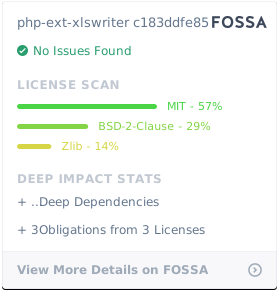
License
BSD License
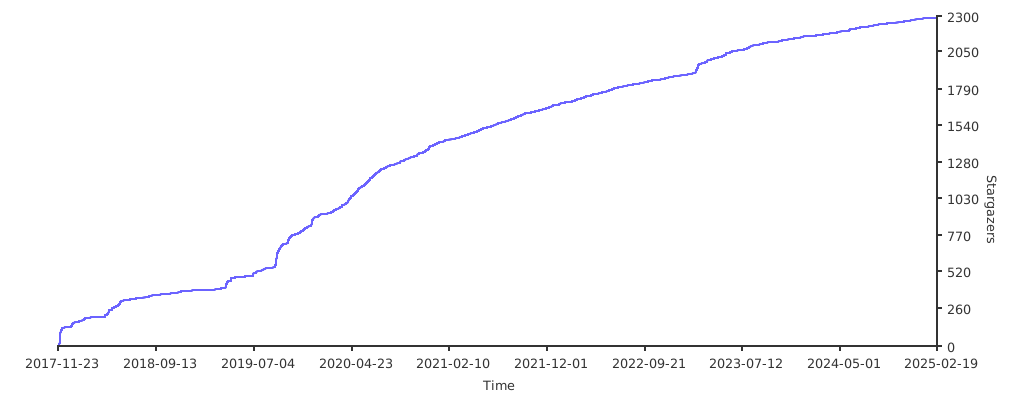
Stargazers over time
Top Related Projects
A pure PHP library for reading and writing spreadsheet files
ARCHIVED
Lightweight XLSX Excel Spreadsheet Writer in PHP
A Python module for creating Excel XLSX files.
Read and write spreadsheet files (CSV, XLSX and ODS), in a fast and scalable way
Parse and retrieve data from Excel XLSx files
Convert designs to code with AI
Introducing Visual Copilot: A new AI model to turn Figma designs to high quality code using your components.
Try Visual Copilot