 getsploit
Search and download public exploits from the Vulners database — online, or fully offline from a local SQLite FTS5 index.
Top Related Projects

The legacy Exploit Database repository - New repo located at https://gitlab.com/exploit-database/exploitdb

Metasploit Framework

linux-kernel-exploits Linux平台提权漏洞集合
windows-kernel-exploits Windows平台提权漏洞集合

📡 PoC auto collect from GitHub. ⚠️ Be careful Malware.

Community curated list of templates for the nuclei engine to find security vulnerabilities.
Quick Overview
Getsploit is a command-line search tool for the Vulners.com database, allowing users to search for and download exploits directly from the terminal. It provides a simple interface to access a vast collection of security-related content, including exploits, vulnerabilities, and security articles.
Pros
- Easy-to-use command-line interface for quick exploit searches
- Integrates with the extensive Vulners.com database
- Supports downloading of exploit code directly from the terminal
- Offers flexible search options and filtering capabilities
Cons
- Requires an internet connection to function
- Limited to the content available in the Vulners.com database
- May require additional setup for some users (Python environment, API key)
- Could potentially be misused for malicious purposes if not handled responsibly
Code Examples
# Search for exploits related to Apache
getsploit.py Apache

# Search for a specific CVE
getsploit.py CVE-2017-0144

# Download a specific exploit by its ID
getsploit.py -m download -i 7611851
# Search with advanced filtering
getsploit.py -t exploit_id,bulletinFamily,title,cvss,published,type,sourceData Apache httpd

# Display full information about exploits
getsploit.py -f Apache Struts
# Use JSON output for integration with other tools
getsploit.py --json Apache Tomcat
Getting Started
-
Clone the repository:
git clone https://github.com/vulnersCom/getsploit.git -
Install the required dependencies:
pip install -r requirements.txt -
(Optional) Set up your Vulners API key:
export VULNERS_API_KEY=your_api_key_here -
Run getsploit:
python getsploit.py [search_term]
For more advanced usage and options, refer to the project's README file.
Competitor Comparisons
The legacy Exploit Database repository - New repo located at https://gitlab.com/exploit-database/exploitdb
Pros of ExploitDB
- Larger and more comprehensive database of exploits
- Regularly updated with new exploits and vulnerabilities
- Includes additional tools like searchsploit for offline searching
Cons of ExploitDB
- Requires more storage space due to its larger database
- May include older or less relevant exploits
- Can be overwhelming for users looking for specific exploits
Code Comparison
Getsploit (Python):
def search_sploit(search_request):
    url = "https://vulners.com/api/v3/search/lucene/"
    headers = {"User-Agent": USER_AGENT}
    data = {"query": search_request, "type": "exploitdb"}
    response = requests.post(url, headers=headers, json=data)
    return response.json()
ExploitDB (Shell):
searchsploit() {
    if [ $# -eq 0 ]; then
        echo "Usage: searchsploit [options] <search term>"
        return 1
    fi
    /usr/share/exploitdb/searchsploit "$@"
}
The code comparison shows that Getsploit uses a Python function to search for exploits via an API, while ExploitDB utilizes a shell function to search locally using the searchsploit tool. This reflects the different approaches of the two projects, with Getsploit focusing on online searching and ExploitDB providing offline capabilities.
Metasploit Framework
Pros of Metasploit-framework
- Comprehensive exploitation framework with a vast array of modules and payloads
- Active community and regular updates
- Extensive documentation and support resources
Cons of Metasploit-framework
- Steeper learning curve for beginners
- Larger footprint and more complex setup process
- May be overkill for simple vulnerability scanning tasks
Code Comparison
Metasploit-framework (Ruby):
use exploit/windows/smb/ms17_010_eternalblue
set RHOSTS 192.168.1.100
set PAYLOAD windows/x64/meterpreter/reverse_tcp
exploit
Getsploit (Python):
from getsploit import search_exploits

results = search_exploits("ms17-010")
for exploit in results:
    print(exploit.title, exploit.description)
Key Differences
- Metasploit-framework is a full-featured exploitation toolkit, while Getsploit focuses on exploit searching and information retrieval
- Metasploit-framework requires more setup and resources, whereas Getsploit is lightweight and easy to integrate into existing workflows
- Metasploit-framework offers hands-on exploitation capabilities, while Getsploit primarily serves as an information gathering tool
Both tools serve different purposes in the security ecosystem, with Metasploit-framework being more suitable for comprehensive penetration testing and Getsploit excelling at quick exploit discovery and research.
linux-kernel-exploits Linux平台提权漏洞集合
Pros of linux-kernel-exploits
- Focused specifically on Linux kernel exploits, providing a curated collection
- Includes detailed information and usage instructions for each exploit
- Regularly updated with new kernel vulnerabilities
Cons of linux-kernel-exploits
- Limited to Linux kernel exploits only, not covering other platforms or software
- Requires manual browsing and searching through the repository
- May lack some features for easy integration into security tools
Code Comparison
linux-kernel-exploits:
# Example usage of a Linux kernel exploit
./exploit
[*] Linux kernel exploit for CVE-20XX-XXXX
[*] Targeting kernel version 4.X.X
[+] Exploit successful, enjoy root privileges!
getsploit:
# Example usage of getsploit
from getsploit import Getsploit
gs = Getsploit()
results = gs.search("linux kernel")
for exploit in results:
    print(exploit.title, exploit.description)
getsploit offers a more programmatic approach to searching and retrieving exploit information, while linux-kernel-exploits provides ready-to-use exploit code specifically for Linux kernels. The choice between them depends on the user's specific needs and workflow preferences.
windows-kernel-exploits Windows平台提权漏洞集合
Pros of windows-kernel-exploits
- Focused specifically on Windows kernel exploits, providing a curated collection
- Includes pre-compiled executables for easier testing and deployment
- Organizes exploits by Windows version, facilitating targeted research
Cons of windows-kernel-exploits
- Limited to Windows kernel exploits, lacking broader vulnerability coverage
- Less frequently updated compared to getsploit
- Doesn't provide a search functionality or API for programmatic access
Code comparison
windows-kernel-exploits (PowerShell script example):
$ErrorActionPreference = "Stop"
$OSVersion = (Get-WmiObject Win32_OperatingSystem).Version
$Architecture = (Get-WmiObject Win32_OperatingSystem).OSArchitecture
getsploit (Python script example):
import sys
import requests
from terminaltables import AsciiTable

API_URL = "https://vulners.com/api/v3/search/lucene/"
windows-kernel-exploits focuses on providing ready-to-use exploit code and binaries for Windows kernel vulnerabilities, while getsploit offers a broader search capability for various vulnerabilities across multiple platforms. The code examples reflect their different approaches, with windows-kernel-exploits using PowerShell for Windows-specific tasks and getsploit utilizing Python for API interactions and data presentation.
📡 PoC auto collect from GitHub. ⚠️ Be careful Malware.
Pros of PoC-in-GitHub
- Comprehensive collection of PoC exploits organized by CVE
- Regular updates with new exploits and vulnerabilities
- Easy-to-navigate structure with links to original sources
Cons of PoC-in-GitHub
- Lacks a command-line interface for searching and retrieving exploits
- No built-in functionality for exploit verification or testing
- Requires manual browsing and downloading of exploit code
Code Comparison
Getsploit offers a Python-based command-line interface:
from getsploit import GSF
gsf = GSF()
results = gsf.search("CVE-2021-44228")
for exploit in results:
    print(exploit.description)
PoC-in-GitHub doesn't provide a direct code interface, but users can clone the repository and access exploits manually:
git clone https://github.com/nomi-sec/PoC-in-GitHub.git
cd PoC-in-GitHub
ls -l CVE-2021-44228
Both repositories serve as valuable resources for security researchers and penetration testers, with Getsploit offering more programmatic access and PoC-in-GitHub providing a wider range of exploits in a well-organized structure.
Community curated list of templates for the nuclei engine to find security vulnerabilities.
Pros of nuclei-templates
- Larger and more diverse collection of templates for various vulnerabilities and misconfigurations
- Regularly updated with community contributions, ensuring coverage of new threats
- Designed for use with Nuclei, a powerful and flexible scanning engine
Cons of nuclei-templates
- Requires familiarity with Nuclei's syntax and usage
- May include more false positives due to the broad range of templates
- Larger repository size, which can be overwhelming for beginners
Code Comparison
nuclei-templates:
id: example-vulnerability
info:
  name: Example Vulnerability
  severity: high
requests:
  - method: GET
    path: /vulnerable-endpoint
getsploit:
from getsploit import search_exploits

results = search_exploits("example vulnerability")
for exploit in results:
    print(exploit.title, exploit.description)
Summary
nuclei-templates offers a comprehensive set of templates for vulnerability scanning, while getsploit focuses on searching and retrieving exploit information. nuclei-templates is more suited for active scanning and testing, whereas getsploit is primarily a tool for researching and retrieving exploit data. The choice between the two depends on the specific use case and the user's familiarity with the respective tools and ecosystems.
Convert  designs to code with AI

Introducing Visual Copilot: A new AI model to turn Figma designs to high quality code using your components.
Try Visual CopilotREADME
Getsploit
Search and download public exploits from the Vulners database â online, or fully offline from a local index.









Get an API key · Vulners search · Changelog · Architecture · Security policy
Why Getsploit
- ð One query, every collection. Exploit-DB, Metasploit, Packet Storm, Zero Day Initiative, GitHub proof-of-concepts and more, as indexed by Vulners.
- ð´ Works with the network off. One
--updatebuilds a local SQLite FTS5 index of the whole exploit corpus; every later search is a local query. - ð§ Searches for what you typed.
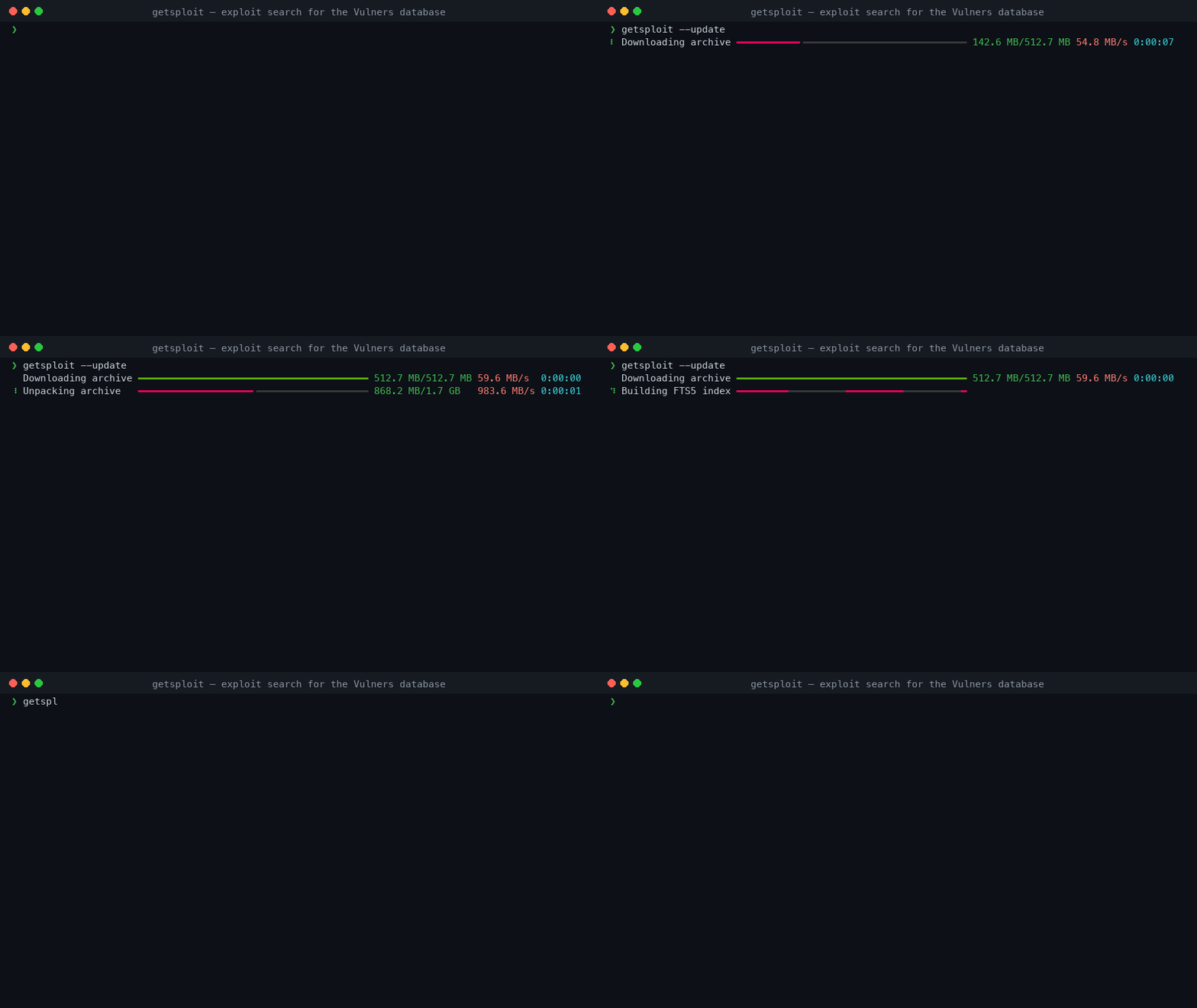
wordpress 4.7,CVE-2024-3094andms17-010match literally, while a deliberate full-text expression still gets full FTS5 syntax. - ð Progress you can trust. Every stage of an update reports real numbers, and the two stages whose size cannot be known say so instead of inventing a percentage.
- 𧾠Pipe-friendly. JSON, JSON Lines, and stable tab-separated records when the output is redirected. No colour or decoration ever reaches a machine format.
- ð¾ Keeps the source.
--mirrorwrites each exploit body to its own file. - ð Careful with your data. The key is never a command-line argument, the key file is opened without following symlinks, and downloaded content is never executed.
- 𧪠Verified. 100% statement and branch coverage on Python 3.11 through 3.14, on Linux, macOS and Windows.
Install
Getsploit needs Python 3.11 or newer.
$ pipx install getsploit
$ uv tool install getsploit
$ python -m pip install getsploit
API key
Create a key in your Vulners account, then expose it through the environment:
$ export VULNERS_API_KEY="your-key" # pragma: allowlist secret
$env:VULNERS_API_KEY = "your-key" # pragma: allowlist secret
getsploit --set-key stores a key through a hidden confirmation prompt, in a private
file under the Getsploit home. The environment takes precedence over that file and is
the better choice for automation. There is no --api-key option: a key passed on the
command line ends up in the shell history and in the process list.
Online search and --update need a key. --local and --status do not.
Usage
Online search
$ getsploit CVE-2024-3094
$ getsploit "wordpress 4.7 remote code execution" --count 25
The query reaches Vulners unchanged, so its Lucene syntax works as documented:
$ getsploit 'title:wordpress AND description:"code execution"'
--count above 100 is paged transparently; a single API response never carries more
than 100 documents.
Offline search
$ getsploit --update                 # download the archive and build the FTS5 index
$ getsploit --status                 # where it is, how big, how many documents
$ getsploit --local wordpress 4.7
Ordinary search words are matched literally, so identifiers and version numbers work as
typed: wordpress 4.7, CVE-2024-3094, ms17-010. A query that uses column filters,
boolean operators, quotes, parentheses, * or ^ is treated as an
SQLite FTS5 expression and reports its own error
when malformed:
$ getsploit --local 'title:eternalblue AND NOT description:metasploit'
Searchable columns are id, title, published, description and source_data. The
legacy sourceData: spelling is still accepted.
Saving exploit sources
$ getsploit --mirror wordpress 4.7
$ getsploit --local --mirror eternalblue
Files land in a directory derived from the query, one file per exploit, created without following symlinks and never overwriting anything that already exists.
[!WARNING] Mirrored files are untrusted third-party code. Read them before running them.
Machine-readable output
$ getsploit --format json CVE-2024-3094
$ getsploit --format jsonl wordpress | jq -r .id
$ getsploit wordpress > results.tsv       # redirected output is tab-separated
--json remains an alias for --format json.
Terminal control
$ getsploit --color always query | less -R
$ getsploit --color never query
Colour defaults to auto. A wide terminal gets a table, a narrow one gets stacked
records, and a redirected stream gets tab-separated values â the same data in all three.
Run getsploit --help for the full option list.
The local database
| Location | ~/.getsploit/getsploit.db, or $GETSPLOIT_HOME |
| Format | SQLite with an external-content FTS5 index |
| Tokenizer | unicode61 remove_diacritics 2 |
| Size | roughly 1.7 GB for the full corpus |
| Update | atomic: the new database replaces the old one in a single operation |
An update downloads the archive over eight parallel range connections, unpacks and converts it beside the destination, verifies it, and only then commits. Memory use does not depend on the size of the archive. A search already running against the old database finishes against it undisturbed.
Databases built by Getsploit 2.x remain searchable; the next --update migrates them
from FTS4 to FTS5. FTS4 proximity expressions such as one NEAR/5 two must be rewritten
in the FTS5 NEAR(...) form.
Compatibility
| Python | 3.11, 3.12, 3.13, 3.14 |
| Operating systems | Linux, macOS, Windows |
| Vulners SDK | 4.1 and newer 4.x |
| Runtime dependencies | click, rich, vulners |
Development
$ git clone https://github.com/vulnersCom/getsploit.git
$ cd getsploit
$ uv sync --all-groups
$ make check
| Command | Purpose |
|---|---|
make format | Format and autofix source files |
make lint | Check formatting, lint, and types |
make test | Run tests in parallel |
make coverage | Enforce 100% statement and branch coverage |
make leaks | Scan tracked files for secrets |
make build | Build the wheel and source distribution |
make release | Run every gate and validate both distributions |
make check | Everything above that gates a merge |
CONTRIBUTING.md has the contribution rules and ARCHITECTURE.md the module boundaries and database invariants.
A release is a pushed v<version> tag. From there
the release workflow re-runs the full gate on the
tagged commit, publishes to PyPI through trusted publishing, and writes the GitHub
release from the changelog. No PyPI token exists to leak.
Security
Exploit source files are untrusted content: review them before opening or running them. Getsploit itself never executes what it downloads.
Releases are published from GitHub Actions through PyPI trusted publishing, so no long-lived API token exists to leak, and every artifact carries a build provenance attestation. To report a vulnerability in Getsploit, follow SECURITY.md.
License
MIT © Vulners Team and contributors.
Top Related Projects
The legacy Exploit Database repository - New repo located at https://gitlab.com/exploit-database/exploitdb
Metasploit Framework
linux-kernel-exploits Linux平台提权漏洞集合
windows-kernel-exploits Windows平台提权漏洞集合
📡 PoC auto collect from GitHub. ⚠️ Be careful Malware.
Community curated list of templates for the nuclei engine to find security vulnerabilities.
Convert designs to code with AI
Introducing Visual Copilot: A new AI model to turn Figma designs to high quality code using your components.
Try Visual Copilot