 Sn1per
Automated penetration testing & attack surface management platform. Recon, scan, exploit, report - 600+ exploits, 90+ integrations, 10K+ detections.
Top Related Projects

E-mails, subdomains and names Harvester - OSINT

The Social-Engineer Toolkit (SET) repository from TrustedSec - All new versions of SET will be deployed here.

WPScan WordPress security scanner. Written for security professionals and blog maintainers to test the security of their WordPress websites. Contact us via contact@wpscan.com

Nikto web server scanner

Directory/File, DNS and VHost busting tool written in Go

Nuclei is a fast, customizable vulnerability scanner powered by the global security community and built on a simple YAML-based DSL, enabling collaboration to tackle trending vulnerabilities on the internet. It helps you find vulnerabilities in your applications, APIs, networks, DNS, and cloud configurations.
Quick Overview
Sn1per is an automated reconnaissance and vulnerability scanning tool designed for penetration testers and security professionals. It combines various security tools and techniques to perform comprehensive scans on target systems, identifying potential vulnerabilities and providing detailed reports.
Pros
- Automates multiple scanning and enumeration processes, saving time and effort
- Integrates numerous popular security tools into a single platform
- Provides detailed reports and output for easy analysis
- Supports various scanning modes for different use cases (e.g., discovery, stealth, normal)
Cons
- May generate false positives, requiring manual verification
- Can be resource-intensive, especially for large-scale scans
- Requires careful use to avoid unintended impact on target systems
- Some features are only available in the paid professional version
Getting Started
To get started with Sn1per, follow these steps:
-
Clone the repository:
git clone https://github.com/1N3/Sn1per -
Navigate to the Sn1per directory:
cd Sn1per -
Install Sn1per:
bash install.sh -
Run a basic scan:
sniper -t <target>
Replace <target> with the IP address or domain name of the system you want to scan. Always ensure you have proper authorization before scanning any systems you don't own.
Note: Sn1per should be used responsibly and in compliance with all applicable laws and regulations. Unauthorized scanning or testing of systems is illegal and unethical.
Competitor Comparisons
E-mails, subdomains and names Harvester - OSINT
Pros of theHarvester
- Focused specifically on gathering open-source intelligence (OSINT)
- Lightweight and easy to use with minimal setup
- Supports a wide range of data sources for information gathering
Cons of theHarvester
- Limited in scope compared to Sn1per's comprehensive scanning capabilities
- Lacks advanced vulnerability assessment features
- May require additional tools for a complete security assessment
Code Comparison
theHarvester:
from theHarvester.discovery import *
from theHarvester.discovery.constants import *
search = googlesearch.search_google(word, limit, start)
search.process()
Sn1per:
sniper -t $TARGET -m $MODE -w $WORKSPACE
nmap -sV -p- -O --script=vulners $TARGET
theHarvester focuses on OSINT gathering using Python modules, while Sn1per provides a more comprehensive bash-based scanning approach that includes vulnerability assessment. theHarvester's code is more modular and easier to extend for specific OSINT tasks, whereas Sn1per offers a broader range of built-in scanning and enumeration capabilities.
The Social-Engineer Toolkit (SET) repository from TrustedSec - All new versions of SET will be deployed here.
Pros of Social-Engineer-Toolkit
- Focused specifically on social engineering attacks, providing a comprehensive suite of tools for this purpose
- Regularly updated with new features and improvements
- Well-documented with extensive community support
Cons of Social-Engineer-Toolkit
- Limited in scope compared to Sn1per's broader range of security testing capabilities
- Requires more manual configuration and setup for certain attacks
- May have a steeper learning curve for beginners due to its specialized nature
Code Comparison
Social-Engineer-Toolkit:
# Example of a phishing attack setup
choice = input("Select attack vector: ")
if choice == "1":
    site = input("Enter site to clone: ")
    clone_site(site)
Sn1per:
# Example of running a full scan
sniper -t example.com -m fullportonly
The code snippets demonstrate the different focus areas of each tool. Social-Engineer-Toolkit emphasizes user interaction for social engineering attacks, while Sn1per provides a more automated approach to comprehensive security scanning.
WPScan WordPress security scanner. Written for security professionals and blog maintainers to test the security of their WordPress websites. Contact us via contact@wpscan.com
Pros of WPScan
- Specialized for WordPress security scanning, offering in-depth vulnerability detection
- Regularly updated with the latest WordPress vulnerabilities
- Lightweight and easy to use, focusing on a single purpose
Cons of WPScan
- Limited to WordPress sites, lacking versatility for other platforms
- Requires manual interpretation of results, less automated than Sn1per
- May miss broader infrastructure vulnerabilities outside of WordPress
Code Comparison
WPScan (Ruby):
def scan_wordpress_version
  response = Browser.get(url)
  if response.body =~ /meta name="generator" content="WordPress #{wp_version}"/i
    puts "[+] WordPress version #{wp_version} detected"
  end
end
Sn1per (Bash):
sniper(){
  case "$MODE" in
    normal)
      discover
      port_scan
      web_scan
      ;;
    stealth)
      discover
      port_scan
      ;;
  esac
}
WPScan focuses specifically on WordPress version detection and vulnerability scanning, while Sn1per offers a broader range of reconnaissance and scanning capabilities for various targets and technologies.
Nikto web server scanner
Pros of Nikto
- Lightweight and easy to use, with a focus on web server scanning
- Extensive plugin system for customization and extensibility
- Well-established and widely used in the security community
Cons of Nikto
- Limited scope compared to Sn1per's comprehensive scanning capabilities
- Less frequent updates and potentially slower development cycle
- May require additional tools for a complete security assessment
Code Comparison
Nikto (Perl):
sub nikto_headers {
    my ($mark) = @_;
    my %headers;
    foreach my $header (split(/\n/, $mark->{'headers'})) {
        my ($key, $value) = split(/:\s*/, $header, 2);
        $headers{lc($key)} = $value;
    }
    return %headers;
}
Sn1per (Bash):
sniper(){
  if [[ "$REPORT" = "1" ]]; then
    args="$args -o"
  fi
  if [[ "$OSINT" = "1" ]]; then
    args="$args -re"
  fi
  sniper $args $TARGET
}
The code snippets demonstrate the different approaches: Nikto uses Perl for header parsing, while Sn1per employs Bash for argument handling and command execution.
Directory/File, DNS and VHost busting tool written in Go
Pros of gobuster
- Focused tool for directory/file enumeration and DNS subdomain discovery
- Written in Go, offering cross-platform compatibility and easy installation
- Lightweight and fast execution
Cons of gobuster
- Limited scope compared to Sn1per's comprehensive scanning capabilities
- Lacks advanced reporting and visualization features
- Does not include automated exploitation or post-exploitation modules
Code Comparison
gobuster (main.go):
func main() {
    globalopts, err := parseGlobalOpts()
    if err != nil {
        fmt.Fprintf(os.Stderr, "%v\n", err)
        os.Exit(1)
    }
    if globalopts.NoColor {
        nocolorizer.SetupNoColor()
    }
    // ... (additional code)
}
Sn1per (sniper):
#!/bin/bash
# Install script for Sn1per
# Created by @xer0dayz - https://sn1persecurity.com

OKBLUE='\033[94m'
OKRED='\033[91m'
OKGREEN='\033[92m'
OKORANGE='\033[93m'
RESET='\e[0m'

echo -e "$OKRED                ____               $RESET"
# ... (additional ASCII art and installation code)
The code comparison shows that gobuster is written in Go, focusing on efficient directory enumeration, while Sn1per is a Bash script that orchestrates various tools for comprehensive scanning and exploitation.
Nuclei is a fast, customizable vulnerability scanner powered by the global security community and built on a simple YAML-based DSL, enabling collaboration to tackle trending vulnerabilities on the internet. It helps you find vulnerabilities in your applications, APIs, networks, DNS, and cloud configurations.
Pros of Nuclei
- Highly extensible with a large community-contributed template library
- Fast and efficient scanning with multi-threading support
- Easy-to-write YAML-based templates for custom vulnerability checks
Cons of Nuclei
- Requires more manual configuration and template selection
- Less comprehensive out-of-the-box scanning compared to Sn1per
- Steeper learning curve for creating custom templates
Code Comparison
Sn1per (Bash script):
sniper -t $TARGET -m $MODE -w $WORKSPACE
Nuclei (CLI command):
nuclei -t nuclei-templates -u https://example.com
Both tools offer command-line interfaces, but Nuclei's approach is more modular, allowing users to specify template directories and target URLs separately. Sn1per's single command encompasses multiple scanning modes and workspace management.
Nuclei's template-based approach provides greater flexibility for customization:
id: example-vulnerability
info:
  name: Example Vulnerability Check
  severity: medium
requests:
  - method: GET
    path:
      - "{{BaseURL}}/vulnerable-endpoint"
    matchers:
      - type: word
        words:
          - "vulnerable response"
This YAML structure allows for easy creation and sharing of vulnerability checks within the community.
Convert  designs to code with AI

Introducing Visual Copilot: A new AI model to turn Figma designs to high quality code using your components.
Try Visual CopilotREADME







[Products] [Attack Surface Management] [About Sn1per] [News] [Contact] [Demo] [Pricing] [Shop]
Sn1per â The Offensive-Security Platform for Modern Teams
Recon, scanning, exploitation, and reporting in a single workspace â whether you're a solo pentester or a global SOC.
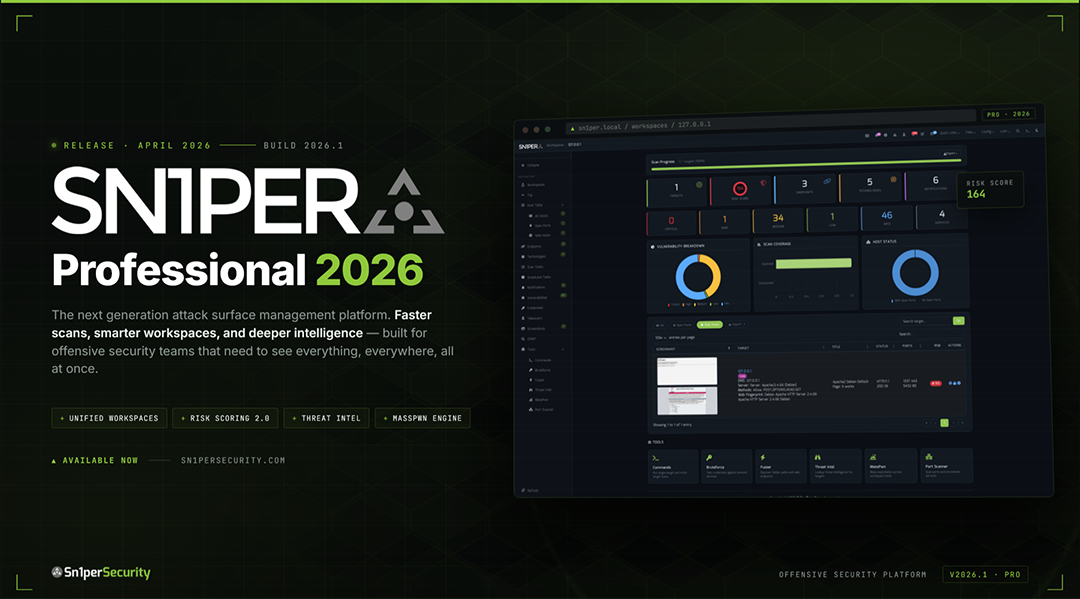
Sn1per Professional 2026 is here
The largest release since v10.0 â Docker-first deployment, Bootstrap 5 / Tabler UI, Workspace Navigator, Workspace + Host Reports with CSV / Excel / PDF export, JSON API v1.0, an Offcanvas Quick Commands sidebar with 13 panels, and expanded modules for ReverseAPK, MassPwn, Threat Intel, Nessus, and Burp.
Table of Contents
- About
- What Sn1per Is For
- What's New in 2026
- Editions & Pricing
- Install
- Quick Start
- Usage
- Scan Modes
- Integrations
- Documentation & Help
- News & Releases
- Community & Support
- Contributing
- License & Legal
About Sn1per
Sn1per is an offensive-security platform that consolidates reconnaissance, vulnerability scanning, exploitation, and reporting into a single workspace. Built by pentesters since 2015, it ships in three editions â a free Community Edition (source-available, custom EULA â see LICENSE.md) in this repository, a paid Professional edition for individual operators and small teams, and an Enterprise edition for global SOCs â all backed by the same core scanning engine.
Sn1per orchestrates 90+ third-party tools, ships with 600+ exploits and 10,000+ detections, and is used by 500+ teams worldwide. Battle-tested by the community. Built by pentesters, for pentesters.
500+ Teams · 90+ Integrations · 10,000+ Detections · 600+ Exploits · Trusted since 2015
What Sn1per Is For
Sn1per ships as one platform that covers the core jobs offensive security teams otherwise stitch together from a dozen tools:
- External Attack Surface Management - continuous discovery, monitoring, and active exploitation of every internet-facing asset your organization owns, including the ones nobody on your team knows about.
- Continuous Attack Surface Management - daily-cadence rescans that diff yesterday's surface against today's so new exposures hit your SOC within hours, not the next quarterly pentest.
- Automated Penetration Testing - 600+ exploits and 10,000+ detections orchestrated as a single workflow, with active verification eliminating the false positives version-only scanners ship as "critical."
- Reconnaissance & Attack Surface Discovery - the full phased recon workflow, from OSINT and subdomain enumeration through live-host discovery and fingerprinting, run as one automated pass.
What's New in 2026
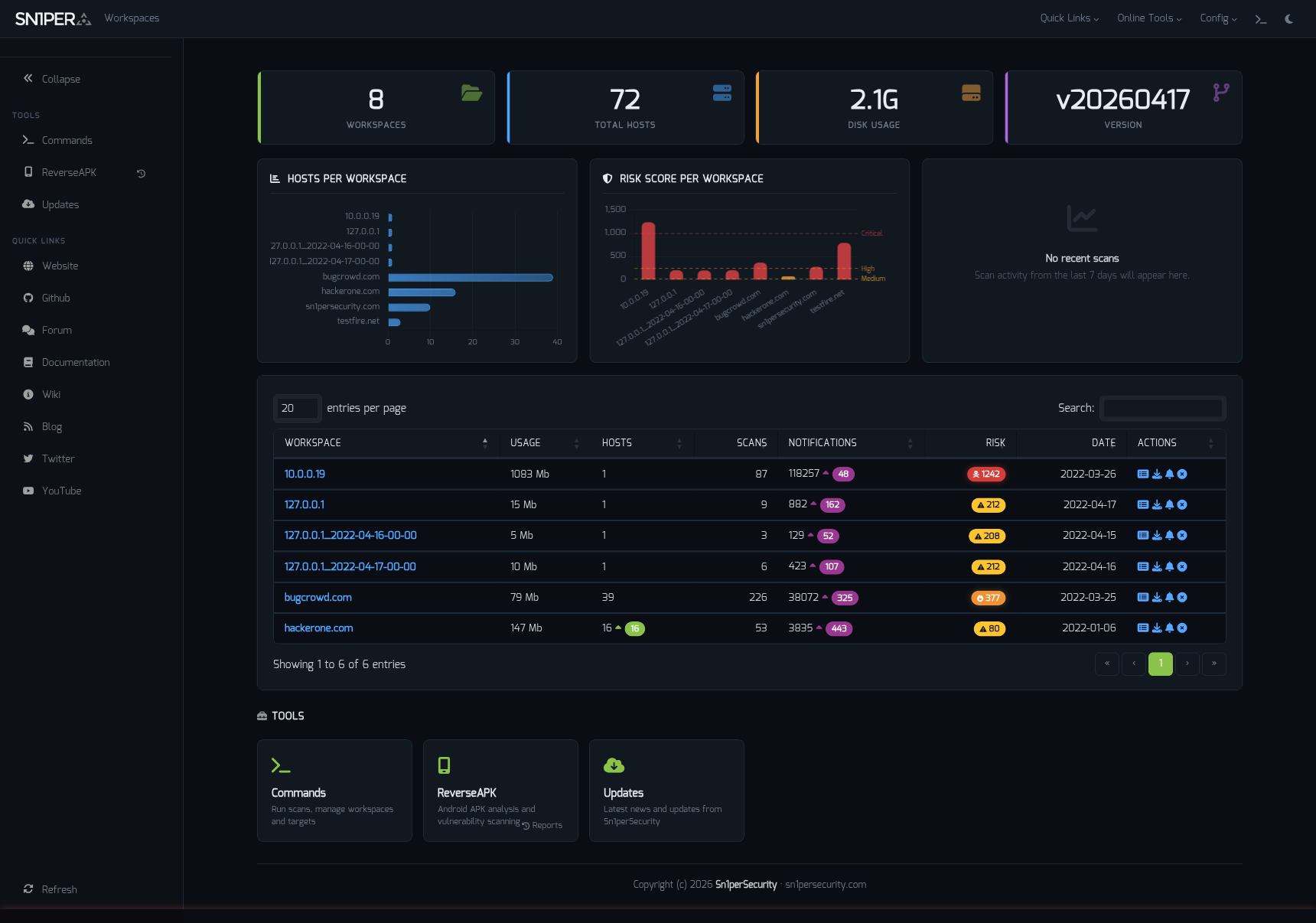
Workspace Navigator â switch contexts across hosts, scopes, and engagements.
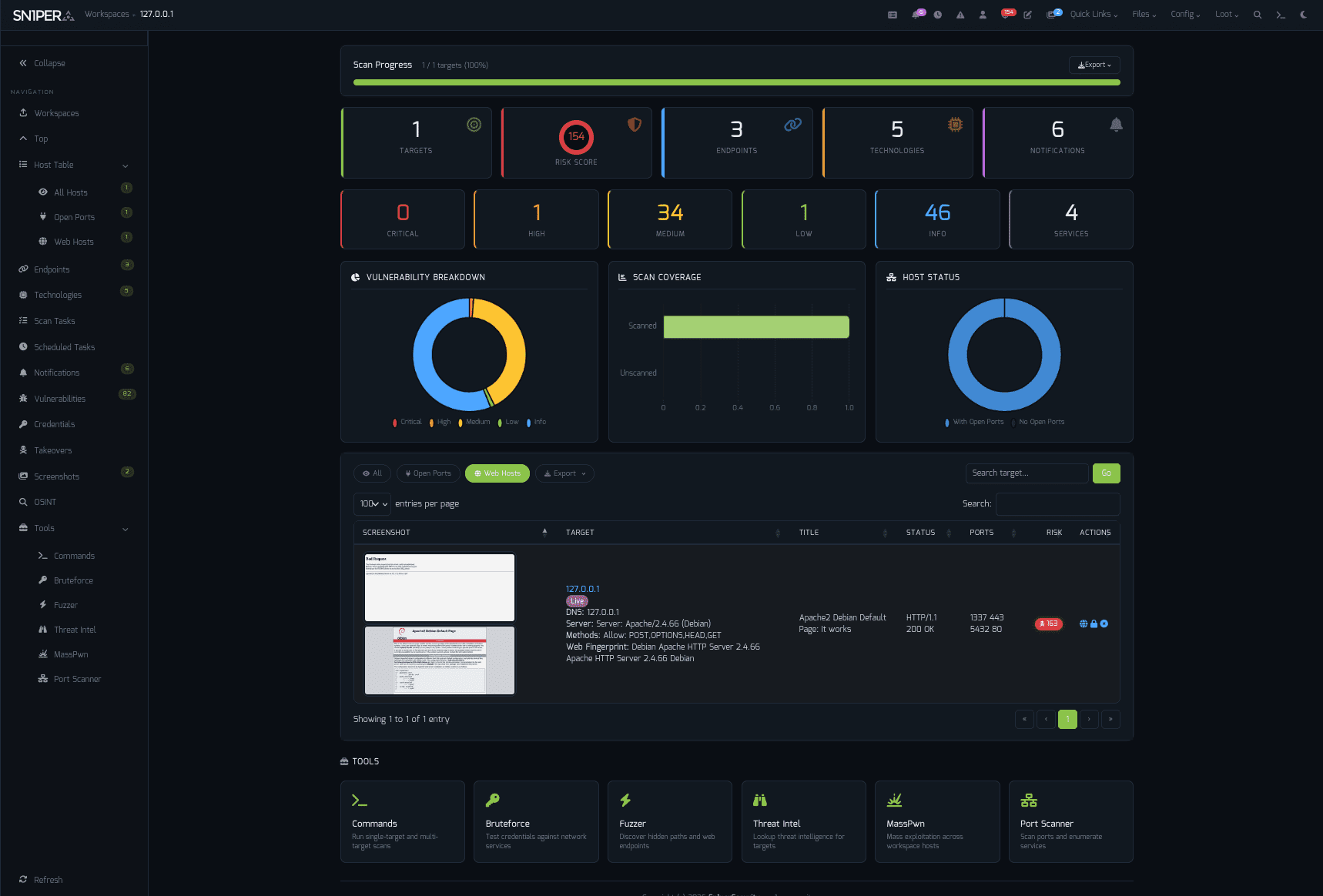
Dashboard â at-a-glance scan posture, top findings, and exploitable assets.
Highlights
- Docker-first deployment â same image, every distro
- Bootstrap 5 / Tabler UI â refreshed responsive interface with light + dark mode
- Workspace Navigator â fast workspace switching with state preservation
- Workspace & Host Reports â CSV, Excel, and PDF export
- JSON API v1.0 â programmatic access for CI / SOAR / SIEM pipelines
- Offcanvas Quick Commands â 13 panels, every common action one click away
- Expanded modules â ReverseAPK, MassPwn, Threat Intel, Nessus, Burp Suite
- Maturing SC0PE framework â more parsers, better noise reduction
- Hardened PHP library stack â modern dependencies, audited components
- New CLI flags â
-v(verbose),-db(debug),-rr(remove resume files)
"Sn1per Professional 2026 is the largest release since the v10.0 line."
Read the full release notes â
Editions & Pricing
The Community Edition is free and lives in this repository. The Professional and Enterprise editions add a Web UI, commercial integrations, and email support.
| Sn1per Professional | Sn1per Enterprise | |
|---|---|---|
| Price | $984 / year (per seat) | Get a quote |
| Subscription | 1 year | 1 year |
| â Included â | ||
| Web UI | Professional Web UI | Enterprise Web UI |
| Scan Engine & UI Updates | â | â |
| All Modules & Integrations | â | â |
| On-Prem (Self Hosted) | â | â |
| Email Support | 1 Year | 1 Year |
| Improved Speed & Scalability | â | â |
| Cutting-Edge Features | â | â |
| â Limits & Quotas â | ||
| Max Scans | Unlimited | Unlimited |
| Max Assets / Workspace | 30 | Unlimited |
| Max Workspaces | 5 | Unlimited |
| Total Assets | 150 | 500+ |
| Licensed Systems | 1 | 1 |
Buy a Sn1per Professional license â · Get an Enterprise quote â
Install
Linux (Kali / Ubuntu / Debian / Parrot)
git clone https://github.com/1N3/Sn1per.git
cd Sn1per
sudo bash install.sh
Sn1per installs to
/usr/share/sniperand requires root. Usesudo bash install.sh forceto skip the confirmation prompt.
Docker
Kali Linux base
sudo docker compose up
sudo docker run --privileged -it sn1per-kali-linux /bin/bash
BlackArch base
sudo docker compose -f docker-compose-blackarch.yml up
sudo docker run --privileged -it sn1per-blackarch /bin/bash
AWS Marketplace (EC2 AMI)
Subscribe via AWS Marketplace:
- Click Continue to Subscribe
- Click Continue to Configuration, choose region/instance type
- Click Continue to Launch
- SSH to the EC2 public IP â Sn1per is preinstalled
Quick Start
sudo bash install.sh
sniper -t example.com -m normal
Results land in /usr/share/sniper/loot/<workspace>/. See Usage for more modes.
Usage
[*] NORMAL MODE
sniper -t <TARGET>

[*] NORMAL MODE + OSINT + RECON
sniper -t <TARGET> -o -re

[*] STEALTH MODE + OSINT + RECON
sniper -t <TARGET> -m stealth -o -re

[*] DISCOVER MODE
sniper -t <CIDR> -m discover -w <WORKSPACE_ALIAS>

[*] SCAN ONLY SPECIFIC PORT
sniper -t <TARGET> -m port -p <portnum>

[*] FULLPORTONLY SCAN MODE
sniper -t <TARGET> -fp

[*] WEB MODE - PORT 80 + 443 ONLY!
sniper -t <TARGET> -m web

[*] HTTP WEB PORT MODE
sniper -t <TARGET> -m webporthttp -p <port>

[*] HTTPS WEB PORT MODE
sniper -t <TARGET> -m webporthttps -p <port>

[*] HTTP WEBSCAN MODE
sniper -t <TARGET> -m webscan

[*] ENABLE BRUTEFORCE
sniper -t <TARGET> -b

[*] AIRSTRIKE MODE
sniper -f targets.txt -m airstrike

[*] NUKE MODE WITH TARGET LIST, BRUTEFORCE ENABLED, FULLPORTSCAN ENABLED, OSINT ENABLED, RECON ENABLED, WORKSPACE & LOOT ENABLED
sniper -f targets.txt -m nuke -w <WORKSPACE_ALIAS>

[*] MASS PORT SCAN MODE
sniper -f targets.txt -m massportscan

[*] MASS WEB SCAN MODE
sniper -f targets.txt -m massweb

[*] MASS WEBSCAN SCAN MODE
sniper -f targets.txt -m masswebscan

[*] MASS VULN SCAN MODE
sniper -f targets.txt -m massvulnscan

[*] PORT SCAN MODE
sniper -t <TARGET> -m port -p <PORT_NUM>

[*] LIST WORKSPACES
sniper --list

[*] DELETE WORKSPACE
sniper -w <WORKSPACE_ALIAS> -d

[*] DELETE HOST FROM WORKSPACE
sniper -w <WORKSPACE_ALIAS> -t <TARGET> -dh

[*] GET SNIPER SCAN STATUS
sniper --status

[*] LOOT REIMPORT FUNCTION
sniper -w <WORKSPACE_ALIAS> --reimport

[*] LOOT REIMPORTALL FUNCTION
sniper -w <WORKSPACE_ALIAS> --reimportall

[*] LOOT RELOAD FUNCTION
sniper -w <WORKSPACE_ALIAS> --reload

[*] LOOT EXPORT FUNCTION
sniper -w <WORKSPACE_ALIAS> --export

[*] SCHEDULED SCANS
sniper -w <WORKSPACE_ALIAS> -s daily|weekly|monthly

[*] USE A CUSTOM CONFIG
sniper -c /path/to/sniper.conf -t <TARGET> -w <WORKSPACE_ALIAS>

[*] UPDATE SNIPER
sniper -u|--update

[*] VERBOSE OUTPUT (NEW IN 2026)
sniper -t <TARGET> -m airstrike -v

[*] DEBUG OUTPUT (NEW IN 2026)
sniper -t <TARGET> -m normal -db

[*] REMOVE RESUME FILES (NEW IN 2026)
sniper -t <TARGET> -m airstrike -v -rr
Scan Modes
| Mode | Description |
|---|---|
normal | Active + passive scan of the target and its open ports |
stealth | Quick, mostly non-intrusive enumeration to avoid WAF / IPS |
flyover | Fast multi-threaded high-level scans of many hosts |
airstrike | Open-port enumeration + basic fingerprinting against a host file |
nuke | Full audit across all targets in a host file |
discover | Walks a CIDR and runs Sn1per on every live host |
port | Targeted scan of a specific port |
fullportonly | Full TCP port scan, results saved to XML |
web | Web app scan on 80/tcp + 443/tcp only |
webporthttp / webporthttps | Web app scan on a specific HTTP / HTTPS port |
webscan | Full HTTP + HTTPS web app scan via Burp Suite + Arachni |
vulnscan | OpenVAS vulnerability scan |
mass* | Multi-target variants of the above (-f targets.txt) |
Integrations
Sn1per ships with native integrations for 90+ tools and services. Featured partners:
| Category | Integrations |
|---|---|
| Vulnerability scanners | Nessus · OpenVAS · GVM 21.x · Nuclei |
| Web app testing | Burp Suite Pro · OWASP ZAP · WPScan |
| Exploitation | Metasploit |
| Reconnaissance | Shodan · Censys · Hunter.io · VirusTotal · Nmap |
| AI / LLM | OpenAI · Claude · Gemini |
| Notifications & DevOps | Slack · GitHub API |
Browse all integrations on the wiki â
Documentation & Help
- Getting Started
- Installation
- Configuration
- Usage
- Architecture
- Integrations
- Troubleshooting
- Wiki â full reference
- Sn1per Documentation Hub
- Passive Reconnaissance Techniques for Penetration Testers
- CVE-2024-21733 â Apache Tomcat HTTP Request Smuggling writeup
Configuration & Templates
- Plugins & Tools
- Scheduled Scans
- Sn1per Configuration Options
- Sn1per Configuration Templates
- Sc0pe Templates
News & Releases
- Sn1per Professional 2026 Released - April 26, 2026
- Introducing SILENTCHAIN AI Community Edition v1.1.3 - February 11, 2026
- Sn1per SE v11.0 Now Available - January 8, 2026
Guides & deep dives (2026)
Reconnaissance
- Reconnaissance Methodology - Sn1per's full recon-to-report workflow, phase by phase, from OSINT to reporting
- Subdomain Enumeration - passive sources, active brute force, and subdomain-takeover checks
- Active Reconnaissance - port scanning, service and technology fingerprinting, and endpoint discovery
Penetration testing
- Automated Penetration Testing - the method, the tooling, and the continuous-testing model
- Best Automated Pentest Tools - the 2026 open-source and all-in-one pentest tooling landscape
- Continuous Penetration Testing (PTaaS) - the always-on model beyond the once-a-year pentest
Attack surface management
- Red Team Attack Surface Management - running Sn1per as a continuous red-team and adversarial-exposure-validation workflow
- Adversarial Exposure Validation - proving which exposures are actually exploitable, not just present
- Continuous Attack Surface Testing - daily-cadence rescans that diff yesterday's surface against today's
- On-Prem External Attack Surface Management - self-hosted, air-gapped ASM with zero data leaving your perimeter
- Open-Source Self-Hosted ASM Tools - the self-hosted attack surface management tooling landscape
- External Attack Surface Management with Sn1per - background reading on the ASM use case
Community & Support
- Bugs: Open an issue
- Twitter: @xer0dayz
- YouTube: Sn1per Security - latest demo: Continuous Attack Surface Testing
- Email (Pro / Enterprise customers): see your license email
Contributing
Pull requests welcome. For substantial changes, open an issue first to discuss the design.
- Mode scripts live in
modes/â one bash file per scan mode - Test changes against a controlled target before opening a PR
- Follow Keep a Changelog format in
CHANGELOG.md
35 contributors and counting. Thank you.
License & Legal
- Code: see
LICENSE.mdandTHIRD_PARTY_LICENSES.md - Notices: see
NOTICE - Trademark: "Sn1per" and the Sn1per logo are trademarks of Sn1perSecurity LLC. Use in derivative works requires permission. Contact: sn1persecurity.com
About Sn1perSecurity
Sn1per is built and maintained by Sn1perSecurity, the team behind the Sn1per attack surface management and automated penetration testing platform. Small team of pentesters shipping offensive-security tooling since 2015. We focus on the workflows we want to use ourselves â fast recon, ergonomic reporting, honest pricing, and a Community Edition that genuinely keeps up with the commercial editions. If that resonates, say hi.
Topics: penetration-testing · offensive-security · attack-surface-management · vulnerability-scanner · recon · osint · red-team · bug-bounty · security-tools
Top Related Projects
E-mails, subdomains and names Harvester - OSINT
The Social-Engineer Toolkit (SET) repository from TrustedSec - All new versions of SET will be deployed here.
WPScan WordPress security scanner. Written for security professionals and blog maintainers to test the security of their WordPress websites. Contact us via contact@wpscan.com
Nikto web server scanner
Directory/File, DNS and VHost busting tool written in Go
Nuclei is a fast, customizable vulnerability scanner powered by the global security community and built on a simple YAML-based DSL, enabling collaboration to tackle trending vulnerabilities on the internet. It helps you find vulnerabilities in your applications, APIs, networks, DNS, and cloud configurations.
Convert designs to code with AI
Introducing Visual Copilot: A new AI model to turn Figma designs to high quality code using your components.
Try Visual Copilot