
Top Related Projects

🐶 Kubernetes CLI To Manage Your Clusters In Style!

Lens - The way the world runs Kubernetes

⎈ Multi pod and container log tailing for Kubernetes -- Friendly fork of https://github.com/wercker/stern

📦 Find and install kubectl plugins

Highly extensible platform for developers to better understand the complexity of Kubernetes clusters.

Bulk port forwarding Kubernetes services for local development.
Quick Overview
kubectx is a command-line utility designed to enhance the Kubernetes user experience by simplifying the management of multiple Kubernetes contexts and namespaces. It provides an easy way to switch between clusters and namespaces, improving workflow efficiency for developers and operators working with Kubernetes.
Pros
- Streamlines context and namespace switching in Kubernetes environments
- Offers interactive menus for easier selection of contexts and namespaces
- Integrates well with shell environments and supports various shells (bash, zsh, fish)
- Lightweight and easy to install with minimal dependencies
Cons
- Limited functionality beyond context and namespace switching
- May require additional setup for some shell integrations
- Not a native Kubernetes tool, which means it's an extra utility to maintain
- Might be unnecessary for users working with a single Kubernetes cluster
Getting Started
To install kubectx and kubens on macOS using Homebrew:
brew install kubectx
For other installation methods, visit the project's GitHub repository.
Basic usage:
# List available contexts
kubectx

# Switch to a different context
kubectx my-cluster-name

# List available namespaces
kubens

# Switch to a different namespace
kubens my-namespace
For interactive mode, use the -i flag:
kubectx -i
kubens -i
Competitor Comparisons
🐶 Kubernetes CLI To Manage Your Clusters In Style!
Pros of k9s
- Offers a rich, interactive terminal UI for managing Kubernetes clusters
- Provides real-time monitoring and resource management capabilities
- Supports multiple views and customizable keyboard shortcuts for efficient navigation
Cons of k9s
- Steeper learning curve due to more complex interface and features
- Requires more system resources to run compared to the lightweight kubectx
- May be overwhelming for users who only need simple context switching
Code Comparison
kubectx:
kubectx my-cluster
kubens my-namespace
k9s:
k9s
# Navigate using arrow keys and shortcuts
# Press ':' to enter command mode
:context my-cluster
:namespace my-namespace
Summary
kubectx is a lightweight tool focused on quick context and namespace switching, while k9s is a comprehensive Kubernetes management tool with a feature-rich terminal UI. kubectx is simpler to use and requires fewer resources, making it ideal for basic operations. k9s offers more advanced features and real-time monitoring but has a steeper learning curve. The choice between the two depends on the user's needs and preferences for managing Kubernetes clusters.
Lens - The way the world runs Kubernetes
Pros of Lens
- Provides a full-featured GUI for managing Kubernetes clusters
- Offers real-time cluster monitoring and resource visualization
- Includes built-in terminal and log viewing capabilities
Cons of Lens
- Requires more system resources due to its graphical interface
- Has a steeper learning curve for users new to Kubernetes
- May be overkill for simple context switching tasks
Code Comparison
While a direct code comparison isn't particularly relevant due to the different nature of these tools, we can look at how they approach context switching:
kubectx:
kubectx my-cluster
Lens:
// Context switching is done through the GUI, but the underlying API call might look like:
api.switchContext('my-cluster');
Summary
kubectx is a lightweight CLI tool focused on quick context and namespace switching, while Lens is a comprehensive Kubernetes IDE with a graphical interface. kubectx is ideal for users who prefer command-line operations and quick context changes, whereas Lens provides a more visual and feature-rich experience for managing Kubernetes clusters. The choice between them depends on the user's specific needs and workflow preferences.
⎈ Multi pod and container log tailing for Kubernetes -- Friendly fork of https://github.com/wercker/stern
Pros of stern
- Focuses on log tailing across multiple pods, providing a more specialized and powerful logging solution
- Offers color-coded output for easier log reading and differentiation
- Supports regular expressions for pod name matching, allowing for more flexible log filtering
Cons of stern
- Limited to log-related operations, lacking broader cluster management features
- May require additional tools for complete Kubernetes workflow management
- Steeper learning curve for users who need a simple context-switching solution
Code comparison
stern:
stern pod-query [flags]
kubectx:
kubectx [<context_name>]
kubens [<namespace_name>]
Summary
stern is a specialized tool for tailing logs from multiple Kubernetes pods, offering advanced filtering and colorized output. It excels in log management but has a narrower focus compared to kubectx.
kubectx provides a broader set of utilities for managing Kubernetes contexts and namespaces, making it more versatile for general cluster management tasks. However, it lacks the advanced logging capabilities of stern.
The choice between these tools depends on the specific needs of the user. stern is ideal for developers and operators who require detailed log analysis, while kubectx is better suited for users who frequently switch between different Kubernetes contexts and namespaces.
📦 Find and install kubectl plugins
Pros of krew
- Broader plugin ecosystem: Krew is a plugin manager for kubectl, offering a wide range of plugins beyond just context and namespace switching
- Official Kubernetes SIG project: Being part of kubernetes-sigs gives it more visibility and community support
- Standardized plugin installation and management: Provides a consistent way to discover, install, and manage kubectl plugins
Cons of krew
- More complex setup: Requires installation of Krew itself before accessing plugins
- Potentially overwhelming for new users: The large number of available plugins might be confusing for those just starting with Kubernetes
Code comparison
kubectx:
# Switch context
kubectx my-context

# Switch namespace
kubens my-namespace
krew:
# Install a plugin
kubectl krew install ctx

# Use the installed plugin
kubectl ctx my-context
Summary
While kubectx focuses specifically on context and namespace switching with a simple, easy-to-use interface, krew offers a more comprehensive plugin management system for kubectl. kubectx is more straightforward for users who only need context and namespace management, while krew provides a broader range of functionality through its plugin ecosystem. The choice between the two depends on the user's specific needs and familiarity with Kubernetes tooling.
Highly extensible platform for developers to better understand the complexity of Kubernetes clusters.
Pros of Octant
- Provides a rich, interactive web-based UI for visualizing Kubernetes clusters
- Offers a more comprehensive view of cluster resources and their relationships
- Supports plugins for extending functionality and customizing views
Cons of Octant
- Requires more setup and resources to run compared to the lightweight kubectx
- Has a steeper learning curve due to its more complex interface and features
- Less suitable for quick command-line operations and context switching
Code Comparison
kubectx:
kubectx my-cluster
kubectx -
kubectx -c
Octant:
apiVersion: config.octant.dev/v1alpha1
kind: Plugin
metadata:
  name: my-plugin
Summary
kubectx is a lightweight command-line tool for managing and switching between Kubernetes contexts quickly. It's ideal for users who prefer simple, fast context switching from the terminal.
Octant, on the other hand, is a more comprehensive web-based dashboard for visualizing and managing Kubernetes clusters. It offers a richer set of features and a graphical interface, making it suitable for users who need a detailed overview of their cluster resources and relationships.
The choice between the two depends on the user's specific needs, workflow preferences, and the level of detail required for cluster management.
Bulk port forwarding Kubernetes services for local development.
Pros of kubefwd
- Provides port forwarding for multiple services simultaneously
- Allows access to Kubernetes services as if they were running locally
- Supports namespaces and label selectors for flexible service targeting
Cons of kubefwd
- More complex setup and usage compared to kubectx
- Requires root/sudo access for modifying /etc/hosts
- May introduce network overhead due to port forwarding
Code Comparison
kubefwd:
sudo kubefwd services -n mynamespace
kubectx:
kubectx my-cluster
kubectl config set-context --current --namespace=mynamespace
Key Differences
kubefwd focuses on port forwarding and local access to Kubernetes services, while kubectx is primarily used for managing and switching between Kubernetes contexts and namespaces. kubefwd is more suited for developers who need to interact with multiple services locally, whereas kubectx is ideal for users who frequently switch between different clusters or namespaces.
kubefwd requires more system-level access and may have a steeper learning curve, but it provides a more comprehensive local development environment for Kubernetes services. kubectx, on the other hand, is simpler to use and doesn't require elevated permissions, making it more suitable for quick context and namespace management tasks.
Convert  designs to code with AI

Introducing Visual Copilot: A new AI model to turn Figma designs to high quality code using your components.
Try Visual CopilotREADME
kubectx + kubens: Power tools for kubectl



/badge.svg)
This repository provides both kubectx and kubens tools.
Install →
What are kubectx and kubens?
kubectx is a tool to switch between contexts (clusters) on kubectl
faster, and launch readonly shells for each context.
kubens is a tool to switch between Kubernetes namespaces (and
configure them for kubectl) easily.
Here's a kubectx demo:

...and here's a kubens demo:

Usage
kubectx
Switch to another cluster that's in kubeconfig:
$ kubectx minikube
Switched to context "minikube".
Switch back to previous cluster:
$ kubectx -
Switched to context "oregon".
Start an isolated shell that only has a single context:
$ kubectx -s minikube
Start a read-only shell where write operations are blocked:
$ kubectx -r minikube
Rename context:
$ kubectx dublin=gke_ahmetb_europe-west1-b_dublin
Context "gke_ahmetb_europe-west1-b_dublin" renamed to "dublin".
kubens
Change the active namespace on kubectl:
$ kubens kube-system
Context "test" set.
Active namespace is "kube-system".
Go back to the previous namespace:
$ kubens -
Context "test" set.
Active namespace is "default".
Change the active namespace even if it doesn't exist:
$ kubens namespace-404 -f
Context "test" set.
Active namespace is "namespace-404".
If you have fzf installed, you can also
interactively select a context or cluster, or fuzzy-search by typing a few
characters. To learn more, read interactive mode →
Both kubectx and kubens support Tab completion on bash/zsh/fish
shells to help with long context names. You don't have to remember full context
names anymore.
Installation
| Package manager | Command |
|---|---|
| Homebrew (macOS & Linux) | brew install kubectx |
| MacPorts (macOS) | sudo port install kubectx |
| apt (Debian/Ubuntu) | sudo apt install kubectx |
| pacman (Arch Linux) | sudo pacman -S kubectx |
| Chocolatey (Windows) | choco install kubens kubectx |
| Scoop (Windows) | scoop bucket add main && scoop install main/kubens main/kubectx |
| winget (Windows) | winget install --id ahmetb.kubectx && winget install --id ahmetb.kubens |
| Krew (kubectl plugin) | kubectl krew install ctx && kubectl krew install ns |
Alternatively, download binaries from the Releases page → and add them to somewhere in your PATH.
Shell completion scripts
zsh (with antibody)
Add this line to your Plugins File (e.g.
~/.zsh_plugins.txt):
ahmetb/kubectx path:completion kind:fpath
Depending on your setup, you might or might not need to call compinit or
autoload -U compinit && compinit in your ~/.zshrc after you load the Plugins
file. If you use oh-my-zsh, load the
completions before you load oh-my-zsh because oh-my-zsh will call
compinit.
zsh (plain)
The completion scripts have to be in a path that belongs to $fpath. Either
link or copy them to an existing folder.
Example with oh-my-zsh:
mkdir -p ~/.oh-my-zsh/custom/completions
chmod -R 755 ~/.oh-my-zsh/custom/completions
ln -s /opt/kubectx/completion/_kubectx.zsh ~/.oh-my-zsh/custom/completions/_kubectx.zsh
ln -s /opt/kubectx/completion/_kubens.zsh ~/.oh-my-zsh/custom/completions/_kubens.zsh
echo "fpath=($ZSH/custom/completions $fpath)" >> ~/.zshrc
If completion doesn't work, add autoload -U compinit && compinit to your
.zshrc (similar to
zsh-completions).
If you are not using oh-my-zsh, you
could link to /usr/share/zsh/functions/Completion (might require sudo),
depending on the $fpath of your zsh installation.
In case of errors, calling compaudit might help.
bash
git clone https://github.com/ahmetb/kubectx.git ~/.kubectx
COMPDIR=$(pkg-config --variable=completionsdir bash-completion)
ln -sf ~/.kubectx/completion/kubens.bash $COMPDIR/kubens
ln -sf ~/.kubectx/completion/kubectx.bash $COMPDIR/kubectx
cat << EOF >> ~/.bashrc


#kubectx and kubens
export PATH=~/.kubectx:\$PATH
EOF
fish
mkdir -p ~/.config/fish/completions
ln -s /opt/kubectx/completion/kubectx.fish ~/.config/fish/completions/
ln -s /opt/kubectx/completion/kubens.fish ~/.config/fish/completions/
[!NOTE] Tip: Show context/namespace in your shell prompt with oh-my-posh or simply with kube-ps1.
Interactive mode
If you want kubectx and kubens commands to present you an interactive menu
with fuzzy searching, you just need to install
fzf in your $PATH.

Caveats:
- If you have
fzfinstalled, but want to opt out of using this feature, set the environment variableKUBECTX_IGNORE_FZF=1. - If you want to keep
fzfinteractive mode but need the default behavior of the command, you can do it by piping the output to another command (e.g.kubectx | cat).
Customizing colors
If you like to customize the colors indicating the current namespace or context,
set the environment variables KUBECTX_CURRENT_FGCOLOR and
KUBECTX_CURRENT_BGCOLOR (refer color codes
here):
export KUBECTX_CURRENT_FGCOLOR=$(tput setaf 6) # blue text
export KUBECTX_CURRENT_BGCOLOR=$(tput setab 7) # white background
Colors in the output can be disabled by setting the
NO_COLOR environment variable.
If you liked kubectx, you may like my
kubectl-aliases project, too. I
recommend pairing kubectx and kubens with fzf and
kube-ps1.
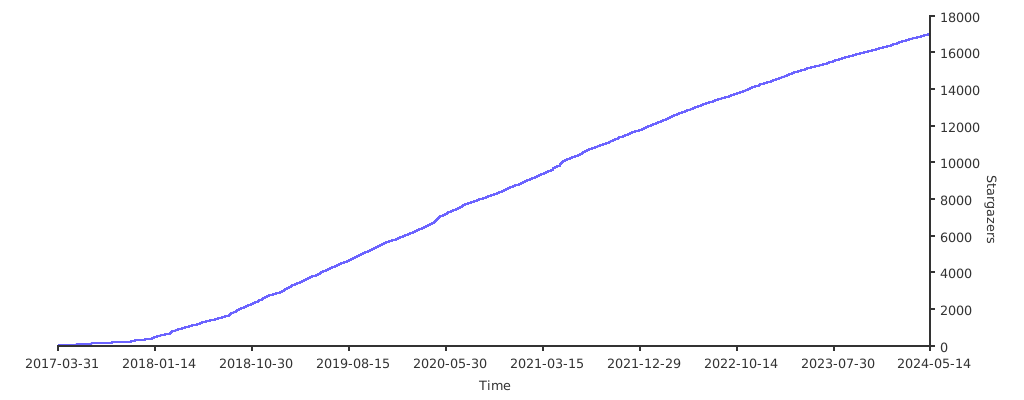
Stargazers over time
Top Related Projects
🐶 Kubernetes CLI To Manage Your Clusters In Style!
Lens - The way the world runs Kubernetes
⎈ Multi pod and container log tailing for Kubernetes -- Friendly fork of https://github.com/wercker/stern
📦 Find and install kubectl plugins
Highly extensible platform for developers to better understand the complexity of Kubernetes clusters.
Bulk port forwarding Kubernetes services for local development.
Convert designs to code with AI
Introducing Visual Copilot: A new AI model to turn Figma designs to high quality code using your components.
Try Visual Copilot