
Top Related Projects

Local development against a remote Kubernetes or OpenShift cluster

Develop your applications directly in your Kubernetes Cluster

open source Kubernetes-native API gateway for microservices built on the Envoy Proxy

kubernetes log viewer

Faster way to switch between clusters and namespaces in kubectl
Quick Overview
Kubefwd is a command-line utility that bulk forwards Kubernetes services for local development. It allows developers to access services in remote Kubernetes clusters as if they were running locally, simplifying the development and testing process for distributed applications.
Pros
- Simplifies local development by making remote Kubernetes services accessible locally
- Supports bulk forwarding of multiple services simultaneously
- Works with any Kubernetes cluster, including managed services like EKS, GKE, and AKS
- Provides a user-friendly CLI interface for easy configuration and management
Cons
- Requires sudo privileges to modify local DNS settings, which may be a security concern
- Can potentially conflict with existing local services using the same ports
- May introduce latency when accessing services, depending on network conditions
- Limited to forwarding services only, not other Kubernetes resources
Getting Started
To get started with Kubefwd, follow these steps:
-
Install Kubefwd:
brew install txn2/tap/kubefwd -
Ensure you have a valid Kubernetes configuration file (
~/.kube/config). -
Forward all services in a namespace:
sudo kubefwd services -n mynamespace -
Access the forwarded services locally using their service names as hostnames.
For more detailed instructions and advanced usage, refer to the project's GitHub repository: https://github.com/txn2/kubefwd
Competitor Comparisons
Local development against a remote Kubernetes or OpenShift cluster
Pros of Telepresence
- More comprehensive solution for local development, allowing developers to run services locally while connected to a remote Kubernetes cluster
- Supports intercept functionality, enabling selective routing of traffic to local development environment
- Offers a CLI and desktop GUI for easier management and visualization
Cons of Telepresence
- More complex setup and configuration compared to kubefwd
- Requires installation of additional components on the cluster, potentially increasing security concerns
- May have a steeper learning curve for new users due to its advanced features
Code Comparison
kubefwd:
sudo kubefwd services -n mynamespace
Telepresence:
telepresence connect
telepresence intercept my-service --port 8080:80
Both tools aim to simplify local development with Kubernetes, but Telepresence offers a more feature-rich solution at the cost of increased complexity. kubefwd focuses primarily on port-forwarding services, making it simpler to use for basic scenarios. Telepresence provides a more comprehensive development environment, allowing developers to run and debug services locally while maintaining seamless integration with the remote cluster.
Develop your applications directly in your Kubernetes Cluster
Pros of Okteto
- Provides a complete development environment in Kubernetes, not just port forwarding
- Supports live code synchronization and remote development
- Offers a collaborative platform for team development
Cons of Okteto
- More complex setup and learning curve compared to simpler port forwarding tools
- Requires more resources as it creates development environments in the cluster
Code Comparison
Kubefwd usage:
sudo -E kubefwd services -n namespace
Okteto usage:
okteto up
okteto down
Okteto offers a more comprehensive development workflow, while Kubefwd focuses solely on port forwarding. Okteto requires more configuration but provides a richer feature set for Kubernetes development. Kubefwd is simpler to use for basic port forwarding needs.
Okteto is better suited for teams working on complex Kubernetes applications, while Kubefwd is ideal for developers who need quick access to services in a Kubernetes cluster without additional features.
Both tools serve different purposes within the Kubernetes ecosystem, with Okteto offering a more integrated development experience and Kubefwd providing a straightforward solution for port forwarding.
open source Kubernetes-native API gateway for microservices built on the Envoy Proxy
Pros of Emissary
- Full-featured API Gateway and Ingress Controller for Kubernetes
- Supports advanced traffic management and routing capabilities
- Offers built-in authentication and rate limiting features
Cons of Emissary
- More complex setup and configuration compared to Kubefwd
- Requires additional resources to run as a separate service in the cluster
- Steeper learning curve for users new to API gateways
Code Comparison
Kubefwd (port-forward configuration):
spec:
  containers:
  - name: kubefwd
    image: txn2/kubefwd
    args:
    - -n default
    - -l app=myapp
Emissary (basic routing configuration):
apiVersion: getambassador.io/v2
kind: Mapping
metadata:
  name: example-mapping
spec:
  prefix: /example/
  service: example-service
Kubefwd is a simple tool for port-forwarding Kubernetes services to localhost, while Emissary is a comprehensive API Gateway and Ingress Controller. Kubefwd is easier to set up and use for basic port-forwarding needs, but Emissary offers more advanced features for managing and securing API traffic in Kubernetes environments. The code examples demonstrate the simplicity of Kubefwd's configuration compared to Emissary's more detailed routing setup.
kubernetes log viewer
Pros of kail
- Focuses specifically on log streaming from Kubernetes pods
- Supports filtering logs by various criteria (labels, containers, etc.)
- Provides real-time log tailing functionality
Cons of kail
- Limited to log-related operations only
- Doesn't offer port-forwarding capabilities
- May require additional tools for comprehensive cluster management
Code Comparison
kail:
cmd := &cobra.Command{
    Use:   "kail",
    Short: "Kubernetes tail",
    Run:   run,
}
kubefwd:
cmd := &cobra.Command{
    Use:   "kubefwd services",
    Short: "Forward kubernetes services",
    Long:  `Forward multiple Kubernetes services from one or more namespaces.`,
    Run:   runServices,
}
Key Differences
- kubefwd primarily focuses on port-forwarding Kubernetes services
- kail specializes in log streaming and filtering
- kubefwd offers broader cluster connectivity features
- kail provides more granular control over log output
Use Cases
- Use kail for efficient log monitoring and debugging
- Choose kubefwd for local development and testing of services
- Combine both tools for a comprehensive development workflow
Community and Maintenance
- Both projects are open-source and actively maintained
- kail has a slightly larger community and more frequent updates
- kubefwd offers extensive documentation and usage examples
Faster way to switch between clusters and namespaces in kubectl
Pros of kubectx
- Simpler and more focused tool for managing Kubernetes contexts and namespaces
- Lightweight and easy to install with minimal dependencies
- Provides shell completion for faster and more convenient usage
Cons of kubectx
- Limited functionality compared to kubefwd, focusing only on context and namespace switching
- Doesn't provide direct service forwarding capabilities
- May require additional tools for more advanced Kubernetes operations
Code Comparison
kubectx:
kubectx my-cluster
kubens my-namespace
kubefwd:
sudo kubefwd services -n my-namespace
Key Differences
kubectx is a lightweight tool for managing Kubernetes contexts and namespaces, while kubefwd focuses on forwarding Kubernetes services to local ports. kubectx is ideal for users who frequently switch between different clusters or namespaces, whereas kubefwd is more suited for developers who need to access services running in a Kubernetes cluster from their local machine.
kubectx offers a simpler and more focused approach to context and namespace management, making it easier to use for specific tasks. On the other hand, kubefwd provides more advanced functionality for service forwarding, which can be crucial for local development and testing of Kubernetes-based applications.
While both tools serve different purposes, they can be complementary in a Kubernetes workflow. Users may find value in using both kubectx for quick context switching and kubefwd for local service access, depending on their specific needs and development processes.
Convert  designs to code with AI

Introducing Visual Copilot: A new AI model to turn Figma designs to high quality code using your components.
Try Visual CopilotREADME
kubefwd (Kube Forward)







Documentation | Getting Started | User Guide | API Reference | MCP (AI Integration)
Develop Locally, Connect to Kubernetes
kubefwd enables developers to work on their local machine while seamlessly accessing services running in a Kubernetes cluster. If you're building a new API that needs to connect to a database at db:5432, an auth service at auth:443, and a cache at redis:6379, all running in your development cluster, kubefwd makes them available locally by their service names, exactly as they would appear in-cluster. No environment-specific configuration, no local service setup, no Docker Compose files. Just run kubefwd and your application's existing connection strings work.
This is the essential use case: reduce or eliminate environment-specific connection setup and configurations during local development. Your code uses http://api-gateway:8080 in production? It works the same way on your laptop with kubefwd.
Bulk Kubernetes port forwarding with an interactive TUI, unique IPs per service, and automatic reconnection.
kubefwd is a command-line utility that bulk port forwards Kubernetes services to your local workstation. Each service gets its own unique loopback IP (127.x.x.x), eliminating port conflicts and enabling realistic local development with cluster services accessible by name.

Quick Start
# Install (macOS)
brew install kubefwd

# Forward all services in a namespace with the interactive TUI
sudo -E kubefwd svc -n my-namespace --tui
Press ? for help, q to quit. See Getting Started for detailed installation and setup.
How It Works
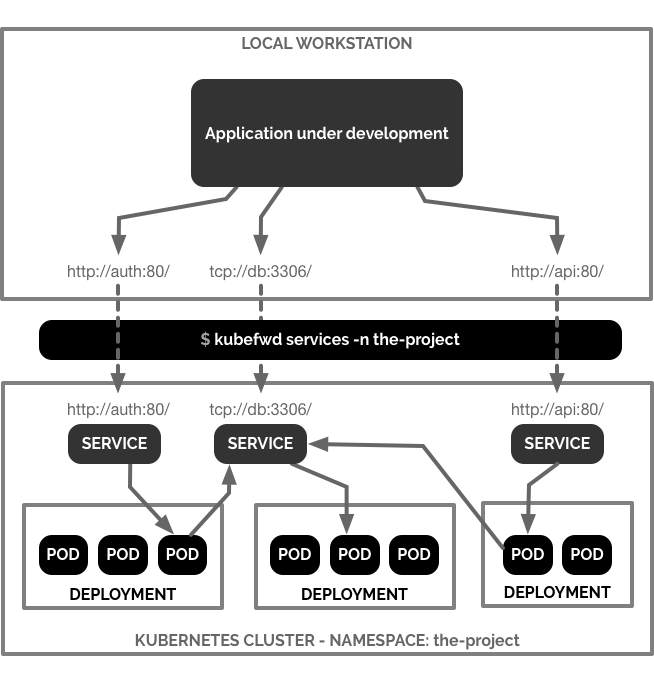
kubefwd discovers services in your namespace, assigns each a unique loopback IP, updates /etc/hosts with service names, and establishes port forwards through the Kubernetes API. Access services by name just like in-cluster:
curl http://api-service:8080
mysql -h database -P 3306
redis-cli -h cache -p 6379
Features
- Interactive TUI: Real-time service monitoring with traffic metrics
- Unique IP per Service: Each service gets its own 127.x.x.x address
- Auto-Reconnect: Reconnects when pods restart or connections drop
- Bulk Forwarding: Forward all services in a namespace with one command
- Live Traffic Monitoring: See bytes in/out and HTTP activity
- Pod Log Streaming: View container logs in the TUI
- REST API: Programmatic control via HTTP endpoints
- MCP Support: Integration with AI assistants (Claude Code, Cursor)
Installation
macOS:
brew install kubefwd
Linux: Download .deb, .rpm, or .tar.gz from releases
Windows:
winget install txn2.kubefwd
# or
scoop install kubefwd
Docker:
docker run -it --rm --privileged \
  -v "$HOME/.kube:/root/.kube:ro" \
  txn2/kubefwd services -n my-namespace --tui
Usage
# Interactive mode (recommended)
sudo -E kubefwd svc -n default --tui

# Multiple namespaces
sudo -E kubefwd svc -n default,staging --tui

# Filter by label
sudo -E kubefwd svc -n default -l app=api --tui

# With REST API enabled
sudo -E kubefwd svc -n default --tui --api
Why kubefwd?
Unlike kubectl port-forward, kubefwd:
| Feature | kubectl port-forward | kubefwd |
|---|---|---|
| Services per command | One | All in namespace |
| IP allocation | localhost only | Unique IP per service |
| Port conflicts | Manual management | None (unique IPs) |
| Service name resolution | Not supported | Automatic (/etc/hosts) |
| Auto-reconnect | No | Yes |
| Real-time monitoring | No | TUI with metrics |
See Comparison for detailed comparisons with Telepresence, mirrord, and other tools.
Documentation
Full documentation at kubefwd.com:
- Getting Started - Installation and setup
- User Guide - Interface and shortcuts
- Configuration - CLI options
- Advanced Usage - Multi-cluster, selectors
- REST API - API reference
- MCP Integration - AI assistant setup
- Troubleshooting - Common issues
- Architecture - Technical details
- Comparison - vs Telepresence, mirrord
Requirements
- kubectl configured with cluster access
- Root/sudo access (for /etc/hosts and network interfaces)
Contributing
We welcome contributions for bug fixes, tests, and documentation. Feature development is limited to maintainers. See CONTRIBUTING.md.
License
Open source by Craig Johnston, sponsored by Deasil Works, Inc.
Top Related Projects
Local development against a remote Kubernetes or OpenShift cluster
Develop your applications directly in your Kubernetes Cluster
open source Kubernetes-native API gateway for microservices built on the Envoy Proxy
kubernetes log viewer
Faster way to switch between clusters and namespaces in kubectl
Convert designs to code with AI
Introducing Visual Copilot: A new AI model to turn Figma designs to high quality code using your components.
Try Visual Copilot