
Top Related Projects
JSLint, The JavaScript Code Quality and Coverage Tool

Find and fix problems in your JavaScript code.

JSHint is a tool that helps to detect errors and potential problems in your JavaScript code

🌟 JavaScript Style Guide, with linter & automatic code fixer

Prettier is an opinionated code formatter.

JavaScript Style Guide
Quick Overview
JSLint is a static code analysis tool for JavaScript, created by Douglas Crockford. It scans JavaScript code for potential errors, coding style violations, and suspicious constructs, helping developers write cleaner and more reliable code.
Pros
- Helps maintain consistent coding style across projects
- Identifies potential errors and problematic patterns early in development
- Encourages best practices and safer coding habits
- Can be integrated into various development environments and build processes
Cons
- Some developers find its rules too strict or opinionated
- May require configuration adjustments to fit specific project needs
- Can produce false positives in certain scenarios
- Limited customization options compared to some other linting tools
Code Examples
- Basic usage:
// Assuming JSLint is available as a global function
var source = "var x = 1; // This is a comment";
var result = JSLINT(source);

if (result) {
    console.log("No errors found.");
} else {
    console.log("Errors found:");
    console.log(JSLINT.errors);
}
- Using JSLint with Node.js:
const jslint = require('jslint');

const source = "function add(a, b) { return a + b; }";
const options = { node: true };

const result = jslint(source, options);

if (result.ok) {
    console.log("No errors found.");
} else {
    console.log("Errors found:", result.warnings);
}
- Configuring JSLint options:
// Set JSLint options
JSLINT.config({
    browser: true,
    devel: true,
    plusplus: true
});

var source = "for (var i = 0; i < 10; i++) { console.log(i); }";
var result = JSLINT(source);

console.log(result ? "No errors" : "Errors found");
Getting Started
To use JSLint in your project:
-
Install JSLint via npm:
npm install jslint -
Create a JavaScript file (e.g.,
lint.js) with the following content:const jslint = require('jslint'); const fs = require('fs'); const source = fs.readFileSync('your-file.js', 'utf8'); const result = jslint(source); if (result.ok) { console.log("No errors found."); } else { console.log("Errors found:"); result.warnings.forEach(warning => { console.log(`Line ${warning.line}: ${warning.message}`); }); } -
Run the linter:
node lint.js
This will lint the specified file and output any errors or warnings found by JSLint.
Competitor Comparisons
JSLint, The JavaScript Code Quality and Coverage Tool
Pros of jslint
- More actively maintained with recent updates
- Includes additional features and improvements
- Better documentation and examples
Cons of jslint
- Potentially less stable due to frequent changes
- May have compatibility issues with older projects
- Steeper learning curve for new users
Code Comparison
jslint:
function lint(source, options) {
    "use strict";
    let warnings;
    options = Object.assign(Object.create(null), options);
    warnings = jslint_core(source, options);
    return {
        warnings,
        options,
        directives: options.directives
    };
}
jslint>:
function lint(source, options) {
    var warnings;
    options = Object.create(options || {});
    warnings = jslint_core(source, options);
    return {
        warnings: warnings,
        options: options,
        directives: options.directives
    };
}
The main differences in the code are:
- Use of
"use strict"in jslint - ES6 features like
letand object shorthand in jslint - More modern JavaScript syntax in jslint overall
Both repositories serve the same primary purpose of providing a JavaScript linting tool, but jslint appears to be more up-to-date and feature-rich, while jslint> might be more suitable for projects requiring older JavaScript syntax or greater stability.
Find and fix problems in your JavaScript code.
Pros of ESLint
- Highly configurable with numerous rules and plugins
- Supports modern JavaScript features and frameworks
- Active development and large community support
Cons of ESLint
- Steeper learning curve due to extensive configuration options
- Can be slower than JSLint for large codebases
- Requires more setup and maintenance
Code Comparison
JSLint:
/*jslint browser: true, devel: true */
(function () {
    "use strict";
    // Your code here
}());
ESLint:
/* eslint-env browser, node */
/* eslint-disable no-console */
(() => {
  'use strict';
  // Your code here
})();
Key Differences
- JSLint is more opinionated and less flexible
- ESLint offers more customization and modern JavaScript support
- JSLint focuses on enforcing good practices, while ESLint allows for team-specific preferences
Community and Ecosystem
- ESLint has a larger ecosystem with numerous plugins and integrations
- JSLint has a smaller but dedicated user base
- ESLint is more widely adopted in modern JavaScript development
Performance
- JSLint is generally faster for small to medium-sized projects
- ESLint's performance can be optimized with careful configuration
- Both tools can be integrated into CI/CD pipelines for automated linting
JSHint is a tool that helps to detect errors and potential problems in your JavaScript code
Pros of JSHint
- More flexible and configurable than JSLint
- Supports a wider range of JavaScript coding styles
- Actively maintained with regular updates
Cons of JSHint
- Less strict than JSLint, potentially allowing some code quality issues
- Can be more complex to set up due to numerous configuration options
- May produce more false positives in certain scenarios
Code Comparison
JSLint (more strict):
function example(a, b) {
    "use strict";
    return a + b;
}
JSHint (more flexible):
function example(a, b) {
    // JSHint allows omitting "use strict"
    return a + b;
}
JSLint enforces stricter coding standards, such as requiring "use strict" in functions, while JSHint allows for more flexibility in coding style. JSHint's configuration options enable developers to customize the linting rules to match their project's specific needs, whereas JSLint follows a more opinionated approach with fewer customization options.
Both tools aim to improve code quality and catch potential errors, but they differ in their philosophy and implementation. JSLint focuses on enforcing a specific coding style, while JSHint provides more flexibility for developers to define their own standards.
🌟 JavaScript Style Guide, with linter & automatic code fixer
Pros of Standard
- More active development and community support
- Supports modern JavaScript features and syntax
- Includes automatic code formatting capabilities
Cons of Standard
- Less configurable than JSLint
- May be too opinionated for some developers
- Larger package size and potentially slower performance
Code Comparison
JSLint:
/*jslint browser */
function example() {
    var x = 1;
    return x;
}
Standard:
function example () {
  const x = 1
  return x
}
Standard enforces a more modern JavaScript style, including:
- No semicolons (optional)
constinstead ofvar- Spaces after function names
- No JSLint-style directives
Both tools aim to enforce consistent coding styles, but Standard takes a more opinionated approach with less configuration options. JSLint offers more granular control over rules but may be less suited for modern JavaScript development. Standard's popularity and active community make it a strong choice for many projects, while JSLint's simplicity and focus on strict code quality may appeal to developers seeking a more traditional linting experience.
Prettier is an opinionated code formatter.
Pros of Prettier
- Supports a wider range of languages and file types
- Highly configurable with extensive options
- Integrates well with various editors and IDEs
Cons of Prettier
- Can be opinionated, sometimes forcing unwanted formatting
- May require more setup and configuration than JSLint
- Slower performance on large codebases compared to JSLint
Code Comparison
JSLint:
function example(x) {
    if (x) {
        return true;
    } else {
        return false;
    }
}
Prettier:
function example(x) {
  if (x) {
    return true;
  } else {
    return false;
  }
}
Key Differences
- JSLint focuses on JavaScript linting, while Prettier is a code formatter for multiple languages
- JSLint enforces strict coding standards, whereas Prettier primarily focuses on consistent formatting
- Prettier automatically reformats code, while JSLint provides warnings and errors without modifying the code
Use Cases
- JSLint: Best for projects requiring strict JavaScript code quality checks
- Prettier: Ideal for teams wanting consistent code formatting across various languages and file types
Community and Ecosystem
- Prettier has a larger and more active community
- JSLint has been around longer but has a smaller, more focused user base
- Prettier offers more integrations with modern development tools and workflows
JavaScript Style Guide
Pros of JavaScript
- More comprehensive and modern style guide, covering ES6+ features
- Actively maintained with frequent updates and community contributions
- Includes explanations and examples for each rule, enhancing understanding
Cons of JavaScript
- More complex and potentially overwhelming for beginners
- May require additional configuration and setup in projects
- Some rules might be opinionated and not universally agreed upon
Code Comparison
JSLint:
/*jslint browser */
function example(x) {
    'use strict';
    return x + 1;
}
JavaScript:
// airbnb-style
const example = (x) => {
  return x + 1;
};
Key Differences
- JSLint focuses on strict error checking and enforcing a specific coding style
- JavaScript provides a more flexible and comprehensive set of guidelines
- JSLint is more prescriptive, while JavaScript allows for some customization
- JavaScript includes rules for modern JavaScript features and best practices
- JSLint has a simpler setup, while JavaScript may require additional tools like ESLint
Use Cases
- JSLint: Suitable for quick code quality checks and enforcing a strict coding style
- JavaScript: Ideal for teams looking for a comprehensive, modern JavaScript style guide and linting rules
Community and Ecosystem
- JSLint has a smaller, more focused community
- JavaScript has a larger ecosystem with various tools and extensions built around it
Convert  designs to code with AI
Introducing Visual Copilot: A new AI model to turn Figma designs to high quality code using your components.
Try Visual CopilotREADME
 JSLint, The JavaScript Code Quality and Coverage Tool
Douglas Crockford douglas@crockford.com
Status
| Branch | master (v2026.9.29) | beta (Web Demo) | alpha (Development) |
|---|---|---|---|
| CI |  |  |  |
| Coverage |  |  |  |
| Demo | | | |
| Artifacts |  | | |
Web Demo
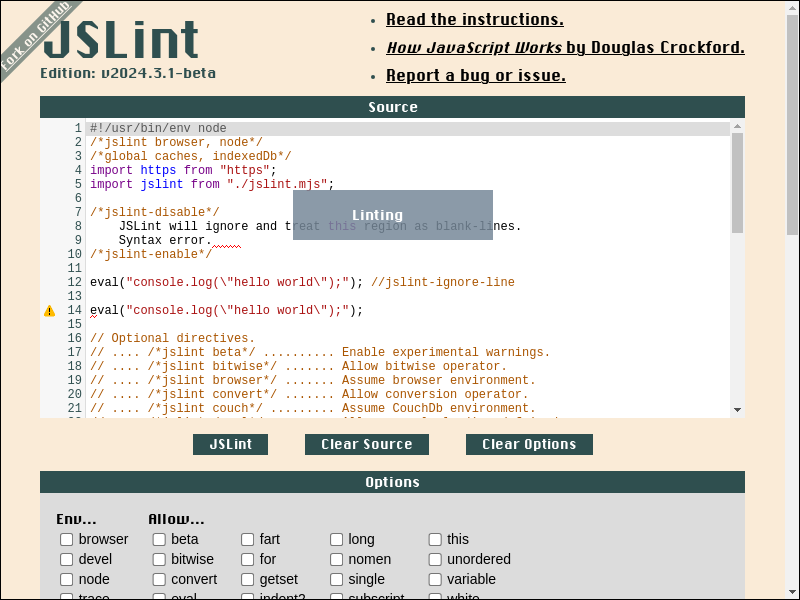
Web Demo Archived
Table of Contents
-
- API Doc
- Directive
/*jslint beta*//*jslint bitwise*//*jslint browser*//*jslint convert*//*jslint couch*//*jslint devel*//*jslint eval*//*jslint fart*//*jslint getset*//*jslint indent2*//*jslint long*//*jslint node*//*jslint nomen*//*jslint single*//*jslint subscript*//*jslint this*//*jslint trace*//*jslint unordered*//*jslint white*//*global*//*property*//*jslint-disable*/.../*jslint-enable*///jslint-ignore-line/*coverage-disable*/.../*coverage-enable*///coverage-ignore-line
- ECMAScript Feature Support
Quickstart Install
To install, just download and save https://www.jslint.com/jslint.mjs to file:
#!/bin/sh

curl -L https://www.jslint.com/jslint.mjs > jslint.mjs
- shell output

To run jslint.mjs in shell:
#!/bin/sh

printf "console.log('hello world');\n" > hello.js

node jslint.mjs hello.js
- shell output

To import jslint.mjs in ES Module environment:
#!/bin/sh

node --input-type=module --eval '

/*jslint devel*/

// Import JSLint in ES Module environment.

import jslint from "./jslint.mjs";

let globals = ["caches", "indexedDb"];
let options = {browser: true};
let result;
let source = "console.log(\u0027hello world\u0027);\n";

// JSLint <source> and print <formatted_message>.

result = jslint.jslint(source, options, globals);
result.warnings.forEach(function ({
    formatted_message
}) {
    console.error(formatted_message);
});

'
- shell output

To import jslint.mjs in CommonJS environment:
#!/bin/sh

node --eval '

/*jslint devel*/
(async function () {
    let globals = ["caches", "indexedDb"];
    let jslint;
    let options = {browser: true};
    let result;
    let source = "console.log(\u0027hello world\u0027);\n";

// Import JSLint in CommonJS environment.

    jslint = await import("./jslint.mjs");
    jslint = jslint.default;

// JSLint <source> and print <formatted_message>.

    result = jslint.jslint(source, options, globals);
    result.warnings.forEach(function ({
        formatted_message
    }) {
        console.error(formatted_message);
    });
}());

'
- shell output

To JSLint entire directory in shell:
#!/bin/sh

# JSLint directory '.'

node jslint.mjs .
- shell output

Quickstart JSLint Report
To create a JSLint report in shell:
#!/bin/sh

printf "function foo() {console.log('hello world');}\n" > hello.js

# Create JSLint report from file 'hello.js' in shell.

node jslint.mjs \
    jslint_report=.artifact/jslint_report_hello.html \
    hello.js
- shell output

- screenshot file .artifact/jslint_report_hello.html
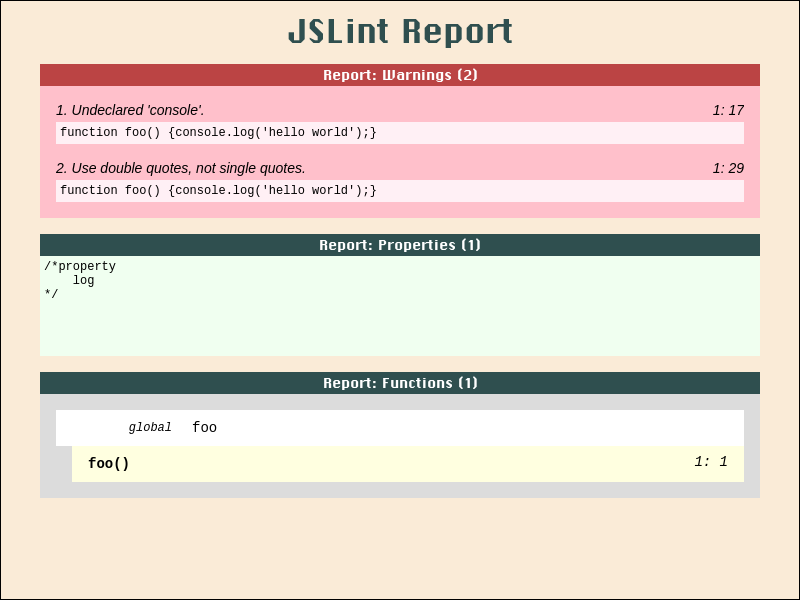
To create a JSLint report in javascript:
#!/bin/sh

node --input-type=module --eval '

/*jslint devel*/
import jslint from "./jslint.mjs";
import fs from "fs";
(async function () {
    let result;
    let source = "function foo() {console.log(\u0027hello world\u0027);}\n";

// Create JSLint report from <source> in javascript.

    result = jslint.jslint(source);
    result = jslint.jslint_report(result);
    result = `<body class="JSLINT_ JSLINT_REPORT_">\n${result}</body>\n`;

    await fs.promises.mkdir(".artifact/", {recursive: true});
    await fs.promises.writeFile(".artifact/jslint_report_hello.html", result);
    console.error("wrote file .artifact/jslint_report_hello.html");
}());

'
- shell output

- screenshot file .artifact/jslint_report_hello.html
Quickstart V8 Coverage Report
To create V8 coverage report from Node.js / Npm program in shell:
#!/bin/sh

git clone https://github.com/tryghost/node-sqlite3 node-sqlite3-sh \
    --branch=v5.0.11 \
    --depth=1 \
    --single-branch

cd node-sqlite3-sh
npm install

# Create V8 coverage report from program `npm run test` in shell.

node ../jslint.mjs \
    v8_coverage_report=../.artifact/coverage_sqlite3_sh/ \
        --exclude=tes?/ \
        --exclude=tes[!0-9A-Z_a-z-]/ \
        --exclude=tes[0-9A-Z_a-z-]/ \
        --exclude=tes[^0-9A-Z_a-z-]/ \
        --exclude=test/**/*.js \
        --exclude=test/suppor*/*elper.js \
        --exclude=test/suppor?/?elper.js \
        --exclude=test/support/helper.js \
        --include=**/*.cjs \
        --include=**/*.js \
        --include=**/*.mjs \
        --include=li*/*.js \
        --include=li?/*.js \
        --include=lib/ \
        --include=lib/**/*.js \
        --include=lib/*.js \
        --include=lib/sqlite3.js \
    npm run test
- shell output

- screenshot file .artifact/coverage_sqlite3_sh/index.html
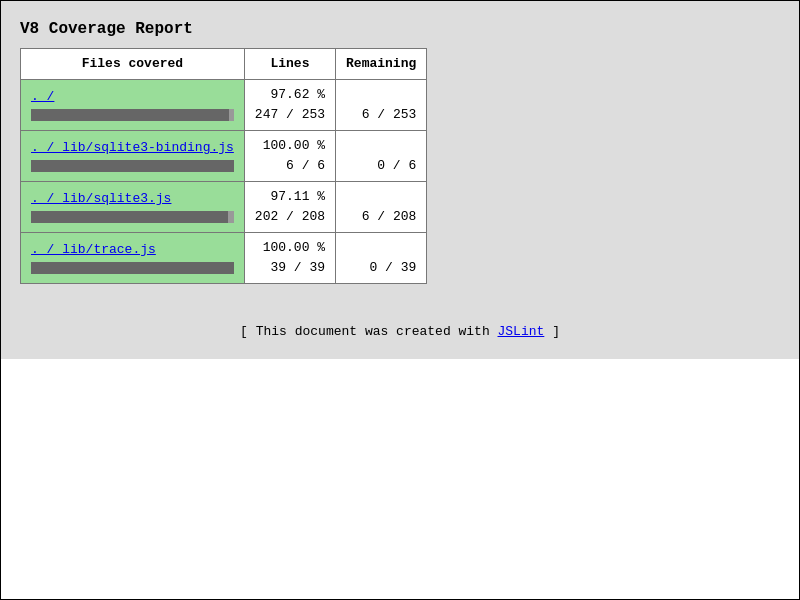
- screenshot file .artifact/coverage_sqlite3_sh/lib/sqlite3.js.html
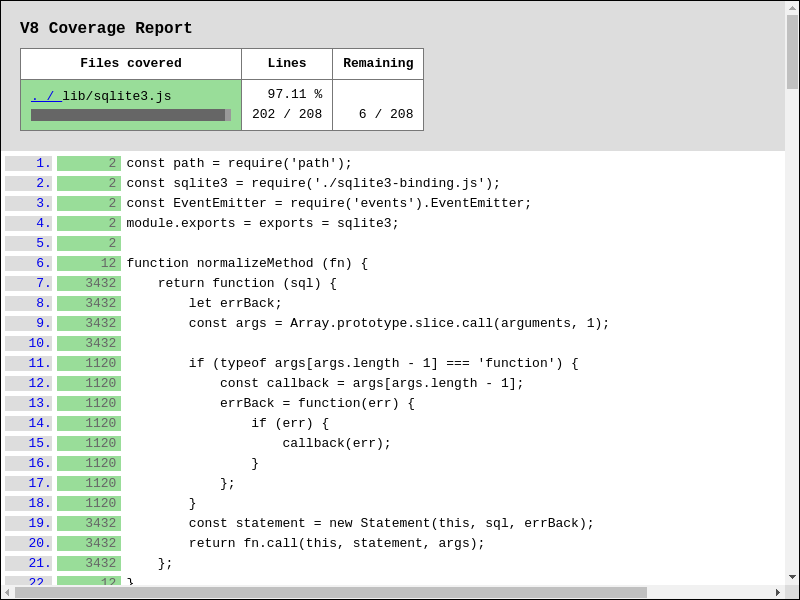
To create V8 coverage report from Node.js / Npm program in javascript:
#!/bin/sh

git clone https://github.com/tryghost/node-sqlite3 node-sqlite3-js \
    --branch=v5.0.11 \
    --depth=1 \
    --single-branch

cd node-sqlite3-js
npm install

node --input-type=module --eval '

/*jslint node*/
import jslint from "../jslint.mjs";
(async function () {

// Create V8 coverage report from program `npm run test` in javascript.

    await jslint.v8CoverageReportCreate({
        coverageDir: "../.artifact/coverage_sqlite3_js/",
        processArgv: [
            "--exclude=tes?/",
            "--exclude=tes[!0-9A-Z_a-z-]/",
            "--exclude=tes[0-9A-Z_a-z-]/",
            "--exclude=tes[^0-9A-Z_a-z-]/",
            "--exclude=test/**/*.js",
            "--exclude=test/suppor*/*elper.js",
            "--exclude=test/suppor?/?elper.js",
            "--exclude=test/support/helper.js",
            "--include=**/*.cjs",
            "--include=**/*.js",
            "--include=**/*.mjs",
            "--include=li*/*.js",
            "--include=li?/*.js",
            "--include=lib/",
            "--include=lib/**/*.js",
            "--include=lib/*.js",
            "--include=lib/sqlite3.js",
            "npm", "run", "test"
        ]
    });
}());

'
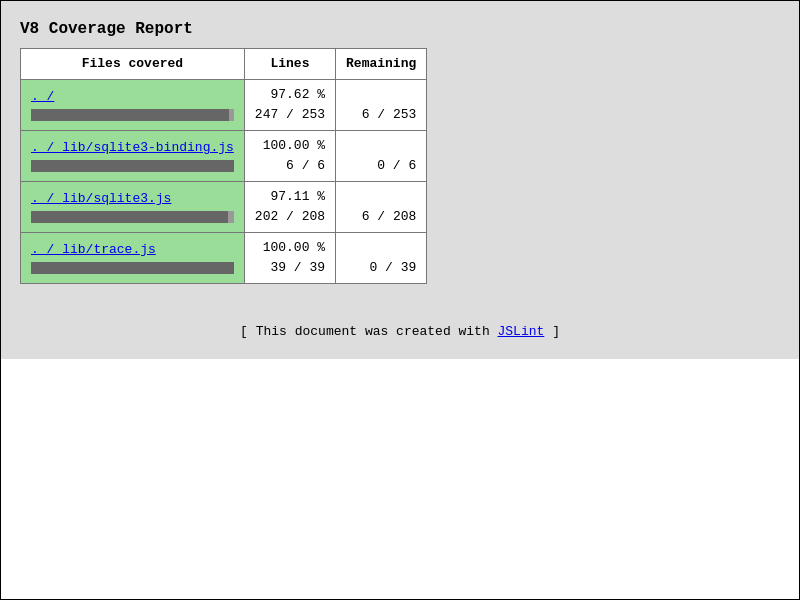
- shell output

- screenshot file .artifact/coverage_sqlite3_js/index.html
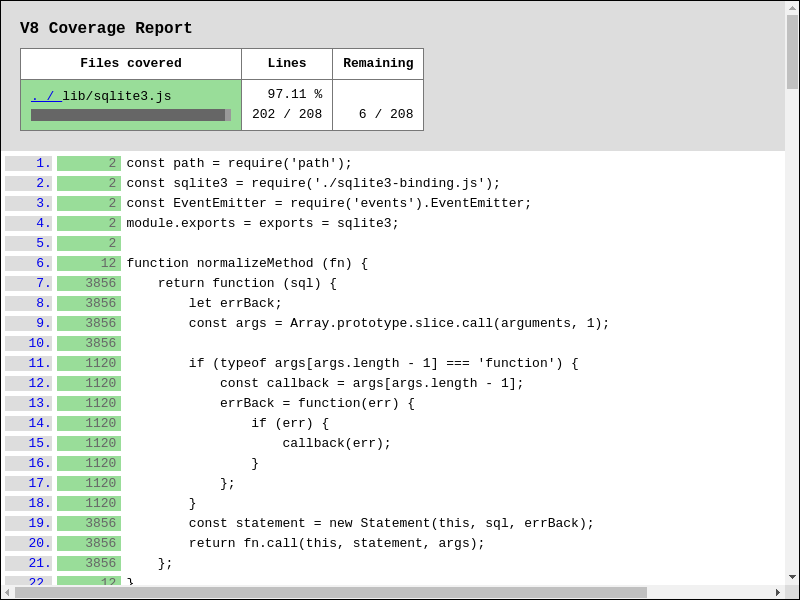
- screenshot file .artifact/coverage_sqlite3_js/lib/sqlite3.js.html
Quickstart JSLint in CodeMirror
-
Download and save
jslint.mjs,jslint_wrapper_codemirror.jsto file. -
Edit, save, and serve example html-file below:
<!DOCTYPE html>
<html lang="en">
<head>
    <meta charset="utf-8">
    <title>CodeMirror: JSLint Demo</title>

<!-- Assets from codemirror. -->

    <link rel="stylesheet" href="https://cdnjs.cloudflare.com/ajax/libs/codemirror/5.65.21/codemirror.css">
    <link rel="stylesheet" href="https://cdnjs.cloudflare.com/ajax/libs/codemirror/5.65.21/addon/lint/lint.css">
    <script defer src="https://cdnjs.cloudflare.com/ajax/libs/codemirror/5.65.21/codemirror.js"></script>
    <script defer src="https://cdnjs.cloudflare.com/ajax/libs/codemirror/5.65.21/mode/javascript/javascript.js"></script>
    <script defer src="https://cdnjs.cloudflare.com/ajax/libs/codemirror/5.65.21/addon/lint/lint.js"></script>

<!-- Assets from jslint. -->

    <script type="module" src="./jslint.mjs?window_jslint=1"></script>
    <script defer src="./jslint_wrapper_codemirror.js"></script>
<style>
body {
    background: #bbb;
    color: #333;
    font-family: sans-serif;
    margin: 20px;
}
.JSLINT_.JSLINT_REPORT_ {
    margin-top: 20px;
}
#editor1 {
    height: 300px;
    width: 100%;
}
</style>
</head>


<body>
    <h1>CodeMirror: JSLint Demo</h1>
    <h3>
This demo will auto-lint the code below, and auto-generate a report as you type.
    </h3>

<!-- Container for codemirror-editor. -->

    <textarea id="editor1">console.log('hello world');</textarea>

<!-- Container for jslint-report. -->

    <div class="JSLINT_ JSLINT_REPORT_"></div>


<script type=module>
window.addEventListener("load", function () {
    let editor = window.CodeMirror.fromTextArea(document.getElementById(
        "editor1"
    ), {
        gutters: [
            "CodeMirror-lint-markers"
        ],
        indentUnit: 4,
        lineNumbers: true,
        lint: {
            lintOnChange: true, // Enable auto-lint.
            options: {
                // browser: true,
                // node: true
                globals: [
                    // "caches",
                    // "indexedDb"
                ]
            }
        },
        mode: "javascript"
    });

// Initialize event-handling before linter is run.

    editor.on("lintJslintBefore", function (/* options */) {
        // options.browser = true;
        // options.node = true;
        // options.globals = [
        //     "caches",
        //     "indexedDb"
        // ];
        return;
    });

// Initialize event-handling after linter is run.

    editor.on("lintJslintAfter", function (options) {

// Generate jslint-report from options.result.

        document.querySelector(
            ".JSLINT_REPORT_"
        ).innerHTML = window.jslint.jslint_report(options.result);
    });

// Manually trigger linter.

    editor.performLint();
});
</script>
</body>
</html>
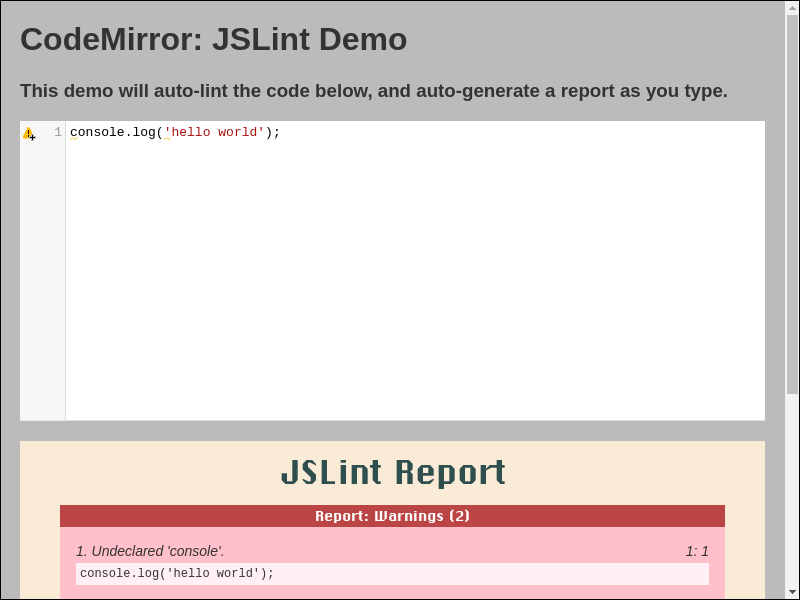
- Live example at https://www.jslint.com/jslint_wrapper_codemirror.html
Quickstart JSLint in Vim
- Download and save
jslint.mjs,jslint_wrapper_vim.vimto directory~/.vim/ - Add vim-command
:source ~/.vim/jslint_wrapper_vim.vimto file~/.vimrc- If above files were saved to custom-directory, then use that directory instead, e.g.:
- save
jslint.mjs,jslint_wrapper_vim.vimto directory~/vimfiles/ - vim-command
:source ~/vimfiles/jslint_wrapper_vim.vim
- save
- If above files were saved to custom-directory, then use that directory instead, e.g.:
- Vim can now jslint files (via nodejs):
- with vim-command
:SaveAndJslint - with vim-key-combo
<Ctrl-S> <Ctrl-J>
- with vim-command
- screenshot

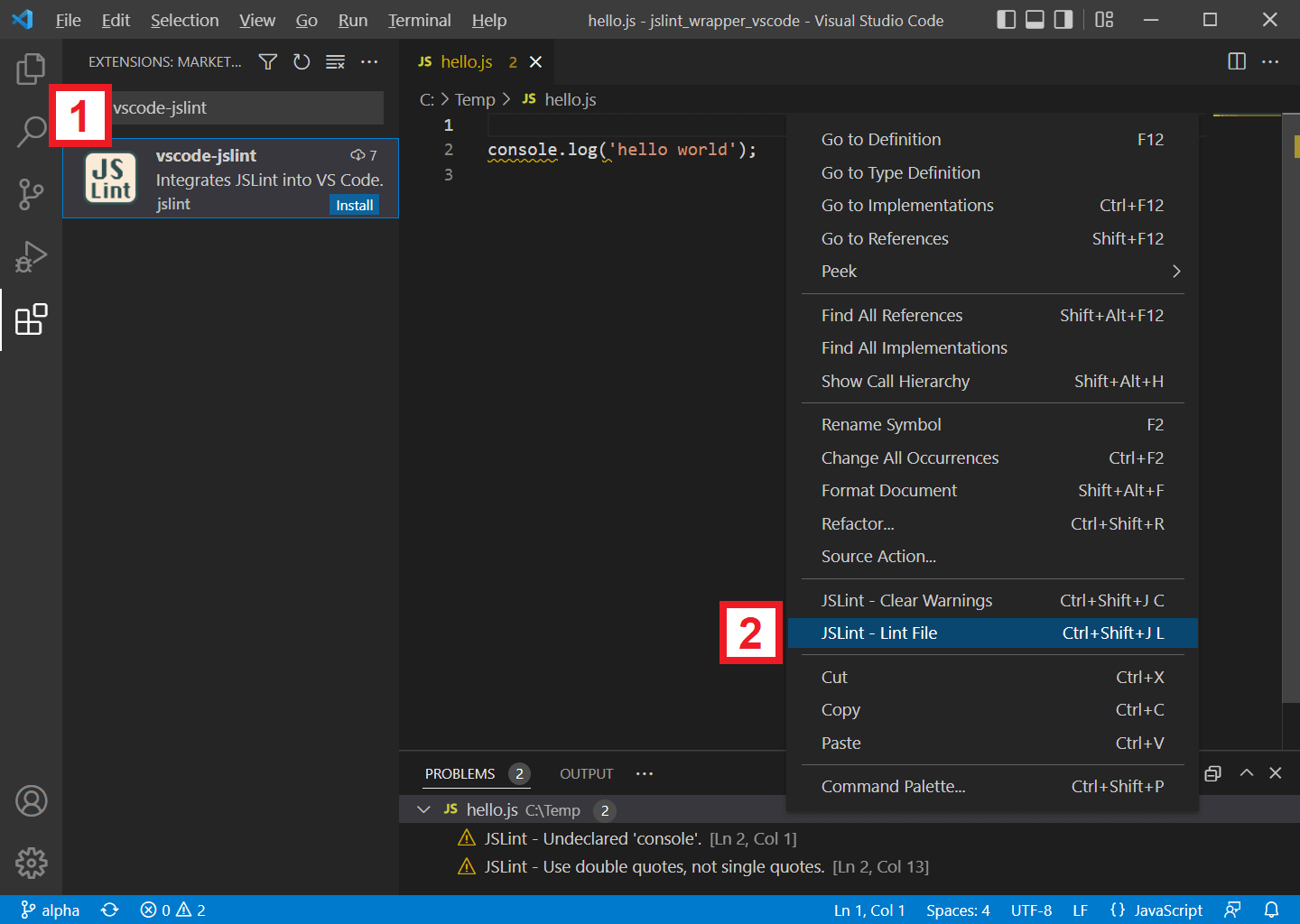
Quickstart JSLint in VSCode
- In VSCode, search and install extension
vscode-jslint - In VSCode, while editing a javascript file:
- right-click context-menu and select
[JSLint - Lint File] - or use key-binding
[Ctrl + Shift + J], [L] - or use key-binding
[ Cmd + Shift + J], [L]for Mac
- right-click context-menu and select
- screenshot
Documentation
- jslint.mjs contains the jslint function. It parses and analyzes a source file, returning an object with information about the file. It can also take an object that sets options.
- index.html runs the jslint.mjs function in a web page.
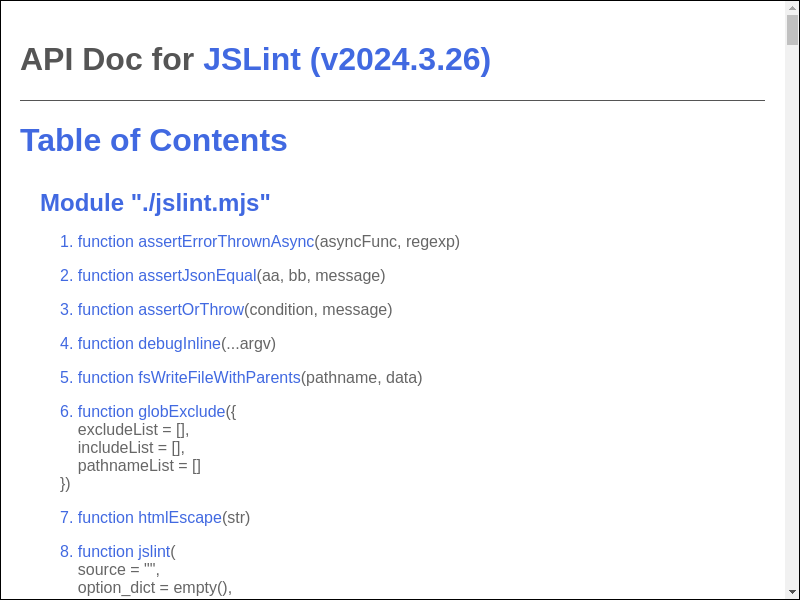
API Doc
Directive
/*jslint beta*/
/*jslint beta*/
// Enable experimental warnings.
// Warn if global variables are redefined.
// Warn if const / let statements are not declared at top of function or
//    script, similar to var statements.
// Warn if const / let / var statements are not declared in ascii-order.
// Warn if named-functions are not declared in ascii-order.
// Warn if cases in switch-statements are not in ascii-order.
/*jslint bitwise*/
/*jslint bitwise*/
// Allow bitwise operator.

let foo = 0 | 1;
/*jslint browser*/
/*jslint browser*/
// Assume browser environment.

localStorage.getItem("foo");
/*jslint convert*/
/*jslint convert*/
// Allow conversion operator.

let foo = new Date() + "";
let bar = !!0;
/*jslint couch*/
/*jslint couch*/
// Assume CouchDb environment.

registerType("text-json", "text/json");
/*jslint devel*/
/*jslint devel*/
// Allow console.log() and friends.

console.log("hello");
/*jslint eval*/
/*jslint eval*/
// Allow eval().

eval("1");
/*jslint fart*/
/*jslint fart*/
// Allow complex fat-arrow.

let foo = async ({bar, baz}) => {
    return await bar(baz);
};
/*jslint getset*/
/*jslint getset, this, devel*/
// Allow get() and set().

let foo = {
    bar: 0,
    get getBar() {
        return this.bar;
    },
    set setBar(value) {
        this.bar = value;
    }
};
console.log(foo.getBar); // 0
foo.setBar = 1;
console.log(foo.getBar); // 1
/*jslint indent2*/
/*jslint indent2*/
// Use 2-space indent.

function foo() {
  return;
}
/*jslint long*/
/*jslint long*/
// Allow long lines.

let foo = "aaaaaaaaaaaaaaaaaaaaaaaaaaaaaaaaaaaaaaaaaaaaaaaaaaaaaaaaaaaaaaaaaaaa";
/*jslint node*/
/*jslint node*/
// Assume Node.js environment.

require("fs");
/*jslint nomen*/
/*jslint nomen*/
// Allow weird property name.

let foo = {};
foo._bar = 1;
/*jslint single*/
/*jslint single*/
// Allow single-quote strings.

let foo = '';
/*jslint subscript*/
/*jslint subscript*/
// Allow identifiers in subscript-notation.

let foo = {};
foo["bar"] = 1;
/*jslint this*/
/*jslint this*/
// Allow 'this'.

function foo() {
    return this;
}
/*jslint trace*/
/*jslint trace*/
// Include jslint stack-trace in warnings.

console.log('hello world');
/*
1. Undeclared 'console'.
console.log('hello world');
Error
    at warn_at (...)
    at warn (...)
    at lookup (...)
    at pre_v (...)
    at jslint.mjs
2. Use double quotes, not single quotes.
console.log(...);
Error
    at warn_at (...)
    at lex_string (...)
    at lex_token (...)
    at jslint_phase2_lex (...)
    at Function.jslint (...)
    at jslint.mjs
*/
/*jslint unordered*/
/*jslint unordered*/
// Allow unordered cases, params, properties, variables, and exports.

let foo = {bb: 1, aa: 0};

function bar({
    bb = 1,
    aa = 0
}) {
    return aa + bb;
}

export {
    foo,
    bar
};
/*jslint white*/
/*jslint white*/
// Allow messy whitespace.

let foo = 1; let bar = 2;
/*global*/
/*global foo, bar*/
// Declare global variables foo, bar.

foo();
bar();
/*property*/
/*property foo, bar*/
// Restrict property-access to only .foo, .bar.

let aa = {bar: 1, foo: 2};
/*jslint-disable*/.../*jslint-enable*/
/*jslint-disable*/

JSLint will ignore and treat this region as blank-lines.
Syntax error.

/*jslint-enable*/
//jslint-ignore-line
// JSLint will ignore non-fatal warnings at given line.

eval("1"); //jslint-ignore-line
/*coverage-disable*/.../*coverage-enable*/
/*coverage-disable*/

// JSLint will ignore code-coverage in this region.

if (false) {
    console.log("hello world");
}

/*coverage-enable*/
//coverage-ignore-line
// JSLint will ignore code-coverage at given line.

if (false) {
    console.log("hello world"); //coverage-ignore-line
}
ECMAScript Feature Support
- https://github.com/tc39/proposals/blob/main/finished-proposals.md
- https://github.com/lukehoban/es6features
Package Listing

Changelog

License
- JSLint is under Unlicense License.
- CodeMirror editor is under MIT License.
- Function
v8CoverageListMergeis derived from MIT Licensed v8-coverage.
Devops Instruction
pull-request merge
-
update
.github/workflows/ci.yml.github/workflows/publish.ymlto:- latest nodejs-lts version @ https://nodejs.org/en/about/previous-releases
-
update
CHANGELOG.md- verify
<CHANGELOG.md entry #1>is most-relevant to pull-request. - run
# re-run until version propagates npm run test2 # re-run until version propagates sh jslint_ci.sh shGithubPrCreate alpha beta # v20yy.mm.dd __pr_beta_pre git push upstream alpha -f- verify ci-success @ https://github.com/kaizhu256/jslint/actions
- verify ci-success @ https://github.com/jslint-org/jslint/actions
- verify
-
goto https://github.com/jslint-org/jslint/compare/beta...kaizhu256:jslint:branch-p20yy.mm.dd
- click
Create pull request - input
Add a title *with:<CHANGELOG.md entry #1> - input
Add a descriptionwith:Fixes #xxx. This PR will: <CHANGELOG.md entry #1> This PR will additionally: <CHANGELOG.md entry extra> <screenshot> - click
Previewand review - verify:
- base respository:
jslint-org/jslint - base:
beta
- base respository:
- click
Create pull request- verify ci-success @ https://github.com/jslint-org/jslint/actions/workflows/on_pull_request.yml
- click
-
wait awhile before continuing ...
- click
Squash and merge- verify ci-success @ https://github.com/jslint-org/jslint/actions
- run
sh jslint_ci.sh shGithubPrCleanup git push upstream alpha -f- verify ci-success @ https://github.com/kaizhu256/jslint/actions
- verify ci-success @ https://github.com/jslint-org/jslint/actions
- click
Delete branch
- click
branch-master commit
-
update
.github/workflows/ci.yml.github/workflows/publish.ymlto:- latest nodejs-lts version @ https://nodejs.org/en/about/previous-releases
-
update
CHANGELOG.md- verify
<CHANGELOG.md entry #1>is most-relevant to pull-request. - run
# re-run until version propagates npm run test2 # re-run until version propagates sh jslint_ci.sh shGithubPrCreate alpha master # v20yy.mm.dd __pr_master_pre git push upstream alpha -f- verify ci-success @ https://github.com/kaizhu256/jslint/actions
- verify ci-success @ https://github.com/jslint-org/jslint/actions
- verify
-
goto https://github.com/jslint-org/jslint/compare/beta...kaizhu256:jslint:branch-v20yy.mm.dd
- click
Create pull request - input
Add a title *with:# v20yy.mm.dd - input
Add a descriptionwith:<CHANGELOG.md entry #1> <CHANGELOG.md entry extra> - click
Previewand review - verify:
- base respository:
jslint-org/jslint - base:
beta
- base respository:
- click
Create pull request- verify ci-success @ https://github.com/jslint-org/jslint/actions/workflows/on_pull_request.yml
- click
-
wait awhile before continuing ...
- click
Squash and merge- verify ci-success @ https://github.com/jslint-org/jslint/actions
- run
sh jslint_ci.sh shGithubPrCleanup git push upstream alpha -f- verify ci-success @ https://github.com/kaizhu256/jslint/actions
- verify ci-success @ https://github.com/jslint-org/jslint/actions
- click
Delete branch - run
git push origin beta:master git push upstream beta:master- verify ci-success @ https://github.com/kaizhu256/jslint/actions
- verify ci-success @ https://github.com/jslint-org/jslint/actions
- click
branch-master publish
- goto https://www.npmjs.com/package/@jslint-org/jslint/access
- click
Github Actions - input
Organization or user*with:jslint-org - input
Repository*with:jslint - input
Workflow filename*with:publish.yml - click
Set up connectionorUpdate Package Settings
- click
-
- run
git push upstream beta:master- verify ci-success @ https://github.com/jslint-org/jslint/actions
- run
- goto https://github.com/jslint-org/jslint/releases/new
- input
Tag: Select tagwith:v20yy.mm.dd- click
Create new tagand clickCreate - verify correct-year
v20yy.mm.dd - select
Target: master
- click
- input
Release titlewith:v20yy.mm.dd - <CHANGELOG.md entry #1>- select
Previous tag: Auto - click
Generate release notes
- select
- input
Writewith:<CHANGELOG.md entry #1> <CHANGELOG.md entry extra> **Full Changelog**: ... - click
Previewand review - click
Latest - click
Publish release- verify ci-success @ https://github.com/jslint-org/jslint/actions
- verify email-notification
Successfully published @jslint-org/jslint@20yy.mm.dd
- input
vscode-jslint publish
- goto https://github.com/jslint-org/jslint/tree/gh-pages/branch-beta/.artifact/jslint_wrapper_vscode
- click
vscode-jslint-20yy.mm.dd.vsix - click
Rawto download
- click
- goto https://marketplace.visualstudio.com/manage/publishers/jslint
- move mouse to version-number, right-click, and select
Update - upload downloaded file
vscode-jslint-20yy.mm.dd.vsix - click 'Upload'
- verify email-notification
[Succeeded] Extension publish on Visual Studio Marketplace - vscode-jslint
- verify email-notification
- move mouse to version-number, right-click, and select
Top Related Projects
JSLint, The JavaScript Code Quality and Coverage Tool
Find and fix problems in your JavaScript code.
JSHint is a tool that helps to detect errors and potential problems in your JavaScript code
🌟 JavaScript Style Guide, with linter & automatic code fixer
Prettier is an opinionated code formatter.
JavaScript Style Guide
Convert designs to code with AI
Introducing Visual Copilot: A new AI model to turn Figma designs to high quality code using your components.
Try Visual Copilot