 netbird
Connect your devices into a secure WireGuard®-based overlay network with SSO, MFA and granular access controls.
Top Related Projects

The easiest, most secure way to use WireGuard and 2FA.

Netmaker makes networks with WireGuard. Netmaker automates fast, secure, and distributed virtual networks.

A scalable overlay networking tool with a focus on performance, simplicity and security
Connect your devices into a secure WireGuard®-based overlay network with SSO, MFA and granular access controls.

A private network system that uses WireGuard under the hood.

Enterprise-ready zero-trust access platform built on WireGuard®.
Quick Overview
NetBird is an open-source VPN management platform that simplifies the creation and management of secure, peer-to-peer networks. It uses WireGuard® protocol for fast and secure connections, and provides a user-friendly interface for easy network administration and monitoring.
Pros
- Easy setup and management of secure networks
- Cross-platform support (Windows, macOS, Linux, iOS, Android)
- Automatic key rotation and peer discovery
- Integration with identity providers (e.g., Google Workspace, Azure AD)
Cons
- Relatively new project, may have undiscovered issues
- Limited documentation compared to more established VPN solutions
- Requires self-hosting for full control and privacy
- May not be suitable for very large enterprise networks
Getting Started
To get started with NetBird, follow these steps:
-
Install NetBird on your device:
curl -fsSL https://pkgs.netbird.io/install.sh | sh -
Sign up for a NetBird account or set up a self-hosted management service.
-
Run NetBird and connect to your account:
sudo netbird up -
Access the NetBird UI to manage your network, add peers, and configure access controls.
For more detailed instructions and advanced configuration options, refer to the official NetBird documentation at https://netbird.io/docs/.
Competitor Comparisons
The easiest, most secure way to use WireGuard and 2FA.
Pros of Tailscale
- More mature and widely adopted project with a larger user base
- Offers a managed service option for easier deployment and maintenance
- Provides advanced features like access controls and single sign-on integration
Cons of Tailscale
- Closed-source control server, limiting self-hosting options
- Requires a central coordination server, which may introduce latency
- Less flexible in terms of customization compared to fully open-source alternatives
Code Comparison
Tailscale (Go):
func (c *Conn) Close() error {
    c.mu.Lock()
    defer c.mu.Unlock()
    if c.closed {
        return nil
    }
    c.closed = true
    return c.pconn.Close()
}
NetBird (Go):
func (c *Conn) Close() error {
    c.Lock()
    defer c.Unlock()
    if c.isClosed {
        return nil
    }
    c.isClosed = true
    return c.conn.Close()
}
Both projects use similar patterns for connection closing, with mutex locks and checks for already closed connections. The main difference lies in variable naming conventions and specific implementation details.
Netmaker makes networks with WireGuard. Netmaker automates fast, secure, and distributed virtual networks.
Pros of Netmaker
- More flexible networking options, including support for multiple network topologies
- Advanced features like access control lists (ACLs) and network segmentation
- Better suited for complex enterprise environments
Cons of Netmaker
- Steeper learning curve and more complex setup process
- Less user-friendly interface compared to Netbird
- May require more resources to run and manage
Code Comparison
Netmaker (Go):
func (server *Server) CreateNetwork(network *models.Network) error {
    network.SetDefaults()
    if err := server.DB.Create(network).Error; err != nil {
        return err
    }
    return nil
}
Netbird (Go):
func (s *Server) CreateNetwork(ctx context.Context, network *Network) error {
    if err := s.store.CreateNetwork(ctx, network); err != nil {
        return err
    }
    return nil
}
Both projects use Go and have similar network creation functions, but Netmaker's implementation includes default value setting and uses GORM for database operations, while Netbird's approach is more straightforward and uses a custom store interface.
A scalable overlay networking tool with a focus on performance, simplicity and security
Pros of Nebula
- More mature project with a longer history and larger community
- Offers advanced networking features like IP address management and certificate-based authentication
- Provides better performance for high-throughput applications
Cons of Nebula
- More complex setup and configuration process
- Lacks built-in NAT traversal capabilities
- Limited platform support compared to NetBird
Code Comparison
NetBird configuration example:
peers:
  - public_key: ABC123...
    allowed_ips:
      - 10.0.0.1/32
Nebula configuration example:
static_host_map:
  "10.0.0.1": ["public_ip:4242"]
lighthouse:
  am_lighthouse: false
  interval: 60
Both projects aim to create secure overlay networks, but NetBird focuses on simplicity and ease of use, while Nebula offers more advanced networking features at the cost of increased complexity. NetBird provides a more user-friendly experience with its web UI and automatic NAT traversal, making it suitable for less technical users. Nebula, on the other hand, offers greater flexibility and control over network configurations, making it a better choice for advanced users and complex network setups.
Connect your devices into a secure WireGuard®-based overlay network with SSO, MFA and granular access controls.
Pros of NetBird
- More comprehensive documentation and user guides
- Larger community and more active development
- Better integration with cloud platforms and services
Cons of NetBird
- Higher resource consumption
- Steeper learning curve for new users
- More complex configuration process
Code Comparison
NetBird:
func (s *Server) Run() error {
    s.wg.Add(1)
    go s.runGRPCServer()
    s.wg.Add(1)
    go s.runHTTPServer()
    s.wg.Wait()
    return nil
}
NetBird>:
func (s *Server) Start() error {
    err := s.startGRPCServer()
    if err != nil {
        return err
    }
    return s.startHTTPServer()
}
The code comparison shows that NetBird uses goroutines for concurrent server execution, while NetBird> opts for a sequential approach. This difference reflects the overall design philosophy of each project, with NetBird focusing on performance and scalability, and NetBird> prioritizing simplicity and ease of use.
Both projects aim to provide secure and efficient networking solutions, but they cater to slightly different use cases and user preferences. NetBird is better suited for larger, more complex deployments, while NetBird> may be more appropriate for smaller projects or users who prefer a simpler setup process.
A private network system that uses WireGuard under the hood.
Pros of innernet
- Written in Rust, potentially offering better performance and memory safety
- Designed for internal networks, with a focus on simplicity and ease of use
- Supports automatic IP address assignment and management
Cons of innernet
- Limited to internal networks, not suitable for public-facing VPNs
- Fewer features compared to NetBird, such as lack of built-in DNS management
- Smaller community and less frequent updates
Code Comparison
innernet (Rust):
let server = Server::new(config)?;
server.run().await?;
NetBird (Go):
server, err := server.New(config)
if err != nil {
    return err
}
err = server.Run()
Both projects use similar high-level structures for server initialization and running, but innernet's Rust implementation may offer better performance and safety guarantees. NetBird's Go code is more verbose due to explicit error handling.
innernet is focused on internal networks, making it simpler to set up and manage for specific use cases. NetBird offers a more comprehensive solution with additional features like DNS management and public VPN support.
While innernet benefits from Rust's performance and safety, NetBird has a larger community and more frequent updates, potentially leading to better long-term support and feature development.
Enterprise-ready zero-trust access platform built on WireGuard®.
Pros of Firezone
- Built with Elixir, offering robust concurrency and fault tolerance
- Provides a user-friendly web UI for easier management
- Supports single sign-on (SSO) integration with various identity providers
Cons of Firezone
- Less mature project compared to Netbird
- Smaller community and fewer contributors
- Limited multi-platform support (primarily focused on Linux)
Code Comparison
Netbird (Go):
func (s *Server) Run() error {
    s.wg.Add(1)
    go s.runTURNServer()
    return s.runSignalServer()
}
Firezone (Elixir):
defmodule Firezone.Server do
  use GenServer

  def start_link(_) do
    GenServer.start_link(__MODULE__, [], name: __MODULE__)
  end

  def init(_) do
    {:ok, %{}}
  end
end
Both projects use different programming languages, which impacts their architecture and performance characteristics. Netbird's Go implementation may offer better raw performance, while Firezone's Elixir codebase provides better concurrency handling and fault tolerance. The code snippets demonstrate the different approaches to server implementation in each project.
Convert  designs to code with AI

Introducing Visual Copilot: A new AI model to turn Figma designs to high quality code using your components.
Try Visual CopilotREADME





Start using NetBird at netbird.io
See Documentation
Join our Slack channel or our Community forum
ð We are hiring! Join us at https://netbird.io/careers
ð¤ NetBird Agent Network (Beta)
Identity-aware access control for AI agents â keyless access to LLM APIs and private resources over the encrypted NetBird tunnel. See
agent-network/or read the docs at netbird.ai.
NetBird combines a configuration-free peer-to-peer private network and a centralized access control system in a single platform, making it easy to create secure private networks for your organization or home.
Connect. NetBird creates a WireGuard-based overlay network that automatically connects your machines over an encrypted tunnel, leaving behind the hassle of opening ports, complex firewall rules, VPN gateways, and so forth.
Secure. NetBird enables secure remote access by applying granular access policies while allowing you to manage them intuitively from a single place. Works universally on any infrastructure.
https://github.com/user-attachments/assets/10cec749-bb56-4ab3-97af-4e38850108d2
Self-host NetBird (video)

Key features
Quickstart with NetBird Cloud
- Download and install NetBird at https://app.netbird.io/install.
- Follow the steps to sign up with Google, Microsoft, GitHub or your email address.
- Check the NetBird admin UI.
Quickstart with self-hosted NetBird
This is the quickest way to try self-hosted NetBird. It should take around 5 minutes to get started if you already have a public domain and a VM. Follow the Advanced guide with a custom identity provider for installations with different IdPs.
Infrastructure requirements:
- A Linux VM with at least 1 CPU and 2 GB of memory.
- The VM should be publicly accessible on TCP ports 80 and 443 and UDP port 3478.
- A public domain name pointing to the VM.
Software requirements:
- Docker with the Compose plugin (Compose v2 or higher). See the Docker installation guide.
Steps
- Download and run the installation script:
export NETBIRD_DOMAIN=netbird.example.com; curl -fsSL https://github.com/netbirdio/netbird/releases/latest/download/getting-started.sh | bash
A bit on NetBird internals
- Every machine in the network runs the NetBird agent, which manages WireGuard.
- Every agent connects to the Management Service, which holds network state, manages peer IPs, and distributes updates to agents.
- Agents use ICE (via pion/ice) to discover connection candidates for peer-to-peer connections.
- Candidates are discovered with the help of STUN servers.
- Agents negotiate a connection through the Signal Service, exchanging end-to-end encrypted messages with candidates.
- When NAT traversal fails (e.g. mobile carrier-grade NAT) and a direct p2p connection isn't possible, the system falls back to a Relay Service and a secure WireGuard tunnel is established through it.
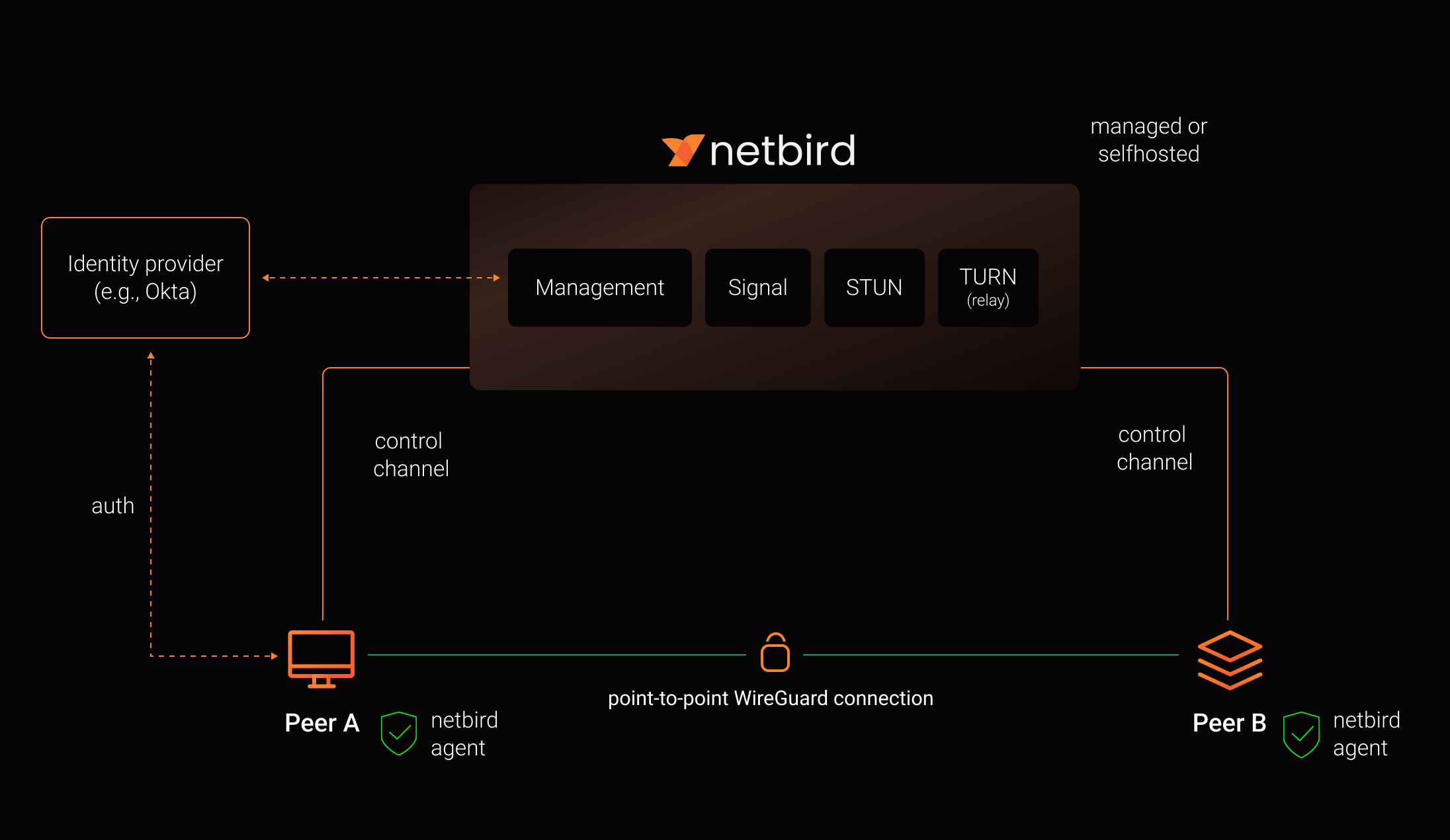
See a complete architecture overview for details.
Community projects
- NetBird installer script
- netbird-tui - terminal UI for managing NetBird peers, routes, and settings
- caddy-netbird - Caddy plugin that embeds a NetBird client for proxying HTTP and TCP/UDP traffic through NetBird networks
Note: The main branch may be in an unstable or even broken state during development.
For stable versions, see releases.
Support acknowledgement
In November 2022, NetBird joined the StartUpSecure program sponsored by the Federal Ministry of Education and Research of the Federal Republic of Germany. Together with the CISPA Helmholtz Center for Information Security, NetBird brings security best practices and simplicity to private networking.

Acknowledgements
We build on open source technologies like WireGuard®, Pion ICE, and Rosenpass. We greatly appreciate the work these projects are doing, and we'd love it if you could support them too (e.g., by starring or contributing).
Legal
This repository is licensed under the BSD-3-Clause license, which applies to all parts of the repository except for the directories management/, signal/ and relay/. Those directories are licensed under the GNU Affero General Public License version 3.0 (AGPLv3). See the respective LICENSE files inside each directory.
WireGuard and the WireGuard logo are registered trademarks of Jason A. Donenfeld.
Top Related Projects
The easiest, most secure way to use WireGuard and 2FA.
Netmaker makes networks with WireGuard. Netmaker automates fast, secure, and distributed virtual networks.
A scalable overlay networking tool with a focus on performance, simplicity and security
Connect your devices into a secure WireGuard®-based overlay network with SSO, MFA and granular access controls.
A private network system that uses WireGuard under the hood.
Enterprise-ready zero-trust access platform built on WireGuard®.
Convert designs to code with AI
Introducing Visual Copilot: A new AI model to turn Figma designs to high quality code using your components.
Try Visual Copilot