 data-table-filters
Faceted filters, sorting & infinite scroll for React data tables - shadcn/ui + TanStack Table
Top Related Projects

📋 Low-level table primitives for React, maintained in the Ant Design ecosystem.

The best JavaScript Data Table for building Enterprise Applications. Supports React / Angular / Vue / Plain JavaScript.

Datatable for React based on material-ui's table with additional features

A responsive table library with built-in sorting, pagination, selection, expandable rows, and customizable styling.

Datatables for React using Material-UI
Quick Overview
The openstatusHQ/data-table-filters repository is a React component library for building advanced data table filters. It provides a set of customizable and reusable components that allow developers to create complex filtering interfaces for data tables, enhancing the user experience in data-heavy applications.
Pros
- Highly customizable and flexible filtering components
- Seamless integration with React applications
- Improved user experience for data table interactions
- Responsive design for various screen sizes
Cons
- Limited documentation and examples
- Potential performance issues with large datasets
- Dependency on specific React versions
- Steep learning curve for complex filter configurations
Code Examples
- Basic Filter Component:
import { Filter } from '@openstatus/data-table-filters';

function BasicFilter() {
  return (
    <Filter
      column="name"
      operator="contains"
      value="John"
      onChange={(newFilter) => console.log(newFilter)}
    />
  );
}
- Multiple Filters:
import { FilterGroup } from '@openstatus/data-table-filters';

function MultipleFilters() {
  return (
    <FilterGroup>
      <Filter column="age" operator="greaterThan" value={18} />
      <Filter column="status" operator="equals" value="active" />
    </FilterGroup>
  );
}
- Custom Filter Component:
import { createFilter } from '@openstatus/data-table-filters';

const DateRangeFilter = createFilter({
  type: 'dateRange',
  component: ({ value, onChange }) => (
    <div>
      <input
        type="date"
        value={value.start}
        onChange={(e) => onChange({ ...value, start: e.target.value })}
      />
      <input
        type="date"
        value={value.end}
        onChange={(e) => onChange({ ...value, end: e.target.value })}
      />
    </div>
  ),
});
Getting Started
To use the data-table-filters in your React project:
-
Install the package:
npm install @openstatus/data-table-filters -
Import and use the components in your React application:
import { Filter, FilterGroup } from '@openstatus/data-table-filters'; function MyComponent() { return ( <FilterGroup> <Filter column="name" operator="contains" value="" /> <Filter column="age" operator="greaterThan" value={0} /> </FilterGroup> ); } -
Customize the filters and handle changes as needed in your application logic.
Competitor Comparisons
📋 Low-level table primitives for React, maintained in the Ant Design ecosystem.
Pros of table
- More comprehensive and feature-rich, offering advanced functionalities like pagination, sorting, and custom cell rendering
- Better documentation and examples, making it easier for developers to implement and customize
- Larger community and more frequent updates, ensuring better long-term support and maintenance
Cons of table
- Steeper learning curve due to its extensive API and configuration options
- Heavier package size, which may impact application performance and load times
- Less focus on modern React patterns and hooks, potentially making it less suitable for newer React projects
Code Comparison
data-table-filters:
<DataTable
  columns={columns}
  data={data}
  filters={filters}
  onFilterChange={handleFilterChange}
/>
table:
<Table
  columns={columns}
  dataSource={data}
  pagination={{ pageSize: 10 }}
  onChange={handleTableChange}
/>
The code comparison shows that data-table-filters has a more straightforward API focused on filtering, while table offers more built-in features like pagination. The table component requires additional configuration for advanced functionalities, which can be both an advantage (flexibility) and a disadvantage (complexity) depending on the use case.
The best JavaScript Data Table for building Enterprise Applications. Supports React / Angular / Vue / Plain JavaScript.
Pros of ag-grid
- More comprehensive and feature-rich data grid solution
- Supports multiple frameworks (React, Angular, Vue, etc.)
- Extensive documentation and community support
Cons of ag-grid
- Steeper learning curve due to its complexity
- Larger bundle size, which may impact performance
- Commercial license required for advanced features
Code Comparison
data-table-filters:
<DataTable
  columns={columns}
  data={data}
  filters={[
    { id: 'name', label: 'Name', type: 'text' },
    { id: 'age', label: 'Age', type: 'number' }
  ]}
/>
ag-grid:
<AgGridReact
  columnDefs={columnDefs}
  rowData={rowData}
  defaultColDef={{
    filter: true,
    floatingFilter: true
  }}
/>
Summary
data-table-filters is a lightweight, focused solution for adding filters to data tables, while ag-grid is a more comprehensive data grid library with advanced features. data-table-filters is easier to set up and use for simple filtering needs, but ag-grid offers more flexibility and functionality for complex data management scenarios. The choice between the two depends on the specific requirements of your project and the level of customization needed.
Datatable for React based on material-ui's table with additional features
Pros of material-table
- More comprehensive feature set, including sorting, filtering, and grouping
- Better documentation and examples
- Larger community and more frequent updates
Cons of material-table
- Heavier package size due to more features
- Steeper learning curve for complex implementations
- Dependency on Material-UI, which may not fit all project designs
Code Comparison
material-table:
import MaterialTable from 'material-table';

<MaterialTable
  columns={[
    { title: 'Name', field: 'name' },
    { title: 'Age', field: 'age', type: 'numeric' },
  ]}
  data={[
    { name: 'John', age: 30 },
    { name: 'Jane', age: 25 },
  ]}
/>
data-table-filters:
import { DataTable } from '@openstatus/data-table-filters';

<DataTable
  columns={[
    { accessorKey: 'name', header: 'Name' },
    { accessorKey: 'age', header: 'Age' },
  ]}
  data={[
    { name: 'John', age: 30 },
    { name: 'Jane', age: 25 },
  ]}
/>
material-table offers a more feature-rich solution with built-in functionality, while data-table-filters provides a lighter, more customizable approach. The choice between them depends on project requirements and design preferences.
A responsive table library with built-in sorting, pagination, selection, expandable rows, and customizable styling.
Pros of react-data-table-component
- More comprehensive feature set, including sorting, pagination, and selection
- Higher level of customization options for styling and behavior
- Larger community and more frequent updates
Cons of react-data-table-component
- Steeper learning curve due to more complex API
- Heavier bundle size, which may impact performance for smaller projects
- Less focus on specific filtering functionality compared to data-table-filters
Code Comparison
data-table-filters:
<DataTable
  data={data}
  columns={columns}
  filters={[
    { key: 'name', label: 'Name', type: 'text' },
    { key: 'age', label: 'Age', type: 'number' }
  ]}
/>
react-data-table-component:
<DataTable
  columns={columns}
  data={data}
  pagination
  selectableRows
  customStyles={customStyles}
  onSort={handleSort}
/>
The code comparison shows that data-table-filters focuses on a simpler API with built-in filter configuration, while react-data-table-component offers more advanced features like pagination and row selection out of the box.
react-data-table-component provides a more feature-rich solution with greater flexibility, but at the cost of increased complexity and potentially larger bundle size. data-table-filters offers a more streamlined approach, focusing specifically on filtering functionality with a simpler API, which may be preferable for projects with specific filtering requirements or those prioritizing a smaller footprint.
Datatables for React using Material-UI
Pros of mui-datatables
- More comprehensive feature set, including built-in sorting, filtering, and pagination
- Better integration with Material-UI components and styling
- Larger community and more frequent updates
Cons of mui-datatables
- Heavier package size due to more features and dependencies
- Steeper learning curve for customization and advanced usage
- Less flexibility for custom styling outside of Material-UI theming
Code Comparison
data-table-filters:
<DataTable
  columns={columns}
  data={data}
  filters={filters}
  onFilterChange={handleFilterChange}
/>
mui-datatables:
<MUIDataTable
  title={"Employee List"}
  data={data}
  columns={columns}
  options={options}
/>
The code comparison shows that mui-datatables requires more configuration through the options prop, while data-table-filters has a more straightforward API for basic filtering functionality. mui-datatables offers more built-in features out of the box, but data-table-filters provides a simpler approach for basic table filtering needs.
Convert  designs to code with AI

Introducing Visual Copilot: A new AI model to turn Figma designs to high quality code using your components.
Try Visual CopilotREADME
About The Project
A Table Schema builder, BYOS (Bring Your Own Store) state management, and a set of pre-built components for building powerful, filterable data-tables with React.
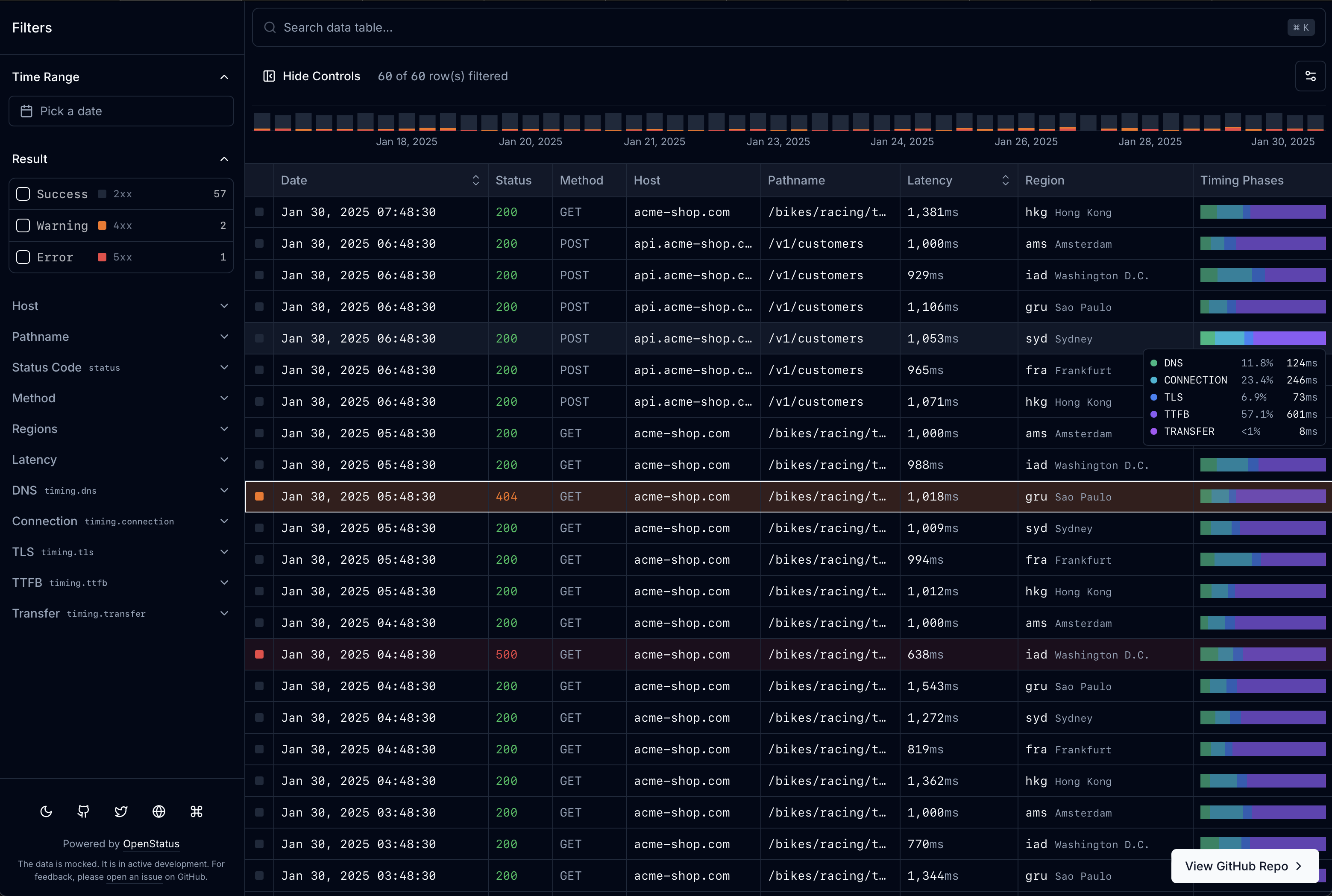
Visit data-table.openstatus.dev to learn more. Read the Docs for full documentation.
Install
Install blocks via the shadcn registry:
npx shadcn@latest add https://data-table.openstatus.dev/r/data-table.json
| Block | Install URL | What it adds |
|---|---|---|
data-table | .../r/data-table.json | Core: table engine, store, 4 filter types, memory adapter |
data-table-filter-command | .../r/data-table-filter-command.json | Command palette with history + keyboard shortcuts |
data-table-cell | .../r/data-table-cell.json | 8 cell renderers (text, code, badge, boolean, number, status-code, level-indicator, timestamp) |
data-table-sheet | .../r/data-table-sheet.json | Row detail side panel |
data-table-nuqs | .../r/data-table-nuqs.json | nuqs URL state adapter |
data-table-zustand | .../r/data-table-zustand.json | zustand state adapter |
data-table-schema | .../r/data-table-schema.json | Declarative schema system with col.* factories |
data-table-drizzle | .../r/data-table-drizzle.json | Drizzle ORM server-side helpers |
data-table-query | .../r/data-table-query.json | React Query infinite query integration |
data-table-filter-command-ai | .../r/data-table-filter-command-ai.json | AI-powered natural language â filter inference |
data-table-mcp | .../r/data-table-mcp.json | MCP server endpoint for AI agents |
All URLs use base https://data-table.openstatus.dev.
Agent Skill
Install the agent skill to let Claude Code (or any compatible AI coding tool) set up data-table-filters in your project:
npx skills add https://github.com/openstatushq/data-table-filters --skill data-table-filters
Then just say "add a filterable data table" â the skill detects your stack, installs the right blocks, generates a schema, and wires everything up.
Table Schema
Define your entire table â columns, filters, display, sorting, row details â in one place with createTableSchema and col.* factories.
import {
  col,
  createTableSchema,
  type InferTableType,
} from "@/lib/table-schema";

const LEVELS = ["error", "warn", "info", "debug"] as const;

export const tableSchema = createTableSchema({
  level: col.presets.logLevel(LEVELS),
  date: col.presets.timestamp().label("Date").size(200).sheet(),
  latency: col.presets
    .duration("ms")
    .label("Latency")
    .sortable()
    .size(110)
    .sheet(),
  status: col.presets.httpStatus().label("Status").size(60),
  host: col.string().label("Host").size(125).sheet(),
});

export type ColumnSchema = InferTableType<typeof tableSchema.definition>;
Generators produce everything the table components need from a single schema:
const columns = generateColumns<ColumnSchema>(tableSchema.definition);
const filterFields = generateFilterFields<ColumnSchema>(tableSchema.definition);
const sheetFields = generateSheetFields<ColumnSchema>(tableSchema.definition);
Presets cover common patterns: logLevel, httpStatus, httpMethod, duration, timestamp, traceId, pathname.
Examples
/defaultâ client-side pagination (nuqs or zustand)/infiniteâ infinite scroll with server-side filtering, live mode, row details/drizzleâ Drizzle ORM + Supabase PostgreSQL with cursor-based pagination, faceted search, and live data via Vercel cron/lightâ OpenStatus Light Viewer (UI forvercel-edge-ping)/builderâ interactive schema builder (paste JSON/CSV, live table preview, export TS)
BYOS (Bring Your Own Store)
A pluggable adapter pattern for filter state management. Three built-in adapters:
- nuqs â URL-based state (shareable URLs, browser history)
- zustand â client-side state (existing store integration)
- memory â ephemeral in-memory state (embedded tables, builder)
Or implement the StoreAdapter interface for a custom solution. See the Docs for details.
Built With
- nextjs
- tanstack-query
- tanstack-table
- shadcn/ui
- cmdk
- nuqs
- zustand
- drizzle-orm
- zod
- superjson
- date-fns
- recharts
- dnd-kit
Getting Started
No environment variable required for the default examples. For the Drizzle example, set DATABASE_URL to a PostgreSQL connection string.
pnpm install
pnpm dev
Open http://localhost:3000 with your browser to see the result.
Want more?
If you are looking for specific use-cases or like what we are building and want to hire us, feel free write us to hire@openstatus.dev or book a call via cal.com.
Credits
- sadmann17 for the dope
<Sortable />component around@dnd-kit(see sortable.sadmn.com) - shelwin_ for the draggable chart inspiration (see zoom-chart-demo.vercel.app)
Top Related Projects
📋 Low-level table primitives for React, maintained in the Ant Design ecosystem.
The best JavaScript Data Table for building Enterprise Applications. Supports React / Angular / Vue / Plain JavaScript.
Datatable for React based on material-ui's table with additional features
A responsive table library with built-in sorting, pagination, selection, expandable rows, and customizable styling.
Datatables for React using Material-UI
Convert designs to code with AI
Introducing Visual Copilot: A new AI model to turn Figma designs to high quality code using your components.
Try Visual Copilot